Full IDE debugging support for Python scripts in Revit:
-
VSCode Debugger Integration
- Set breakpoints directly in VSCode
- Step through code execution (F10, F11)
- Inspect variables and Revit API objects
- Debug console for expression evaluation
- Conditional breakpoints support
- Visual connection status indicator (🔴/🟢)

-
Technical Implementation
debugpyintegration via PEP 723 automatic installation- Configurable debug port (default: 5678)
- In-process debug adapter for seamless integration
- Connection status monitoring in UI
- Non-blocking - scripts run normally without debugger attached
-
New Components
PythonInitializer- Manages Python runtime and debugpy listenerIsDebuggerConnectedproperty - Real-time connection status- Debug port configuration in General Settings
- Status indicator in Trace panel
Documentation:
- Python Debugging Guide
- Demo script:
debugpy_script.py
- Interface Implementation Workaround
- Added
selectionfilter_script.pydemonstrating__namespace__pattern - Shows how to implement .NET interfaces (e.g.,
ISelectionFilter) in PythonNet3 - Documents runtime overhead trade-off for dynamic type checking
- Added
- Streamlined Script Execution
- Refactored
PythonExecutorfor cleaner scope management - Improved script content execution flow
- Better separation of concerns between initialization and execution
- Enhanced error handling and cleanup
- Refactored
- Enhanced Method Writing
- Improved generic type handling in stub generation
- Better overload detection and signature writing
- More accurate property accessor detection
- Enhanced type mapping for complex .NET types
-
README Enhancements
- Redesigned for better first impression
- Visual-first approach with demos and context
- Clear value proposition and target audience
- Improved structure and navigation
- Added comparison tables (vs pyRevit, Python ecosystems)
-
Wiki Updates
- New dedicated Python Debugging page
- Updated Python Execution with debugger info
- Revised vs pyRevit to focus on target audiences
- Updated Python Ecosystems with objective analysis
- Simplified CodeExecute Overview to be true overview
- Enhanced Dashboard Example with accurate architecture
-
Architecture Documentation
- Converted text diagrams to Mermaid charts for better readability
- Updated PythonDemo architecture with debugging workflow
- Improved cross-repo link handling (relative paths → URLs)
- Removed architecture details from Wiki (moved to docs/)
- Python UV Installer Improvements
- Added robust UV installation and update management flow
- Improved detection and handling for local UV binaries
- Enhanced reliability for Python package tooling bootstrap
-
CI Workflow Enhancements
- Compile workflow now builds per-Revit version via dynamic matrix
- Matrix versions are derived from
source/Directory.Build.propsto avoid hardcoded values - Added workflow concurrency controls with auto-cancel on newer runs
- Added cross-workflow lock so compile and release do not run in parallel
-
Build Configuration Flexibility
- Exposed build configuration patterns as Nuke parameter for targeted CI builds
- Updated dependency definitions for Python/UV execution path
- Refined UV resource handling in project configuration
Stats: 9 files changed, 221 insertions(+), 34 deletions(-)
A complete Python runtime environment with professional package management and development tools:
-
Python Script Execution
- Execute Python scripts directly in Revit with native Python runtime
- Support for PEP 723 inline script metadata for dependency declarations
- Built-in
__file__variable for script file path access - Enhanced stdout/stderr redirection for better debugging
- Support for processing Python iterable objects (lists, tuples, generators) in GeometryListener
-
Python Dependency Management
- Integrated
uvpackage manager for fast, reliable Python package installation - Professional dependency resolution and conflict management
- UI for installing and managing Python packages
- Automatic detection of newly-installed packages for immediate use
- Support for
pyproject.tomldependency specifications

- Integrated
-
Python Stub Generator (PythonNetStubGenerator)
- Generate Python type stubs (.pyi) from .NET assemblies for IntelliSense support
- Complete support for methods, properties, events, and nested types
- XML documentation comments extraction and conversion
- Enhanced IDE experience with autocomplete and type hints

-
Enhanced Python Type System
- Improved type conversion for delegates and indexers
- Better handling of Python-to-.NET type conversions
- Support for complex Python data structures
Brand new code execution infrastructure built from scratch with modern design patterns:
-
Unified Execution System
- Strategy Pattern implementation for DotNet and Python execution
- Centralized ExecutionOrchestrator for managing execution workflows
- Clean separation between execution providers and strategies
- Support for multiple execution modes (File, Selection, Addin)
-
Tree-Based Code Structure
- New tree model for representing directory and file hierarchies
- Efficient tree state management with caching
- Smart file watching with debouncing for hot reload
- Enhanced tree operations (expand, collapse, refresh)
- Visual feedback with highlight ranges for executed code

-
Add-in Manager
- Load and execute external Revit add-ins (.dll) dynamically
- Assembly Load Context isolation for proper unloading
- Track last executed add-in for quick re-execution
- Support for IExternalCommand implementations
Professional-grade Python analytics dashboard showcasing advanced integration:
-
Modern Web-Based UI
- Built with React, TypeScript, and TailwindCSS
- Hosted in WebView2 with seamless Revit integration
- Real-time bidirectional communication bridge
- Support for light/dark themes

-
Comprehensive Analytics
- Project metrics and statistics dashboard
- Family and category inventory analysis
- Health monitoring with warnings matrix
- Heavy families tracker for performance optimization
- Schedule data explorer with export to Excel
-
Advanced Features
- Element filtering and selection synchronization
- Keyboard shortcuts for power users
- Session history tracking
- Automatic data refresh with progress indicators
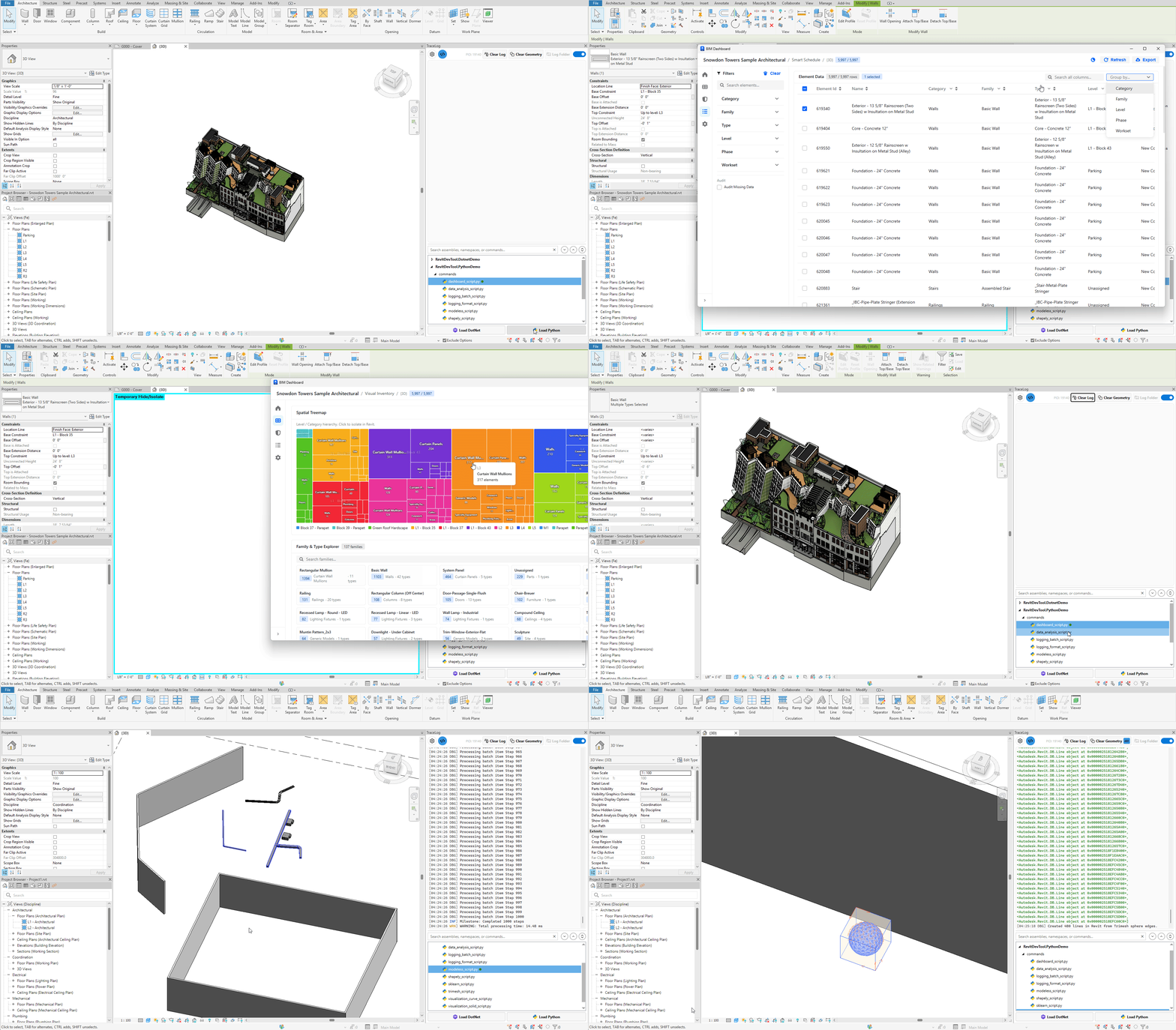
-
Code Execute View
- New dockable panel for code execution interface
- Tree view with directory and file browsing
- Syntax highlighting for selected code regions
- Double-click to execute files or selections
-
Trace Toggle Setting
- New
IsTraceEnabledsetting to enable/disable trace listener - Improves performance when tracing is not needed
- Configurable via settings UI
- New
-
CSharp Execution Thread Safety
- Wrapped command execution in external event handler
- Prevents threading issues when executing code from UI
-
Python Package Imports
- Ensured newly-installed packages are immediately importable
- Fixed module path resolution after package installation
- Comprehensive Architecture Documentation
- Added architecture guides for all major modules:
- Code Execution (Strategy Pattern, Tree Model)
- Logging System (Listeners, Theme System, Python Integration)
- Visualization System (Geometry Processing)
- Python Demo (Dashboard, WebView2 Integration)
- PythonNetStubGenerator (Stub Generation Process)
- Developer guides for extending functionality
- Detailed README files with diagrams and examples
- Added architecture guides for all major modules:
-
Refactored Logging Infrastructure
- Reorganized listeners for better modularity
- Improved separation between LoggerTraceListener and NotifyListener
- Enhanced GeometryListener with Python iterable support
- Better error handling and diagnostics
-
Optimized File Operations
- Enhanced file watching with better performance
- Debouncing for file change events
- Reduced unnecessary tree refreshes
-
Code Quality
- Cleaned up invalid assembly and directory paths
- Simplified module removal logic in PythonExecutor
- Better script execution and output handling
- More robust error handling throughout
-
Settings Management
- Added CodeExecuteConfig for execution-related settings
- Improved settings persistence and loading
- Better validation for configuration values
- Dockable Pane Visibility
- Streamlined visibility handling for trace command
- Better state management for floating vs docked windows
-
Build System
- Added Git LFS filters for executable and archive files (.exe, .dll, .msi, .zip)
- Updated global.json for SDK compatibility
- Enhanced project dependencies management
-
Resources
- Added Python icon (python32.png) for UI consistency
- Bundled uv executables (uv.exe, uvw.exe, uvx.exe) for offline package management
- Moved and reorganized image assets
Stats: 236 files changed, 32,835 insertions(+), 773 deletions(-)
- Ensure UI thread handling for open/close FloatingWindow
- Updated usage instructions in README
- Clarified
Tracemethods support for Geometry and Pretty JSON
- Dropped Revit 2021 Support - Minimum supported version is now Revit 2022
- Removed SQLite Log Format - SQLite (.db) logging format has been removed. Use JSON or CLEF formats for structured logging
- Removed CLEF Log Format - CLEF (.clef) format has been removed. Use JSON format for Seq integration
-
WPF Trace Listener
- Capture WPF binding errors and trace output directly in the log panel
- Configurable WPF trace level (Off, Error, Warning, Information, Verbose)
- Helps debug XAML binding issues without external tools
-
Filter Keywords for Log Level Detection
- Automatic log level detection based on message content
- Customizable keywords for each log level (Information, Warning, Error, Critical)
- Default keywords:
info,success,completedfor Info,warning,warn,cautionfor Warning, etc. - Supports prefix detection:
[INFO],[WARN],[ERROR],[FATAL],[DEBUG]
-
Pretty JSON Output
- Enable formatted JSON output for complex objects in trace logs
- Objects logged via
Trace.WriteLine(object)are automatically serialized - Configurable via settings UI
-
Revit Enrichers
- Add Revit context to every log entry automatically
- Available enrichers: Revit Version, Document Title, Document Path, Model Path, Addin ID
- Configurable via settings UI
-
New Single-Page Settings UI
- All settings now accessible in a single integrated panel
- No more separate settings window - everything in the dockable panel
- Cleaner, more intuitive configuration experience
-
Live Geometry Count Badge
- Real-time badge showing count of geometry objects currently visualized
- Visual feedback for geometry pool status
- Helps track visualization state at a glance
-
Python Stack Trace Support
- Enhanced logging for Python/pyRevit scripts with full traceback
PyTrace.Write(message, traceback)bridge for Python integration- Respects stack trace depth settings
- Helper script:
source/RevitDevTool/Logging/Python/trace.py
-
Auto-Clean Log Files
- Automatically clean old log files based on rolling interval
- Prevents log folder from growing indefinitely
-
Process ID in Log Files
- Log file names now include process ID for multi-instance scenarios
- Easier identification of logs from different Revit sessions
-
Logging Architecture Refactored
- Complete reorganization of logging infrastructure
- Improved separation of concerns between trace listener and logger adapter
- Better extensibility for future logging backends
-
UI Enhancements
- Improved settings panel layout and organization
- Better visual feedback for pending changes
- Enhanced theme consistency
- Stack trace now properly included in UI output
- Settings reset functionality improved
- geometry rendering ratio calculations
-
Automatic Floating Window on Trace Events
- Floating trace log window automatically opens when trace events occur and no document is open
- Listener monitors document open/close events to manage window visibility
- Auto-hides when document is opened to avoid interference
-
External File Logging System
- Multiple log file format support:
- Plain Text (.log) - Human-readable format with timestamps
- JSON (.json) - Structured JSON format for parsing
- CLEF (.clef) - Compact Log Event Format for analysis tools like Seq
- SQLite (.db) - Database format for querying and data analysis
- Configurable rolling intervals (daily, hourly, etc.)
- File size limit controls
- Shared file access support for multi-process logging
- Multiple log file format support:
-
Log Configuration UI
- Settings panel for managing log output preferences
- Enable/disable external file logging
- Select log format and output path
- Configure rolling intervals and file management
- Stack trace inclusion toggle with depth control
-
Enhanced Stack Trace in Logs
- Stack traces now show actual caller location (method, file, line number)
- Automatic filtering of framework and system internals
- Configurable stack trace depth
- Displays call chain in readable format (e.g.,
MyClass.Execute:42 > Helper.Process:18) - Includes Revit version and active document name in structured log context
-
Visualization System
- Adjusted default axis length for better scale
- Optimized geometry rendering pipeline
-
UI Adjustments
- Disabled window backdrop (mica/acrylic) to fix RichTextBox overlay issues
- Adjusted glass frame thickness for better WinForms control integration
- Proper cleanup of trace listener when Revit closes
- Window theme subscription leaks on close
- Updated manual test case: batch log
Clearmethod in TraceLog - text not actually clearing and reappearing on next trace event due toOnIdlingevent handler interference- Curve Test case - cast to
Edgeinstead ofCurve
- DockablePane visibility tracking to automatically subscribe/unsubscribe TraceLog when panel is shown/hidden
- Proper lifecycle management for TraceLog with subscription state tracking
- Changed default
AxisLengthinXyzVisualizationSettingsfrom 6 to 2 for better default visualization scale - Changed Settings window startup location from
CenterScreentoCenterOwner - Improved TraceLog initialization and disposal flow with better state management
- Refactored TraceLog to completely unsubscribe when panel is not visible
- Enhanced theme change handling with proper dispatcher invocation
- Removed unused external event handlers (
AsyncEventHandler,AsyncCollectionEventHandler,IdlingEventHandler) - Updated
.csprojrepack configuration to exclude only UI assemblies
- Prevented multiple Settings windows from opening simultaneously by controlling
OpenSettingscommand execution state - TraceLog resource cleanup and memory management
- Trace listeners registration to ensure persistence across application lifecycle
- Removed
PixiEditor.ColorPickerto avoid conflicts betweenMicrosoft.Xaml.Behaviors.Wpfand other add-ins.
- Settings integration
- Visualization options
- Theme management options
- Suppor
Outlineobject
- Revit 2026 context isolation
- Ensure Trace.Listeners are re-added if removed by other add-ins
- DirectContext3D visualization support for geometry rendering
- Support for visualizing multiple geometry types (Solid, Face, Curve, XYZ, CurveLoop, Outline)
- Trace support for ICollection
<object>and IEnumerable<CurveLoop> - Serilog sink for WinForms RichTextBox with theme support
- Nice3Point packages integration
- New designed icons and button icons
- Multiple geometries visualization
- Face normal vector visualization
- SolidVisualizationServer rendering issues
- VisualizationServerController startup
- Exception handling when retrieving bounding box of solids
- Skip solids with zero volume in bounding box calculation
- Improved theme management and resource handling
- Enhanced TraceLog with RichTextBox using dynamic theme and max log lines
- Optimized bounding box calculations by transforming corners individually
- Streamlined buffer disposal and clearing methods
- Refactored XYZ rendering methods with updated color settings and axis length support
- Updated PolylineVisualizationServer rendering
- Improved safe server registration
- Better start/stop mechanism for Visualization server
- Disposed unmanaged resources properly
- Added RenderHelper in-depth documentation
- Updated README with Acknowledgments section
- Refined geometry visualization details in README
- Streamlined table of contents and updated Python references for Revit 2025
- Listen to Console.WriteLine
- Auto start listening on revit start
- Use single DockablePanel
- Simplified codebase
- UI ehancements
Initial release. Enjoy!