
Connect DingTalk bots to OpenClaw Gateway with AI Card streaming and session management
- Prerequisites
- Quick Start
- Features
- Configuration
- Troubleshooting
- Advanced Topics
- DingTalk DEAP Agent Integration
- License
Before you begin, ensure you have:
This connector is used as an OpenClaw Gateway plugin, and you usually don't need to install or manage Node.js runtime by yourself.
- Official Website: https://openclaw.ai/
- Installation: Follow the official guide to install OpenClaw
- Verify installation:
Expected output:
openclaw gateway status
✓ Gateway is running on http://127.0.0.1:18789
- You need a DingTalk enterprise account to create internal applications
- Official Website: https://www.dingtalk.com/
💡 Goal: Get your DingTalk bot working in ~5 minutes
- macOS / Linux: Use the default shell (zsh, bash, etc.).
- Windows:
- Recommended: PowerShell or Windows Terminal.
- OpenClaw config file path (default):
C:\Users\<YourUserName>\.openclaw\openclaw.json.
Whenever you see ~/.openclaw/openclaw.json below, it is equivalent to the above path on Windows.
openclaw plugins install @dingtalk-real-ai/dingtalk-connectorIf you want to develop or modify the plugin, clone the repository first:
# 1. Clone the plugin repository
git clone https://github.com/DingTalk-Real-AI/dingtalk-openclaw-connector.git
cd dingtalk-openclaw-connector

# 2. Install dependencies (required)
npm install

# 3. Install in link mode (changes take effect immediately)
openclaw plugins install -l .- Download or copy this repository to
~/.openclaw/extensions/dingtalk-connector. - Make sure it contains
index.ts,openclaw.plugin.json, andpackage.json. - Run
npm installin that directory to install dependencies.
If openclaw plugins install gets stuck at Installing plugin dependencies... or fails with npm install failed due to network issues in China, you can specify a mirror registry for that install:
NPM_CONFIG_REGISTRY=https://registry.npmmirror.com openclaw plugins install @dingtalk-real-ai/dingtalk-connectorIf the plugin is in a partially installed state (e.g., the extension directory exists but dependencies are incomplete), you can manually reinstall dependencies:
cd ~/.openclaw/extensions/dingtalk-connector
rm -rf node_modules package-lock.json
NPM_CONFIG_REGISTRY=https://registry.npmmirror.com npm install
To make the mirror permanent, set the default npm registry:
npm config set registry https://registry.npmmirror.comOr add to ~/.npmrc:
registry=https://registry.npmmirror.com
Verify installation:
openclaw plugins listYou should see output similar to ✓ DingTalk Channel (vX.X.X) - loaded.
⚠️ If you don't seeloaded, resolve the plugin loading issue before proceeding to Step 3. Otherwise, DingTalk will not appear inopenclaw channels add.
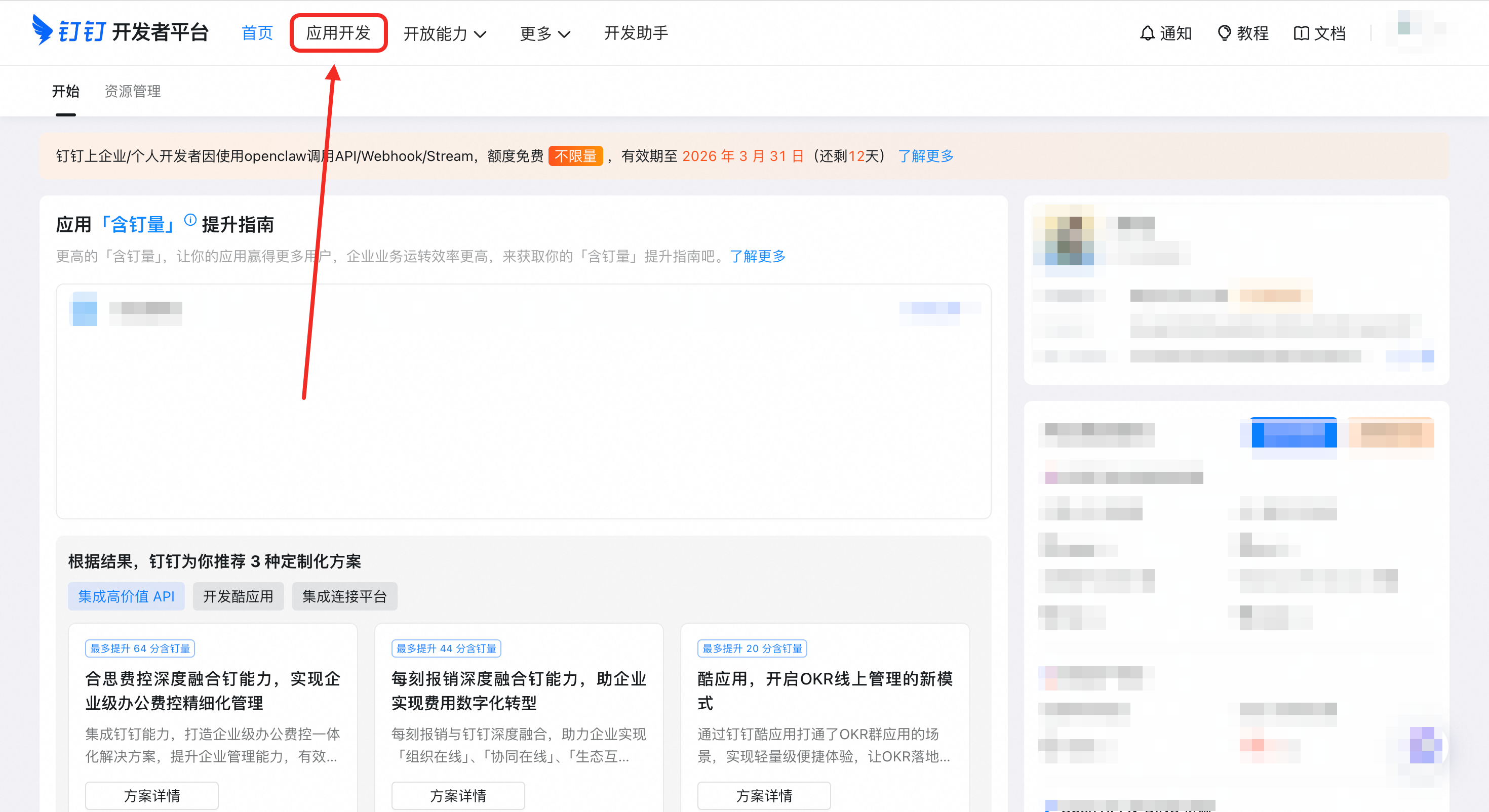
- Go to DingTalk Open Platform
- Click "Application Development"
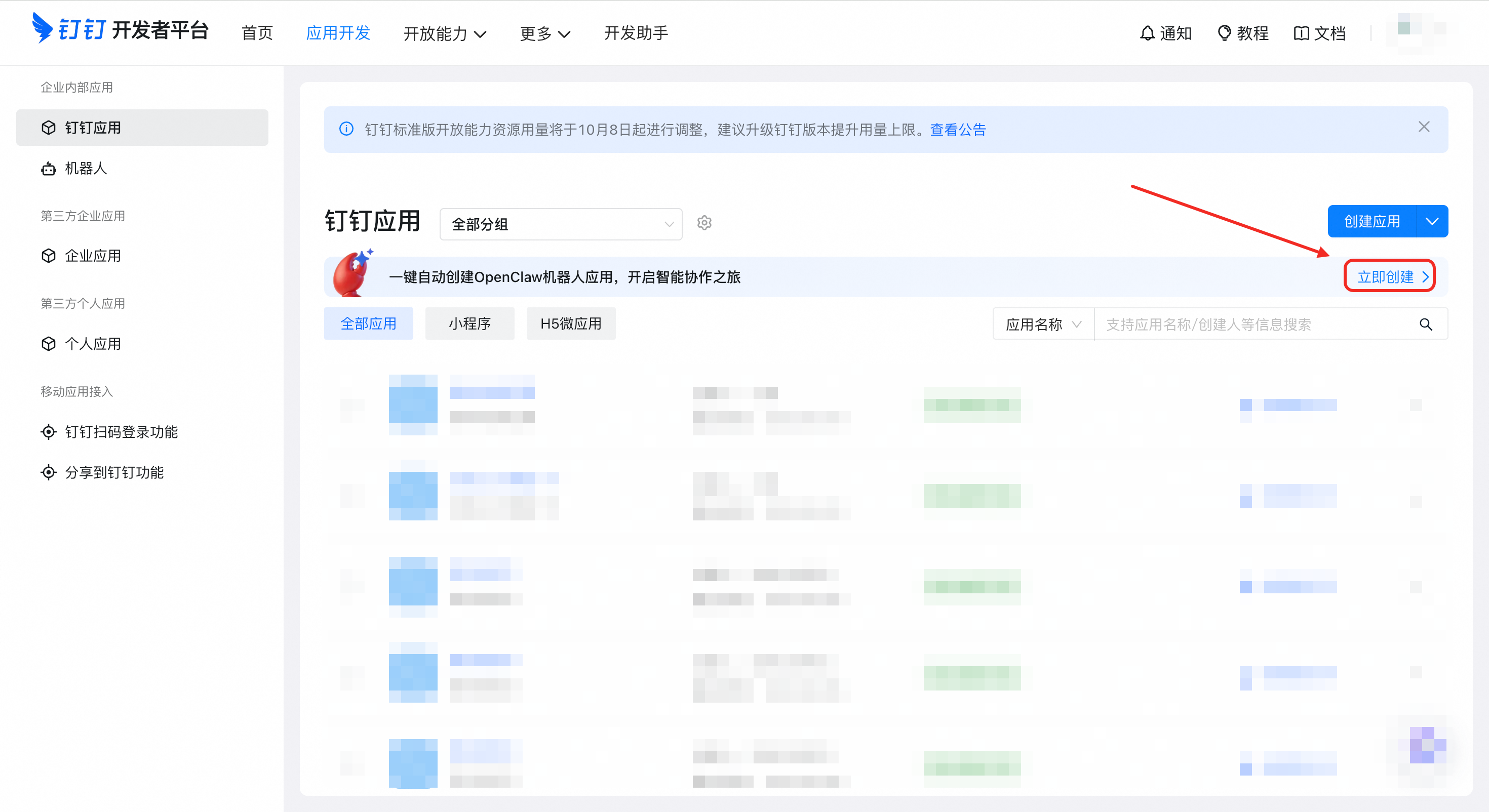
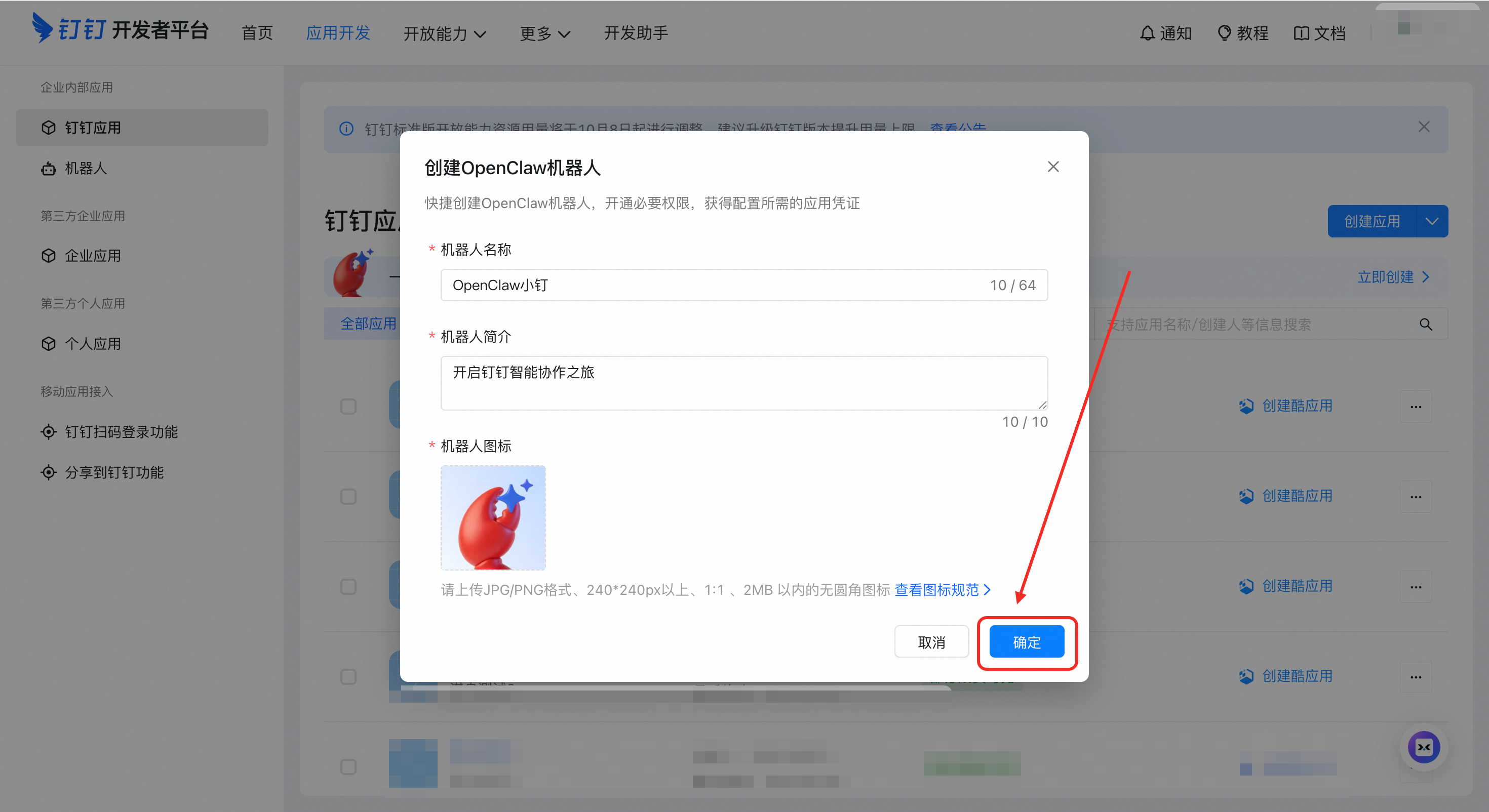
- On the application details page, use the “one-click OpenClaw bot app” flow
- Finish creation and open "Credentials & Basic Info"
- Copy your AppKey (Client ID)
- Copy your AppSecret (Client Secret)
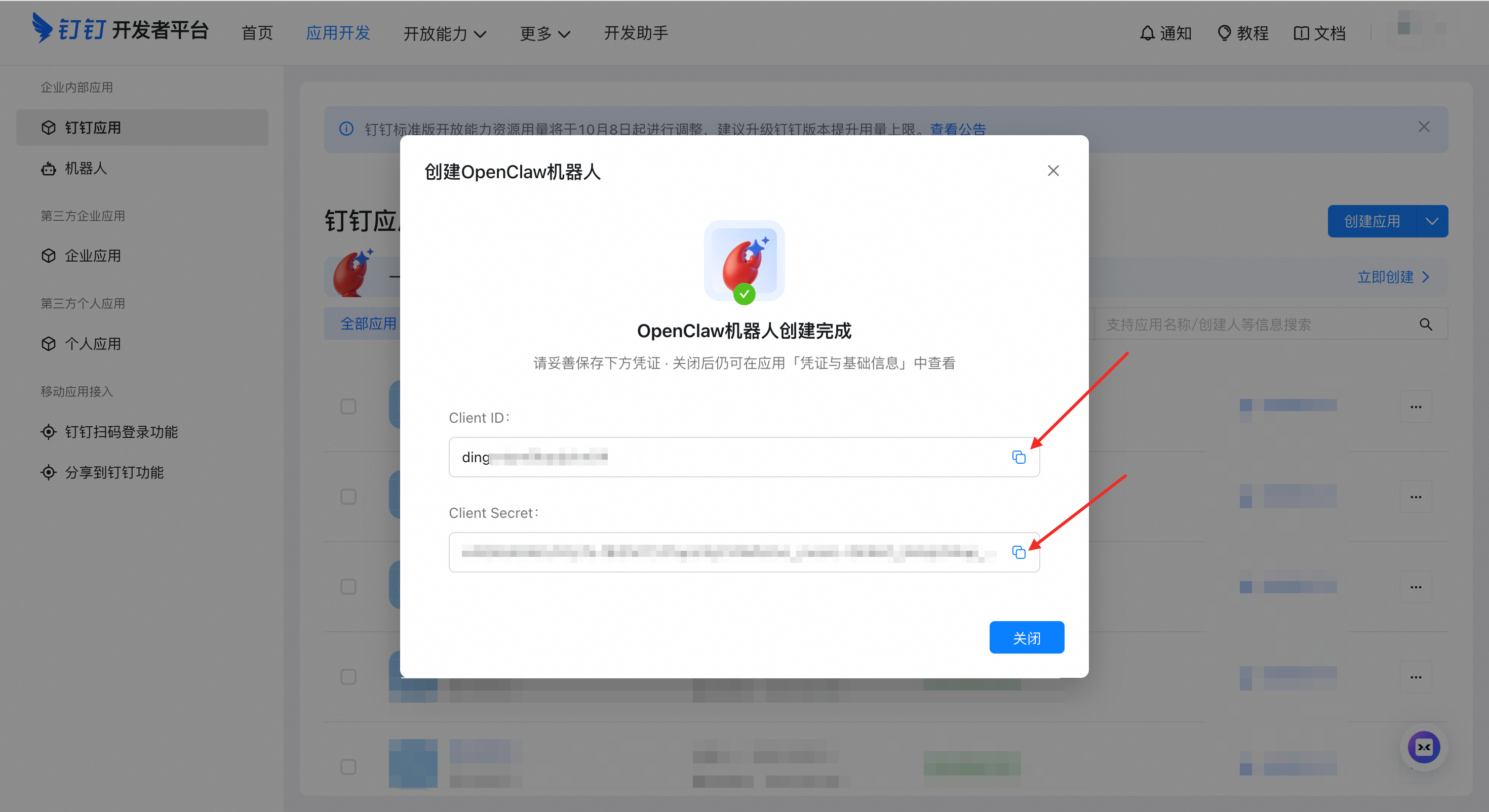
⚠️ Important: Client ID and Client Secret are your bot’s unique credentials. Store them safely.
You have three options to configure the connector:
You can directly copy and paste the following command into your terminal to run the configuration wizard.
openclaw channels addSelect "DingTalk (钉钉)" and follow the prompts to enter:
clientId(AppKey)clientSecret(AppSecret)
Edit the configuration file:
- macOS / Linux:
~/.openclaw/openclaw.json - Windows:
C:\Users\<YourUserName>\.openclaw\openclaw.json
{
  "channels": {
    "dingtalk-connector": {
      "enabled": true,
      "clientId": "dingxxxxxxxxx",
      "clientSecret": "your_app_secret"
    }
  }
}
💡 Tip: If the file already has content, add the
dingtalk-connectorsection under thechannelsnode.
# Restart OpenClaw Gateway
openclaw gateway restart

# Watch logs in real-time
openclaw logs --follow
Test your bot:
- Open DingTalk app
- Find your bot in the contact list
- Send a message:
Hello - You should receive a response within 10 seconds
- AI Card Streaming - Typewriter-like replies with real-time streaming
- Session Management - Multi-turn conversations with context preservation
- Session Isolation - Separate sessions for DMs, groups, and different groups
- Auto Session Reset - Automatic new session after 30 minutes of inactivity
- Manual Session Reset - Send
/newor新会话to clear conversation history - Image Auto-Upload - Local image paths automatically uploaded to DingTalk
- Proactive Messaging - Send messages to users or groups programmatically
- Rich Media Reception - Receive and process JPEG/PNG images, pass to vision models
- File Attachment Extraction - Parse .docx, .pdf, text files, and binary files
- Audio Message Support - Send audio messages in multiple formats (mp3, wav, amr, ogg)
- DingTalk Docs API - Create, append, search, and list DingTalk documents
- Multi-Agent Routing - Connect multiple bots to different agents for specialized services
- Markdown Table Conversion - Auto-convert Markdown tables to DingTalk-compatible format
- Async Mode - Immediate acknowledgment with background processing (optional)
| Option | Environment Variable | Description |
|---|---|---|
clientId |
— | DingTalk AppKey |
clientSecret |
— | DingTalk AppSecret |
| Option | Default | Description |
|---|---|---|
separateSessionByConversation |
true |
Separate sessions for DMs/groups |
groupSessionScope |
group |
Group session scope: group (shared) or group_sender (per-user) |
sharedMemoryAcrossConversations |
false |
Share memory across different conversations |
Both session routing/message policy options (including pmpolicy and groupPolicy) are supported now, so you do not need to remove them from existing configurations.
Note: field names may vary across versions/upstream; on the connector side, related policies are supported and applied (for example,
dmPolicy/groupPolicydefault toopen).
| Option | Default | Description |
|---|---|---|
asyncMode |
false |
Enable async mode for long-running tasks |
ackText |
🫡 任务已接收,处理中... |
Acknowledgment message text |
Symptoms: Bot doesn't reply to messages
Solutions:
- Check plugin status:
openclaw plugins list - Check gateway status:
openclaw gateway status - Check logs:
openclaw logs --follow - Verify the app is published/enabled in DingTalk Open Platform
Symptoms:
Problem:
  - channels.dingtalk-connector: invalid config: must NOT have additional properties
Cause: Your config file contains deprecated or renamed fields that are no longer recognized.
Solution: Open openclaw.config.yaml and remove any unsupported fields under channels.dingtalk-connector. Known fields to remove:
| Old Field | Notes |
|---|---|
gatewayPassword |
Deprecated legacy field |
gatewayToken |
Deprecated legacy field |
dmHistoryLimit |
Removed in v0.8.9 (never implemented) |
The error message will indicate the exact field name. Remove it and restart.
Symptoms: Error message shows "401 Unauthorized"
Solution: Upgrade to the latest version.
Symptoms: Logs show "Request failed with status code 400"
Common Causes:
| Cause | Solution |
|---|---|
| App not published | DingTalk Open Platform → Version Management → Publish |
| Invalid credentials | Check clientId/clientSecret for typos or extra spaces |
| Not Stream mode | Verify bot is configured for Stream mode (not Webhook) |
| IP whitelist | Check if the app has IP whitelist restrictions |
Verification Steps:
- Check app status in DingTalk Open Platform
- After any configuration change, click Save → Publish
Configure multiple bots connected to different agents:
{
  "agents": {
    "list": [
      {
        "id": "ding-bot1",
        "name": "Customer Service Bot",
        "model": "your-model-config",
        "workspace": "~/.openclaw/workspace-bot1",
        "identity": {
          "name": "Service Assistant",
          "theme": "customer service",
          "emoji": "🤝"
        }
        // Other agent configurations...
      },
      {
        "id": "ding-bot2",
        "name": "Technical Support Bot",
        "model": "your-model-config",
        "workspace": "~/.openclaw/workspace-bot2",
        "identity": {
          "name": "Tech Expert",
          "theme": "technical support",
          "emoji": "🔧"
        }
        // Other agent configurations...
      }
    ]
  },
  "channels": {
    "dingtalk-connector": {
      "enabled": true,
      "accounts": {
        "bot1": {
          "enabled": true,
          "clientId": "ding_bot1_app_key",
          "clientSecret": "bot1_secret"
        },
        "bot2": {
          "enabled": true,
          "clientId": "ding_bot2_app_key",
          "clientSecret": "bot2_secret"
        }
      }
    }
  },
  "bindings": [
    {
      "agentId": "ding-bot1",
      "match": {
        "channel": "dingtalk-connector",
        "accountId": "bot1"
      }
    },
    {
      "agentId": "ding-bot2",
      "match": {
        "channel": "dingtalk-connector",
        "accountId": "bot2"
      }
    }
  ]
}
For more details, see OpenClaw Multi-Agent Configuration Guide.
Users can send the following commands to start a fresh session:
/new,/reset,/clear新会话,重新开始,清空对话
DingTalk Docs capabilities (docs.*, including docs.create / docs.append / docs.search / docs.list / docs.read) require MCP (Model Context Protocol) to provide the underlying tools. To enable docs.*, install and enable the corresponding MCP Server/Tool in the OpenClaw Gateway/Agent.
- Where to get MCP Server/Tool: via the DingTalk MCP Marketplace (or your team’s internal MCP marketplace). You can also use a third-party marketplace to source an equivalent “DingTalk Docs Read / DingTalk Docs Reader” capability and connect it to OpenClaw.
- Where to configure: usually at the Gateway or Agent tool configuration level (not in this connector).
- How it takes effect: restart the Gateway and ensure the tool is exposed to the target agent.
References (OpenClaw configuration docs):
https://docs.openclaw.ai/configurationhttps://docs.openclaw.ai/gateway/configuration-reference
Create and manage DingTalk documents from your agent:
// Create document
dingtalk-connector.docs.create({
  spaceId: "your-space-id",
  title: "Test Document",
  content: "# Test Content"
})

// Append content
dingtalk-connector.docs.append({
  docId: "your-doc-id",
  markdownContent: "\n## Appended Content"
})

// Search documents
dingtalk-connector.docs.search({
  keyword: "search keyword"
})

// List documents
dingtalk-connector.docs.list({
  spaceId: "your-space-id"
})dingtalk-openclaw-connector/
├── src/
│ ├── core/ # Core connector logic
│ ├── services/ # DingTalk API services
│ ├── utils/ # Utility functions
│ └── types/ # TypeScript type definitions
├── docs/
│ └── images/ # Documentation images
├── openclaw.plugin.json # Plugin manifest
├── package.json # npm dependencies
└── LICENSE
| Package | Purpose |
|---|---|
dingtalk-stream |
DingTalk Stream protocol client |
axios |
HTTP client |
mammoth |
Word document (.docx) parsing |
pdf-parse |
PDF document parsing |
Connect DingTalk DEAP Agent with OpenClaw Gateway to enable natural language-driven local device operations. See DingTalk DEAP Agent Integration Guide for details.
- Issues: GitHub Issues
- Changelog: CHANGELOG.md