BuySmart is a comprehensive e-commerce platform developed as a CSE327.2 Software Engineering project. The system integrates multiple AI agents to enhance user experience while maintaining transparency, security, and reliability through sound software engineering practices.
Built using agile development methodology over 6 weeks (3 sprints), the platform demonstrates disciplined AI integration where core business logic remains deterministic while AI agents provide decision support and user assistance.
Team: 3 members
Duration: 6 weeks (Feb 8 - March 21, 2026)
Methodology: Agile Scrum with 2-week sprints
- User authentication with email/password and federated login (Google, Facebook)
- Product catalog with search, filtering, and category management
- Shopping cart and checkout system
- Order management and tracking
- Seller dashboard for product management
- Buyer dashboard with order history
- Smart Product Recommendations: Personalized suggestions based on user preferences and browsing history
- Feedback Sentiment Analysis: Automated analysis of customer reviews for quality insights
- Refund Decision Support: AI-assisted refund eligibility evaluation with human-in-the-loop approval
- Customer Support Chatbot: Multi-agent orchestration for FAQ handling and issue escalation
- Admin dashboard with user and refund management
- Comprehensive activity logging and audit trails
- AI action approval workflow for sensitive operations
- Real-time notifications and system monitoring
- Next.js 14
- React 18
- Tailwind CSS
- shadcn/ui
- Supabase (Edge Functions, RLS policies)
- PostgreSQL (Supabase)
- Supabase Auth
- Supabase Storage & Realtime
- LangChain (Python/TypeScript)
- TanStack Query
- React Context (state management)
- ESLint, Prettier, Husky
- Jest/Vitest (frontend tests)
- Playwright (E2E tests)
- Vercel (frontend)
- Supabase (backend + database)
- Frontend communicates with Supabase via client APIs for authentication, data queries, and real-time updates
- Edge Functions handle complex business logic for orders, refunds, and AI integrations
- Row Level Security (RLS) policies enforce role-based access control for buyers, sellers, and admins
- Database triggers maintain comprehensive activity logs for audit and transparency
Core entities: users, products, orders, order_items, feedback, refund_requests, activity_logs, ai_agent_logs, chat_messages
- LangChain agents generate recommendations, sentiment analysis, refund assistance, and chatbot responses
- Human-in-the-loop workflow stores AI actions as pending until admin approval
- All AI decisions logged in
ai_agent_logsfor transparency and audit
- Full-text search using Supabase PostgreSQL capabilities
- In-app and email notifications via Supabase triggers
- Real-time dashboard updates using Supabase Realtime
- Node.js (LTS version)
- Supabase account and project
- Vercel account (for deployment)
Create a .env.local file with the following variables:
NEXT_PUBLIC_SUPABASE_URL=your_supabase_url
NEXT_PUBLIC_SUPABASE_ANON_KEY=your_supabase_anon_key
SUPABASE_SERVICE_ROLE_KEY=your_service_role_key
SUPABASE_JWT_SECRET=your_jwt_secret
GOOGLE_OAUTH_CLIENT_ID=your_google_client_id
GOOGLE_OAUTH_CLIENT_SECRET=your_google_client_secret
FACEBOOK_OAUTH_CLIENT_ID=your_facebook_client_id
FACEBOOK_OAUTH_CLIENT_SECRET=your_facebook_client_secret
LANGCHAIN_API_KEY=your_langchain_api_key
AI_AGENT_MODEL=your_preferred_model
- Clone the repository
- Install dependencies:
npm installorpnpm install - Configure environment variables in
.env.local - Start development server:
npm run dev
- Create a new Supabase project
- Apply database schema for all core tables
- Configure RLS policies for role-based access
- Set up database triggers for activity logging
- Seed initial demo data (optional)
npm run dev- Start development serverpnpm dev- Alternative with pnpm
npm run build- Production buildpnpm build- Alternative with pnpm
npm run test- Run unit tests (Jest/Vitest)npx playwright test- Run E2E tests
npm run lint- Run ESLintnpm run format- Run Prettier
The project follows a structured 3-sprint agile approach:
Sprint 1 (Weeks 1-2): Foundation setup, authentication system, product catalog, and basic AI recommendations
Sprint 2 (Weeks 3-4): Order management, feedback system, refund workflow, and admin dashboard
Sprint 3 (Weeks 5-6): Customer support chatbot, comprehensive testing, and production deployment
Each sprint delivers working software increments with continuous integration, testing, and stakeholder feedback. The team maintains a product backlog of 56 user stories across 9 epics, prioritizing high-value features for early delivery.
Screenshots and demo videos showcasing key user journeys:
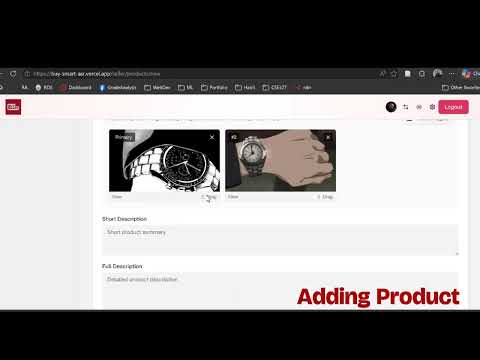
Watch the full platform demo: BuySmart in Action
- User registration and authentication flow
- Product browsing and AI-powered recommendations
- Complete purchase workflow from cart to confirmation
- Seller dashboard and product management
- Admin interface with AI action approvals
- Customer support chatbot interactions