[Spike] Zarr Investigation #6961


Description

Background
Zarr is a binary file format for storing multi-dimensional array data, similar to netCDF.
This is an initial investigation in to how it might be supported as a file format in Iris.
Drop me down for a brief technical synopsis on ZArr ...
Zarr stores its data as a hierarchical tree structure that (at a basic level) maps across to a file system directory structure. The Zarr archive hierarchy is built from two types of "nodes":
array: An array of data, with zero or more dimensions and an associated datatype.group: A logical grouping ofarrayor othergroupnodes - synonymous to a subdirectory in the filesystem hierarchy.
One of the most important distinctions compared to netCDF data storage is that Zarr stores data for array nodes data in chunks where each chunk is an individual file on the filesystem. Compare this to a netCDF file where everything is stored in a single file. This allows for efficient parallel access of array data on a file system as each array is in it's own directory and each of it's data chunks is stored in a separate file.
Each node (including the root node at the top level of the archive) has an associated metadata file the describes the node's properties (such as array shape, dimensionality, data type) and any other generic user settable attributes (like netCDF attrs). See this excellent Zarr heirarchy diagram for more visual representation:
https://Zarr-specs.readthedocs.io/en/latest/_images/terminology-hierarchy.excalidraw.png
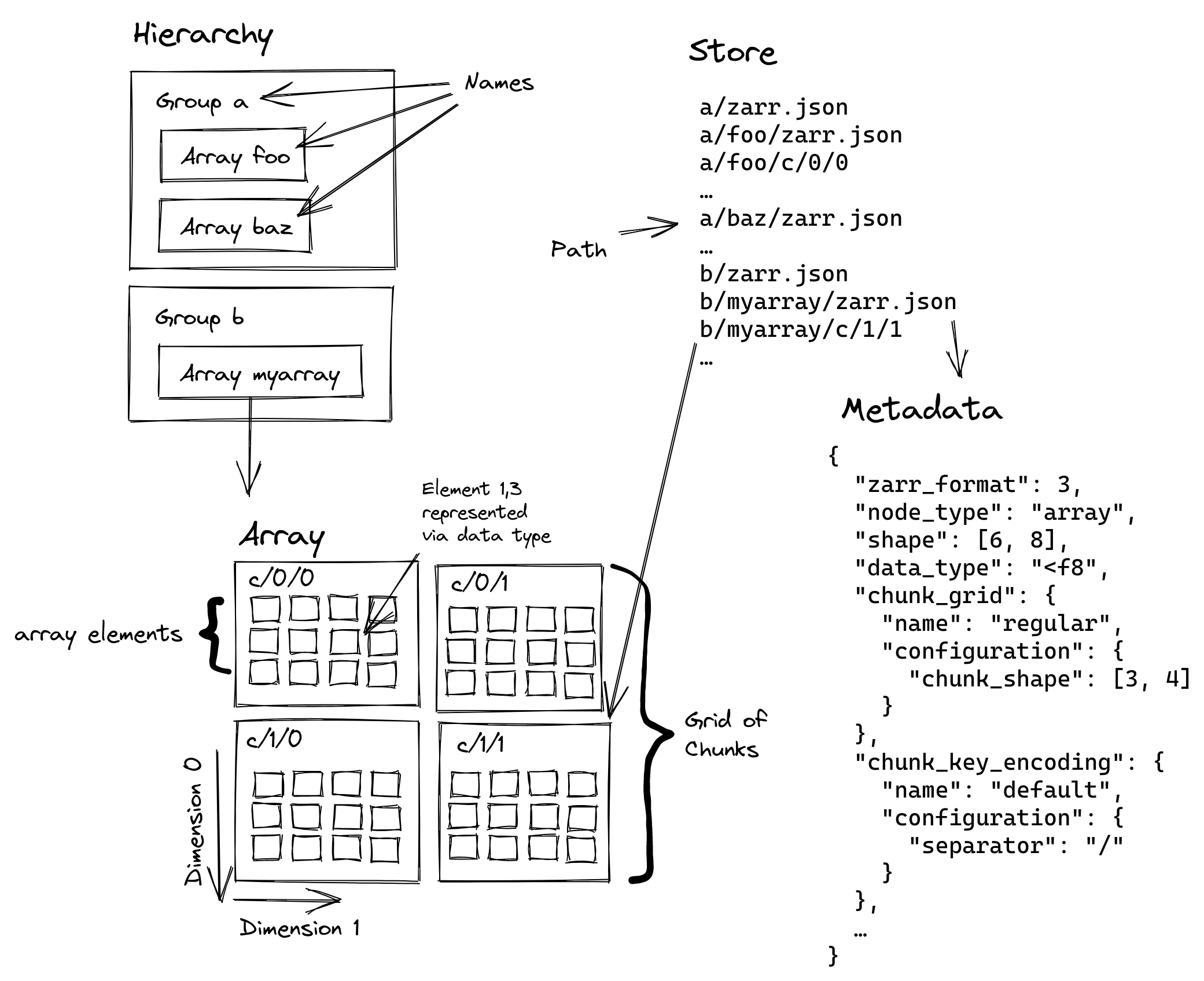
Stores
Zarr archives are accessed via a Store object. Multiple storage backends are avaiable that support local files, Zip Files, S3 buckets, in-memory stores, etc.
In most cases an implicit LocalStore is used when you open a Zarr dataset using a filename. The treats a Zarr archive like a directory structure on a local filesystem (as described above).
The multiple storage backends mean that we should be able to get access to Zarr archives stored on remote filesystems like S3 without the need to add any extra code in Iris.
CF Conventions + Zarr
The GeoZarr Specification Working Group have proposed as CF Zarr Spec (and several other geospatial specs).
This applies the CF conventions to Zarr file metadata attributes in a similar way to how they are stored in NetCDF files. 3rd party packages like XArray already read/write Zarr data using the standard CF conventions (with some small Zarr specific handling, see "dimension names" later).
It should be noted that there is a proposal for a Zarr-CS (Coordinate System) convention that provides an encoding of coordinate data for Zarr arrays. This is still a proposal at the moment but should be borne in mind.
Zarr in Iris? Things to consider
Attributes
Each node in a Zarr file has it's own metadata file in JSON format that describes any specific properties of the node such as shape, datatype, etc. This metadata also contains an attributes entry for any extra a metadata that is not part of the Zarr spec (e.g. CF metadata). As the file is encoded in JSON format, any attributes need to be to be serializable.
Things like numpy arrays/scalars are not serializable and therefore must be converted to standard Python scalars. This will loose the precision of the original numpy dtype (e.g. float16, int8, etc).
If maintaining precision is important, an option is to encode the numpy variable in Base64 encoding and store the raw data along with it's dtype:
z.attrs['some_numpy_array'] = {
    'dtype': arr.dtype,
    'raw': base64.b64encode(arr.tobytes()).decode('ascii')
}
Python bytes stings, e.g. b"a string" are also not serializable and must be stored as a decoded str instance, i.e.
s = b'A byte string'
z.attrs['some_str'] = s.decode()
Dimensions
Zarr does not have a built-in concept of named dimensions as there is in NetCDF; there is no "dimension-like" node in a Zarr file that can be used to define the shape of array data. Instead dimension names are stored as a text metadata/attribute property on each individual Zarr array. This is used as a loose reference to another array in the dataset that provides dimensions coordinates for the array data.
The existence of any variables defined in dimension names for an array is not enforced in any way by Zarr. The only constraint is that the number of dimension names must equal the number of dimensions on the array. The dimension names metadata is primarily intended to be used by 3rd party libraries using Zarr (e.g. XArray) to associate coordinates arrays with data arrays.
Depending on the Zarr Specification version, the dimension names are stored differently:
- Spec v3 provides a specific
dimension_namesmetadataentry on anarrayobject. - Spec v2 has no metadata entry for dimension names, but the convention (defined by Xarray?) is to store the dimension names in the Array
attrsas_ARRAY_DIMENSIONS.
Note: Although setting dimension_names is optional in Zarr, libraries like XArray (and eventually Iris!) will expect them, so they need to be set in the same way as if you were creating a netCDF variable. I.e all arrays should have a dimension names set, other than for scalar coordinates (i.e. shape=())
Array datatypes
Datatypes are mostly the same as in numpy (and you can use numpy dtypes to specify the Zarr dtpyes)
There are a few things to note:
Masked arrays
Zarr can't write numpy masked arrays directly. It seems like the best approach is to write the filled() array (fills masked values with the fill_value).
The fill_value should be set accordingly when the Zarr array when it is created.
arr = np.ma.masked_greater(np.arange(10), 5)
# Note: {} creates an "in-memory" array
z = zarr.create_array({}, data=arr.filled(), fill_value=arr.fill_value)
np.ma.masked_equal(z[:], z.fill_value)
>> masked_array(data=[0, 1, 2, 3, 4, 5, --, --, --, --]
The other option is to write a separate "mask" array, but that seems overkill.
Scalar values
You can create scalar array (i.e. an array with no dimensions), but you don't seem to be able to do this by passing a scalar value via the data keyword (assumedly as the array constructor wants to call .shape on the data value).
The solution is to create the array first with no data, but specify the shape=() and a relevant datatype. The data can then be written to the array afterwards using scalar index syntax: [()], e.g.
z = zarr.create_array({}, shape=(), dtype=np.float64)
z[()] = 1.0  # note scalar indexing
Note
I have noticed that the nczarr netCDF driver (more this later) does not use scalar variables, but rather creates a single element array of shape=(1,) and a dimension_names=["_scalar_"]. This means that things like grid_mapping variables get written out as a dimensioned array, rather than a scalar array. This seems to confuse Iris when loading these variables as they fail to be recognised as their expected CF type and end up as CFDataVariables.
Data packing/compresison:
Data in chunks is compressed by default.
Various other compression and packing methods can be applied as filters
- See
numcodecpackage andzarr.codecs- NOTE: The Zarr v3 codec support is still being hammered out and certain codecs are not officially part of the spec yet…see:
String datatype
The Unicode (python str) datatype (dtype=str) is supported in Zarr and creates a Variable length string array, much as NetCDF does.
Fixed length Unicode (e.g. dtype='U2') and byte strings (e.g. dtype='S4') are not technically supported by the Spec.
- However, you CAN write arrays of this type, but the support is subject to change
Remote filesystem access
Various storage backends are provided by Zarr - the LocalStore being the commonly used store for accessing Zarr files on the local filesystem.
However, there is also a FsspecStore type that allows access to remote storage via any method that supports the FSSpec API.
For instance, we can access Zarr files in AWS S3 object storage if the s3 python package is installed:
z = zarr.open_group(store='s3://ppeglar-iris-test-bucket/Zarr_store', mode='r')or more explicitly:
store = zarr.storage.FsspecStore.from_url('s3://ppeglar-iris-test-bucket/Zarr_store')
z = zarr.open_group(store, mode='r')
This means we should get remote file access support for free in Iris when using Zarr.
Parallelism
Within a single process (i.e the python process), Zarr uses asycnio to handle all I/O, so reading and writing concurrently from a single process is supported. See https://zarr.readthedocs.io/en/stable/user-guide/performance/#concurrent-io-operations
Note
assume this means we don't need an equivalent of the Thread Safe NetCDF Wrapper in Iris for Zarr I/O?
Multi-process parallism is not supported. From the docs:
For multi-process parallelism, Zarr provides safe concurrent writes as long as: - Different processes write to different chunks - The storage backend supports atomic writes (most do)
When writing to the same chunks from multiple processes, you should use external synchronization mechanisms or ensure that writes are coordinated to avoid race conditions.
Note
@trexfeathers and @pp-mo mention that there has been some thoughts on using git as a means to support parallel writing to Zarr datasets from multiple applications (not multi-process), but this is not explored here.
Lazy loading
Zarr works with Dask, although see some details here about setting the zarr_async_concurrency config value to avoid overwhelming your storage.
There is a dask.array.from_zarr function that will wrap a Zarr array; by defaukt this will set the Dask chunks to match the zarr chunks.
z = zarr.open_array('big_dataset.zarr')
arr = da.from_zarr(z)  # das
result = arr.mean().compute()
Proposed implementation plan in Iris
Quick win: NetCDF + NCZarr
Since v4.8.0, the NetCDF-c library can read/write Zarr files.
Ref: https://docs.unidata.ucar.edu/nug/current/ncZarr_head.html
It would be fairly straightfoward to use the existing netCDF reader and writer modules in Iris to perform I/O on a Zarr file instead.
To acheive this, the netCDF dataset needs to be opened with a URL rather than a simple filename. For a Zarr archive file located on a local filesystem, for example:
/home/users/me/air_pressure.zarr
The URL passed to netcdf4.Dataset() needs to be of the form:
file:///home/users/me/air_pressure.zarr#mode=nczarr,file
To allow this in Iris, a brief investigation shows that simply allowing the Iris NetCDF Saver to accept this form of URL as a filename is sufficient to save a cube to a Zarr file.
Loading works with no modification, but some scalar variables (such as grid_maping) are not correclty identified as a specific CF variable due to the way that the ncZarr saver writes them with a dimensionality of (1,) rather than ()
Some investigation will be required here to handle this.
Note
The NCZarr datamodel is based on the Zarr Version 2 Specification so it is not currently possible to read/write modern Zarr files that use the Zarr Verision 3 Specification. It is not clear when Spec V3 support will be added.
Native Zarr support in Iris
This section assumes that CF-Zarr looks the same as CF-netCDF.
If the implentation of the CF spec for Zarr is significantly different than for netCDF, then this might need rethinking...
Refs:
- Draft CF like convention here (suggested by GeoZarr WG): zarr-conventions/CF: Proposal for registering CF conventions in Zarr (Work in progress)
- Remapping CF semantics on "Coordinates" : R-CF/zarr_conventions_cs: Coordinate System convention for Zarr arrays
Note: There is some discussion on whether Zarr should take a different approach to encoding of CF data; as discussed in the second point above and this discussion: https://github.com/orgs/cf-convention/discussions/461
Loading
The existing cf.py module can be modified fairly easily to build a CFReader object from a ZArr archive.
The required changes are around:
- How we access attributes
- Special handling for the "dimension" attribute.
If we generalise what a dataset is to provide abstract methods for accesing the relevant parts of a netCDF and Zarr file, then the netcdf/cf.py module should be able to handle both formats transparently.
Most of the the logic in the netcdf/loader.py module would be the same too. This module could be generalised to work for both formats?
Saving
The logic in the exsting netCDF Saver class is mostly applicable to Zarr saving too.
A proof-of-concept Zarr Saver was implemented here using a copy of the netcDF saver.py module. Note - this does not include deferred writing of lazy data at the moment - all data is realised at variable creation.
There is a lot of common code.
Can we make cf_var a wrapper around a dataset and a Zarr store to allow the existing save to output both files?
Questions
-
V2 SPEC : Do we want to support writing Zarr files in V2 Spec format?
- Mostly similar w.r.t to the API, but needs some different handling of dimension names.
- Other software might not read V3 format yet.
-
GROUPS : How do we handle subgroups in dataset?
- Are groups useful when saving?
- How do we handle them when loading?
- Xarray only loads one group (root by default), but you can specify a "group" to load. You can't load "all" groups in a file though.
- Although you can open all groups using
xa.open_groupsorxa.open_datatree. Not really anything analogous in Iris though.
- Although you can open all groups using
- Xarray only loads one group (root by default), but you can specify a "group" to load. You can't load "all" groups in a file though.
-
HPC PERFORMANCE : Is there a performance implication of potentially lots of small files in a Zarr archive on the HPC? There are a few things that might help:
- Chunk sharding - grouping some chunks together in a single file. Helps reduce the total number of files in an
arrayif you have lots of small chunks - Consolidate metadata - writes a consolidated version of all the metadata in a store's hierarchy to a single file at the root level to multi-file read costs.
- Chunk sharding - grouping some chunks together in a single file. Helps reduce the total number of files in an
Links:
Tasks
- Implicit Zarr handling- allow
netcdf.loaderandnetcdf.saverto open netCDF dataset usingnczarrdatamodel. - Zarr loading: Update
CFReaderto handle Zarr-CF files; generalisation of "dataset" to handle both Zarr and NetCDF? - Zarr loading: Update
netcdf.loaderto make it agnostic to dataset in CFReader. Or - scope out a specificzarr.loadermodule. - Zarr saving support: Either factor out common code in
netcdf.saverto share with a newzarr.savermodule, or generalisenetcdf.saverto handle both (needscf_varwrapper)?
Sub-issues
Metadata
Metadata
Assignees
Labels
Type
Projects
Status