[每日精选] 2025-10-11 #1013

Description

昨日精选汇总(2025-10-10)
-
M09Ic 手动精选
- [9-30] 更多关于 WMI 的乐趣](https://0xthirteen.com/2025/09/19/more-fun-with-wmi/
文章内容
Posted on September 19, 2025September 19, 2025
More Fun With WMI
TL;DR Win32_Process has been the go to WMI class for remote command execution for years. In this post we will cover a new WMI class that functions like Win32_Process and offers further capability
From time to time, across different versions of Windows, I like to take a look at Windows Management Instrumentation (WMI) classes to see if any interesting classes and methods exist to perform particular actions. One of the things that I look for are methods I could use for general post-ex capability.
To take a deeper dive into WMI for new opportunities, we need to have an idea of what we already know in terms of a technique like lateral movement. Current classes and their methods include:
- Process – Win32_Process (Create)
- Service – Win32_Service (Create/StartService or Change)
- Job – Win32_ScheduledJob (Create)
- Task – PS_ScheduledTask (New)
- Product – Win32_Product (Install)
- Performance – Win32_PerfData/Win32_PerfRawData
- Custom/Malicious WMI Provider
- Derived Class
- Event Subscription
While searching, I came across some interesting classes and their methods that extend the classes above. I will only cover one at this time, due to some of the other potential candidates not being fully fleshed out.
MSFT_MTProcess
MSFT_MTProcess is the closest WMI class that I have seen to Win32_Process. Win32_Process is the canonical example of WMI lateral movement and is what most people think of when discussing lateral movement with WMI. MSFT_MTProcess has a method called CreateProcess that accepts a command-line argument much like Win32_Process. However, a big caveat to this class is that it only exists on Windows Server 2016 and newer. This means it is not available when attempting lateral movement to workstations, but it will trigger execution of a given binary/file like Win32_Process. What is nice about this is that the setup is just as straight forward as Win32_Process, with an argument being passed to a binary, unlike something like Win32_PerfData which takes a little bit of setup. This particular class is in the .\Root\Microsoft\Windows\ManagementTools namespace.
MSFT_MTProcess Part 2
A second interesting method for MSFT_MTProcess is CreateDump. You can leverage this class to create a dump of a given process. If you want to remotely (or locally) create a dump of a process without adding any new tooling, then you can leverage MSFT_MTProcess’s CreateDump method. Again this class only exists on Windows Server 2016 or later. This means that if you want to get a process dump of everyone’s favorite process (i.e., lsass.exe) and take it offline to extract data, you can. Does this class offer an interesting or novel way of dumping a process? No. This class follows the same technique as Task Manager where you can right click a process and create a process dump. This loads dbghelpd.dll and calls MiniDumpWriteDump on the instance of the process you give it. This does make sense, since this WMI provider is called the Task Manager Provider; however the process execution chain is a little different. Rather than Task Manager loading the DLL, you have WmiPrvSe completed the load and making the function call.

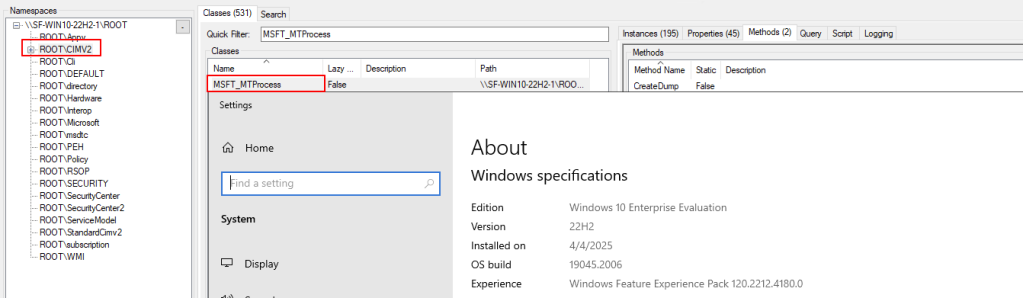
MSFT_MTProcess on Workstations
I did leave out an important note about MSFT_MTProcess above. Earlier, I stated that it will only work on Windows Server 2016 and higher. By default, that is still true; however, we can make it work on Windows workstation operating systems as well. There are two main components to this. First is the provider dynamic-link library (DLL); this WMI class provider is mttmprov.dll. Second, is the MOF file which will be used for all of the parameters and associated data for the WMI class. With a couple of steps, we can take those two provided files and install them to a Windows 10/11 host and gain functionality of dumping a process or executing a program through the class’s previously mentioned methods.
First, we write the provider DLL and MOF file to C:\Windows\System32\wbem on the target host. From there, we will want to install the MOF file so that the class is created in the WMI database and becomes usable. To do this, we’d want to use something like:
mofcomp.exe C:\Windows\System32\wbem\mttmprov.mof
Technically, we don’t have to use mofcomp. We could use pure WMI to do this, but you lend yourself to encountering issues by doing this. Lastly, we would need to register the COM CLSID manually by creating some registry keys. Once you complete all of these steps, the class becomes available for use.

This entire process is similar to installing a malicious WMI Provider mentioned above in the list of known lateral movement techniques; however, rather than being overtly malicious, it’s an existing legitimate Windows WMI provider much like Win32_Process’s provider.
Tooling
Since there is a new usable class listed above, it would not be very useful if there wasn’t tooling available for it. I have created two tools that implement the classes above and a little bit more: WMI_Proc_Dump.py and mtprocess.py.
WMI_Proc_Dump.py is a tool that uses the MSFT_MTProcess class to dump a process remotely when targeting Windows Server 2016 or higher (or Windows workstation OS if you have installed MT Process provider). This will call MSFT_MTProcess to dump the process, which will automatically write <Process_Name>.dmp to C:\Windows\Temp. However, if you want to rename it to something less suspicious, you can with CIM_DataFile (even though telemetry would likely capture the original name).

Mtprocess.py is the second script being released that implements the CreateProcess method of the MSFT_MTProcess class. Additionally, this script provides an automated way to install theMSFT_MTProcess class to a workstation host.


One major drawback of the implementation was that in order for this to be done remotely, I used Win32_Process to call mofcomp.exe on the MOF file. This is a bit of a chicken and egg problem, because the point of adding MSFT_MTProcess is to get away from Win32_Process. Additionally, the MOF file changes the namespace from .\Root\Microsoft\Windows\ManagementTools to .\Root\CIMv2 since that namespace doesn’t exist on the Windows workstation operating system.
WMI_Proc_Dump can be found here https://github.com/0xthirteen/WMI_Proc_Dump and mtprocess can be found here https://github.com/0xthirteen/mtprocess.
Conclusion
Win32_Process has been the de facto WMI class for most lateral movement and is still used today. Over time, there have been other methods of achieving almost the same functionality with other classes. However, often other requirements are needed to be successful and sometimes can be a bit cumbersome. The MSFT_MTProcess class is the closest replacement class for Win32_Process that I have seen on any Windows host, and is installed by default on any 2016 and higher server OS versions. There are native Windows utilities that make installing this WMI provider on non server OS’s very simple, and this can even be done remotely. And as a bonus, this provider also offers ways of getting process dumps of a given process instance. Both of these methods make this class useful for offen...
AI 摘要
-
文章主题
介绍并 weaponize 一个“新” WMI 类 MSFT_MTProcess,作为传统 Win32_Process 的替代/增强通道,用于远程命令执行与进程转储。 -
关键点
- MSFT_MTProcess 提供与 Win32_Process 等价的 CreateProcess 方法,可直接执行任意命令行。
- 额外带 CreateDump 方法,可远程生成任意进程(包括 lsass.exe)的 MiniDump,无需额外工具。
- 默认仅 Windows Server 2016+ 安装;通过复制 mttmprov.dll + mof 文件并注册 COM,可移植到 Win10/11 工作站。
- 作者发布两套 PoC 脚本:WMI_Proc_Dump.py(远程 Dump)与 mtprocess.py(远程执行 + 自动安装 provider)。
- 利用链与检测面:由 WmiPrvSe.exe 加载 dbghelp.dll → MiniDumpWriteDump,EDR 可见性类似 TaskManager Dump,但源进程不同。
-
应用场景
- 红队横向移动、远程代码执行(C2 通道)。
- 无文件远程转储 LSASS / 数据库 / 服务进程,离线提取凭据或敏感数据。
- 在 Win32_Process 被禁用或 heavily monitored 时,提供备用执行/ Dump 通道。
-
局限性或挑战
- 默认仅存在于 Server SKU;工作站需落地 DLL+MOF 并注册,首次部署仍依赖 Win32_Process(鸡与蛋问题)。
- 安装新 provider 会留下 MOF、DLL、COM 注册表痕迹,易被后续取证发现。
- Dump 文件先写入 C:\Windows\Temp,文件名固定,主机级 telemetry / EDR 可捕获;需二次改名转移。
- 依赖管理员权限才能完成 provider 安装与远程 WMI 调用。
-
总结评价
文章把微软自带的“Task Manager Provider”首次系统地引入攻防视野,填补了 Win32_Process 被严格监控情况下的空白;方法简单、稳定、 Server 默认自带,实用价值高。缺点是工作站环境需要额外部署且会落盘留痕,更适合高级红队而非长期隐蔽作业。总体为 WMI 横向移动与 Dump 技术补充了一个“近原生”且低摩擦的新选项。
*文章已保存为 markdown: *) - discussion