This repository was archived by the owner on Dec 14, 2025. It is now read-only.
v1.7 Turbo / Autofire instruction #327
darthcloud
started this conversation in
Show and tell

Replies: 1 comment

-
|
Sorry for the delay in testing ... I tried for my PC engine and it works perfectly. More testing later... |
Beta Was this translation helpful? Give feedback.
0 replies
Sign up for free
to join this conversation on GitHub.
Already have an account?
Sign in to comment


Uh oh!
There was an error while loading. Please reload this page.
Uh oh!
There was an error while loading. Please reload this page.
-
Adding the Turbo / Autofire feature this late into BlueRetro made it so I had to make changes all over the place.
BlueRetro turbo feature is probably one of the most over-engineered one around. You got 50 possible options.
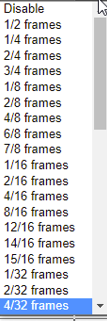
Not only you can choose the rate but you can also select the duty cycle.
The rate is base on the console controller polling rate which is most of the time 60hz.
Using for example "1/2 frames" give a button pulsing at 30Hz, one frame it's pressed and it's unpressed for 1.
"2/4 frames" give a button pulsing at 15Hz, 2 frames on, 2 frames off. etc..
As I said you can select the duty cycle.
"1/4 frames" still give a button pulsing at 15Hz but it's 1 frames on and 3 frames off.
This allow to tweak your turbo to work well in any game.
A lot of games filter out buttons press that are only 1 frames long, so often the "1/X frames" look like they do nothing.
For example on PC-Engine/TG16 original controller the slow turbo is the equivalent of "4/8 frames" and the fast one is "2/4 frames".
You can also set the turbo on a axis, in that case the axis will toggle between it's neutral value (off) and it's current position (on).
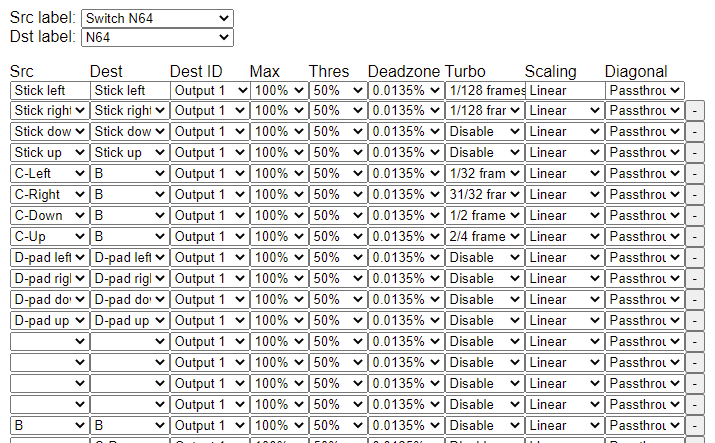
You can map the same buttons multiple time with different turbo settings aswell:
Beta Was this translation helpful? Give feedback.
All reactions