
Latest NIST FRVT evaluation report 2024-12-20

🆔 ID Document Liveness Detection - Linux - Here 
🤗 Hugging Face - Here
📚 Product & Resources - Here
🛟 Help Center - Here
💼 KYC Verification Demo - Here
🙋♀️ Docker Hub - Here
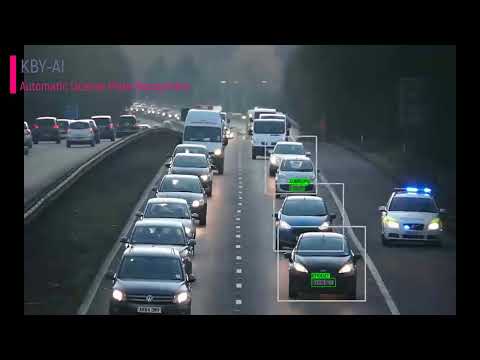
We implemented ANPR/ALPR(Automatic Number/License Plate Recognition) engine with unmatched accuracy and precision by applying cutting-edge deep learning techniques in this repository.
KBY-AI's LPR solutions utilizes artificial intelligence and machine learning to greatly surpass legacy solutions. Now, in real-time, users can receive a vehicle's plate number.
| No. | Repository | SDK Details | Status |
|---|---|---|---|
| 1 | LPR - Linux | License Plate Recognition Linux SDK | Available |
| 2 | LPR - Docker | License Plate Recognition Docker Image | Available |
| 3 | LPR - Flutter | License Plate Recognition Flutter SDK | Available |
| 4 | LPR - C# | License Plate Recognition C# SDK | Available |
| ➡️ | LPR - Android | License Plate Recognition Android SDK | Available |
| 6 | LPR - iOS | License Plate Recognition iOS SDK | Available |
To get more products, please visit products here:



You can visit our YouTube video for ANPR/ALPR model's performance here to see how well our demo app works.
- The code line below shows how to update SDK with the
license key: - To request
license key, please contact us:
🧙Email:contact@kby-ai.com
🧙Telegram:@kbyaisupport
🧙WhatsApp:+13348402323
🧙Discord:KBY-AI
🧙Teams:KBY-AI
Android
- Copy the SDK(folder
libttvalpr) torootfolder in yourAndroidproject. - Add SDK to the project in
settings.gradle.
include ':libttvalpr' implementation project(path: ':libttvalpr')- Activate the
SDKby calling thesetActivationmethod:
var ret = AlprSdk.setActivation("xxx...")- Extract plates using the
extractPlatesmethod:
 val alprResult: AlprResult = AlprSdk.process(
      SDK_IMAGE_TYPE.ULTALPR_SDK_IMAGE_TYPE_RGBA32,
      nativeBuffer, width.toLong(), height.toLong()
 )
 val plates = AlprUtils.extractPlates(alprResult);