-
Notifications
You must be signed in to change notification settings - Fork 0
Expand file tree
/
Copy pathCodeckFeatureCarnival.mdeck
More file actions
228 lines (159 loc) · 5.19 KB
/
CodeckFeatureCarnival.mdeck
File metadata and controls
228 lines (159 loc) · 5.19 KB
1
2
3
4
5
6
7
8
9
10
11
12
13
14
15
16
17
18
19
20
21
22
23
24
25
26
27
28
29
30
31
32
33
34
35
36
37
38
39
40
41
42
43
44
45
46
47
48
49
50
51
52
53
54
55
56
57
58
59
60
61
62
63
64
65
66
67
68
69
70
71
72
73
74
75
76
77
78
79
80
81
82
83
84
85
86
87
88
89
90
91
92
93
94
95
96
97
98
99
100
101
102
103
104
105
106
107
108
109
110
111
112
113
114
115
116
117
118
119
120
121
122
123
124
125
126
127
128
129
130
131
132
133
134
135
136
137
138
139
140
141
142
143
144
145
146
147
148
149
150
151
152
153
154
155
156
157
158
159
160
161
162
163
164
165
166
167
168
169
170
171
172
173
174
175
176
177
178
179
180
181
182
183
184
185
186
187
188
189
190
191
192
193
194
195
196
197
198
199
200
201
202
203
204
205
206
207
208
209
210
211
212
213
214
215
216
217
218
219
220
221
222
223
224
225
226
227
228
---
format: codeck.mdeck
version: 1
theme: atelier
codex:
sandbox: read-only
model: "gpt-5.5"
reasoning: medium
---
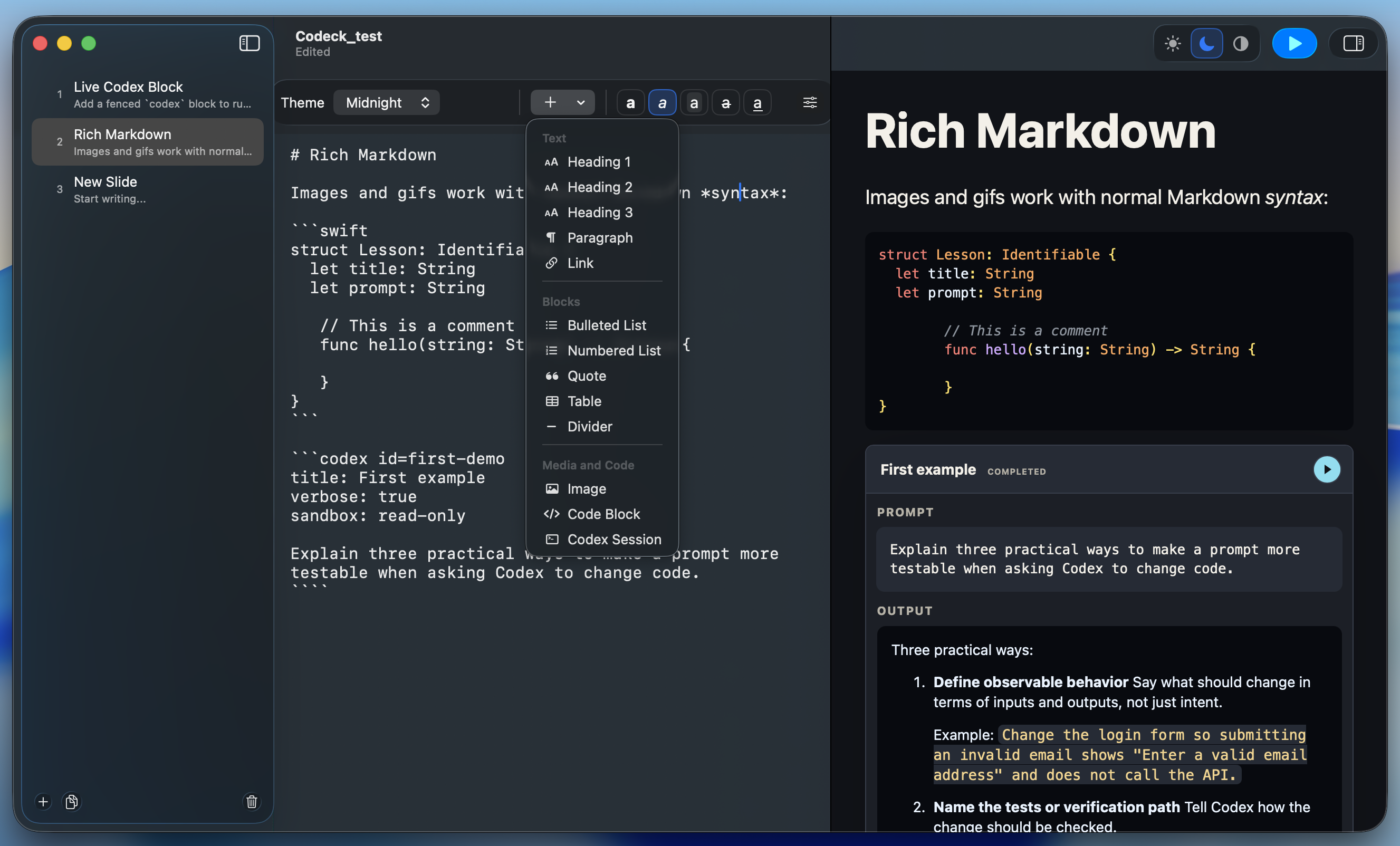
# Codeck Feature Carnival
A quick, playful tour of Markdown slides, live Codex cards, themes, preview, and presentation mode.
---
# Codeck In One Slide
| Thing | Why it matters |
| --- | --- |
| `.mdeck` files | Plain text decks that open in Codeck |
| Markdown slides | Easy to write, diff, and edit |
| Live preview | The slide renders as you work |
| Live Codex | Run prompts directly from a slide |
| Presentation mode | Full-screen delivery from the selected slide |
Writing a deck is still just typing Markdown:

---
# The File Format
Front matter sets deck defaults. `---` separates slides.
````markdown
---
format: codeck.mdeck
version: 1
theme: atelier
codex:
sandbox: read-only
model: "gpt-5.5"
reasoning: medium
---
# First Slide
Write Markdown. Present Markdown.
---
# Second Slide
Now with more drama.
````
---
# Markdown Goodies
Codeck renders the Markdown pieces you need for a real teaching deck:
- **Text styling:** **bold**, *italic*, `inline code`, ~~strikethrough~~, and [links](https://github.com/openai/codex).
- **Slide structure:** headings, paragraphs, bullets, numbered steps, blockquotes, and `***` dividers.
- **Rich content:** tables, web images, animated GIFs, and fenced code blocks.
- **Live demos:** fenced `codex` blocks become runnable prompt cards.
> The deck stays readable in plain text, even outside the app.
***
Use `***` for visual dividers because `---` means "new slide".
---
# Themes
Pick a deck mood from the toolbar or front matter.
| Theme | Vibe |
| --- | --- |
| `studio` | Clean workshop |
| `midnight` | Late-night build |
| `chalk` | Classroom board |
| `solar` | Sunny explainer |
| `atelier` | Cozy studio |
---
# Syntax Highlighting
Name the language after the opening fence.
```swift
struct SlideFeature: Identifiable {
let id: String
let isFun = true
}
```
```json
{
"renderer": "MarkdownWebView",
"themes": 5,
"liveCodex": true
}
```
```diff
+ live preview
+ runnable prompts
- mystery formatting
```
When the language label is right:
---
# Editor And Sidebar
| Control | What it does |
| --- | --- |
| Theme picker | Changes the whole deck mood |
| Insert menu | Adds headings, lists, tables, code, images, and Codex cards |
| Style buttons | Bold, italic, inline code, strike, link |
| Deck settings | Model, reasoning, sandbox |
| Sidebar | Add, duplicate, delete, drag, and scan slide summaries |
---
# Preview And Present
| Mode | What happens |
| --- | --- |
| Wide window | Editor and preview sit side by side |
| Compact window | Switch between Editor and Preview |
| Hidden preview | Give the editor more room |
| Play button | Present full-screen from the selected slide |
In presentation mode: Right arrow advances, Left arrow goes back, Escape exits.
---
# Live Codex Card
Fenced `codex` blocks become runnable prompt cards.
For live coding demos, the assistant is part of the slide instead of a separate tab.
```codex id=slide-title-polisher
title: Polish a slide title
model: gpt-5.5
reasoning: medium
sandbox: read-only
Rewrite the title "Markdown Goodies" in three playful styles.
Keep each option under seven words.
```
---
# Run-All Codex
Multiple Codex cards on one slide unlock a run-all button in the top-right corner.
```codex id=quiz-writer
title: Make a quick audience quiz
reasoning: low
sandbox: read-only
Write three multiple-choice questions about Codeck's live Codex cards.
```
```codex id=speaker-notes
title: Draft short speaker notes
reasoning: medium
sandbox: read-only
Create five concise speaker notes for presenting a Markdown deck editor.
```
---
# Why It Clicks
The old loop: edit, export, reopen, spot one typo, repeat.

Codeck keeps the loop calmer:
1. Write plain Markdown.
2. Watch the themed slide render.
3. Run Codex when a prompt needs to teach, explain, or demo.
4. Present without exporting.
---
# Feature Checklist
| Feature | Covered |
| --- | --- |
| `.mdeck` front matter and slide separators | yes |
| Markdown renderer and syntax highlighting | yes |
| Web images and GIFs | yes |
| Themes and app appearance | yes |
| Editor, sidebar, preview, presentation mode | yes |
| Live Codex cards and run-all | yes |
| Deck defaults and per-card overrides | yes |
The trick is that the deck is still just Markdown.
---
# Asset Links
- Screenshot: [raw GitHub image](https://raw.githubusercontent.com/lkuczborski/Codeck/refs/heads/main/screenshot.png)
- Kermit typing: [GIPHY](https://giphy.com/gifs/muppets-LmBsnpDCuturMhtLfw)
- Code works: [GIPHY](https://giphy.com/gifs/my-code-works-runs-wGEymBvo6FUlR9bbda)
- Coding smiley: [GIPHY](https://giphy.com/gifs/Giflytics-MT5UUV1d4CXE2A37Dg)
- This is fine: [GIPHY](https://giphy.com/gifs/this-is-fine-dumpster-fire-tZyxxR4lUIRnTgIzl9)