The following components use this resource and are potentially impacted by any changes. They should also be validated to ensure the changes do not cause a regression.
- Trigger L1 CDK constructor
- Quickstart SageMaker
All these resources need to be manually provided. Follow the steps below.
- Atlas project (PROJECT_ID)
- Atlas Cluster loaded with database and a collection (DB_NAME,COLLECTION_NAME)
- App Services App (APP_ID)
- App Services Service (SERVICE_ID)
- Atlas Function (FUNC_NAME,FUNC_ID)
This guide will help you set up your MongoDB App Services configuration for testing a trigger resource. You'll define properties and create essential components such as a project, application, service, and function.
Required Properties: PROJECT_ID: Project Identifier. DB_NAME: Database Name. COLLECTION_NAME: Collection Name. APP_ID: Application Identifier. SERVICE_ID: Service Identifier. FUNC_NAME: Function Name. FUNC_ID: Function Identifier.
Start by creating a project and setting up a cluster to host your test data (load sample data). Use the appropriate credentials to configure the necessary settings. this can be done with the Atlas UI once this step is completed we should have the:
PROJECT_ID: We can get the project ID within the Atlas UI. DB_NAME: Database Name for this example we are using the sample data database "sample_analytics". COLLECTION_NAME: Collection Name, for this example we are using the sample collection "accounts".
we are going to use the application service provided by atlas, in order to use this service we require a token we can get it with this CURL:
curl --request POST \
  --url https://services.cloud.mongodb.com/api/admin/v3.0/auth/providers/mongodb-cloud/login \
  --header 'Accept: application json' \
  --header 'Content-Type: application/json' \
  --data '{"username": {your pub key}, "apiKey": {your pvt key}}'
this will throw an "access_token" we need to save this access token because we will need to use them in the next steps
Before creating a new app we should validate if our project already contains an app:
curl --request GET \
--url https://services.cloud.mongodb.com/api/admin/v3.0/groups/64bad960538ae76ec5c70050/apps \
--header 'Authorization: Bearer {Your Access Token}'
if not we can create a new one with this Curl:
curl --request POST \
--url https://services.cloud.mongodb.com/api/admin/v3.0/groups/650e24611a33225d7e9b90d5/apps \
--header 'Authorization: Bearer {Your access token}' \
--header 'Content-Type: application/json' \
--data '{
"name": "MyApp",
"provider_region": "aws-us-east-1",
"location": "US-VA",
"deployment_model": "GLOBAL",
"environment": "production",
"data_source": {
"name": "mongodb-atlas",
"type": "mongodb-atlas",
"config": {
"clusterName": "TriggerCluster",
"readPreference": "primary",
"wireProtocolEnabled": true
}
}
}'
once this step is done we can extract the Id of the app:
APP_ID: Application Identifier.
to create a service we need to use the next curl:
curl --request POST \
--url https://services.cloud.mongodb.com/api/admin/v3.0/groups/64bad960538ae76ec5c70050/apps/64c00d91250e0ebe36dc6bc6/services \
--header 'Authorization: Bearer HERE_THE_access_token' \
--header 'Content-Type: application/json' \
--data '{
"name": "mongodb-atlas-test",
"type": "mongodb-atlas",
"config": {
"clusterName": {ClusterName},
"readPreference": "primary",
"wireProtocolEnabled": true
}'
we can extract the SERVICE_ID from this result
finally we require a Function we can use the next curl call:
curl --request POST \
--url https://services.cloud.mongodb.com/api/admin/v3.0/groups/{groupId}/apps/{appid}/functions \
--header 'Authorization: Bearer HERE_THE_access_token' \
--header 'Content-Type: application/json' \
--data '{
"can_evaluate": { },
"name": "testfunc",
"private": true,
"source": "exports = function(changeEvent) {console.log(\"New Document Inserted\")};",
"run_as_system": true
}'
once this is done we can get the function id: FUNC_ID: Function Identifier.
at this point we should have all the properties required:
export PROJECT_ID= export APP_ID= export DB_NAME= export COLLECTION_NAME= export FUNC_NAME= export FUNC_ID= export SERVICE_ID=
for the publishing flow we can use the next environment variables:
'{"PROJECT_ID":"","DB_NAME":"","COLLECTION_NAME":"","FUNC_NAME":"","FUNC_ID":"","SERVICE_ID":"","APP_ID":""}'
- Follow general prerequisites for testing CFN resources.
- Update trigger.json under cfn-resources/examples/
- Replace ProjectId, AppId, ServiceId (for DatabaseTrigger only) with your data.
- If your EventProcessor is an Atlas Function, you will need to create a function and get its FUNC_ID and FUNC_NAME from Atlas UI under App Services in your Project.
- Alternatively, your EventProcessor can be AWS Eventbridge. Add your AWS AccountId and Region in the example for this.
- Set any additional required configuration options as per your needs.
- To update test cases, update and run cfn-test-create-inputs.sh with required params from above.
- Follow general steps to test CFN resources.
-
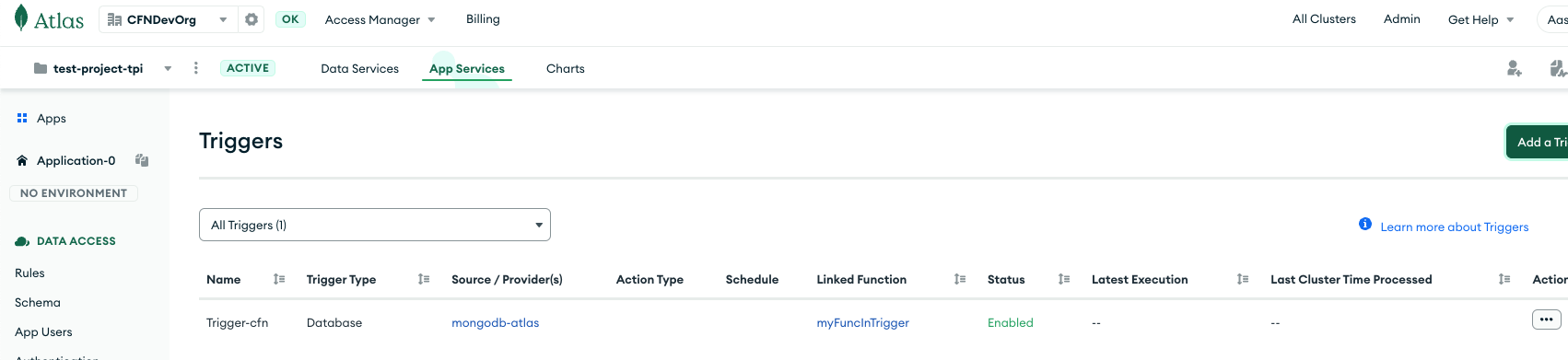
Trigger should be set up in your Atlas account as per configuration specified in the inputs/example.
-
General CFN resource success criteria should be satisfied.
The local tests are integrated with the AWS sam local and cfn invoke tooling features:
sam local start-lambda --skip-pull-image
then in another shell:
repo_root=$(git rev-parse --show-toplevel)
source <(${repo_root}/quickstart-mongodb-atlas/scripts/export-mongocli-config.py)
cd ${repo_root}/cfn-resources/trigger
./test/cluster.create-sample-cfn-request.sh YourProjectID YourClusterName > test.request.json
echo "Sample request:"
cat test.request.json
cfn invoke resource CREATE test.request.json
cfn invoke resource DELETE test.request.json
cd -
Both CREATE & DELETE tests must pass.