One person, a team of agents.
A CLI, a local web app and a desktop app — one product, running on your own machine.
macOS · Windows · Linux





简体中文 | English
A deliberately narrow toolset over clean low-level interfaces, tuned for open models like DeepSeek. Head-to-head with OpenAI Codex on the same model and the same public suites:
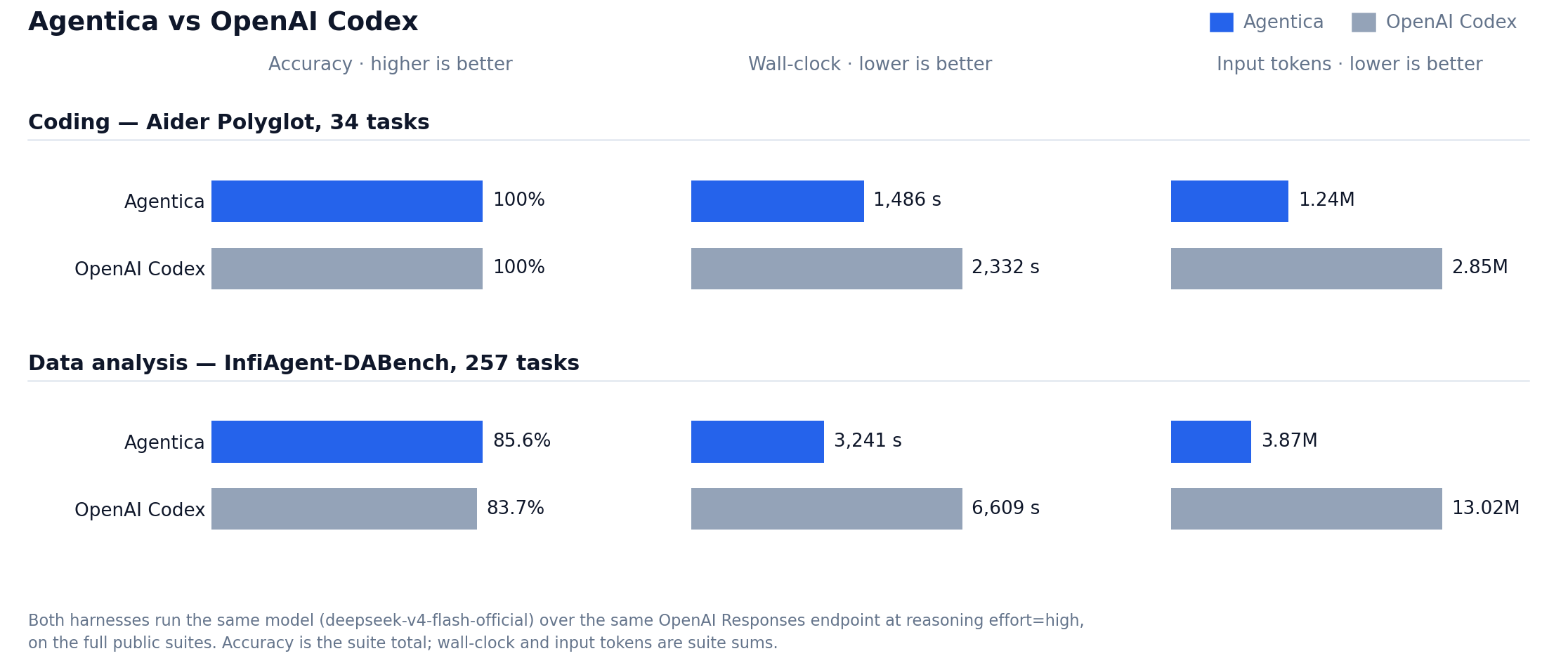
A clean sweep on coding, higher accuracy on data analysis — at roughly half the wall-clock and a third of the input tokens. Reproduction commands, per-metric tables and the raw predictions.jsonl are on the benchmark page.
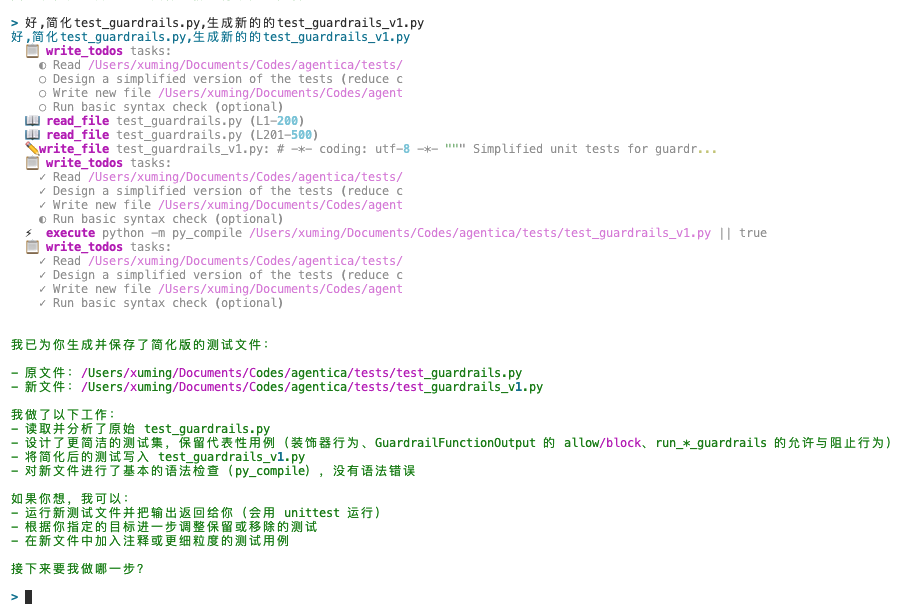
A terminal session is a collaborator. In-process task spawns a cheap read-only subagent, process-level delegate starts a whole other agent for work that deserves its own context window, and cross-terminal peer messaging lets two sessions talk. Nothing extra to deploy.
What a session learned is compiled into a reusable SKILL.md, so the next run of a similar task starts from last time's conclusion instead of from scratch. See the Skills docs.
WeChat / WeCom / Feishu / Telegram reach the agents on this machine: address one with @session-name, or just say what you want and let the gateway agent direct every session on the box.
The CLI (agentica) and the Web / Desktop backend (agentica-gateway) are products: install them with uv tool into an isolated env, not your system Python. No uv yet:
curl -LsSf https://astral.sh/uv/install.sh | sh    # standalone binary → ~/.local/bin
# macOS: brew install uv
# CLI
uv tool install agentica
# Web / Desktop (same command; also puts agentica-gateway on PATH)
uv tool install "agentica[gateway]"Already have the CLI and want the Web UI: uv tool install --force "agentica[gateway]". Upgrade with uv tool upgrade agentica. If the command is missing, run uv tool update-shell.
Embed Agentica in your own Python project with uv add agentica. Only checkout development uses pip install -e .. Details: Installation docs.
The window is the same web UI, on the same ~/.agentica — mixing it with the CLI or a browser makes no difference.
Important
These builds are unsigned, so the OS may block the first launch — one step, once.
If this machine has no agentica-gateway yet, the first launch installs a managed
runtime (uv + Python 3.12 + agentica[gateway]) under Application Support, not
inside ~/.agentica. An existing uv tool install (or an older pip install) is used as-is.
| OS | Installer |
|---|---|
| macOS 11+ | Apple silicon (arm64) · Intel (x64) |
| Windows 10+ | x64 installer (NSIS) |
| Linux x64 | AppImage · deb |
They are attached to every GitHub Release too.
🍎 macOS says "Agentica is damaged and can't be opened"
macOS quarantines anything downloaded from the web, and reports unsigned apps as damaged. Remove the flag:
-
Open the dmg and drag
Agentica.appinto Applications. -
Open Terminal and run this (it asks for your login password; nothing is echoed while you type):
sudo xattr -rd com.apple.quarantine /Applications/Agentica.app
🪟 Windows says "Windows protected your PC"
SmartScreen blocks unsigned installers: click "More info" → "Run anyway". First launch only.
🐧 Double-clicking the AppImage does nothing
Browsers download AppImages without the execute bit (the deb goes through your package manager and is unaffected):
chmod +x agentica-desktop-linux-x86_64.AppImageYou can also run it from source: cd desktop && npm install && npm start. See desktop/README.md.
Provide an API key for any model provider (precedence: shell env > .env > config.yaml):
export OPENAI_BASE_URL="https://api.openai.com/v1"
export OPENAI_API_KEY="sk-xxx"
# or start free with ZhipuAI: export ZAI_API_KEY="your-api-key"
You can also write it into ~/.agentica/.env, or run agentica setup to generate ~/.agentica/config.yaml (switch models anytime with /model). Full details: Installation docs.
agenticaOnce the interactive terminal is up, just talk — e.g. "find out why the tests in this repo are failing".
uv tool install "agentica[gateway]"
agentica-gateway
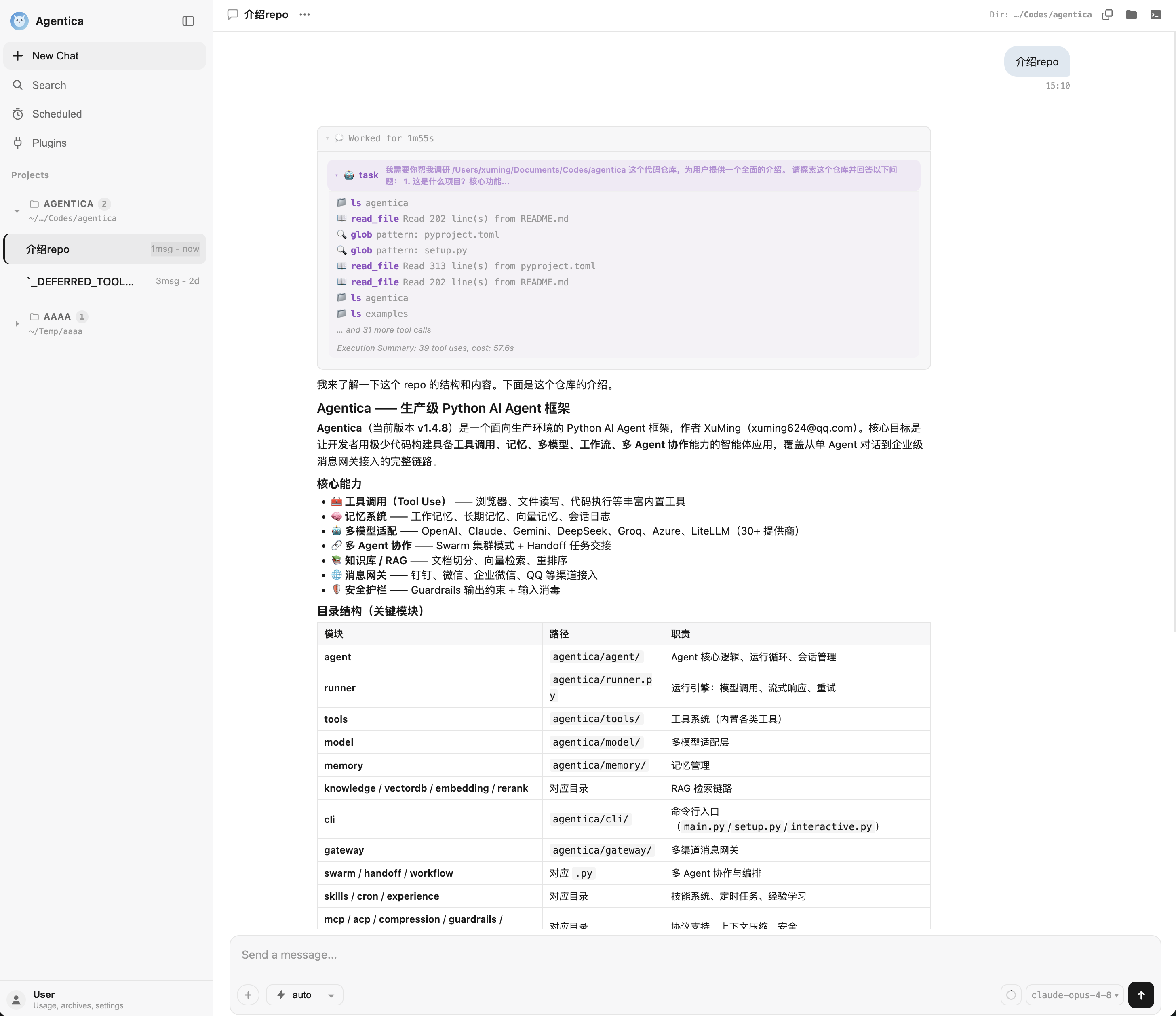
Serves at http://127.0.0.1:8881/chat (chat, traces, settings). The first start creates a default account and prints a random initial password in the terminal; an administrator can add more under User management, and each account gets its own conversations and memory. For WeChat / WeCom / Feishu / Telegram, see the Gateway docs.
Self-host with Docker (the image compiles the UI; runtime still has no Node):
cp .env.docker.example .env   # fill OPENAI_API_KEY
docker compose up -d --build
Open http://127.0.0.1:8881/chat. State lives in a named volume; the current directory is mounted at /workspace.
For Node programs talking to a running gateway. This is not how you start the web UI:
npm install @agentica-ai/sdkAlways the full name @agentica-ai/sdk (from registry.npmjs.org; not agentica-sdk).
import { Agentica } from "@agentica-ai/sdk";
const agentica = new Agentica({
  baseURL: "http://127.0.0.1:8881",
  apiKey: process.env.AGENTICA_GATEWAY_TOKEN, // ~/.agentica/cache/gateway/runtime.json
});
for await (const event of agentica.chat.stream({ message: "ping", session_id: "demo" })) {
  if (event.event === "content") process.stdout.write(String(event.data));
}
Source: sdk-ts/.
Give the Agent search + files and start working with one run_sync:
from agentica import Agent, OpenAIChat, BuiltinWebSearchTool, BuiltinFileTool, BuiltinExecuteTool

agent = Agent(
    model=OpenAIChat(id="gpt-4o-mini"),
    tools=[BuiltinWebSearchTool(), BuiltinFileTool(work_dir="./workspace"), BuiltinExecuteTool(work_dir="./workspace")],
)
agent.run_sync("Search Python 3.13 new features and write them to features.md")
Or grab the batteries-included preset (built-in tools + compression + long-term memory + skills + MCP):
from agentica import DeepAgent
agent = DeepAgent()Core engine
- Async-First — Native async API,
asyncio.gather()parallel tool execution, sync adapter included - Built-in tools —
read_file/write_file/apply_patch/grep/glob,execute, web search; long reports are HTML viawrite_file - Many models — OpenAI Chat Completions / Responses API, DeepSeek, Claude, ZhipuAI, Qwen, Moonshot, Ollama, LiteLLM and more
- Guardrails — Input / output / tool-level guardrails, streaming real-time detection
- Multi-Modal — Text, image, audio, video understanding
Product surfaces
- CLI —
agenticainteractive terminal; in-processtask, process-leveldelegate, cross-terminal peer messaging - Web —
agentica-gatewaylocal SPA (chat / traces / settings) plus IM channels - Desktop app — Thin Electron shell over the same web UI; attaches to a running gateway before starting one
Collaboration
- Multi-Agent — SDK:
Agent.as_tool(), Workflow, Swarm, Markdown Subagents; CLI:task/delegate/ peer messaging (see Terminal docs) - Actor-Critic Refinement —
refine()with parallel multi-critic review,SchemaCriticfor zero-cost program-level validation,AgentCriticfor heterogeneous strong-model gating, automatic loop-detection early-stop
Memory & evolution
- Persistent Memory — Index/content separation, relevance-based recall, four-type classification, drift defense; standing rules live in
AGENTS.md - Context compression — Layer 1 evicts old tool results; a full window opens an empty new one (no LLM summary). Prior turns stay in the JSONL;
search_sessionretrieves them; handover goes in<session>.notes.md - Skill System — Markdown-based skill injection with project, user, and managed external skill directories
- Self-Evolution — Experience cards auto-compile into reusable
SKILL.mdacross sessions
Integrations
- MCP / ACP — Model Context Protocol and Agent Communication Protocol support
- RAG — Knowledge base management, hybrid retrieval, Rerank, LangChain / LlamaIndex integration
For the architecture and the execution engine (agentic loop, two-layer context compression, four-layer guardrails), see the architecture docs.
| Mechanism | What it does | When to use |
|---|---|---|
task |
In-process subagent (aux model by default, read-only) | Short lookups: search code, gather facts |
delegate |
Spawns a full agentica --query --print process |
Large work needing its own context / cwd; managed via /ps, wait, /stop |
| peer | Plain text between two interactive terminals (list_agents / send_message) |
Inform another session — not hire a worker |
Details: Choosing · Terminal docs.
See examples/ for full examples, covering:
| Category | Content |
|---|---|
| Basics | Hello World, streaming, structured output, multi-turn, multi-modal, Agentic Loop comparison |
| Tools | Custom tools, async tools, search, code execution, parallel tools, concurrency safety, cost tracking, sandbox isolation, compression |
| Agent Patterns | Agent-as-tool, parallel execution, multi-agent collaboration, debate, routing, Swarm, sub-agent, model-layer hooks, session resume |
| Guardrails | Input / output / tool-level guardrails, streaming guardrails |
| Memory | Session history, WorkingMemory, context compression, Workspace memory, LLM auto-memory |
| RAG | PDF Q&A, advanced RAG, LangChain / LlamaIndex integration |
| Workflows | Data pipeline, investment research, news reporting, code review |
| MCP | Stdio / SSE / HTTP transport, JSON config |
| Observability | Langfuse, token tracking, usage aggregation |
| Applications | LLM OS, deep research, customer service, financial research (6-Agent pipeline) |
→ View full examples directory
| Agentica | Claude Code | Codex CLI | |
|---|---|---|---|
| Model choice | ✅ Many providers, freely swappable | Claude models only | OpenAI models only |
| Cross-terminal multi-session collab | ✅ peer + delegate / task |
❌ | ❌ |
| Web + Desktop + IM | ✅ local web app / desktop app / WeChat, WeCom, Feishu, Telegram | ❌ | ❌ |
| Self-evolving skills | ✅ experience auto-compiles into SKILL.md |
❌ | ❌ |
| Python SDK | ✅ full SDK, embed anywhere | partial (Claude-bound) | ❌ |
| Open source | ✅ Apache 2.0 | ❌ | ✅ |
- [2026/09/11] Unreleased: Layer 2 compact now opens an empty window (Codex TokenBudget). It no longer calls an LLM or
/responses/compact. Prior turns stay in the session JSONL and are retrieved withsearch_session; handover is<session>.notes.md. See Context Compression - [2026/09/01] v1.4.15: Adds the
@agentica-ai/sdkTypeScript client and a Gateway Docker image;/exportnow writes the session JSONL;apply_patchmatches context exactly; CLI no longer treats[/path]in tool output as Rich markup. See Release-v1.4.15 - [2026/08/25] v1.4.14: Permissions match Codex (ask keeps write tools visible; deny-similar); true multi-account Web/Desktop; file tools narrowed to
apply_patch+write_filewithread_filetail; worktrees live inside the repo; bundled skills load in-place; desktop first-launch bootstraps a Python runtime. See Release-v1.4.14 - [2026/08/20] v1.4.13: The web UI is a Vite + React SPA with a new traces page; the UI ships in English with Simplified Chinese in settings; and there are now desktop installers (macOS dmg / Windows NSIS / Linux AppImage and deb). See Release-v1.4.13
- [2026/08/10] v1.4.12: Two-layer context compression (tool-result eviction → LLM/native summarise); fixes the read-and-reread loop and Anthropic paths where eviction never ran; compaction counts on
RunResponse. Adds cross-terminal peer messaging (list_agents/send_message) and process-leveldelegate(fullagentica --query --print, managed via/ps/stopwait) vs cheap in-processtask. See Release-v1.4.12
Older releases
- [2026/08/04] v1.4.11: Adds OpenAI Responses API (with provider-native compaction), Markdown-configurable subagents, and multi-file
apply_patch; improves CLI resume/status/compaction feedback; trims prompt and grep/glob schema cost; fixes Learned Experiences corruption andwrite_todosfull-list echo. See Release-v1.4.11 - [2026/07/24] v1.4.10: Adds native image input with catalog-driven model capability routing; introduces
/renameand name-based/resume; fixes Pillow core dependency metadata. See Release-v1.4.10 - [2026/07/21] v1.4.9: Unified 3-tier permission across SDK/CLI/Web (
ask/auto/allow-all); built-in subagents are read-only;edit_filegives advisory tips instead of hard-rejecting; fixesask_user_questionCLI freeze. See Release-v1.4.9 - [2026/07/05] v1.4.7: Adds a cron runtime (
/croncommand + daemon) and self-management (/upgrade,/config set|env); unifies config into~/.agentica/config.yaml;/resumeaccepts full/prefix/ellipsis session ids. Also fixes stream-upload OOM and/api/uploadpath traversal (CWE-22). See Release-v1.4.7 - [2026/06/03] v1.4.6: Cross-provider fallback supports tool-calling turns; adds edit-time LSP diagnostics flags (
--enable-diagnostics/--diagnostics-server), an enhancedagentica doctor, and/goalbudget flags. See Release-v1.4.6 - [2026/05/11] v1.4.4: MemoryExtractHooks optimization —
auto_extract_memory_backgroundruns extraction in the background, preferring the cheaperauxiliary_model. See Release-v1.4.4 - [2026/05/10] v1.4.3: Skill lifecycle refactor + VaG decoupling, with a unified
SkillLifecycleHooksextension point. See Release-v1.4.3
Full documentation: https://shibing624.github.io/agentica
If Agentica helps you, please give it a ⭐ Star so more people find it!
- GitHub Issues — Open an issue
- WeChat Group — Add
xuming624on WeChat, mention "llm" to join the developer group

If you use Agentica in your research, please cite:
Xu, M. (2026). Agentica: A Human-Centric Framework for Large Language Model Agent Workflows. GitHub. https://github.com/shibing624/agentica
BibTeX:
@misc{xu2026agentica,
  author    = {Xu, Ming},
  title     = {Agentica: A Human-Centric Framework for Large Language Model Agent Workflows},
  year      = {2026},
  publisher = {GitHub},
  url       = {https://github.com/shibing624/agentica}
}
A CITATION.cff is also available in the repo root.
Contributions welcome! See CONTRIBUTING.md.