Rewrite any text, in any app, instantly. No copy-paste. No switching windows. Just a hotkey.
Select text anywhere → press Alt+Shift+W → AI rewrites it and pastes it back. Done.
Works in Gmail, Notion, Slack, Word, VS Code, Discord — every app on your computer.

-555555?style=for-the-badge&logo=windows)



Most AI writing tools make you open a browser tab, paste your text, wait, copy the result, switch back, and paste again. That's 7 steps — every single time.
Hotkeys does it in 1 step — without ever leaving whatever you're writing in.
It sits quietly in your system tray and gives you three superpowers:
| ✍️ AI Text Refiner | Select any text, press a hotkey — it's rewritten and pasted back in under a second |
| ⌨️ Custom Prompt Hotkeys | Write any instruction, assign it F1–F12, fire it from any app instantly |
| 🎙️ Voice to Text | Hold a hotkey, speak, your words appear wherever your cursor is — fully offline |
All your prompts in one place. Click any card to activate it, drag to reorder, right-click for options:
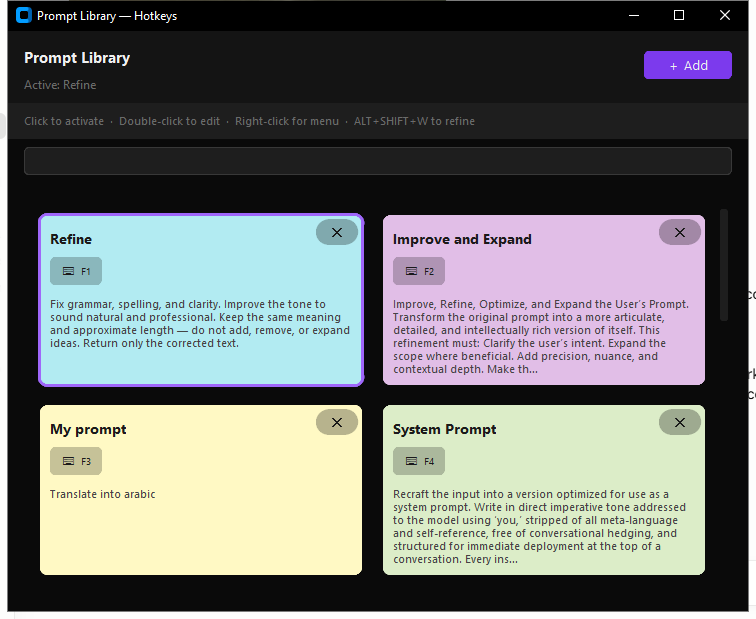
The library ships with 16 ready-to-use prompts. Each one is a single instruction that gets applied to whatever text you've selected.
| Hotkey | Prompt | What it does |
|---|---|---|
F1 |
Refine | Fixes grammar, spelling, and clarity — same meaning, natural tone |
F2 |
Improve & Expand | Makes your text more articulate, detailed, and expressive |
F3 |
Translate | Translates in place (default: Arabic — change it to anything) |
F4 |
System Prompt | Reformats text into a clean, deployable AI system prompt |
F5 |
Simplify | Strips jargon and complexity — immediately understandable |
F6 |
Technical Depth | Adds precision and implementation detail for expert readers |
F7 |
Expand | Develops underdeveloped ideas without going off-topic |
F8 |
Professional | Rewrites in polished, formal language at the same length |
F9 |
Ask Claude | Turns vague thoughts into a sharp, specific AI prompt |
F10 |
Pirate | Rewrites with nautical flair — same meaning, more swagger |
F11 |
ELI5 | Explains anything as if the reader is five years old |
F12 |
Tweet | Compresses the sharpest idea into one punchy tweet |
| — | Brutally Honest | Says exactly what's meant, no softening, no padding |
| — | Story Hook | Turns any idea into a gripping opening line |
| — | Devil's Advocate | Argues the exact opposite with equal conviction |
| — | Haiku | Distils the core idea into a 5-7-5 haiku |
These are just the starting point. Hit + Add to write your own.
The only limit is your imagination. Want a prompt that rewrites emails in your exact voice? Converts meeting notes into action items? Translates to your language? Summarises legal contracts in plain English? Turns rough ideas into job postings?
Add it in 10 seconds and it works everywhere, instantly.
Tip: Press any hotkey to see a floating sticky note preview. Edit the prompt on the fly before it fires, then press the key again to apply.
- Download Hotkeys-v2.0-win64.zip
- Extract the zip — you'll get a
Hotkeysfolder - Open the folder and double-click
Hotkeys.exe - The ⚡ icon appears in your taskbar tray — you're done
No Python. No pip. No installing anything. It just works.
- Download install_mac.command
- Right-click → Open → click Open again (Mac security prompt)
- A terminal window installs everything automatically (~10 min, 600 MB models)
- Grant keyboard permission when prompted (one-time, 30 seconds)
- Double-click Hotkeys.command on your Desktop — done
- Select text in any app
- Press
Alt + Shift + W - Wait ~0.5 seconds — the text is rewritten and pasted back
- Select text in any app
- Press the prompt's hotkey (e.g.
F5for Simplify) - A sticky note appears — read the prompt, edit it if you want
- Press the same key again to fire it
- Press
Alt + Shift + Eto open the Prompt Library - Click + Add
- Give it a name and write your instruction
- (Optional) Assign a hotkey via right-click → Assign hotkey
- Click Save — available everywhere immediately
- Place your cursor where you want the text
- Press
Ctrl + Enterto start recording - Speak naturally
- Press
Ctrl + Enteragain to stop — your words appear instantly
Everything is configurable. Open the library (Alt+Shift+E) and click the gear icon, or right-click the tray icon.
- AI Provider — switch between Cerebras and Groq, enter your API key
- Hotkeys — change any global shortcut
- Voice model — choose small (fast) or large (accurate), pick your microphone
- Transcription — language, beam size, custom vocabulary
- Autostart — launch automatically with Windows
- Push-to-talk — hold to record, release to transcribe
| Action | Shortcut |
|---|---|
| Refine selected text with AI | Alt + Shift + W |
| Open Prompt Library | Alt + Shift + E |
| Fire prompt 1–12 | F1 – F12 |
| Start / stop voice recording | Ctrl + Enter |
| Cancel recording | Escape |
All hotkeys are customisable in Settings. Per-prompt hotkeys are assigned per prompt via right-click → Assign hotkey.
Hotkeys uses Cerebras or Groq to rewrite your text. Both are completely free and take 2 minutes to set up.
| Provider | Speed | Free tier | Sign up |
|---|---|---|---|
| Cerebras | ~0.3 s | ✅ Yes | cerebras.ai |
| Groq | ~0.5 s | ✅ Yes | console.groq.com |
Sign up → copy your API key → paste it into Settings → done.
Voice-to-text works without any API key — it runs fully offline on your device.
- 🔒 Voice is transcribed locally — the Whisper model runs on your computer, nothing is sent anywhere
- 🌐 Text refinement goes to Cerebras or Groq — same as any AI assistant you already use
- 🚫 No analytics, no telemetry, no account required
| Feature | Notes | |
|---|---|---|
| ✍️ | AI text refiner | Works in any app, any text field |
| 📚 | Prompt library | 16 built-in prompts, unlimited custom ones |
| ⌨️ | Per-prompt hotkeys | Assign F1–F12 to any prompt; fires from any app |
| 🗒️ | Sticky note popup | Preview and edit a prompt before it fires |
| 🔤 | Live spell check | Misspellings underlined in red as you type |
| 🔍 | Prompt search | Find prompts instantly as you type |
| 🔄 | Drag to reorder | Organise prompts by drag and drop |
| 🎙️ | Voice to text | Fully offline, no data sent anywhere |
| 🔇 | Noise reduction | Works in noisy environments |
| 🚀 | Push-to-talk | Hold to record, release to transcribe |
| 📋 | Transcription history | Browse and copy past recordings |
| ⚡ | Instant paste | Output types directly where your cursor is |
| 🖥️ | System tray | Zero UI clutter, always available |
git clone https://github.com/sprawf/hotkeys.git
cd hotkeys

# Windows
python -m venv venv
venv\Scripts\pip install -r requirements.txt
venv\Scripts\python main.py

# Mac / Linux
python3 -m venv venv
venv/bin/pip install -r requirements_mac.txt
venv/bin/python3 main.py| Component | Library |
|---|---|
| UI | CustomTkinter + tkinter |
| Speech-to-text | faster-whisper (runs offline) |
| Voice activity detection | Silero VAD |
| AI text refinement | Cerebras / Groq API |
| Spell check | pyspellchecker |
| Global hotkeys | keyboard |
| System tray | pystray |
| Packaging | PyInstaller |
MIT — free to use, fork, and build on.
If this saved you time, consider leaving a ⭐ — it helps others find it.