Retrieve mapping values in custom integration #1014


-
|
Hello, As you may know by now I am building a custom integration and making progress :) I am now at the point where I want to map the submission values to the field mapping I made in the form. So the flow I am looking at now is:
I am stuck as I do not see how the Here is the class as I have it now (shortened for readability): <?php
namespace client\modules;
use Craft;
use craft\errors\InvalidFieldException;
use craft\helpers\App;
use Exception;
use fmREST;
use RuntimeException;
use Throwable;
use verbb\formie\base\Crm;
use verbb\formie\base\Integration;
use verbb\formie\elements\Submission;
use verbb\formie\models\IntegrationField;
use verbb\formie\models\IntegrationFormSettings;
class Filemaker extends Crm
{
public string $hostName;
public string $database;
public string $username;
public string $password;
	public ?array $contactFieldMapping = null;
	public ?array $dealFieldMapping = null;
	public ?array $leadFieldMapping = null;
public ?array $companyFieldMapping = null;
public ?array $formFieldMapping = null;
public bool $debug = false;
public static function displayName(): string
{
return Craft::t('formie', 'FileMaker');
}
public function getIconUrl(): string
{
return Craft::$app->getAssetManager()->getPublishedUrl("@client/web/assets/cp/filemaker.svg", true);
}
public function getDescription(): string
{
return Craft::t('formie', 'Provides FileMaker integration.');
}
public function getSettingsHtml(): string
{
return Craft::$app->getView()->renderTemplate('client/integrations/crm/filemaker/_plugin-settings', [
'integration' => $this,
]);
}
public function getFormSettingsHtml($form): string
{
return Craft::$app->getView()->renderTemplate('client/integrations/crm/filemaker/_form-settings', [
'integration' => $this,
'form' => $form
]);
}
public function fetchFormSettings(): IntegrationFormSettings
{
$settings = [];
try
{
if (!Craft::$app->getRequest()->getParam('sendFormPayload')) {
throw new \InvalidArgumentException('A layout must be specified');
}
$settings['syncFormSuccess'] = '';
$settings['syncFormError'] = '';
$layout = Craft::$app->getRequest()->getParam('layout');
if (!$layout) {
$settings['syncFormError'] = Craft::t('formie', 'Layout required');
}
else
{
$response = $this->getFmClient()->layoutMetadata($layout);
if ($response['messages'][0]['code'] > 0)
{
Integration::error($this, $response['messages'][0]['message'], true);
}
$filemakerFields = [];
foreach ($response['response']['fieldMetaData'] as $field)
{
$filemakerFields[] =
new IntegrationField([
'handle' => $field['name'],
'name' => Craft::t('formie', $field['name']),
'required' => false,
]);
}
$settings['syncFormSuccess'] = Craft::t('formie', 'Successfully synced FileMaker fields');
$settings['fields'] = $filemakerFields;
}
} catch (Throwable $e) {
Integration::apiError($this, $e);
}
return new IntegrationFormSettings($settings);
}
public function sendPayload(Submission $submission): bool
{
$formValues = $this->getFieldMappingValues($submission, $this->formFieldMapping, 'fields');
print_r($formValues);
return true;
}
public function fetchConnection(): bool
{
try {
$this->getFmClient()->productInfo();
} catch (Throwable $e) {
Integration::apiError($this, $e);
return false;
}
return true;
}
}In the database I have seen that the field mapping is stored for the form but the code cannot find it for some reason. Where am I missing something? Thank you. |
Beta Was this translation helpful? Give feedback.
Replies: 12 comments 12 replies

-
|
So firstly, you should supply settings for the mapping screen for a particular name. You've done this in your return new IntegrationFormSettings([
'fields' => [
new IntegrationField([
'handle' => $field['name'],
'name' => Craft::t('formie', $field['name']),
'required' => false,
]),
]
]);Here, you create a collection of I'd recommend you change this from $settings['form'] = $filemakerFields;Because those fields represent the settings for mapping to a "form object", just like a "contact object", deal, etc. In If you run Again, looking at ActiveCampaign as an example, you should have something like this in your form template. Notice the Can you let me know the template side of things, and maybe adjust from |
Beta Was this translation helpful? Give feedback.
-
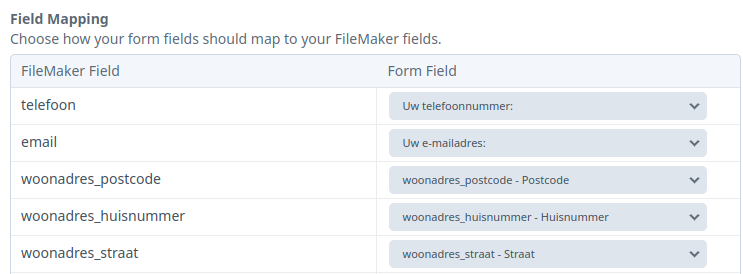
Correct, but my mappings are stored in the database and I see them in the UI. This is what I have in my form template after changing it per your suggestion, I was missing the word This is how I run the command line: When I check the value of Not sure if it is relevant but I must also declare these properties otherwise the page errors out with an unknown property error: Let me know what else I can supply to solve this mystery. Thanks. |
Beta Was this translation helpful? Give feedback.
-
|
Ah yes, the Then run |
Beta Was this translation helpful? Give feedback.
-
|
I have visual 😄 Glad to know it wasn't just me 🙃 Thank you for the fix, I can confirm it works for me. Now I can implement the rest. |
Beta Was this translation helpful? Give feedback.
-
|
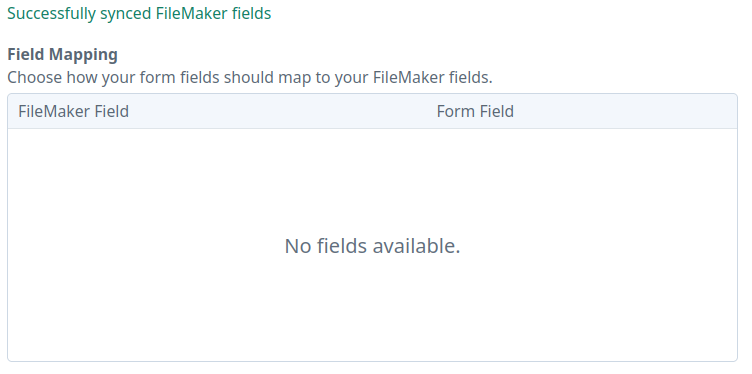
I would like to revisit this somewhat because I have noticed a possible side-effect. Now when I refresh the list of fields on the integration tab, the table is no longer populated. When I click the refresh button I am getting this JSON response: {"syncFormSuccess":"Successfully synced FileMaker fields","syncFormError":"","form":[{"handle":"db_accountcreate","name":"db_accountcreate","type":null,"required":"","options":[]},{"handle":"db_accountmod","name":"db_accountmod","type":null,"required":"","options":[]},{"handle":"db_datecreate","name":"db_datecreate","type":null,"required":"","options":[]},{"handle":"db_datemod","name":"db_datemod","type":null,"required":"","options":[]},{"handle":"db_linkall","name":"db_linkall","type":null,"required":"","options":[]},{"handle":"db_recid","name":"db_recid","type":null,"required":"","options":[]},{"handle":"db_usercreate","name":"db_usercreate","type":null,"required":"","options":[]},{"handle":"db_usermod","name":"db_usermod","type":null,"required":"","options":[]},{"handle":"db_inlog","name":"db_inlog","type":null,"required":"","options":[]},{"handle":"Username","name":"Username","type":null,"required":"","options":[]},{"handle":"UserId","name":"UserId","type":null,"required":"","options":[]},{"handle":"naam","name":"naam","type":null,"required":"","options":[]},{"handle":"UserIp","name":"UserIp","type":null,"required":"","options":[]},{"handle":"db_status","name":"db_status","type":null,"required":"","options":[]},{"handle":"BARCODE","name":"BARCODE","type":null,"required":"","options":[]},{"handle":"aanvraag_voor","name":"aanvraag_voor","type":null,"required":"","options":[]},{"handle":"school_adres","name":"school_adres","type":null,"required":"","options":[]},{"handle":"school_naam","name":"school_naam","type":null,"required":"","options":[]}]}That all looks good, except the UI is not updated. In my <integration-field-mapping
label="{{ 'Field Mapping' | t('formie') }}"
instructions="{{ 'Choose how your form fields should map to your {name} fields.' | t('formie', { name: integration.displayName() }) }}"
name-label="{{ integration.displayName() }}"
id="form-field-mapping"
name="formFieldMapping"
:value="get(form, 'settings.integrations.{{ handle }}.formFieldMapping')"
:rows="get(settings, 'fields')"
></integration-field-mapping>My public ?array $contactFieldMapping = null;
public ?array $dealFieldMapping = null;
public ?array $leadFieldMapping = null;
public ?array $formFieldMapping = null;
public function fetchFormSettings(): IntegrationFormSettings
{
$settings = [];
try
{
if (!Craft::$app->getRequest()->getParam('sendFormPayload')) {
throw new IntegrationException('A layout must be specified');
}
$settings['syncFormSuccess'] = '';
$settings['syncFormError'] = '';
$layout = Craft::$app->getRequest()->getParam('layout');
if (!$layout) {
$settings['syncFormError'] = Craft::t('formie', 'Layout required');
}
else
{
$response = $this->getFmClient()->layoutMetadata($layout);
if ((int) $response['messages'][0]['code'] !== 0)
{
Integration::error($this, $response['messages'][0]['message'], true);
}
$filemakerFields = [];
foreach ($response['response']['fieldMetaData'] as $field)
{
$filemakerFields[] =
new IntegrationField([
'handle' => $field['name'],
'name' => Craft::t('formie', $field['name']),
'required' => false,
]);
}
$settings['syncFormSuccess'] = Craft::t('formie', 'Successfully synced FileMaker fields');
$settings['form'] = $filemakerFields;
}
} catch (Throwable $e) {
Integration::apiError($this, $e);
}
return new IntegrationFormSettings($settings);
}I see no JavaScript errors in my console. |
Beta Was this translation helpful? Give feedback.

-
|
Can you adjust |
Beta Was this translation helpful? Give feedback.
-
|
@engram-design I promise I triple-checked that block of code 🙈 Thank you, that does it. One other thing I found out, I have now 2 forms and when I load the fields in form 1 and go to form 2, I see the fields from form 1. I reload the fields and see my form 2 fields but when I then go to form 1, I see the fields from form 2 🙃 Is there some kind of caching setting I have to set? |
Beta Was this translation helpful? Give feedback.
-
|
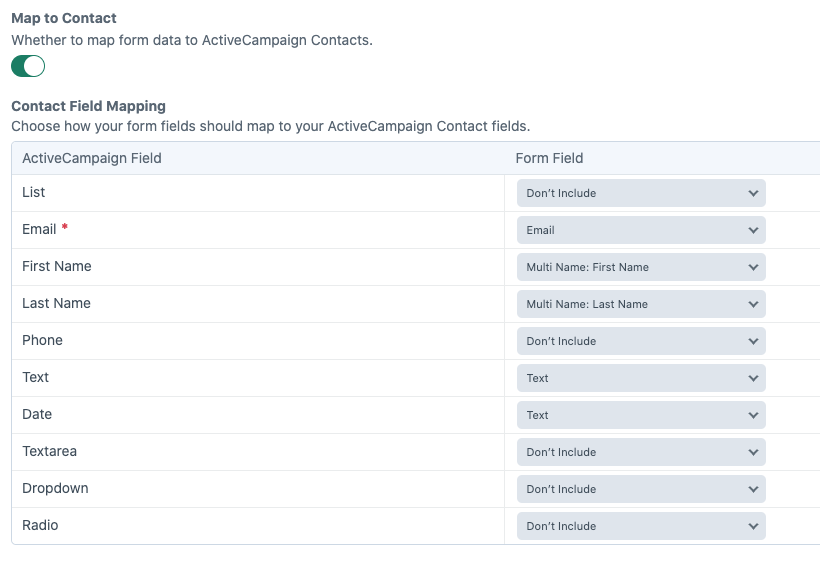
Not quite sure what you mean sorry! You mean your integration settings (for your Filemaker integration) you set on one form are showing on another? Specifically your mappings? So for instance, you might have this configured on one form
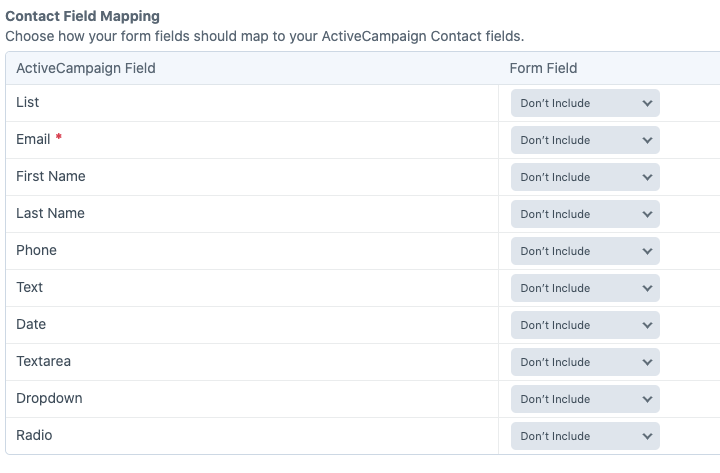
And then on the other form you don't see this, where they should be blank?
That shouldn't be possible at all, as they're stored in the form, and a form only knows about itself. |
Beta Was this translation helpful? Give feedback.
-
|
Hello, sorry for the late reply but I had no access again to the CRM until today. So to explain what I see I have created a short video, this hopefully explains what I mean. As you can see when I switch forms and refresh the fields I get the correct fields but going back to the form I see the fields from the other form. Does this video help? formie-fields.mp4. |
Beta Was this translation helpful? Give feedback.
-
|
Right, I've never seen that happen before with any other integration. I'm not sure if it's down to your custom integration, or something you've setup different, but I'm not quite sure how that's even possible. As for the fields being empty, would you be running PHP 8.1? If so, might be similar to #979 |
Beta Was this translation helpful? Give feedback.
-
|
@engram-design I figured it out, it is not PHP 8.1 as I am running PHP 8.0 but something else. So when I retrieve the field mapping it is eventually stored in the My question now is, how do I store these fields in a form specific cache? Is that even supported? |
Beta Was this translation helpful? Give feedback.
-
|
Field mappings are stored in the form settings and the integrations key in that. Take a look at the ‘settings’ column for a form which is a large JSON object. In that, there’ll be an ‘integrations’ key which inside that will store the settings for the integrations. That’s why integrations are stored per form. The cache column for the integration is updated whenever you refresh the integration. These are not the saves mappings but the available things to map. Think of it like the rows in that table to map values against. Think of this cache in practical terms like the Mailchimp integration, where you might want to pick which list and which fields in each list to map to. This is fetches for all lists and saved in a cache so that the next time you want to that integration on another form you don’t need to fetch that data again. It also helps when reloading the form not to hit the API all the time. as for why you’re getting your saved mapped values mixed up, I have no idea what’s going on there. I’d start by inspecting the form settings from the database. Then adding debug statement ‘{% dd…’ to the Twig templates to double check the integration mapped settings are also correct. whilst some information is saved to the cache for the integration this is global. It has no bearing on the mapped values saved on a form (the values might be there, they’re just never used in practice) |
Beta Was this translation helpful? Give feedback.
-
|
Hello @engram-design Apologies for getting back this late but other priorities took over.
I completely follow that. So my question now is, where or what or when is something triggered to fill the This is probably also my problem, nothing is stored in this field. I only see the I am checking it but not finding my golden egg yet :) |
Beta Was this translation helpful? Give feedback.
-
|
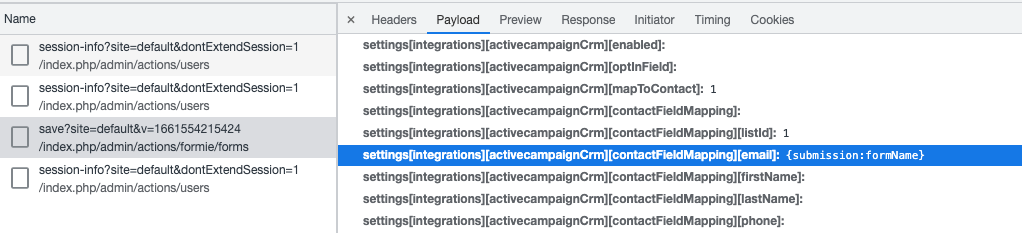
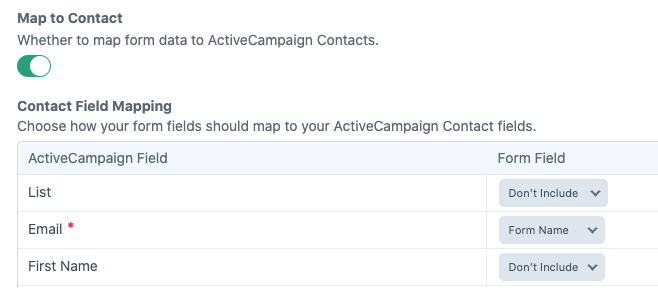
When you save the form is when those values are populated, provided you actually are sending data in the payload for For instance, here I'm saving mapping for the Active Campaign CRM integration.
I've mapped the "Form Name" to the "Email" attribute (aware that's invalid - just a quick example)
Can you compare on your end if this is happening, but looking in the network tab of web developer tools and inspect the save-form request? It sounds like it might not be.
|
Beta Was this translation helpful? Give feedback.
-
|
@engram-design Thank you for that, it is starting to make some sense now. So in a previous post we renamed the In this field I see the correct fields for the given layout. Up to here all is good.
That is looking good now as I see the name of my integration in the POST request. Now, when rendering the table with fields, I still see the fields from the previous form I was. So somehow it is not taking the fields from the |
Beta Was this translation helpful? Give feedback.
-
|
Yeah that behaviour is very, very strange. What I would do first is debug the settings for the form. Add the following: {% if handle == 'myIntegrationHandle' %}
{% dd form.settings.integrations[handle] %}
{% endif %}What does that show? The correct or incorrect settings for the integration for the form? That should be correct, because that's literally grabbing the settings for the from, straight from the column in the database. |
Beta Was this translation helpful? Give feedback.

-
|
@engram-design Here is the debug info These are the correct fields for this form. To be sure I checked another form and this also shows the correct fields in the dump at this point. |
Beta Was this translation helpful? Give feedback.
-
|
Okay, so this content is fed into the Vue component just to check that they're the same there?Then, a little further down You could test on the Vue end: |
Beta Was this translation helpful? Give feedback.
-
Yes, they are exactly the same the So I tested the getForm() in Vue and that output looks good, so I tested it a bit further with the getSettings() and that output is wrong. That has the incorrect fields in it. This is how I tested that: I checked further but I don't see so quickly where this data is pulled from. Where do I look next? |
Beta Was this translation helpful? Give feedback.
-
|
So {% set formSettings = integration.getFormSettings().getSettings() %}Which is all in the file (as an example integration file).
|
Beta Was this translation helpful? Give feedback.
-
|
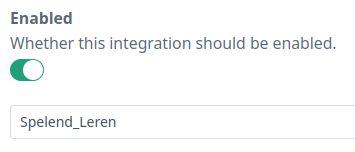
We are getting closer to the truth :) So I set the cache to false and it died on me 😆 That is because I require a layout to be specified, I need this layout to retrieve the fields from an API server. It looks like this: Doing the call from the twig template, does not have the layout field in the Every form that I have has a different layout. I guess this is the root cause of what we are seeing, the cache is called I would need a cache per form based on my handle I guess. So I tried to change and this is the partial output: So to summarize, in my case each form has a unique set of fields coming in from the API, there is not one superset that can be chosen from. The caching of the fields does not expect that. Is this something we can fix? I hope this is clear :) |
Beta Was this translation helpful? Give feedback.
-
|
Right, so that makes sense compared to every other integration out there. Deal objects have set fields, Contacts likewise. For your use-case, these need to be specific and per-form. Unfortunately, this would be a bit of a major refactor on our end to pass an instance of the form to the cache function, which is going to annoy other custom integrations that'll break. But I think you can get around this in your integration, with some changes. You'll need to switch from the generic You can do this by firstly defining the data in your return new IntegrationFormSettings([
'contact-__layout__' => $myFields,
]);Then, ensure that you grab those values in Vue. <integration-field-mapping
...
:rows="get(settings, 'contact-__layout__')"
></integration-field-mapping>Where replacing You'd grab Hopefully, that'll help? Otherwise, you're best to disable the cache altogether and modify your code to check if it's the first-run (because // For the initial render, return an empty array, until we try and fetch again with the layout provided
if (!Craft::$app->getRequest()->getIsPost()) {
return new IntegrationFormSettings([]);
}
if (!Craft::$app->getRequest()->getParam('sendFormPayload')) {
throw new \Exception('A layout must be specified');
}The major drawback with this is that because you have no saved rows for the mapping, you have to fetch the fields every time you want to manage the integration mapping. It'll always show no fields available to map against until you hit "Refresh Integration" |
Beta Was this translation helpful? Give feedback.
-
😄 This is a Filemaker connection and in FIlemaker you create a layout per form. So you can map your website form to the Filemaker form.
I actually made those changes as well and that works. Like you said, you will see no fields until I click This workaround is workable for me, as I can map my fields and the mapping can be used when posting the payload. The integration is something I setup only once (most of the time at least) and after that it is set. Thank you for your help in this and hopefully the option to set fields per form in cache can be added to the wishlist. |
Beta Was this translation helpful? Give feedback.
-
|
Nice one, and yep will give it some further thought for the next major version. We're likely to run into this ourselves at some point for a similar integration requirement. |
Beta Was this translation helpful? Give feedback.


Ah yes, the
run-integrationcommand is actually brand-new, but there's a bug with that. Fixed for the next release. To get this early, change yourverbb/formierequirement incomposer.jsonto:Then run
composer update.