VytalLink is a health data integration platform that connects wearable devices and health apps to AI assistants and developer tools.
It ships as a mobile app that acts as the data bridge — running on the user's phone, reading from their health sources, and exposing that data via MCP, REST API, and WebSocket. No cloud storage, no data pipelines to build, no wearable SDKs to reverse-engineer, no code required.
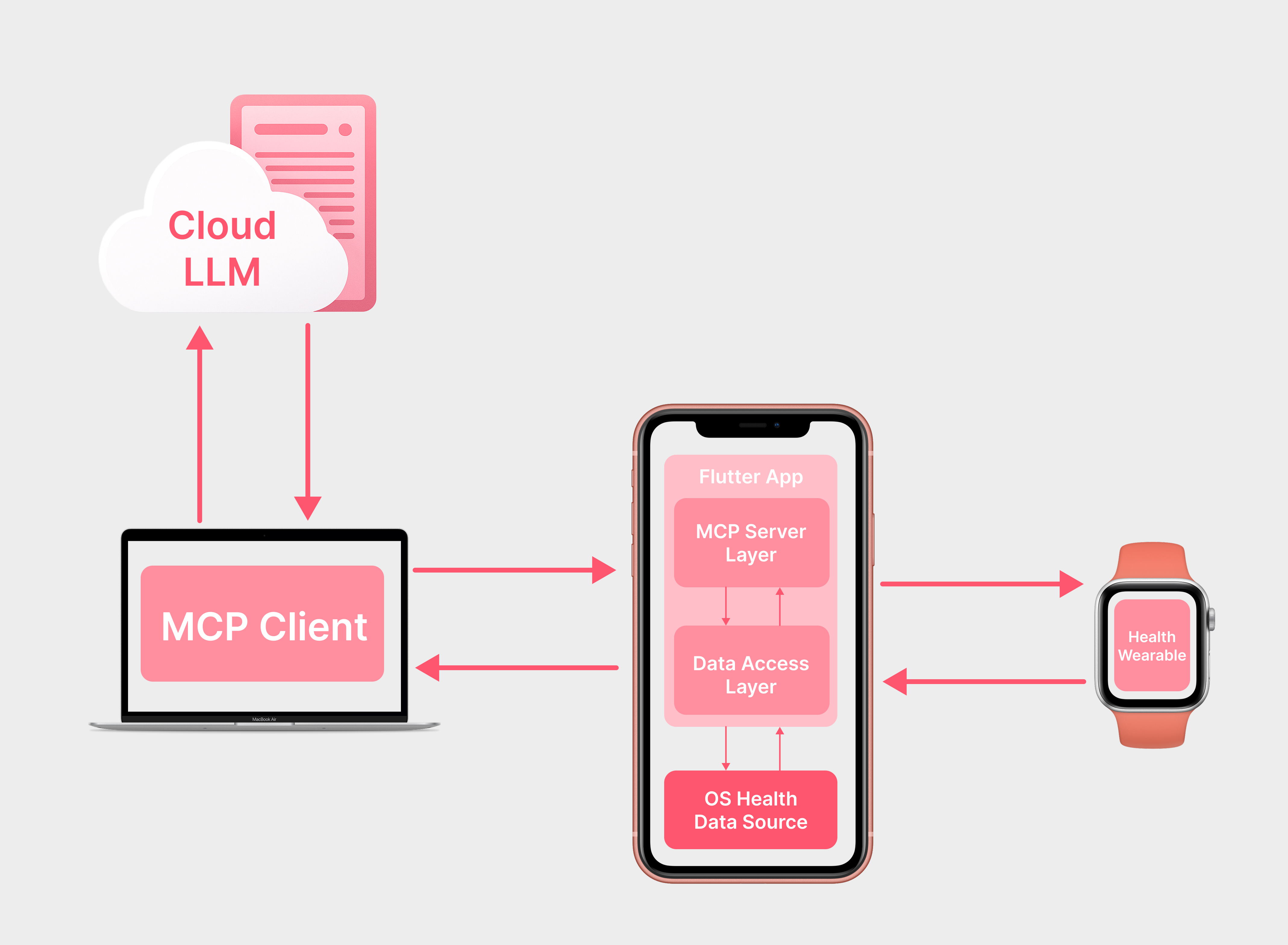
Healthcare projects live or die on data. Your wearables might capture blood oxygen, track movement, or monitor health rate but that data needs to go somewhere useful, fast.
The typical path is painful: parse device outputs, normalize formats across platforms, build ingestion pipelines, wire up an API. That's days of work before you even touch your actual idea.
VytalLink skips all of that. It already speaks Apple Health and Health Connect, exposes your health data through MCP and REST, and integrates natively with Claude and ChatGPT. You plug in and start building the thing that matters.
See the full setup guide at vytallink.xmartlabs.com/developers.html. It covers integrating the MCP server, linking users via the app, and querying health data in three steps.
Scenario: You're building a hackathon project that analyzes sleep quality and its correlation with daily activity.
Input (natural language via AI assistant):
"Give me my sleep data and step counts for the last 7 days"
Output: The AI assistant retrieves your real sleep metrics (duration, phases) and step counts from your connected wearable via VytalLink, ready to analyze, visualize, or feed into your application logic.
Another example:
"Compare my resting heart rate on workout days vs rest days this month"
The AI pulls heart rate and workout data, then produces the comparison — no manual data export or API integration needed on your part.
| Aspect | Details |
|---|---|
| Supported data | Heart rate, sleep, steps, workouts, wellness trends |
| Health sources | Apple Health, Health Connect |
| AI integrations | ChatGPT (GPT), Claude Desktop, any MCP client |
| Authentication | Word + PIN (generated in mobile app) |
| Protocols | MCP, REST API, WebSocket, OAuth 2.0 |
| Platforms | iOS, Android |
| npm package | @xmartlabs/vytallink-mcp-server |
| Setup time | ~2 minutes |
- App must stay open: The mobile app needs to remain active during AI conversations — data streams in real-time from the phone
- No server-side storage: Data stays on your device. This is great for privacy but means there's no persistent API you can poll independently — the phone is the data source
- Data scope: Limited to what Apple Health / Health Connect collect. If your wearable doesn't sync to these platforms, VytalLink can't access it
- Healthcare compliance: This is wellness/fitness data, not clinical-grade medical data. Don't use it for diagnostic purposes
- Connectivity: Requires active internet connection on both phone and desktop