
Xedge32 brings a browser-based Lua development environment to ESP32, ESP32-S3, and ESP32-P4. Use it to build and test connected applications on the device, from sensor and GPIO experiments to web interfaces, protocol bridges, and edge controllers.
Start with prebuilt firmware and develop in Lua. When your product needs custom hardware support or native APIs, build and extend the C firmware. Xedge32 is also a reference platform for evaluating Xedge and the Barracuda App Server (BAS) on a microcontroller.
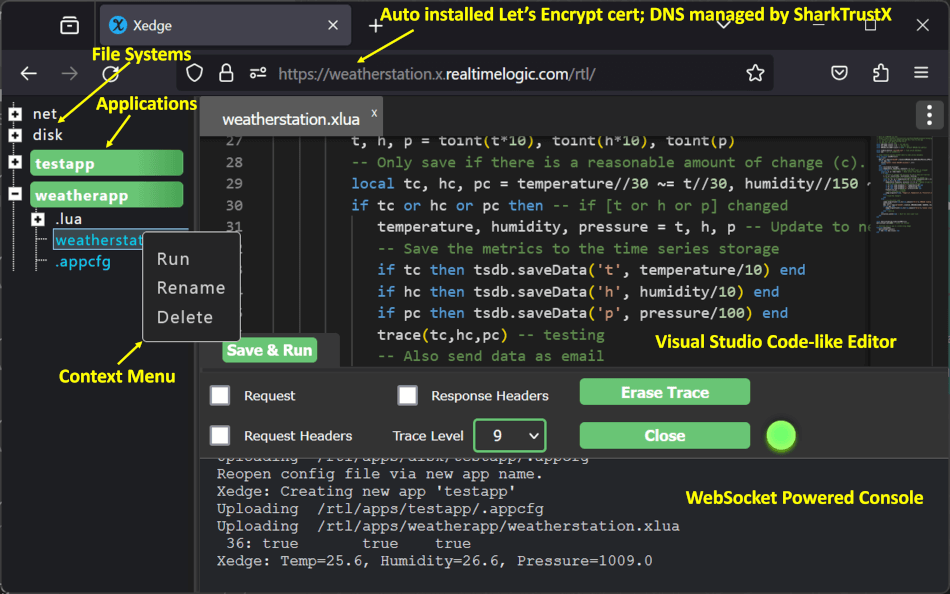
Xedge32 in developer mode
- Install the prebuilt firmware on a supported board. The download page includes a browser installer.
- Follow Your First Xedge32 Project to create and run a Lua application.
- Explore the Xedge32 tutorials, the ESP32 hardware APIs, and the Xedge development environment.
You do not need to compile the firmware to get started. Build from source when you need to change its configuration, native code, or embedded resources.
Xedge32 combines three layers:
- Barracuda App Server provides the embedded application server, Lua runtime, security, and networking services.
- Xedge adds the Lua application environment and browser-based development tools.
- Xedge32 integrates Xedge with ESP32 firmware and Lua APIs for ESP32 hardware.
This structure lets developers prototype in Lua and gives OEMs a foundation they can integrate and extend in their own firmware. For more Xedge build and release options, see the standalone Xedge build guide.
Use a Linux shell to build the firmware. On Windows, you can use the Windows Subsystem for Linux; WSL1 is often more convenient when access to a Windows serial port is needed. Install Git, zip, curl, and ESP-IDF 6.1, then activate the ESP-IDF environment in your shell. This checkout requires ESP-IDF version 6.1 or later, but earlier than 6.2.
On Debian or Ubuntu, install the additional tools with:
sudo apt -y update
sudo apt -y install git zip curlgit clone https://github.com/RealTimeLogic/xedge32.git xedge
cd xedge
# Install the BAS and resource revisions required by this Xedge32 version.
git submodule update --init --recursiveFor an existing checkout, pull the Xedge32 update and rerun the submodule
command above before building. If you already have a build directory, run
idf.py reconfigure to refresh its resource dependencies (include -B if
using a separate build directory).
An outdated BAS-Resources revision can fail while generating XedgeZip.c
with SharkSSLParseCAList not found in the path. Update Xedge32 and its
recorded submodules as described above. The current build uses embedded CA
certificates and does not require running SharkSSLParseCAList.
From the repository root, set IDF_TARGET to your board and select the same
target with idf.py set-target. Keep IDF_TARGET set in the shell while
configuring and building so Xedge32 loads the matching defaults. This example
selects ESP32-S3:
idf.py set-target esp32s3

# For another board, change both lines above to esp32 or esp32p4.
# idf.py set-target esp32
# idf.py set-target esp32p4

# Configure features and board-specific settings, then build.
idf.py menuconfig
idf.py build
The supplied defaults are development profiles, so check the board's flash,
PSRAM, console, and peripheral configuration before flashing. ESP32-P4 does
not have integrated Wi-Fi; the supplied ESP-Hosted profile requires a compatible
companion device and firmware. See the getting started guide
for board and connection details. Existing sdkconfig files retain their saved
values when defaults change.
To keep configurations and build outputs for multiple targets, use a separate directory for each target. The following example uses ESP32-S3:
target=esp32s3
export IDF_TARGET="$target"
build_dir="$PWD/build/$target"
config_file="$build_dir/sdkconfig"

# Configure and build using the selected target's own paths.
idf.py -B "$build_dir" -D SDKCONFIG="$config_file" menuconfig
idf.py -B "$build_dir" -D SDKCONFIG="$config_file" buildidf.py build automatically generates the embedded Lua and web resources.
Resources.cmake calls
build_resources.py to select the PSA or
softTPM Lua implementation, optional OPC UA resources, and firmware-update
support for the target. The helper checks the archive contents and adds
compile-time checks for mismatched PSA and OPC UA settings.
The generated XedgeZip.zip and XedgeZip.c are stored under
esp-idf/main/resources/ in the selected build directory. Each build has its
own resources instead of sharing one generated C file inside the BAS source
tree. This prevents a resource build for one configuration from overwriting
another's. Existing resource inputs and configuration changes trigger rebuilding.
No separate resource-generation step is required before building. To generate
only resources, call the xedge-resources build target directly:
# Generate only resources using the default build directory and configuration.
idf.py xedge-resources

# For the separate build/configuration paths shown above:
idf.py -B "$build_dir" -D SDKCONFIG="$config_file" xedge-resources
The helper is build source and belongs in Git. These .gitignore rules leave
it available for tracking while ignoring other contents of Build-Resources:
/Build-Resources/*
!/Build-Resources/build_resources.py
The first rule ignores the directory's contents; the second makes an exception for the helper. Ignoring the directory itself would prevent this exception from working. Neither rule deletes files or stages them for commit.
Replace PORT with the board's serial port. For an application update on a
device with a compatible partition layout:
# Flash the application and open its serial console.
idf.py -p PORT -b 230400 app-flash
idf.py -p PORT monitor
For a separate build directory, add -B "$build_dir" -D SDKCONFIG="$config_file"
to both commands so they use the intended firmware and configuration.
A first installation or a partition-layout change also needs the matching bootloader and partition table. Review the getting started guide and partition guide before flashing. Factory provisioning can replace configuration, application files, and PSA keys.
Use idf.py menuconfig to select Xedge32 features and board settings. If you
use separate builds, include the -B and SDKCONFIG options shown above. Among
the available options:
- Multicast DNS (mDNS): Enable local discovery so the device can be reached
at
http://xedge32.localon a network that supports mDNS. The name can be customized from Lua. - OPC UA: Enable the industrial communication feature in menuconfig. The build includes matching Lua resources automatically.
- Camera: Configure the camera support and hardware to match your board.
- TPM backend: Keep the default softTPM, or select PSA Crypto on ESP32-S3 and ESP32-P4. Read TPM before changing an existing device's backend.
Xedge32 provides the Lua Trusted Platform Module (TPM) API, ba.tpm
for named keys, signing, certificates, and encryption-key derivation. Applications
use key names instead of handling private-key files. Two backends implement
this API:
| Backend | Targets | Cryptographic implementation |
|---|---|---|
| softTPM (default) | ESP32, ESP32-S3, ESP32-P4 | BAS softTPM and native SharkSSL cryptography |
| PSA Crypto (optional) | ESP32-S3, ESP32-P4 | ESP-IDF's provider of the Platform Security Architecture (PSA) Crypto API |
SharkSSL remains the TLS implementation in both modes. PSA changes its crypto provider and the TPM key store; it does not replace SharkSSL with an mbedTLS TLS server. Neither backend requires a separate TPM chip.
Why softTPM is the default: Its named private keys are derived when needed instead of being stored as persistent private keys in flash. With a protected product secret and device-specific input in eFuse, this can reduce exposure to flash extraction and device cloning compared with the ESP32 PSA provider's ordinary NVS-backed key storage. The protection depends on the full device configuration and threat model; eFuse input is readable by software and is not a hardware-isolated key. PSA providers with hardware-protected keys can offer stronger isolation where supported.
Native SharkSSL can also be faster for some workloads. In a single ESP32-S3
test against PSA configured with provider -O2 and fixed-point optimization,
softTPM with native SharkSSL completed full TLS 1.3 handshakes faster for the
tested P-256 and X25519 key exchanges. PSA was faster for the tested signing
operations and sustained TLS transfers. Results depend on the operation,
configuration, and target; measure your own workload.
PSA support: Xedge32's optional backend uses the standard PSA Crypto API, making ESP32-S3 and ESP32-P4 useful reference platforms for testing BAS and SharkSSL with a PSA provider. API support does not by itself imply PSA Certified hardware or a hardware-isolated root of trust.
The softTPM derives named keys from product-wide secret material and device-specific input. For deployed devices, eFuse is the preferred location for the device-specific input: it remains on the chip when application storage is erased or replaced and cannot be lost by deleting a file.
Xedge32 defaults to storing this input in softpmkey.bin in application
storage because programming eFuse is permanent. The file-based default lets
you evaluate and develop with softTPM without making an irreversible change
to the chip. Preserve this file when retaining identities and data derived
from it.
Before production, replace the example product secret. The checkout includes
example key material in EncryptionKey.h.
Use a unique, confidential secret for each product or deployment and protect
it as part of the firmware design. The BAS build guide
describes selecting a generated header with XEDGE_SOFTTPM_KEY_HEADER.
Changing the product secret on an existing device changes derived keys, so plan
the migration of its identities and encrypted data first.
To use eFuse for the device-specific input:
- Confirm that the eFuse field used in main/main.c is available for this purpose on your target.
- Run
idf.py menuconfig, including your build and configuration paths if you use a separate build. Keep Xedge config > Use PSA Crypto for Xedge disabled; this setting applies to softTPM. - Enable Xedge config > softTPM > Use eFuse. This sets the Boolean option
CONFIG_softTPM_EFUSE_ENABLED=y(default: disabled). - Save, rebuild, and flash the firmware. At startup, Xedge32 generates and permanently writes a random value if the field is empty; subsequent starts reuse the stored value.
Enabling this option does not copy softpmkey.bin into eFuse. On an existing
device, plan migration of identities and encrypted data before changing the
input. Software still reads the eFuse value; this is not hardware-isolated
key storage.
Run idf.py menuconfig, including your build and configuration paths if you
use a separate build, and enable Xedge config > Use PSA Crypto for Xedge.
The Boolean option CONFIG_XEDGE_PSA defaults to disabled. Build normally;
the build selects matching C definitions and Lua TPM resources automatically.
Use ba.tpm for private-key operations. PEM-based private-key Lua APIs are
unavailable in this mode.
PSA builds automatically create a persistent device root in the separate
psa Non-Volatile Storage (NVS) partition. Xedge32 derives both globalkey
and uniquekey from that root, making encrypted configuration device-specific.
Unlike softTPM's product-wide globalkey, it is not shared across devices.
Losing the root makes data encrypted with its derived keys unreadable; creating
a new root does not recover that data.
The current provider stores persistent keys in NVS and can use supported
on-chip crypto accelerators. Acceleration does not imply key isolation:
hardware-protected keys require a suitable provider, key location, and chip
revision. Enabling this option alone does not supply that protection.
Protect production devices with appropriate ESP32 security features, including
secure boot and storage encryption. Enabling NVS encryption for the default
nvs partition does not automatically encrypt the separate psa partition.
The current firmware initializes psa without NVS encryption. Encrypting it
requires additional firmware integration, key provisioning, and validation;
see ESP-IDF's custom NVS encryption guidance.
On ESP32-S3, new PSA configurations default to both provider options for faster elliptic-curve operations:
| Boolean option | Setting |
|---|---|
CONFIG_MBEDTLS_COMPILER_OPTIMIZATION_PERF |
Enable Optimize for performance (-O2) instead of Optimize for size (-Os) |
CONFIG_MBEDTLS_ECP_FIXED_POINT_OPTIM |
Enable fixed-point multiplication optimisations |
PSA remains optional and disabled by default. S3 PSA releases explicitly select
both options; P4 settings are unchanged. An existing sdkconfig can retain
previously saved choices. Use the search function (/) in the menuconfig for
your build to select both options when upgrading an existing S3 PSA configuration.
These options affect the ESP-IDF crypto provider; BAS retains its existing
compiler settings. Faster signing does not guarantee faster complete
TLS handshakes than native SharkSSL, and -O2 can reduce AES-GCM API throughput.
Measure your workload and validate ESP32-P4 separately.
The Lua API is shared, but the keys and encrypted data are not interchangeable. Before switching from softTPM to PSA, switching back, or changing a PSA derivation profile, recover the data using the old firmware and plan its migration, or deliberately reset it. Certificates need matching keys or re-enrollment. There is no automatic migration or fallback.
ESP32-S3 and ESP32-P4 keep PSA keys in a separate psa NVS partition. Ordinary
flashing and application OTA preserve data partitions, but factory images and
explicit partition-flash commands can erase settings, files, or keys. The first
upgrade from firmware that stored PSA keys in nvs requires a new partition
table and reprovisioning; there is no automatic key migration.
See PSA key storage and recovery for the partition layout, recovery behavior, and provisioning details.
For manufacturing, you can prepare filesystem and NVS images containing Lua applications, Xedge configuration, certificates, and network settings. See the partition guide for image generation and provisioning.
Xedge32 is a starting point for OEM products that need local control, connected services, or a device web interface. Embed and configure the platform for your product, add application behavior in Lua, and extend the firmware with C APIs for hardware or native functionality. Lua complements the native firmware and lets you update application logic without rebuilding it for every change.
Learn more about using Lua alongside C for embedded development and creating Lua-to-C bindings.
This distribution includes cryptographic software. The country in which you currently reside may have restrictions on the import, possession, use, and/or re-export to another country, of encryption software. BEFORE using any encryption software, please check your country's laws, regulations and policies concerning the import, possession, or use, and re-export of encryption software, to see if this is permitted. See https://www.wassenaar.org/ for more information.
The U.S. Government Department of Commerce, Bureau of Industry and Security (BIS), has classified this software as Export Commodity Control Number (ECCN) 5D002.C.1, which includes information security software using or performing cryptographic functions with asymmetric algorithms. The form and manner of this distribution makes it eligible for export under the License Exception ENC Technology Software Unrestricted (TSU) exception (see the BIS Export Administration Regulations, Section 740.13) for both object code and source code.
The following page provides details on the included cryptographic software: https://github.com/RealTimeLogic/SharkSSL