

Terms used • Requirements • Install • Usage • Supported providers • Screenshots
nvpm 🌈 aims to be an editor-agnostic 🫶 package manager 📦 for
Tree-sitter parsers, LSP servers, DAP servers,
linters, and formatters and more.
- Tree-sitter: A parser generator tool and an incremental parsing library.
- Language Server Protocol (LSP): A protocol that defines how to communicate with language servers.
- Debug Adapter Protocol (
DAP): A protocol that defines how to communicate with debuggers. - Package: A package is a
LSPserver,DAPserver, formatter, or linter that can be installed vianvpm. - Provider: A provider is a package source,
e.g.,
npm,pypi,golang, etc. - Package ID: A package ID is a unique identifier for a package,
e.g.,
npm:@mistweavercokulala-ls@0.1.0. nvpmRegistry: ThenvpmRegistry is a registry of available packages that can be installed vianvpm.- Terminal User Interface (TUI): A text-based user interface that runs in a terminal emulator.
Note
The nvpm CLI defaults to the nvpm Registry to
install and manage packages.
This can be configured to use other registries as well.
The client then merges all registries together and
deduplicates the packages by their package ID.
nvpm is a CLI, therefore you need to have a terminal emulator available.
Besides that, we shell out a lot to install packages.
E.g. if you want to install npm packages,
you need to have npm installed.
For the packages to work in Neovim, you either need to have
nvpm.nvim installed,
or source the environment setup in your shell.
source <(nvpm env)Just head over to the download page or grab it directly from the releases.
The heart of nvpm is its nvpm-lock.json file.
This file is used to keep track of the installed packages and their versions.
You can tell nvpm where to find the nvpm-lock.json (and optional config.yaml)
by setting the environment variable NVPM_HOME.
If NVPM_HOME isn't set,
nvpm will look for the nvpm-lock.json file in these default locations:
- Linux:
$XDG_CONFIG_HOME/nvpm/nvpm-lock.jsonor$HOME/.config/nvpm/nvpm-lock.json - macOS:
$HOME/Library/Application Support/nvpm/nvpm-lock.json - Windows:
%APPDATA%\nvpm\nvpm-lock.json
If the file doesn't exist,
nvpm will create it for you (when you install a package).
The cache directory of nvpm is controlled separately via NVPM_CACHE.
If NVPM_CACHE isn't set, nvpm uses OS defaults:
- Linux: `~/.cache/nvpm`
- macOS: `~/Library/Caches/nvpm`
- Windows: `%LOCALAPPDATA%\nvpm\cache`
It's advised to keep the nvpm-lock.json file in version control.
Set NVPM_DEBUG to increase log verbosity on stderr:
| Value | Level |
|---|---|
debug, true, 1, yes, on |
Most verbose (commands, paths, install details) |
info |
High-level progress |
warn |
Warnings |
unset / error / 0 / false |
Errors only (default) |
With NVPM_DEBUG=debug (or info), install/update spinners are disabled so log lines stay readable.
Failed installs also print the underlying provider error under the failure line (e.g. go install stderr).
Example:
NVPM_DEBUG=debug nvpm add golang:golang.org/x/tools/goplsOptionally set NVPM_LOG_FORMAT=json for machine-readable logs.
If you want the installed packages to be available in your path, you can add the following to your shell configuration file:
add to ~/.bashrc:
source <(nvpm env)add to ~/.zshrc:
source <(nvpm env zsh)or with evalcache for zsh,
add to ~/.zshrc:
_evalcache nvpm env zshadd to ~/.config/fish/config.fish:
nvpm env fish | sourceadd to profile:
nvpm env powershell | Invoke-ExpressionIf you want autocompletion for the CLI commands, you can add the following to your shell configuration file:
add to ~/.bashrc:
source <(nvpm completion bash)add to ~/.zshrc:
source <(nvpm completion zsh)generate the completion script once:
nvpm completion fish > ~/.config/fish/completions/nvpm.fishFish loads completions from that directory automatically.
add to profile:
nvpm completion powershell | Invoke-ExpressionYou can run nvpm --help to see the available CLI options.
show/info/details shows information about one or more packages.
nvpm show \
  npm:@mistweavercokulala-ls@0.1.0 \
  pypi:black \
golang:golangci-lintadd/install add packages
nvpm add \
  npm:@mistweaverco/kulala-fmt \
  pypi:black \
golang:golangci-lintThis can be either used to "downgrade" or "upgrade" a package to a specific version.
This is especially useful for packages that are not yet available in the registry (or have outdated version information in the registry).
Note
nvpm up will refuse to "update" a package to a fixed version.
The reasoning is that nvpm up is meant to update packages and not to lock them to a specific version.
nvpm up package@version will fail with an error message,
telling you to either use nvpm add package@version or nvpm set package@version.
nvpm add npm:@mistweavercokulala-cli@0.1.0Also accepts multiple packages at once:
nvpm add \
  npm:@mistweavercokulala-cli@0.1.0 \
  pypi:black@22.3.0 \
golang:golangci-lint@v1.52.2sync syncs the installed packages or registry data.
For packages,
it'll make sure exactly the same packages are installed
that are listed in the nvpm-lock.json file.
nvpm sync packagesFor registry data,
it'll update the local registry cache
with the latest data from the nvpm Registry.
nvpm sync registryThe registry data is cached locally,
but with the sync registry command you can force an update.
You can control how long nvpm considers the downloaded registry zip "fresh":
- via
config.yaml(recommended)
The optional config.yaml lives next to nvpm-lock.json in your nvpm configuration directory
(usually ~/.config/nvpm/config.yaml, or $NVPM_HOME/config.yaml).
Example:
# yaml-language-server: $schema=https://nvpm.dev/client-config.schema.json
paths:
  cache-dir: ~/.cache/nvpm
registry:
  cache-max-age: 6h
  min-release-age: 7d
  urls:
    - https://github.com/mistweaverco/nvpm-registry/releases/latest/download/nvpm-registry.json.zip
git:
  update-resolution:
    prefers-branch-over-release:
      branches:
        - main
        - master
      when:
        kind: release-age-gap
        gap: 60d
ui:
  color: auto
  output: rich
git.update-resolution.prefers-branch-over-release controls when non-registry
git-hosted packages use a branch tip instead of a stale tag/release as “latest”.
Registry packages keep the curated registry version. The default (even without
a configuration file) is release-age-gap with gap: 60d and branches main, master.
Use kind: always to ignore tags/releases entirely for those non-registry packages.
A JSON Schema is provided at schemas/config.schema.json.
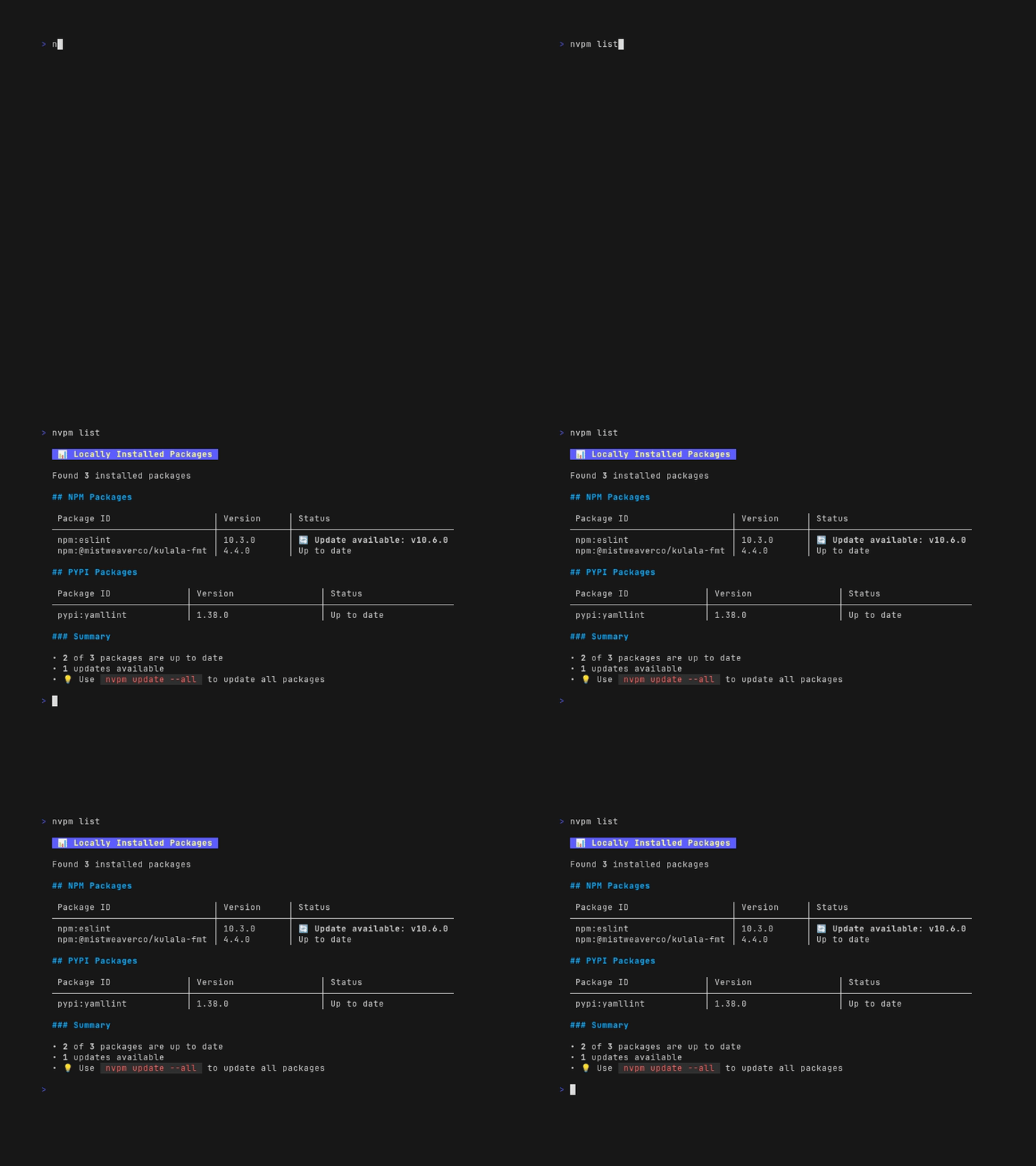
ls/list list all installed packages.
nvpm lsor with the --all/-A flag, list all available packages from the registry.
nvpm ls --allYou can also filter packages by prefix of either the package id or name.
 # lists all available packages with "yaml" in the name
nvpm ls -A yaml
Optional list constraints (combinable with each other and with name filters):
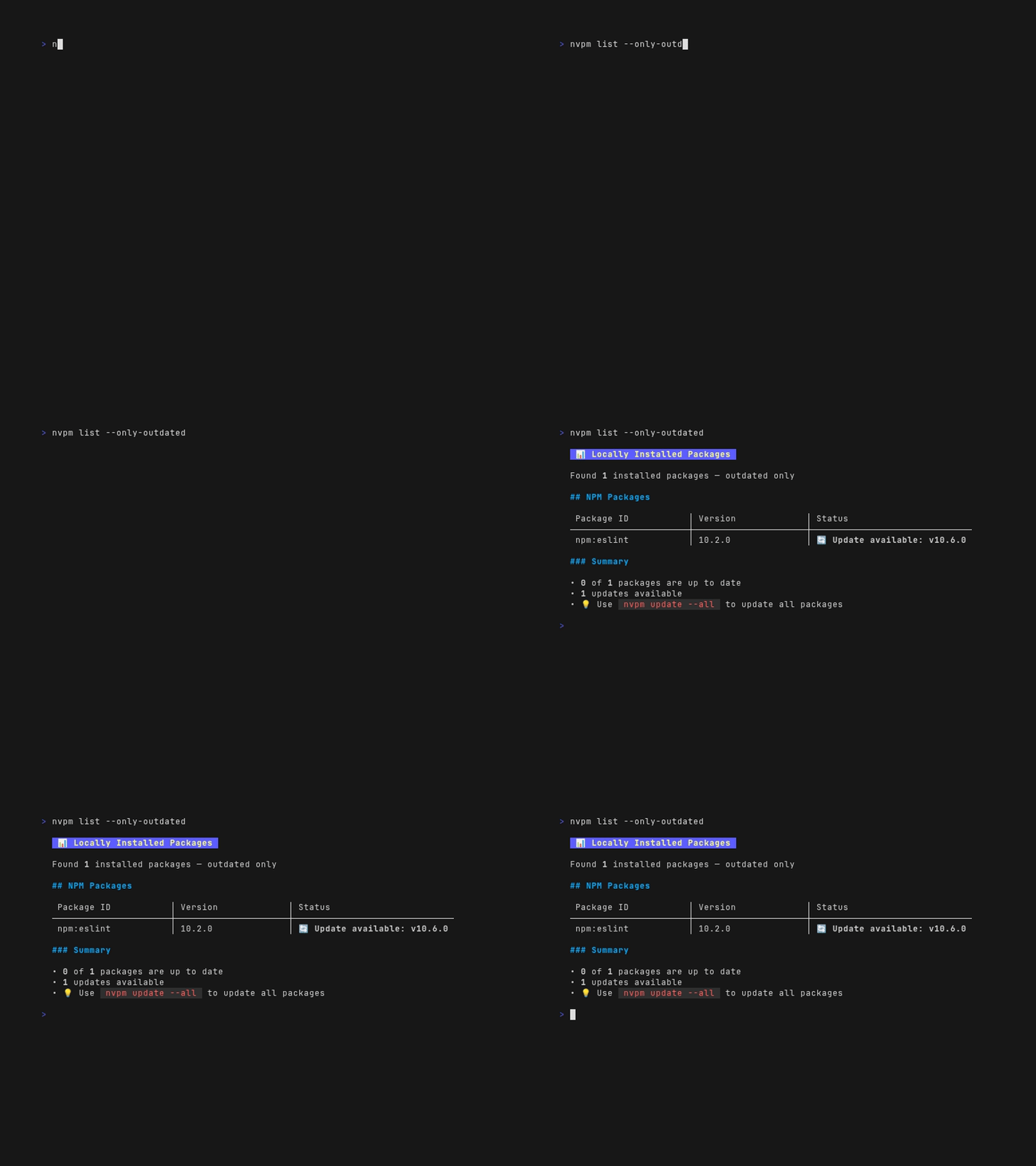
--only-outdated: show only packages that have an update available. For installed packages this is the usual meaning; with--all, only registry entries you have installed and that are outdated are shown.--only-providers: comma-separated provider names (must match a supported provider), for examplepypi,npm.--only-categories: comma-separated category tokens; a package matches if any of its registry categories matches any token (substring match, case-insensitive), for examplelsp,tree-sitter-parser.--only-always-trusted: show only packages withextras.always_trustin the lockfile.--filter '[.]path:value': repeatable AND filters over the same fields asnvpm show -o json(see Filter DSL below).
nvpm ls --only-outdated
nvpm ls --only-providers pypi --only-categories lsp
nvpm ls -A --only-providers npm --only-outdated
nvpm ls --only-always-trusted
nvpm ls --filter 'categories:*tree*' --filter 'provider:github'
Installed list output uses three columns: Package ID, Installed, and Available.
The Available column shows install candidates (tags, branches, or semver versions) that
have passed local discovery, or in X days/hours when --min-release-age is still
waiting. This works for all providers (npm, pypi, github, etc.):
the first time ls surfaces a newer registry version,
it records local first-seen so Available can show
4.11.0 in 7 days.
Use nvpm show for full git ref comparison, update-resolution rationale,
and tag-overwrite alerts. JSON output (--output json) still includes
discovered_versions, eligible_versions, and eligible_soon_versions.
show (alias of info) prints detailed registry metadata. For git-hosted packages it
also includes:
- Remote refs - branch/tag tips with upstream commit age (from registry metadata)
- Update resolution - active policy and why a branch was chosen over a stale tag
- Discovery - remote commit date vs when you first recorded the version locally
- Alerts - force-moved tags/releases
- Always trust - whether
extras.always_trustskipsmin-release-agefor the package
nvpm show github:folke/ts-comments.nvimPer-package git update policy can be overridden on install/update:
nvpm add github:user/repo --update-resolution release-age-gap:30d
nvpm add github:user/repo --update-resolution always
nvpm up github:user/repo --update-resolution branches:main,develop;release-age-gap:60d
Overrides are stored in nvpm-lock.json under extras.update_resolution (see
schemas/lock.schema.json).
--always-trust / --no-always-trust on add and up persistently skip (or clear)
min-release-age for that package via lock extras.always_trust. Unlike --force
(one-shot for the current command), --always-trust is stored and applied on later
installs/updates until cleared.
nvpm add npm:eslint --always-trust
nvpm up npm:eslint --no-always-trust--filter is available on ls, show, add, up, and rm. Repeat the flag for
AND semantics. Each value is [.]path:value against the package's show JSON fields
(name, package_id, categories, provider, always_trust, git_refs, status, …).
- Leading
.is optional - Paths are dot-separated; arrays match if any element matches the remainder
- The first
:separates path from value (sopackage_id:github:owner/repoworks) - Values are case-insensitive;
*and?are globs (*matches any characters, including/and:); without wildcards, match is exact - Booleans:
always_trust:true/false - Missing path → no match
nvpm ls --filter '.categories:*tree*'
nvpm ls --filter 'package_id:github:mistweaverco*'
nvpm show mistweaver --filter 'package_id:*mistweaverco/*'
nvpm up --all --filter 'provider:npm'
nvpm rm eslint --filter 'categories:LSP'up/update updates packages.
nvpm up \
  npm:@mistweavercokulala-ls \
  pypi:black@latest
You can also update all packages at once with the --all/-A flag.
nvpm up --allor filter packages by prefix of either the package id or name.
 # updates all installed packages with "yaml" in the name
nvpm up -A yaml
nvpm can also update itself with:
nvpm up --selfrm/remove removes packages.
nvpm remove \
  npm:@mistweavercokulala-ls \
  pypi:black
or filter packages by prefix of either the package id or name.
 # removes all installed packages with "yaml" in the name
nvpm rm -A yamlhealthchecks for requirements (for shelling out to install packages)
nvpm healthnvpm uses a base path to install packages of different types.
The base path is:
- Linux:
$XDG_DATA_HOME/nvpm/packagesor$HOME/.local/share/nvpm/packages - macOS:
$HOME/Library/Application Support/nvpm/packages - Windows:
%APPDATA%\nvpm\packages
The packages are installed in the following directory structure:
$basepath/$provider/$package-name/
Parsers are written to Neovim's data directory under:
<stdpath("data")>/site/parser/<language>.<so|dylib|dll>
nvpm builds parsers from upstream source using the tree-sitter CLI when a
registry package declares treesitter.build.
By default, nvpm only builds and caches the parser artifacts under:
<nvpm-data-share>/artifacts/treesitter/<package>/<version>/<language>.<so|dylib|dll>
To install built parsers into Neovim, use:
nvpm add --integrate neovim <package>nvpm resolves <stdpath("data")> by running Neovim headless when available
(nvim --headless ...). If nvim is not available, it falls back to common
defaults:
- Linux:
$XDG_DATA_HOME/nvimor~/.local/share/nvim - macOS:
~/Library/Application Support/nvim - Windows:
%LOCALAPPDATA%\\nvim-data
Registry packages with category Plugin or editor_integration: neovim install under:
<nvpm-data-share>/plugins/<provider>/<owner_repo>/
and are recorded in nvpm-lock.json with extras.kind: "neovim-plugin".
nvpm add github:folke/tokyonight.nvim          # auto-detected plugin
nvpm add --plugin neovim github:owner/custom.nvim  # force Neovim plugin install
nvpm ls --only-plugins
Runtime loading uses nvpm.nvim with lazy.nvim-compatible specs.
cargocodebergcomposergemgeneric(shell commands)githubgitlabgolangluarocksnpmnugetopamopenvsxpypi