Releases: AdguardTeam/AdguardForMac
2.18

Disclaimer Adguard for Mac is not an open-source project. We use GitHub as an open bug tracker for users to see what developers are working on.
Great news! Version 2.18 brings a noticeable step forward in performance, stability, and compatibility. One of the main highlights is support for three new AI-powered browsers: ChatGPT Atlas, Perplexity Comet, and Dia. Now you can enjoy clean, ad-free browsing there as well.
We’ve also updated the system requirements: AdGuard for Mac now supports macOS 12 and later.
Alongside that, we refreshed the Filter List Manager, polished many internal processes, and fixed a number of issues to make everyday app use smoother and more reliable.
Changelog
Improvements
- Added support for the Dia browser #1571
- Added support for OpenAI’s Atlas browser #1624
- Added support for Perplexity’s Comet browser #1606
- Updated FLM to v2.3.5 #1632
Fixes
- Settings window position resets after after restarting the app #1579
- Adding a new user rule during the search causes the application to crash #1597
- App com.adguard.mac.adguard requests local network access multiple times #1521
- Trusted Type error when blocking an element on YouTube via Safari Assistant #1637
- AdGuard is not fully synced with the latest Assistant before a release #1639
CoreLibs (Filtering engine)
- CoreLibs updated to v1.18.36 #1632
Improvements
- Added support for ABP’s CSS injection syntax #1927
- Allowed removing content with empty attribute #1934
- Improved content-script performance by using browser cache properly #1929
- Improved performance of content-script loading #1930
- Removed complicated heuristics for the
$domainmodifier #1875 - Added
zstdencoding support #1976
Fixes
- Filtering disabled because it may affect website performance (new.lewd.ninja) #1994
- Some extensions stopped working with CoreLibs 1.18 #1993
$removeparamdoes not work in pair with the$domainmodifier #1999- Some React-based sites fail to load due to Minified React error #1953
$urltransformcombined with$~3pdoesn’t modify the request URL if opened directly in the address bar #1931- Filter UDP under Linux #46
DnsLibs (DNS filtering engine)
- DnsLibs updated to v2.6.20 #1617
Scriptlets (JavaScript enhancement for filtering rules)
- Scriptlets updated to v2.2.8
Improvements
- Added more examples to scriptlet docs #392
- Added new scriptlet:
trusted-replace-argument#405 - Improved
href-sanitizer— added support for uBO arguments #493 - Improved
prevent-fetch— added ability to set random response content #416 - Improved
set-cookieandset-cookie-reload— added support for thedeniedvalue #512 - Improved
set-cookie— added empty object value #497 - Updated AGTree to v3 #247
Fixes
trusted-set-cookie-reload— infinite reload when values constantly change #489inject-css-in-shadow-dom— scriptlet fails ifadoptedStyleSheetsis overridden #477json-prune— does not correctly handlenullvalues when checking the specified key #504prevent-element-src-loading—TrustedScriptURLis not defined in Firefox #514spoof-css— incorrectDOMRectvalues #498trusted-replace-node-text— incorrectly output\', but not'#440trusted-replace-node-text— some quotes are escaped incorrectly #517trusted-set-constant— more precise string value detection #499trusted-suppress-native-method— resetisMatchingSuspendedwhen stack is not matched #496- Scriptlet compilation error in Safari 15 due to unsupported regex lookbehind #519
How to install AdGuard for MAC
2.18 beta 2
Disclaimer Adguard for Mac is not an open-source project. We use GitHub as an open bug tracker for users to see what developers are working on.
This beta version is the final touch before the official release of AdGuard for Mac v2.18. This time, we focused on the heart of ad blocking — the filters. We’ve improved the Filter List manager (FLM), so now filters update faster and more efficiently. This means you’ll see fewer missed ads and have a smoother browsing experience.
We’ve also fixed several minor issues and updated CoreLibs, our filtering engine, to make AdGuard even more stable.
Changelog
Improvements
- Updated FLM to v2.3.5 #1632
CoreLibs (Filtering engine)
- CoreLibs updated to v1.18.36 #1631
How to install AdGuard for MAC
2.18 beta 1
Disclaimer Adguard for Mac is not an open-source project. We use GitHub as an open bug tracker for users to see what developers are working on.
AdGuard for Mac v2.18 now supports the Perplexity Comet and ChatGPT Atlas browsers, the rising AI-powered platforms. You can block ads and trackers there too, keeping your browsing clean and private.
Note: Starting with beta version 2.18, the minimum supported macOS is Monterey (version 12).
We've also polished performance, fixed minor bugs, and made the app more efficient and stable.
Changelog
Improvements
- Added Comet by Perplexity to the list of supported browsers #1606
- Added ChatGPT Atlas to the list of supported browsers #1624
- Updated FLM to version 2.0.0-rc.2 #1589
- Improved support for Dia Browser #1571
Fixes
- Adding a new user rule during search could cause the app to crash #1597
- Apps with mismatched signing identifier and bundle ID are not filtered #1593
- The Settings window position resets after restarting the app #1579
CoreLibs (Filtering engine)
- CoreLibs updated to v1.18.33
Improvements
- Added support for ABP’s CSS injection syntax #143 #1927
- Allowed removal of content with empty attributes #1934
- Improved content script performance by optimizing browser cache usage #1929
- Improved performance of content script loading #1930
- Removed complicated heuristics for the
$domainmodifier #1875 - Added support for the “zstd” encoding #1976
Fixes
- Some extensions stopped working with CoreLibs v1.18 #1993
$removeparamdoes not work with the$domainmodifier #1999$urltransformcombined with$~3pdoes not modify request URLs opened directly from the address bar #1931
DnsLibs (DNS filtering engine)
- DnsLibs updated to v2.6.20
Scriptlets (JavaScript enhancement for filtering rules)
- Scriptlets updated to v2.2.8
Improvements
- Added more examples to the scriptlet documentation #392
- Improved
prevent-fetch— added the ability to set random response content #416 - Improved
set-cookie— added support for empty object values #497
Fixes
trusted-set-cookie-reload— infinite reload for constantly changing values #489inject-css-in-shadow-dom— scriptlet does not work ifadoptedStyleSheetsis overridden #477json-prunehandlesnullvalues when checking specified keys in objects #504spoof-css— incorrect DOMRect assignment #498'trusted-replace-node-text— single quotation marks are not output for escaped quotes #440trusted-suppress-native-methodresetsisMatchingSuspendedwhen the stack is not matched #496
How to install AdGuard for MAC
2.17.3
Disclaimer Adguard for Mac is not an open-source project. We use GitHub as an open bug tracker for users to see what developers are working on.
Have you ever noticed how the app crashes even when you have a freshly updated version? Well, notice no more! This hotfix solves that problem. From now on, just pure ad blocking all the way.
How to install AdGuard for MAC
2.17.2
Disclaimer Adguard for Mac is not an open-source project. We use GitHub as an open bug tracker for users to see what developers are working on.
We fixed an issue reported by users and updated our libraries while we were at it. Now, nothing will interfere with ad blocking.
How to install AdGuard for MAC
2.17.1
Disclaimer Adguard for Mac is not an open-source project. We use GitHub as an open bug tracker for users to see what developers are working on.
A bug has crept into the release. That’s why we’re publishing a hotfix today: so you can enjoy the service, and we can get on with some bigger tasks.
How to install AdGuard for MAC
2.17
Disclaimer Adguard for Mac is not an open-source project. We use GitHub as an open bug tracker for users to see what developers are working on.
In this release, we’ve made AdGuard more helpful by updating interactive blocking pages and stronger by adding post-quantum encryption — it’s a win-win.
New blocking pages
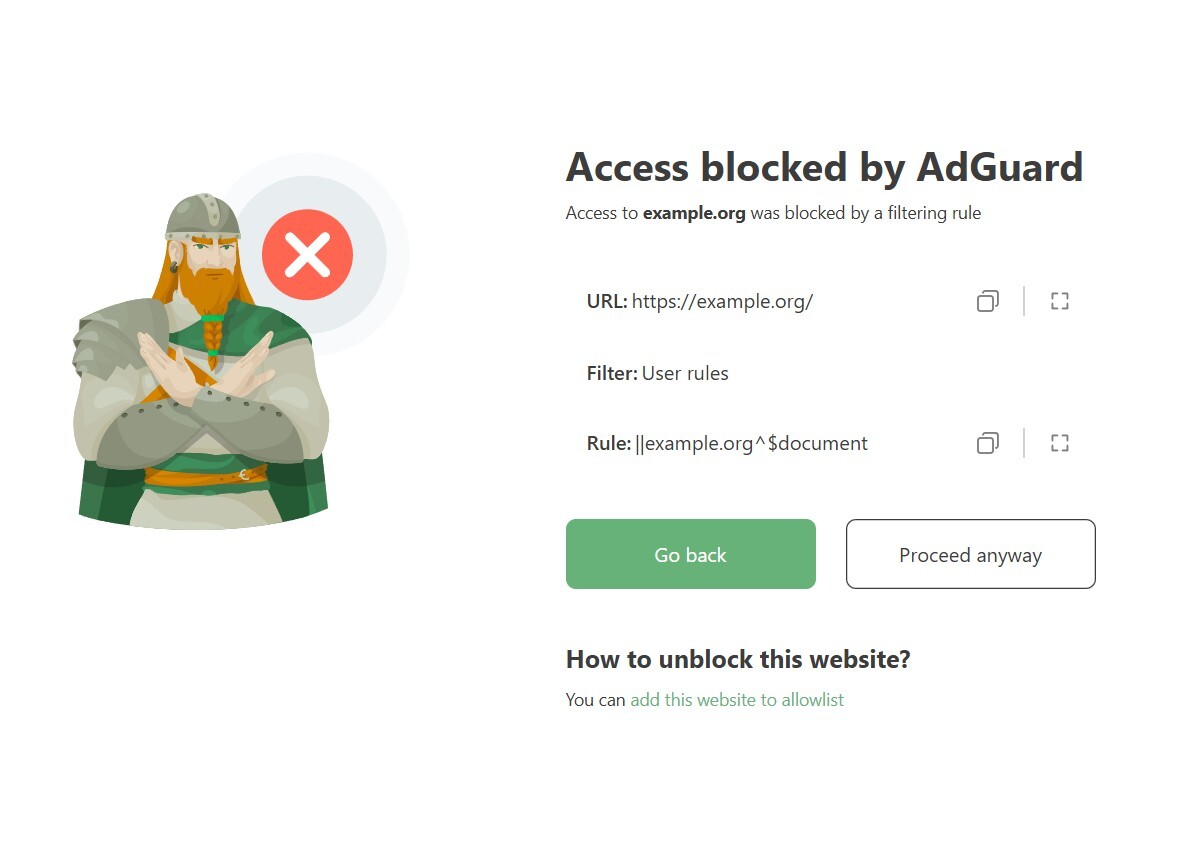
“Access blocked”: You may have already seen one of these screens if you’ve visited a phishing website or if a rule restricted access to a website. If you haven’t seen it yet, now is the time to get familiar with it and see what you can do on these screens.
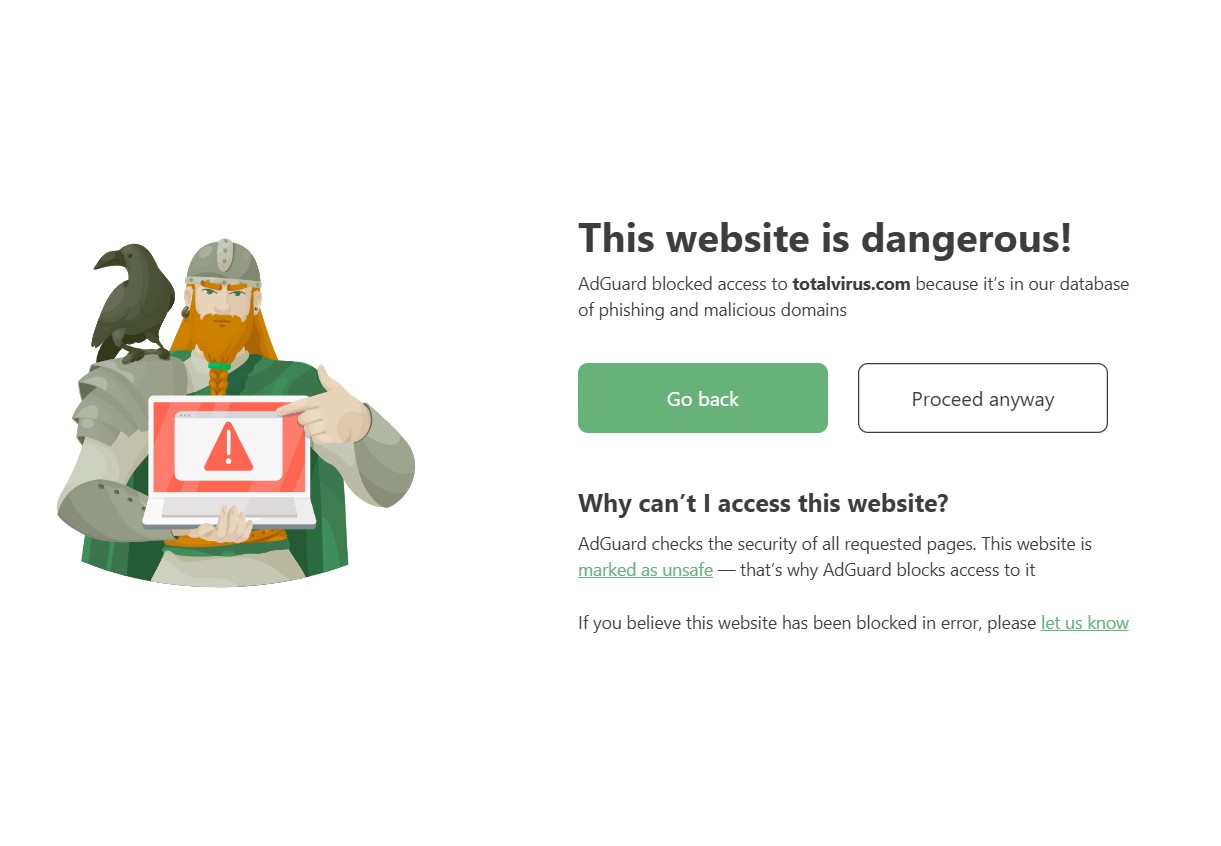
If AdGuard blocks a website due to phishing concerns, but you’re sure it’s safe, you can let us know directly from the blocked page. You can also access our security check tool to get more details about the website.
A website blocked by a filtering rule? Just click Add this website to the allowlist and an unblocking rule will be generated automatically and added to User rules.
Post-quantum cryptography
When it comes to HTTPS filtering, it’s crucial that AdGuard encrypts your traffic just as securely as the app it’s filtering. That’s why we always stay up to date and keep pace with modern apps and browsers.
This time, we’ve added support for post-quantum cryptography. If the filtered app or browser uses the latest encryption methods, AdGuard will do the same, ensuring that even a quantum computer won’t be able to decrypt your traffic.
Updates for better filtering
No new release would be complete without updates to our filtering engines — DnsLibs and CoreLibs. And here’s a nice touch: language-specific filters now activate automatically based on your keyboard layout.
Changelog
Improvements
- Added the confirmation window after pressing Reset #1532
- Added Orion browser to the list of applications filtered by default #1513
- Enabled automatic selection of language-specific filters based on active keyboard layouts #1530
Fixes
- AdGuard icon in the Dock is still active after closing the certificate info in AdGuard Assistant #1533
- After updating or importing settings, the filters with empty metadata have empty titles #1550
- Network extension consumes more than 100% CPU on v2.17.0.1955 nightly #1560
- Userscript or userstyle not enabled after creation #1554
- Enabling Automatically filter applications causes a crash #1564
- Enabling Hide menu bar icon causes UI to disappear on macOS 15 after reopening the app #1565
CoreLibs (Filtering engine)
- CoreLibs updated to v1.17.157 #1577
Improvements
- Removed trust in GlobalTrust certificates #1883
- Enable post-quantum cryptography when it’s used by the filtered app #1916
- Implemented new blocking pages #1859
- Provided the ability to add userscripts without specifying a resource #1889
- Allowed HTTPS filtering with trusted self-signed certs #1890
Fixes
- “##+js(rmnt, #text, [...])” rule with non-ASCII UTF-8 characters is not converted #1946
- Error in content-script when
$jsinjectexception is applied #1960 $network,app=rules with a large number of apps don’t work #1951- The “Proceed anyway” button doesn’t work when a website is blocked by a rule with the
$allmodifier #1952 - Content script is not injected on
www.huya.com#1897 - On certain websites, media playback is broken #1944
- Network filtering service does not start correctly #1462
- CoreLibs v1.17 blocks access to
ota.googlezip.net#1963 - Access to function “GM_getValue” is not allowed #1905
- Upload speed is low #1943
- On
reddit.com, URL parameters with%24are not removed #1922 - Naver Smartstore instances cannot be accessed properly #1971
- Some React-based sites aren’t loaded correctly due to a
Minified React error#1953
DnsLibs (DNS filtering engine)
- DnsLibs updated to v2.6.6 #1576
Improvements
- Added a public method for detecting upstream protocol #209
Fixes
_matter._tcp.default.service.arparequest is not resolved locally #230
Scriptlets (JavaScript enhancement for filtering rules) updated to v2.1.7
Improvements
prevent-addEventListener— added ability to match specific element #480trusted-click-element— check forcontainsTextof all matched selectors #468- Added new scriptlet
prevent-canvas#451 href-sanitizer— added ability to modify the value #460href-sanitizer— added base64 support #455prevent-fetch— setresponse.oktofalseifresponse.typeisopaque#441prevent-xhr— added missed events #414prevent-xhr— modifiedresponse#415remove-node-text— added an ability to remove text node of specified element #397set-cookieandset-local-storage-item— added valuesforbiddenandforever#458trusted-replace-node-text— addedtrusted-typespolicy #457
Fixes
json-prune— content of array was incorrectly removed #482trusted-click-element— element was removed and added again before it was clicked #391trusted-create-element— element is added on every DOM change #450trusted-set-cookie— cannot set cookie if name has__Secure-prefix #448- Tests failing for
trusted-set-cookie#453
UserscriptsWrapper updated to v2.0.1
How to install AdGuard for MAC
2.17 beta 3
Disclaimer Adguard for Mac is not an open-source project. We use GitHub as an open bug tracker for users to see what developers are working on.
The app now runs more smoothly thanks to this minor update, which fixes a number of bugs.
Changelog
DnsLibs (DNS filtering engine)
- DnsLibs updated to v2.6.6 #1576
How to install AdGuard for MAC
2.17 beta 2
Disclaimer Adguard for Mac is not an open-source project. We use GitHub as an open bug tracker for users to see what developers are working on.
While we’re preparing for the release, why not take a moment to do some stargazing?
Orion’s Belt is still magnificent and still has the same three stars — steady and unchanging.
Meanwhile, we’re adding things: the Orion browser is now on the list of apps filtered by default.
Plus, language-specific filters now turn on automatically based on your keyboard layout.
Now, back to the stars — and to polishing the release.
Changelog
Improvements
- Added Orion browser to the list of applications filtered by default #1513
- Enabled automatic selection of language-specific filters based on active keyboard layouts #1530
Fixes
- Userscript or userstyle not enabled after creation #1554
- Enabling Automatically filter applications causes a crash #1564
- Enabling Hide menu bar icon causes UI to disappear on macOS 15 after reopening the app #1565
CoreLibs (Filtering engine)
- CoreLibs updated to v1.17.157 #1577
Fixes
- Naver Smartstore instances cannot be accessed properly #1971
- Some React-based sites aren’t loaded correctly due to a
Minified React error#1953
How to install AdGuard for MAC
2.17 beta
Disclaimer Adguard for Mac is not an open-source project. We use GitHub as an open bug tracker for users to see what developers are working on.
In this release, we’ve made AdGuard more helpful when you need clarity, and stronger when you need security. Interactive blocking pages and post-quantum encryption — it’s a win-win.
Blocking pages: now interactive
Chances are, you’ve seen one of our blocking screens before — whether due to a phishing threat or a filtering rule. Previously, these pages were more like roadblocks. Now they’re more like intersections where you have options.
For example, if AdGuard blocks a website due to phishing suspicion, but you’re sure it’s safe, you can let us know directly from the blocked page. You can also access our security check tool to get more details about the website.
A website blocked by a filtering rule? Just click “Add this website to the allowlist” and an unblocking rule will be generated automatically and added to User rules.
Post-quantum cryptography
When it comes to HTTPS filtering, it’s crucial that AdGuard encrypts your traffic just as securely as the app it’s filtering. That’s why we always stay up to date and keep pace with modern apps and browsers.
This time, we’ve added support for post-quantum cryptography. If the filtered app or browser uses the latest encryption methods, AdGuard will do the same, ensuring that even a quantum computer won’t be able to decrypt your traffic.
Changelog
Improvements
- Added the confirmation window after pressing Reset #1532
Fixes
- AdGuard icon in the Dock is still active after closing the certificate info in AdGuard Assistant #1533
- After updating or importing settings, the filters with empty metadata have empty titles #1550
- Network extension consumes more than 100% CPU on v2.17.0.1955 nightly #1560
CoreLibs (Filtering engine)
- CoreLibs updated to v1.17.135 #1562
Improvements
- Removed trust in GlobalTrust certificates #1883
- Enable post-quantum cryptography when it’s used by the filtered app #1916
- Implemented new blocking pages #1859
- Provided the ability to add userscripts without specifying a resource #1889
- Added safe search for
so.cominto Parental Control #1942 - Allowed HTTPS filtering with trusted self-signed certs #1890
Fixes
- “##+js(rmnt, #text, [...])” rule with non-ASCII UTF-8 characters is not converted #1946
- Error in content-script when
$jsinjectexception is applied #1960 $network,app=rules with a large number of apps don’t work #1951- The “Proceed anyway” button doesn’t work when a website is blocked by a rule with the
$allmodifier #1952 - Content script is not injected on
www.huya.com#1897 - On certain websites, media playback is broken #1944
- Network filtering service does not start correctly #1462
- CoreLibs v1.17 blocks access to
ota.googlezip.net#1963 - Access to function “GM_getValue” is not allowed #1905
- Upload speed is low #1943
- On
reddit.com, URL parameters with%24are not removed #1922
DnsLibs (DNS filtering engine)
- DnsLibs updated to v2.6.0 #1558
Improvements
- Added a public method for detecting upstream protocol #209
Fixes
_matter._tcp.default.service.arparequest is not resolved locally #230
Scriptlets (JavaScript enhancement for filtering rules) updated to v2.1.7
Improvements
prevent-addEventListener— added ability to match specific element #480trusted-click-element— check forcontainsTextof all matched selectors #468- Added new scriptlet
prevent-canvas#451 href-sanitizer— added ability to modify the value #460href-sanitizer— added base64 support #455prevent-fetch— setresponse.oktofalseifresponse.typeisopaque#441prevent-xhr— added missed events #414prevent-xhr— modifiedresponse#415remove-node-text— added an ability to remove text node of specified element #397set-cookieandset-local-storage-item— added valuesforbiddenandforever#458trusted-replace-node-text— addedtrusted-typespolicy #457
Fixes
json-prune— content of array was incorrectly removed #482trusted-click-element— element was removed and added again before it was clicked #391trusted-create-element— element is added on every DOM change #450trusted-set-cookie— cannot set cookie if name has__Secure-prefix #448- Tests failing for
trusted-set-cookie#453