Releases: Avi7ii/AirSend
Release list
AirSend v5.0.2

AirSend v5.0.2
中文
- 新增双端中英文切换,并优化 macOS 玻璃界面、开场动画与 Quick Look 预览。
- 改进 Android 状态提示;模块现可通过 Magisk、KernelSU 和 APatch 自动检查完整更新。
若软件内或模块管理器更新失败,请卸载旧版后从本页重新安装最新版。
English
- Adds Chinese and English switching, with refined macOS glass UI, entrance animations, and Quick Look previews.
- Improves Android status guidance and enables full-module update checks in Magisk, KernelSU, and APatch.
If in-app or module-manager updates fail, uninstall the previous version and reinstall the latest release from this page.
AirSend v5.0.1
AirSend v5.0.1
中文
- 双端默认启用 Full Access,安装后即可直接传输,无需先确认或建立信任;仍可手动切换为 Trusted Only 或 Off。
- 修复旧版
Ask接收策略残留,并自动迁移已有默认配置。
若软件内更新失效,请卸载旧版后从本页重新安装最新版。
English
- Full Access is now the cross-platform default, so transfers work immediately after installation without prior confirmation or trust setup; Trusted Only and Off remain available.
- Removes the legacy
Askpolicy from the UI and automatically migrates existing default configurations.
If the in-app update fails, uninstall the previous version and reinstall the latest release from this page.
AirSend v5.0.0
AirSend v5.0.0
中文
AirSend 5.0 不是一次普通更新,而是一次完整的跨端重塑:更漂亮、更原生,也更可靠。
⚠️ 重要:若软件内更新失效或无法完成,请卸载旧版 AirSend,并从本页重新下载安装最新版。
macOS 升级提示: 已安装用户请直接使用 AirSend 内的 Check for Updates。Sparkle 会退出旧进程、原子替换 App,并重新启动 5.0.0;ZIP 仅用于首次或手动安装。
Features
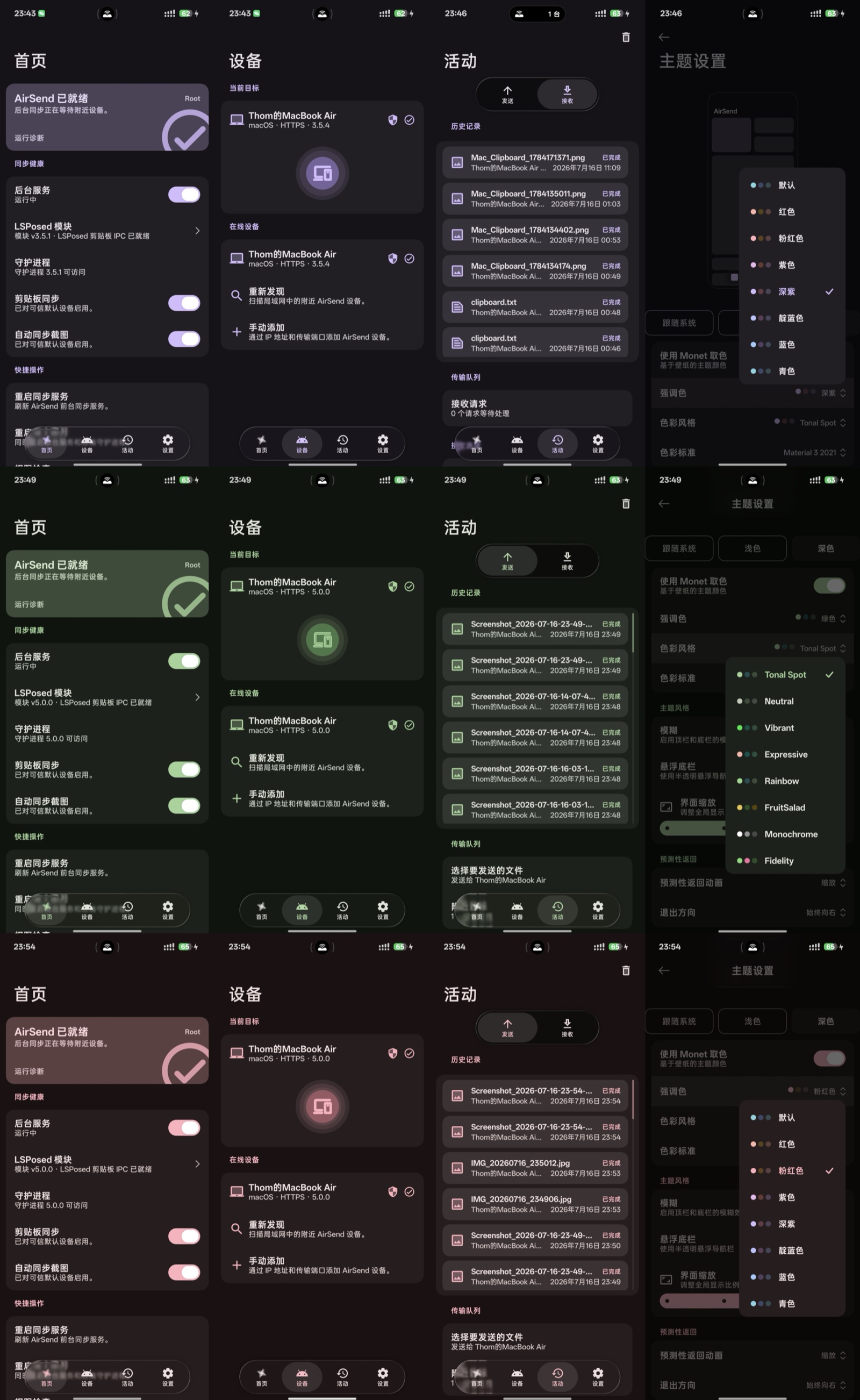
- 全新 Android 液态玻璃界面,将 Material 3、Monet 动态取色、多彩主题与悬浮玻璃组件融为一体。
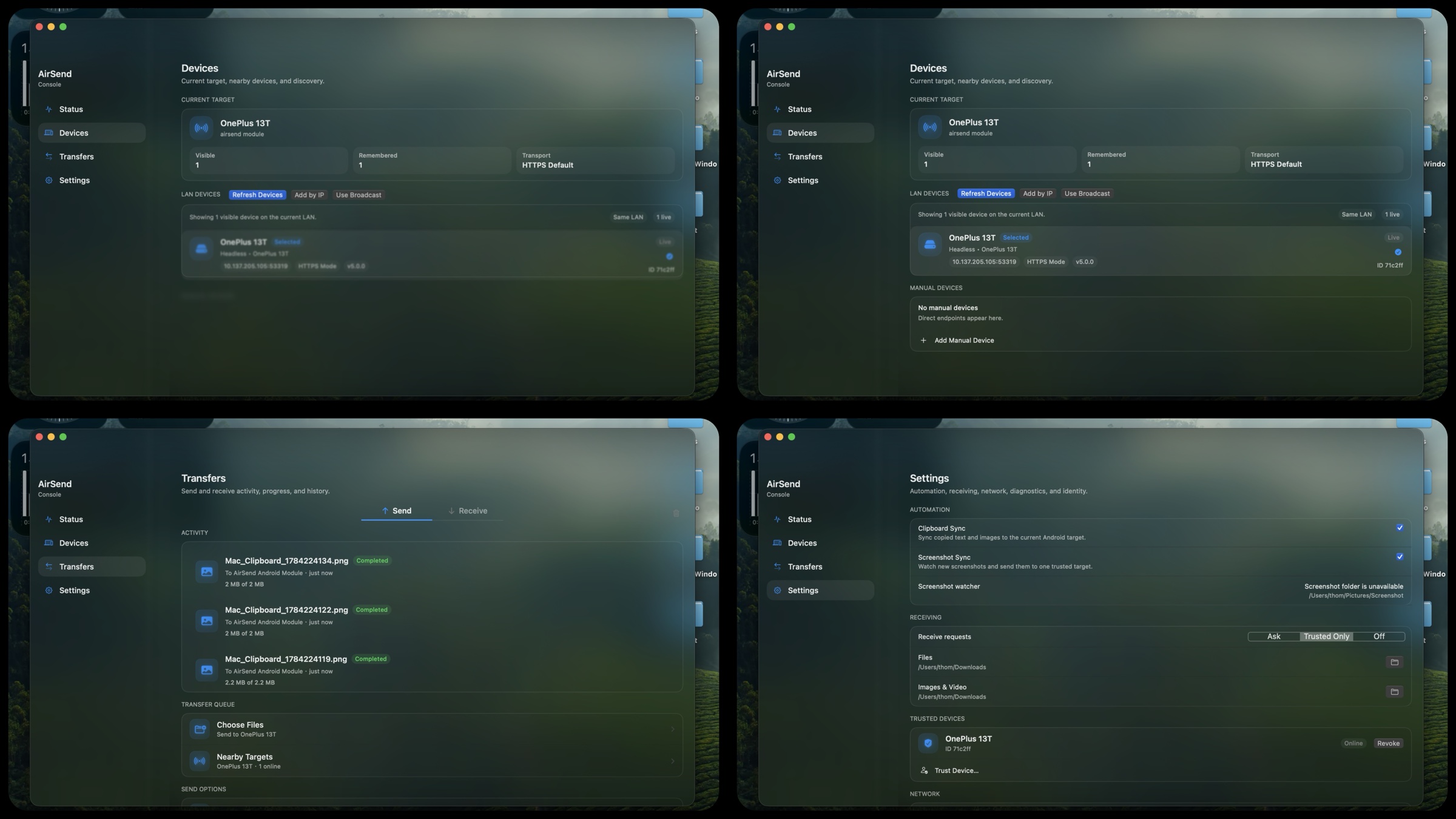
- 全新原生 macOS 玻璃控制台,把状态、设备、传输与设置收进一个通透、轻盈的桌面体验。
- 真正完整的跨端控制中心:实时进度、持久历史、Direct Share、运行诊断、剪贴板与截图同步一应俱全。
Improvements
- DropZone 全面进化:Finder 与 Dock 堆栈都能自然触发,支持连续发送,并适配 macOS 26/27 与不同 Dock 位置。
- 精简玻璃合成与状态刷新,在保留视觉质感的同时显著降低 macOS 渲染负载和功耗。
- 强化设备发现、网络恢复、Android 后台运行与传输可靠性,并将全平台版本统一为 5.0.0。
English
AirSend 5.0 is more than a routine update—it is a complete cross-platform reinvention: more beautiful, more native, and more reliable.
⚠️ Important: If the in-app update fails or cannot complete, uninstall the previous AirSend app and reinstall the latest version from this page.
macOS upgrade note: Existing users should use AirSend's Check for Updates action. Sparkle quits the old process, atomically replaces the app, and relaunches 5.0.0; the ZIP is only for first-time or manual installation.
Features
- A new liquid-glass Android experience blending Material 3, Monet dynamic color, rich themes, and floating translucent components.
- A new native macOS glass console that brings status, devices, transfers, and settings into one light, beautifully layered desktop experience.
- A truly complete cross-device control center with live progress, persistent history, Direct Share, diagnostics, clipboard sync, and automatic screenshot delivery.
Improvements
- A fully evolved DropZone: natural Finder and Dock stack activation, consecutive sends, and support for macOS 26/27 across every Dock position.
- Leaner glass compositing and state updates preserve the visual polish while significantly reducing macOS rendering load and power usage.
- Stronger discovery, network recovery, Android background execution, and transfer reliability, with every platform aligned on version 5.0.0.
AirSend v3.5.4
中文
v3.5.4 是一次 macOS DropZone 触发修复更新。
主要改动
- 修复拖动普通应用窗口时也会误弹 DropZone 的问题。
- 修复文件拖拽又必须贴近状态栏图标才触发的问题,恢复更自然的靠近触发体验。
- 增加拖拽触发策略自测,覆盖窗口拖动与文件拖拽候选触发两个场景。
发布资产
AirSend-v3.5.4-macOS.zipAirSend_Magisk_v3.5.1.zip(Android/Magisk 资产沿用上一版最新版)
English
v3.5.4 is a macOS DropZone activation fix.
Highlights
- Fixed a false DropZone trigger when dragging normal app windows.
- Fixed the regression where file drags had to touch the status-bar icon before DropZone appeared.
- Added drag activation self-tests covering both window movement and file drag candidate activation.
Release Assets
AirSend-v3.5.4-macOS.zipAirSend_Magisk_v3.5.1.zip(latest unchanged Android/Magisk asset)
AirSend v3.5.3
中文
v3.5.3 是一次 macOS 拖拽体验修复更新。
主要改动
- 修复首次拖拽文件时必须紧贴状态栏图标才能触发 DropZone 的问题。
- 拖拽靠近状态栏区域时会先显示候选 DropZone,再由系统拖放回调校验真实文件。
- 新增拖拽触发自测,并接入 CI。
发布资产
AirSend-v3.5.3-macOS.zipAirSend_Magisk_v3.5.1.zip(Android/Magisk 资产沿用上一版最新版)
English
v3.5.3 is a macOS drag-and-drop usability fix.
Highlights
- Fixed the first-drag case where DropZone only appeared when the pointer touched the status-bar icon.
- Shows a candidate DropZone near the status-bar area first, then lets the system drop callback validate real files.
- Added drag handoff self-tests and wired them into CI.
Release Assets
AirSend-v3.5.3-macOS.zipAirSend_Magisk_v3.5.1.zip(latest unchanged Android/Magisk asset)
AirSend v3.5.2
中文
v3.5.2 是一次小型 macOS 稳定性更新,主要修复最近反馈的两个问题。
主要改动
- 修复状态栏菜单偶发打开后立即消失的问题。
- 优化 macOS 冷启动网络栈初始化,降低启动几秒后退出的风险。
- 加固证书生成时的网卡 IP 枚举,避免异常网卡地址影响启动。
发布资产
AirSend-v3.5.2-macOS.zipAirSend_Magisk_v3.5.1.zip(Android/Magisk 资产沿用上一版最新版)
English
v3.5.2 is a small macOS stability update for two recently reported issues.
Highlights
- Fixed a status-bar menu issue where the menu could open and immediately disappear.
- Simplified macOS cold-start networking initialization to reduce early-exit risk.
- Hardened certificate IP enumeration so unusual network interfaces do not affect startup.
Release Assets
AirSend-v3.5.2-macOS.zipAirSend_Magisk_v3.5.1.zip(latest unchanged Android/Magisk asset)
AirSend v3.5.1
中文
v3.5.1 是一次稳定性与发布质量更新,重点补齐自动更新、传输进度、大文件内存安全和发布资产完整性。
这版不是单点功能堆叠,而是把 AirSend 作为长期可更新应用所需要的几条关键链路打通:Mac 端可以从状态栏发现新版本并通过 Sparkle 自动下载/安装;Mac 向 Android 发送大文件时会实时显示进度;Android 侧的守护进程和 App 同步线程也更稳。
主要改动
- macOS 接入 Sparkle 自动更新,保留状态栏里的 “Check for Update” 样式入口,新版本可点击下载并安装。
- Mac → Android 文件上传改回可控的
URLSession路径,传输过程中会实时刷新进度,不再只在完成后更新。 - 修复
SessionDelegate里重复触发进度回调的问题。 - Android Service 的 peers 同步任务现在只会保留一个轮询线程,避免重复启动服务后叠加后台线程。
- Android daemon 的直连文件发送与接收改为流式处理,降低大文件传输时的内存风险。
- 修复 Android
MagicWatcher在 minSdk 26 上触发的FileObserverAPI 兼容问题。 - 新增 CI 门禁:macOS Swift build/app bundle、Rust daemon/patched LocalSend、Android lint/test/assemble。
- 新增发布资产完整性保护:每个 GitHub Release 都必须同时包含 macOS 应用和
AirSend_Magisk*.zip,即使只更新 Mac 端,也会重新附上 Android/Magisk 模块资产。 - macOS、Android APK、Magisk 模块版本号统一提升到
3.5.1/351。
发布资产
AirSend-v3.5.1-macOS.zipAirSend_Magisk_v3.5.1.zip
更新建议
- 推荐所有 Mac 用户更新,以获得自动更新能力和更可靠的大文件发送进度。
- 使用完整 Android 模式的用户建议同时刷新 Magisk 模块;这次模块包含 daemon 流式传输与 Android 兼容性修复。
English
v3.5.1 is a stability and release-quality update focused on automatic updates, transfer progress, large-file memory safety, and complete release assets.
This release ties together several foundations AirSend needs as a long-lived app: the Mac app can now surface updates from the menu bar and install them through Sparkle, Mac → Android large-file uploads report live progress, and the Android service/daemon paths are more resilient.
Highlights
- Added Sparkle automatic updates on macOS while preserving the status-bar “Check for Update” entry; new versions can be downloaded and installed in-app.
- Switched Mac → Android uploads back to a controllable
URLSessionpath so transfer progress updates live instead of only after completion. - Removed a duplicate progress callback in
SessionDelegate. - Guarded the Android Service peer sync loop so repeated service starts do not stack polling threads.
- Changed Android daemon direct file send/receive paths to stream file bodies, reducing large-file memory risk.
- Fixed the Android
MagicWatcherFileObserverAPI compatibility issue for minSdk 26. - Added CI gates for macOS Swift/app bundle, Rust daemon/patched LocalSend, and Android lint/test/assemble.
- Added a release asset completeness guard: every GitHub Release must include both the macOS app and
AirSend_Magisk*.zip; even Mac-only updates re-attach the Android/Magisk module asset. - Aligned macOS, Android APK, and Magisk module versions to
3.5.1/351.
Release Assets
AirSend-v3.5.1-macOS.zipAirSend_Magisk_v3.5.1.zip
Update Recommendation
- Mac users should update for automatic updates and more reliable large-file progress.
- Full Android mode users should refresh the Magisk module as well; it includes daemon streaming and Android compatibility fixes.
AirSend v3.5.0
中文
v3.5.0 把最近两条主线能力正式合并进发布版本:一条是菜单栏设置入口与设置窗口整理,另一条是 DropZone 拖拽链路的重构与稳定性修复。
这次更新的重点不是再堆新功能,而是把过去“能用但不稳”的关键体验补到可持续发布的状态:
- 菜单栏新增更清晰的设置入口,状态栏交互路径更完整。
- DropZone 的触发、锚点定位、显示隐藏与拖拽接管逻辑重新梳理,明显减少文件拖拽时的“弹回”“静默消失”“位置错乱”和窗口被裁切。
- 本地文件拖拽识别与 drag session 维持逻辑更稳,对访达拖拽、菜单栏附近预热和进入目标区后的接管更可靠。
- macOS、Android、Magisk 模块和运行时协议版本统一对齐到
3.5.0,发布产物与运行时代码保持一致。
主要改动
- 合入状态栏设置窗口分支改动,补齐菜单栏设置入口。
- 合入 DropZone 重构分支改动,修复窗口错误出现在屏幕中央、半截裁切、难以触发、拖拽松手无响应和高概率回弹等问题。
- 调整 DropZone 触发带、keepalive 区域和拖拽接管顺序,让状态栏附近更容易拉起 DropZone,同时离开目标区后也能正确收起。
- 刷新 macOS
.app、Android APK、Magisk 模块版本号和模块元数据。
发布资产
AirSend-v3.5.0-macOS.zipAirSend_Magisk_v3.5.0.zip
更新建议
- 建议更新最新的 Mac 版本。
- Magisk 模块可以不更新,因为这次除了版本号之外没有任何改动。
English
v3.5.0 brings the two recent feature lines into one release: the new menu-bar settings entry and the DropZone drag-and-drop stability rewrite.
The point of this release is not to add flashy features, but to make the core workflow feel publishable and dependable:
- A cleaner settings entry is now available from the menu bar, with a more complete status-item workflow.
- DropZone trigger, anchoring, show/hide behavior, and drag-session ownership were reworked to reduce bounce-backs, silent dismissals, mispositioned windows, and clipped panels.
- Local-file drag detection and drag-session retention are more reliable, especially for Finder drags, status-bar prewarm, and handoff after entering the target zone.
- macOS, Android, the Magisk module, and runtime protocol strings are now aligned on version
3.5.0, so shipped assets match the running code.
Highlights
- Merged the status-bar settings window branch into the release line.
- Merged the DropZone refactor branch and fixed center-screen placement, half-clipped windows, hard-to-trigger activation, no-op drop release, and frequent drag bounce-back failures.
- Tuned the DropZone activation band, keepalive area, and drag handoff order so it appears more easily near the menu bar and dismisses correctly after leaving the target area.
- Refreshed the macOS
.app, Android APK, Magisk module metadata, and release version strings.
Release Assets
AirSend-v3.5.0-macOS.zipAirSend_Magisk_v3.5.0.zip
Update Recommendation
- Updating to the latest Mac build is recommended.
- You can skip updating the Magisk module, because this release does not change anything in it except the version number.
AirSend v3.0.1
AirSend 3.0.1 进一步稳定了校园网下的设备发现与列表保活,减少“设备突然消失”与反复全网扫描。
AirSend 3.0.1 further stabilizes campus-network discovery and device-list persistence, reducing sudden disappearances and unnecessary full-subnet rescans.
AirSend v3.0.0
中文
这次 GitHub 上正式发布的 v3.0.0,不仅包含最初 Release v3.0.0 提交里的大版本更新,也补齐了首发后继续验证和修复的那一批关键改动。
重点不只是继续打磨日常传输,而是把复杂校园网环境里最现实的几个痛点一起补上了:
- 不只是“能发现但几乎传不动”,还包括“切到校园网后设备列表经常空白”与“发现到了又很快消失”
- 不只是加了一条兼容链路,还把这条兼容链路的取消、超时回收、会话串包防护和体积边界一起收紧
- 不只是拖拽体验更顺手,DropZone 的预热、回弹防护和后台最小化也进一步稳定
复杂网络与校园网突破
- 新增手动
HTTP 兼容模式,默认关闭,默认仍优先保持 LocalSend 标准 HTTPS 传输。 - 当校园网里设备发现正常、但 HTTPS 数据面频繁超时或悬空时,可在 macOS 菜单栏
Advanced -> Compatibility Mode (HTTP)手动切换到兼容链路。 - macOS 端新增 plain HTTP 接收器,并把局域网接收端口独立到
53318;Android 守护进程侧使用独立传输端口53319,让发现面和数据面职责更清晰。 - 发送前会做真实数据面预检,并在 HTTPS / HTTP 之间选择当前真正可用的链路,减少“设备明明在线却一直发不出去”的假在线情况。
- Android -> Mac 的主动发送链路补上了 peer 记忆与连接重建逻辑,网络切换后更不容易掉进
No target found或旧连接悬挂。 - Android 守护进程增加网络绑定变化检测与自重绑能力,热点、校园网、接口切换后的恢复速度更快。
- macOS 端新增了大网段校园网发现增强:当 UDP multicast 在
/16、/17等校园网里失效时,会按/24切片向外扩散探测,不再只盯着当前一个小网段。 - 设备一旦被发现,Mac 会额外记住它最近可用的 IP,并通过轻量级
preferred host probe做后台保活与冷启动回找,修复“菜单里搜不到 / 出现后又很快消失”的问题。
首发 3.0.0 之后补上的兼容链路加固
- campus fallback 现在加入了
session nonce和来源 IP 绑定,降低旧包、错包、跨会话串包导致误判成功的概率。 - fallback 增加超时清理与取消能力,半传输中断、假 prepare 或用户手动取消时,不再轻易留下脏状态。
- fallback 默认不再每包同时做组播和广播双发,局域网噪音更小。
- fallback 体积边界收紧到
1 MB,避免大文件在弱网或拥塞 Wi-Fi 下放大内存与流量压力。 - HTTP 兼容模式保持手动开启,不会静默把原本的默认 HTTPS 传输自动降级成兼容链路。
DropZone 与拖拽体验升级
- 重做本地文件拖拽识别,只接受真实的本地文件拖拽,忽略文本选择、窗口移动或其他伪拖拽来源。
- 新增拖拽负载缓存与回读逻辑,修复 AppKit 在边界抖动时丢失 pasteboard 内容导致的“松手弹回”问题。
- DropZone 预热、显示、隐藏与最小化流程重新梳理,拖拽飞行中尽量不做破坏 session 的窗口层级变更。
- 边界命中、退出延迟和后台收起策略都做了收紧,拖拽目标更稳,失败时也更少打断操作。
传输与全链路稳定性
- macOS 出站发送器补充了更强的预检、重试与协议切换策略。
- Android 守护进程和 LocalSend patch 继续强化复杂网络下的链路恢复能力。
- Magisk 模块与 Android 侧 daemon 资产一并刷新,发版构建产物与运行时代码保持一致。
兼容性说明
- 默认安全模式仍然优先使用 HTTPS,继续保留与官方 LocalSend 的标准协议兼容能力。
HTTP 兼容模式是 AirSend 针对复杂校园网场景额外提供的能力,官方 LocalSend 当前不提供这条手动兼容路径。- 复杂校园网下的“设备列表恢复与保活”能力现在也一并落地,不再只解决“传不出去”,还解决“设备经常看不见”。
- 建议家庭路由器、手机热点等正常局域网继续使用默认安全模式;只有在“能发现、但几乎传不动”的校园网环境下再手动打开兼容模式。
English
This published GitHub v3.0.0 release includes not only the original Release v3.0.0 commit, but also the critical follow-up fixes we added after continued real-world validation.
The breakthrough is no longer just "campus Wi-Fi can discover devices but can barely transfer":
- it also covers "after switching to campus Wi-Fi the device list is empty"
- and "the device appears once, then disappears again"
It also means the compatibility path is no longer just present; it is now tightened with better cancellation, timeout cleanup, session isolation, and payload boundaries.
Breakthroughs for campus and complex LAN environments
- Added a manual
HTTP Compatibility Mode. It is off by default, and secure LocalSend-style HTTPS remains the default path. - When discovery works on a campus network but the HTTPS data plane keeps timing out or hanging, you can manually switch macOS to
Advanced -> Compatibility Mode (HTTP). - macOS now has a dedicated plain-HTTP receiver and a separate LAN transfer port on
53318; the Android daemon uses its own transfer port53319, keeping discovery and transport concerns cleaner. - Before sending, AirSend now performs real data-plane preflight checks and chooses the transport that is actually reachable, reducing the classic “device looks online but transfers never start” failure mode.
- The Android -> Mac active-send path now remembers peers and rebuilds the connection state more reliably after network churn, reducing
No target foundand stale-route failures. - The Android daemon now watches for binding changes and can rebind itself after hotspot, campus Wi-Fi, or interface transitions.
- macOS discovery now handles large campus subnets more aggressively: when UDP multicast is suppressed on
/16or/17style LANs, it expands probing by/24slices instead of staying trapped in a single local slice. - Once a device has been found, macOS also remembers its last reachable IP and keeps it alive with a lightweight preferred-host probe, fixing the “device list goes blank again” problem after campus-network transitions or app restarts.
Compatibility-path hardening added after the first 3.0.0 commit
- The campus fallback path now uses a session nonce plus source-IP binding to reduce stale packets, wrong packets, and cross-session state pollution.
- Fallback now has timeout cleanup and real cancellation support, so interrupted transfers and fake prepare packets are less likely to leave dirty state behind.
- Fallback no longer defaults to dual multicast+broadcast sending for every packet, which reduces LAN noise.
- The fallback payload cap is now
1 MB, avoiding large-file memory and airtime amplification on congested Wi-Fi. HTTP Compatibility Moderemains manual and explicit instead of silently downgrading the default HTTPS path.
DropZone and drag-and-drop improvements
- Reworked local-file drag detection so only real local file drags are accepted; text selections, window moves, and other false-positive drags are ignored.
- Added staged drag payload caching and recovery to fix the AppKit boundary case where the pasteboard payload disappears and the drop “bounces back”.
- Reworked DropZone prewarm, show, hide, and minimize behavior to avoid window-layer changes that can break the drag session mid-flight.
- Tightened boundary handling, exit timing, and background minimization behavior so the target feels more stable and less disruptive during drag-and-drop.
Transport and end-to-end stability
- The macOS sender now uses stronger preflight, retry, and protocol-switching behavior.
- The Android daemon and LocalSend patches continue to harden recovery on unstable or policy-heavy LANs.
- The Magisk module and Android daemon assets have been refreshed together so release artifacts stay aligned with the runtime code.
Compatibility notes
- The default secure mode still prioritizes HTTPS and preserves standard protocol compatibility with official LocalSend in normal LAN environments.
HTTP Compatibility Modeis an AirSend-specific answer for difficult campus-style networks; official LocalSend does not currently offer this manual compatibility path.- The release also improves device-list recovery and keepalive behavior on campus LANs, not just the transfer path itself.
- For home routers and mobile hotspots, the default secure mode is still recommended. Turn on compatibility mode only for networks where discovery works but actual transfers repeatedly stall.