
Pages in a dialog for the mdialog library
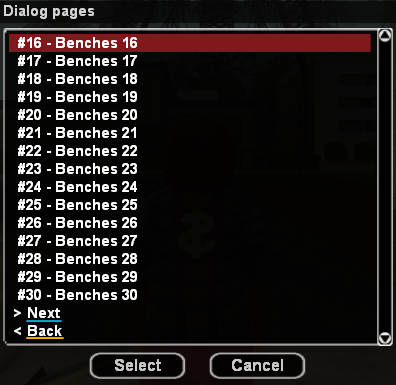
Include in your code and begin using the library:
#include <dialog-pages>CMD:test(playerid, params[])
{
Dialog_Show(playerid, Dialog:Test_Dialog_Page);
return 1;
}
DialogCreate:Test_Dialog_Page(playerid)
{
new string[DP_MAX_TEXT_LINE_LENGTH]; // DP_MAX_TEXT_LINE_LENGTH = 160
Dialog_SetHeader(playerid, "#\tText"); //for style DIALOG_STYLE_TABLIST_HEADERS
for(new x; x < 200; x ++)
{
format(string, sizeof(string), "#%d. \t Benches %d\n", x+1, x);
Dialog_SetString(playerid, string);
}
Dialog_Page(playerid, Dialog:Test_Dialog_Page, DIALOG_STYLE_TABLIST_HEADERS, "Caption", "Select", "Cancel");
return 1;
}
DialogResponse:Test_Dialog_Page(playerid, response, listitem, inputtext[])
{
if(!response) return 1;
new text[DP_MAX_TEXT_LINE_LENGTH]; // DP_MAX_TEXT_LINE_LENGTH = 160
Dialog_GetString(playerid, listitem, text); // or inputtext
new extraid = Dialog_GetExtraID(playerid, listitem); // Specified in Dialog_SetString
new current_page = Dialog_GetPageNumber(playerid);
new string[144];
format(string, sizeof(string), "text: %s | extra id: %d | current_page: %d", text, extraid, current_page);
SendClientMessage(playerid, -1, string);
Dialog_ShowPage(playerid); // show page again
return 1;
}Click to expand the list
Set the line text
playerid- The ID of the player to show the dialog totext- Text of the dialog lineextra_id- Extra valueReturn- Returns (0) on failure or (1) on success
Dialog_Page(playerid, const function[], style, const caption[], const button1[], const button2[], const next_button[] = DP_NEXT_BUTTON, const back_button[] = DP_BACK_BUTTON)
Show the dialog page
playerid- The ID of the player to show the dialog tofunction- The name of the dialogDialog:Teststyle- The style of the dialogcaption[]- The title at the top of the dialogbutton1[]- The text on the left buttonbutton2[]- The text on the right buttonnext_button[]- Next button textback_button[]- Back button textReturn- Returns (0) on failure or (1) on success
Set heading for style DIALOG_STYLE_TABLIST_HEADERS
playerid- The ID of the player to show the dialog toheader[]- Text of the dialog header
Show the dialog page
playerid- The ID of the player to show the dialog toReturn- Returns (0) on failure or (1) on success
Update all dialog pages
playerid- The ID of the player to show the dialog toReturn- Returns (0) on failure or (1) on success
Get text of string
playerid- The ID of the player to show the dialog tolistitem- The ID of the list item selected by the playerReturn- Returns (0) on failure or (1) on success
Get ExtraID
playerid- The ID of the player to show the dialog tolistitem- The ID of the list item selected by the playerReturn- Returns (0) on failure or (1) on success
Get the page number
playerid- The ID of the player to show the dialog to
Set the page number
playerid- The ID of the player to show the dialog topage- Page numbe
Click to expand the list
#define DP_MAX_LINES 500
#define DP_MAX_LINES_ON_PAGE 20
#define DP_MAX_TEXT_LINE_LENGTH 160
#define DP_MAX_TEXT_CAPTION_LENGTH 128
#define DP_MAX_TEXT_BUTTON_LENGTH 32
#define DP_CALLBACK_NAME "dre_"
#define DP_NEXT_BUTTON "> Next"
#define DP_BACK_BUTTON "< Back"