Encrypt any file and enforce delay before decryption.

Timelocked is a portable desktop application that allow to create and unlock timed-release files. Unlocking a timelocked file requires time (minutes, hours, days or more). The delay is chosen at creation time.
Timelocking a file encrypts your content with a random key, then protects that key with sequential work (time-lock puzzle), so unlock time is based on compute work.
Technically, it uses an RSW-style repeated-squaring time-lock puzzle to protect the key (see paper). Only one CPU can be used to unlock a file, so parallelization is not possible.
Timelocked is not a cloud service, it is a local application. It does not require an account and does not connect to the internet at any time. There is no embedded telemetry.
A precise decryption delay is not ensured. The delay is estimated based on the hardware profile selected. Faster hardware will unlock a file faster.
Timelocked does not prevent the original file from being copied, deleted, or modified.
Timelock your documents/passwords with a relatively long delay, let say 10 days. Put them in a usb stick along with the timelocked application and some clear text instructions. Put the usb stick in a temper-evident bag. Put the bag in your home safe and tell your family about it.
If something bad happens to you, your family can open the safe. They would use the usb stick to unlock your documents after more or less 10 days.
If your safe is compromised, or if you see that the temper-evident bag was opened, you have time to change your passwords.
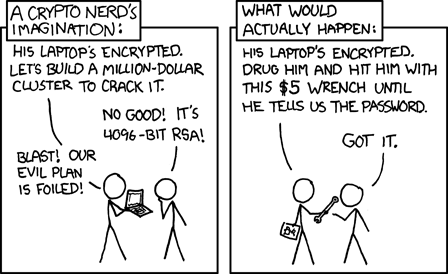
Timelock a BIP39 passphrase and use temporary passphrase setup on your hardware wallet. Tell attackers that came to your house for your crypto currencies that you don't have access to funds right now. You don't have to lie or omit anything, it's easier to tell the truth under pressure. You can prove it to them by showing your whole setup (even this page). Hopefully, they'll think that the risk/reward ratio is not in their favor anymore.
Lock un-memorable online betting site password from direct access. If you have to wait 30 minute before logging, it can give you enough time to reduce the urge to bet.
This can also work for online games, social networks, etc..
- Any file extension supported
- Completely offline local app - no usage of internet, no telemetry.
- Portable windows, macos, linux - you can put it in a usb stick
- Lightweight - ~3 Mb
- Minimal dependences for reduced obsolescence risks - should hopefully work in 20 years
- CLI and TUI - minimal, stable, resilient UI
- Built-in benchmark to estimate unlock duration on your machine (calibration)
- State of the art AEAD encryption - ensure data integrity
- Recoverability from file corruption - data redundancy with Reed-Solomon algorithm
- Optional password protection in addition to the mandatory time-lock puzzle
- Backward compatibility - future versions will unlock file locked years before
Timelocked turns a file or message into a locked package (a file ending in .timelocked). Anyone can copy and keep that package, but opening it requires making a computer do a long, step-by-step calculation. Because each step depends on the previous one, there is no practical way to "skip ahead" and open it early.
Technically, the lock phase generates a random symmetric key K, encrypts the original file/message with AEAD, and stores the ciphertext in the timelocked file payload. K is then time-locked using an RSW-style repeated-squaring time-lock puzzle parameterized by T iterations. unlock performs the sequential work to recover K, then decrypts the payload back to the exact original bytes.
The goal is that the only realistic way to open a .timelocked file early is to do the same long computation you would normally do. There isn't supposed to be a clever trick that jumps to the end.
Timelocked is designed so there is no known practical shortcut to recover the cryptographic key K faster than the required sequential work (for the chosen parameters and assumptions). It is based on Rivest-Shamir-Wagner, "Time-lock puzzles and timed-release crypto" (1996): https://people.csail.mit.edu/rivest/pubs/RSW96.pdf
Important nuance:
- Timelocked protects confidentiality and integrity of the content.
- It does not stop copying, deleting, or withholding the
.timelockedfile. - If an attacker tampers with file bytes, integrity checks (AEAD) should make unlock fail explicitly.
Faster computers can do the required work faster, so the "delay" can be shorter on very powerful hardware. If your use case is important, choose a conservative delay and add a safety margin. Quantum computer are way better for certains usecases like factorisation and parralelization. As the Timelocked solution use sequential work, it will still need time to unlock a file. Howerver, if future quantum capabilities can break assumptions behind the time-lock construction, format/algorithm migration will be required.
Optional password protection can mitigate the faster-hardware problem when the passphrase remains secret. A password-protected timelocked file still requires the sequential time-lock puzzle first; the passphrase is an additional secret needed after that work finishes. It does not replace the delay.
When locking, you may add a passphrase. Timelocked then protects the file key with both the time-lock puzzle result and a password-derived wrapping key. The passphrase alone cannot unlock the payload, and the time-lock result alone cannot unlock a password-protected payload.
Unlock prompting happens only after the sequential time-lock work finishes. In the official CLI and TUI, a wrong passphrase can be retried up to 3 total attempts in the same unlock run without re-solving the time-lock puzzle. This retry limit is typo recovery for users of the official clients, not cryptographic brute-force protection. An attacker who has solved the time-lock puzzle can modify a client or reuse the solved result to keep trying passphrases.
CLI warning: timelocked lock --password '<passphrase>' passes the passphrase as a command-line argument. Command-line arguments may be visible in shell history or process listings. Prefer the TUI password field if that risk matters for your environment.
No. Timelocked enforces "do this much work" rather than "unlock at this exact date and time". The actual duration depends on the machine that unlocks it and what that machine is doing (power mode, temperature/thermals, background load).
The creator already has the original content at creation time. If they keep a copy (or share the key some other way), they can read it immediately. Timelocked is meant to delay access for someone who only receives the .timelocked file (or the for creator if they make sure to delete/forget the original content).
Timelocked is not a backup solution. If you lose both the original file/message and the .timelocked file, the content is gone. If you lose the original but still have the .timelocked file, you can unlock later and recover the original. If you lose the .timelocked file but still have the original, you still have your content - you just don't have the timelocked copy anymore. If it matters, keep multiple backups of the .timelocked file and the Timelocked portable apps.
Sometimes, yes.
Timelocked v1 stores the encrypted payload with Reed-Solomon redundancy, so some limited damage in the payload region can be repaired during recovery. This is meant to help with a small amount of storage corruption or transmission damage.
Important limits:
- Recovery is not guaranteed for arbitrary corruption.
- The file can only be repaired when the damage stays within the stored redundancy budget.
- The recovery metadata also has to remain usable. Timelocked stores 2 authoritative superblock copies so it can survive some damage there too.
- If the file is too damaged, Timelocked fails explicitly rather than silently producing wrong bytes.
In practice: minor corruption may be recoverable, but Timelocked is not a substitute for keeping backups.
Encryption keeps the content private until the unlock work is done. AEAD adds a tamper-evident seal: if the .timelocked file is corrupted or modified, Timelocked can detect that and fail loudly instead of producing wrong output.
AEAD (Authenticated Encryption with Associated Data) is required because it gives us both:
- Confidentiality: protects content from being read before
Kis recovered. - Integrity/authenticity (with respect to
K): detects tampering and corruption.
This is important for Timelocked files because:
- A time-lock puzzle enforces delay, but does not prevent an attacker from modifying bytes in the timelocked file.
- Without AEAD, modified ciphertext could produce silent bit flips in recovered output.
- Timelocked files are portable, offline, and long-lived; data may be moved or stored for years, so corruption/tampering detection is critical.
- With chunked encryption, AEAD tags and associated data can bind chunk index and relevant header context to prevent chunk swapping/reordering attacks.
In short: the time-lock controls when K is obtained; AEAD ensures decrypted output is the exact original bytes once K is obtained.
No. AEAD can tell you "this was decrypted with the right key and wasn't modified", but it can't tell you who created it. Proving authorship requires a separate digital signature.
There is no installation, the binary is portable and can be launched as is. It can be copied in a USB stick or anywhere on your computer.
Run by double clicking or by launching it from a terminal. It will launch the Terminal User Interface (TUI) per default.
Timelocked can optionnaly be commanded by terminal arguments.
Using target delay + hardware profile:
timelocked lock ./secret.txt --target 7d --hardware-profile desktop-2026Adding optional password protection:
timelocked lock ./secret.txt --target 7d --password '<passphrase>'Password protection is additional to the mandatory time-lock puzzle. The --password value is a command-line argument and may be visible in shell history or process listings.
Using explicit --in + iterations:
timelocked lock --in ./secret.txt --iterations 500000Default output is <input>.timelocked in the same directory.
If you pass --out without .timelocked, the extension is added automatically.
When input text is passed directly, --out is required (and .timelocked is auto-added if missing):
timelocked lock "Hello future" --out ./hello.timelocked --target 3dWhen using --in -, --out is required (and .timelocked is auto-added if missing):
echo "Hello future" | timelocked lock --in - --out ./hello.timelocked --target 3dtimelocked inspect ./secret.txt.timelockedtimelocked verify ./secret.txt.timelockedDefault output path (same dir, original filename if known):
timelocked unlock ./secret.txt.timelockedFor password-protected timelocked files, the CLI prompts for the passphrase after the sequential time-lock work finishes. Wrong passphrases can be retried up to 3 total attempts in that unlock run without re-solving the puzzle; this is typo recovery, not brute-force protection.
If the chosen output file already exists, unlock keeps your existing file and writes to
an incremented name like secret.1.txt, secret.2.txt, and so on.
If the timelocked file contains an original message (no original_filename in header),
unlock prints the recovered message to CLI output and does not write a file.
In this case, --out and --out-dir are invalid and unlock returns an error.
Custom output directory:
timelocked unlock --in ./secret.txt.timelocked --out-dir ./out- No silent overwrite:
lockfails if output exists;unlockauto-picksname.N.ext. --jsonprints machine-readable progress/result events.- The TUI main menu includes a short reminder that delays are enforced by sequential work and remain estimates.
- Rust toolchain (stable)
- Cargo
rust-toolchain.toml is included to pin the toolchain for this repository.
- Debug build:
cargo build- Release build:
cargo build --release- Run compiled binary:
./target/release/timelocked --help- Run CLI directly with Cargo:
cargo run -- --help- Launch the TUI (default when no args are provided):
cargo run --- Show command help:
cargo run -- lock --help
cargo run -- unlock --help
cargo run -- inspect --help
cargo run -- verify --help- Run full test suite:
cargo test- Run integration CLI tests only:
cargo test --test cli_mvp- Run coverage check for
src/domains+src/usecases:
python3 scripts/check_domains_usecases_coverage.pyYou can override the minimum coverage threshold (default 92.0):
python3 scripts/check_domains_usecases_coverage.py --threshold 95Product and technical docs are in docs/.
This project is dual-licensed under either of the following, at your option:
- MIT License (
LICENSE-MIT) - Apache License, Version 2.0 (
LICENSE-APACHE)