Article: https://medium.com/@daggieblanqx/youve-been-documenting-apis-wrong-this-entire-time-d26b5c74f73f







cUrlit sits between your client and server, captures every request, and gives you a Postman Collection.
No config. No account. No API key. No AI.
- Pick your setup
- How it works
- Why cUrlit
- Use cases
- What you can do with it
- Live dashboard
- Configuration
- Recipes
- Help & community
cUrlit works in two modes. Pick the one that fits your stack:
Your API server exists as an Express.js app
npm install curlitimport curlit from "curlit";
app.use(curlit());Open http://localhost:3000/\_curlit — your live dashboard is ready.
Your API server is in PHP, Django, Rails, Kotlin, Go, or anything else
npm install -g curlit
curlit-proxy --target http://localhost:8080 --port 3000
Your client → http://localhost:3000 (cUrlit) → http://localhost:8080 (your server)
Open http://localhost:3000/\_curlit — your live dashboard is ready.
Every request is captured. Your server never knows the difference.
curlit-proxy --target http://localhost:8080   # PHP / Laravel / Kotlin / Spring
curlit-proxy --target http://localhost:8000   # Django / FastAPI
curlit-proxy --target http://localhost:9000 --port 3000  # Rails
curlit-proxy --target http://localhost:9090   # Go
curlit-proxy --target https://staging.myapp.com # Remote stagingIn both modes, cUrlit does the same thing:
Incoming request
      ↓
cUrlit (middleware or proxy)
      ↓
Builds cURL command → logs to console → pushes to dashboard via SSE
      ↓
Your server handles the request normally
      ↓
Response captured → ring buffer updated → dashboard updated live
As requests hit your endpoints, your Postman collection gradually builds itself. Once satisfied, click Export to download it.
| cUrlit | Manual logging | Postman Interceptor | |
|---|---|---|---|
| Zero config | ✅ | ❌ | ❌ |
| Live browser dashboard | ✅ | ❌ | ✅ |
| One-click Postman export | ✅ | ❌ | ✅ |
| Works with Express | ✅ | ✅ | ❌ |
| Works with ANY backend | ✅ | ❌ | ❌ |
| Sensitive header redaction | ✅ | ❌ | ❌ |
| Open source | ✅ | ✅ | ❌ |
| One line to install | ✅ | ❌ | ❌ |
Your API is running but your Postman collection isn't. Hit your endpoints while testing and export the entire session in one click. What used to take hours takes seconds.
A client reports an issue. Instead of asking them to describe the request, capture the exact cURL command from the live session and replay it locally — no guessing, no back and forth.
A new engineer joins the team. Instead of hand-writing API docs, they run the server, hit the endpoints, and walk away with a working Postman collection in their first hour.
Every request captured by cUrlit is a test case waiting to happen. Export to Postman, add assertions, run as a collection. Regression testing from real traffic, not fabricated payloads.
Old codebases nobody wants to touch. Drop the proxy in front, capture all the undocumented endpoints, and finally build documentation from real traffic without modifying a single line of code.
A webhook provider is sending malformed requests. Proxy their calls through cUrlit to see exactly what's arriving — headers, body, method — before it hits your handler.
Inspect every request and response flowing through your API in real time — spot missing auth headers, accidental PII leakage in responses, and unexpected data being sent by third-party SDKs. Before a pen test, export the full session as a Postman collection so testers can go straight to probing instead of spending half the engagement mapping your API surface.
PHP shop. Django team. Rails project. Go microservice. None of them have a tool like this that works without touching their codebase. Drop the proxy in front and get the full dashboard instantly.
Running a workshop or tutorial? Run cUrlit so students can see every request they make in real time, with the cURL command ready to copy, study, and replay.
- 🔍 Debug — inspect every request and response in real time, no console diving
- 📊 Monitor — watch live traffic through a gorgeous browser dashboard
- 📦 Export — turn a live session into a full Postman collection in one click
▶️ Replay — copy any captured request and run it directly from your terminal- 🌍 Proxy — drop in front of any backend, any language, zero code changes
- 🔒 Redact — sensitive headers like
AuthorizationandCookieare hidden automatically
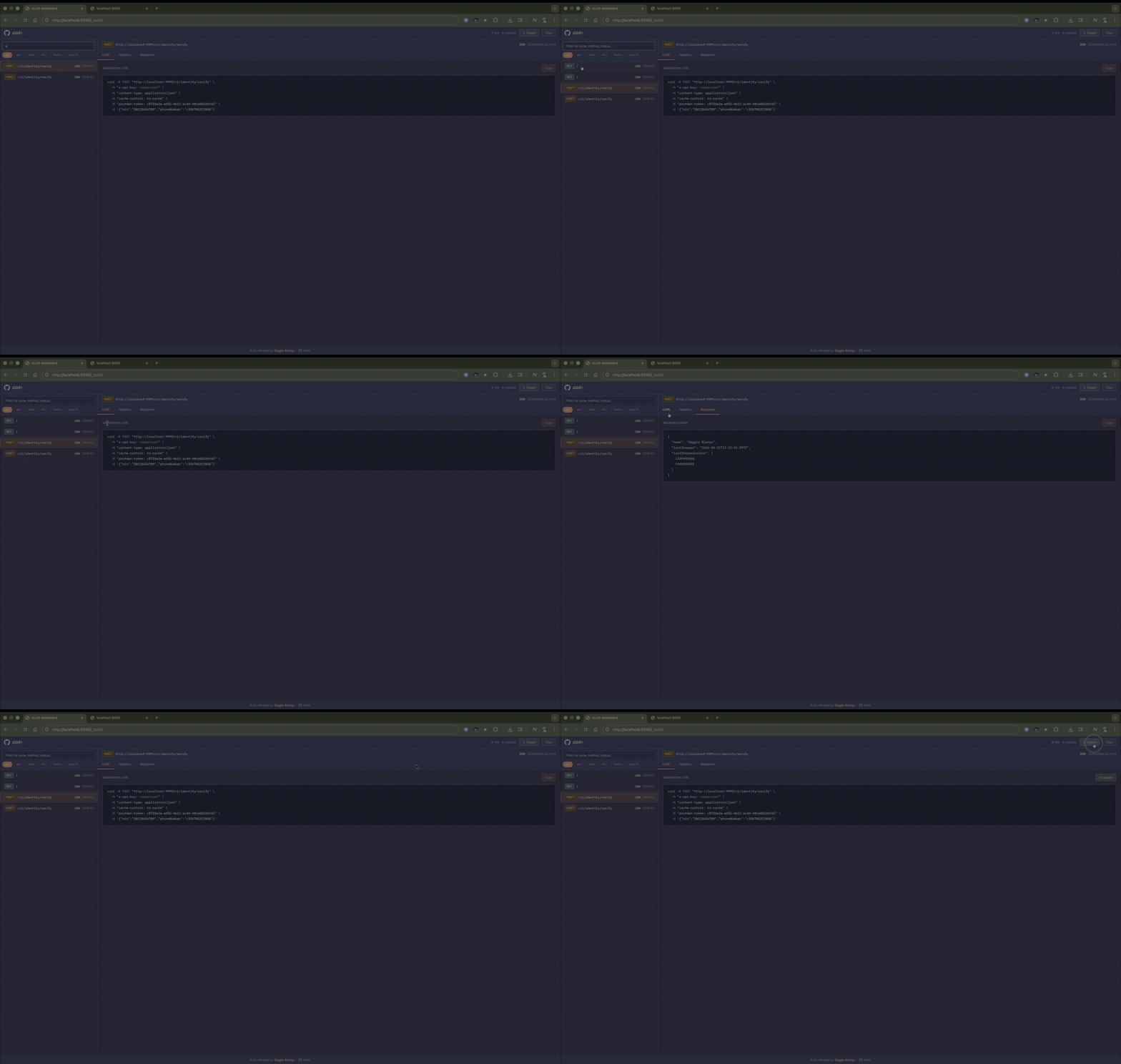
cUrlit serves a live SSE dashboard at /_curlit the moment your server starts. No setup.
- Live feed — new requests stream in instantly via SSE, no polling, no refresh
- cURL tab — full generated command with syntax highlighting and one-click copy
- Headers tab — all request headers, sensitive values auto-redacted
- Response tab — response body, auto pretty-printed if JSON
- Export button — one click downloads a complete Postman Collection v2.1 JSON
- Filter bar — search by route, method, or status code
- Method chips — instantly narrow to GET, POST, PUT, PATCH, or DELETE
- Clear button — wipe history without restarting the server
// Disable the dashboard
app.use(curlit({ dashboard: false }));

// Custom path
app.use(curlit({ dashboardPath: "/_debug" }));
The dashboard never mounts in production unless you explicitly pass
enabledEnvs: null. It is a development tool.
curl -X POST "http://localhost:9000/api/transactions" \
  -H "x-api-key: <redacted>" \
  -H "content-type: application/json" \
  -d '{"amount": 100.5, "currency": "USD"}'
{
"success": true,
"records": [
{
"id": 123456789,
"status": "Completed",
"amount": 100.5,
"currency": "USD",
"channel": "Credit Card",
"paidAt": "2024-02-20T15:30:00Z"
}
],
"total": 100.5,
"page": 1,
"pageSize": 1
}.
├── README.md
├── assets
│ └── demo.gif
├── index.js — root re-export shim
├── package-lock.json
├── package.json
└── src
├── index.js — middleware factory, request wiring
├── defaults.js — DEFAULT_OPTIONS, DEFAULT_REDACTED_HEADERS, DEFAULT_AUTO_HEADERS
├── helpers.js — pure functions: curl building, escaping, body formatting
├── ring-buffer.js — fixed-size in-memory buffer with pub/sub for SSE
├── dashboard
│ ├── dashboard.js — SSE router, clear endpoint, HTML serving
│ └── dashboard.html — dashboard UI (Tailwind + IBM Plex, no build step)
└── proxy
├── cli.js — curlit-proxy CLI entrypoint
└── proxy.js — http-proxy-middleware wrapper
All options are optional. curlit() with no arguments uses sensible defaults.
app.use(
  curlit({
    enabledEnvs: ["development", "test"], // environments where logging is active
    maxBodyLength: 4096, // truncate response bodies larger than this (bytes)
    logResponseBody: true, // set to false to only log the curl command
    dashboard: true, // serve the live dashboard
    dashboardPath: "/_curlit", // URL the dashboard is mounted at
    bufferSize: 200, // max requests kept in memory for the dashboard
    redactedHeaders: new Set([
      // values replaced with <redacted>
      "authorization",
      "cookie",
      "set-cookie",
      "x-api-key",
      "x-auth-token",
      "proxy-authorization",
    ]),
    autoHeaders: new Set([
      // noise headers stripped from curl output
      "host",
      "user-agent",
      "accept",
      "accept-encoding",
      "connection",
      "content-length",
      "transfer-encoding",
    ]),
    logger: console.log, // swap in pino, winston, etc.
  }),
);curlit-proxy --target http://localhost:8080 # required: target server
--port 3000 # proxy port (default: 3000)
--dashboard-path /_curlit # dashboard path (default: /_curlit)
--no-dashboard # disable dashboard
--env development # override NODE_ENVapp.use(curlit());app.use(curlit({ logger: () => {} }));app.use(curlit({ enabledEnvs: null }));Warning: this logs all request bodies and URLs. Only use for short-lived debugging sessions.
import curlit, { DEFAULT_REDACTED_HEADERS } from "curlit";

app.use(
  curlit({
    redactedHeaders: new Set([...DEFAULT_REDACTED_HEADERS, "x-tenant-id"]),
  }),
);import curlit, { DEFAULT_AUTO_HEADERS } from "curlit";
app.use(
curlit({
autoHeaders: new Set([...DEFAULT_AUTO_HEADERS, "x-forwarded-for"]),
}),
);const curlLogger = curlit({ logResponseBody: false });
app.post("/webhooks", curlLogger, (req, res) => res.sendStatus(200));import pino from "pino";
const logger = pino();
app.use(curlit({ logger: (msg) => logger.debug({ msg }, "curlit") }));Tag @daggieblanqx on Twitter — I'll retweet it.
⭐ If cUrlit saves you time, star the repo — it helps other developers find it.
MIT © Daggie Blanqx
- Questions → GitHub Discussions
- Bugs → open an issue
- Features → create a pull request
- Twitter: @daggieblanqx
- LinkedIn: @daggieblanqx
- Blog: Logrocket/@Daggieblanqx
