The folder in which this README is contains three subfolders, two python scripts and a markdown file (.md):
srandgames: folders that contain everything that the used simulator needs to be rundox: folder that contains the documentation generated by the software doxygen based on the comments in the codeassignment1.py: python script that implements the resolution to the presented problemrun.py: python script that allows the running of python scripts on the simulatorLICENSE.md: markdown file that contains the licence of the used software
The simulator used to see the effects of the python script at issue is named Python Robotic Simulator. This is a simple and portable robot simulator developed by Student Robotics.
The simulator requires a Python 2.7 installation, the pygame library, PyPyBox2D, and PyYAML.
Python scripts can be run in the simulator using run.py and passing it the file name. In this particular case the command is the following:
$ python run.py assignment1.pyThe robot simulated in the simulator is controlled by an API that is designed to be as similar as possible to the SR API. The features of the controlling API are the following:
Motors
The simulated robot has two motors configured for skid steering, connected to a two-output Motor Board. The left motor is connected to output 0 and the right motor to output 1.
The Motor Board API is identical to that of the SR API, except that motor boards cannot be addressed by serial number. So, to turn on the spot at one quarter of full power, one might write the following:
R.motors[0].m0.power = 25
R.motors[0].m1.power = -25
Grabber
The robot is equipped with a grabber, capable of picking up a token which is in front of the robot and within 0.4 metres of the robot's centre. To pick up a token, call the R.grab method:
success = R.grab()The R.grab function returns True if a token was successfully picked up, or False otherwise. If the robot is already holding a token, it will throw an AlreadyHoldingSomethingException.
To drop the token, call the R.release method.
Cable-tie flails are not implemented.
Vision
To help the robot find tokens and navigate, each token has markers stuck to it, as does each wall. The R.see method returns a list of all the markers the robot can see, as Marker objects. The robot can see markers around it within a certain distance.
Each Marker object has the following attributes:
info: aMarkerInfoobject describing the marker itself. Has the following attributes:code: the numeric code of the marker.marker_type: the type of object the marker is attached to (eitherMARKER_TOKEN_GOLD,MARKER_TOKEN_SILVERorMARKER_ARENA).offset: offset of the numeric code of the marker from the lowest numbered marker of its type. For example, token number 3 has the code 43, but offset 3.size: the size that the marker would be in the real game, for compatibility with the SR API.
centre: the location of the marker in polar coordinates, as aPolarCoordobject. Has the following attributes:length: the distance from the centre of the robot to the object (in metres).rot_y: rotation about the Y axis in degrees.
dist: an alias forcentre.lengthres: the value of theresparameter ofR.see, for compatibility with the SR API.rot_y: an alias forcentre.rot_ytimestamp: the time at which the marker was seen (whenR.seewas called).
Heading
The sr.robot library contains support for using a simulated compass unit on the robot. This allows robots to determine the direction it is facing in the arena.
  from sr.robot import *
  R = Robot()
  heading = R.heading
When called, the heading method will return the heading of the robot as a float. The heading is in the range -3 to 3, where -3 is the robot facing directly West, and values increasing counter-clockwise.
Once the script is run, it will appear an arena with several square blocks (either golden or silver) and the simulated robot in the upper-left corner. The goal of the script is to guide the robot along the path defined by the golden blocks in counter-clockwise direction, making sure that it doesn't collide with them. Furthermore the robot has to grab the silver blocks that it encounters along the way and move them behind itself.
In order to achieve the goal stated above, the simulated robot has to:
- detect the silver boxes in front of it and move them
- recognize when it is dangerously near a golden box and change direction accordingly
As far as the detection task is concerned, the method of the Robot class that should be used is the R.see. As stated above, thanks to this method, the robot sees blocks around it within a certain distance. The idea is to limit this circular area in order to retrieve the information that the robot needs to move properly in the space. The adopted solution to accomplish that is described in the following picture:
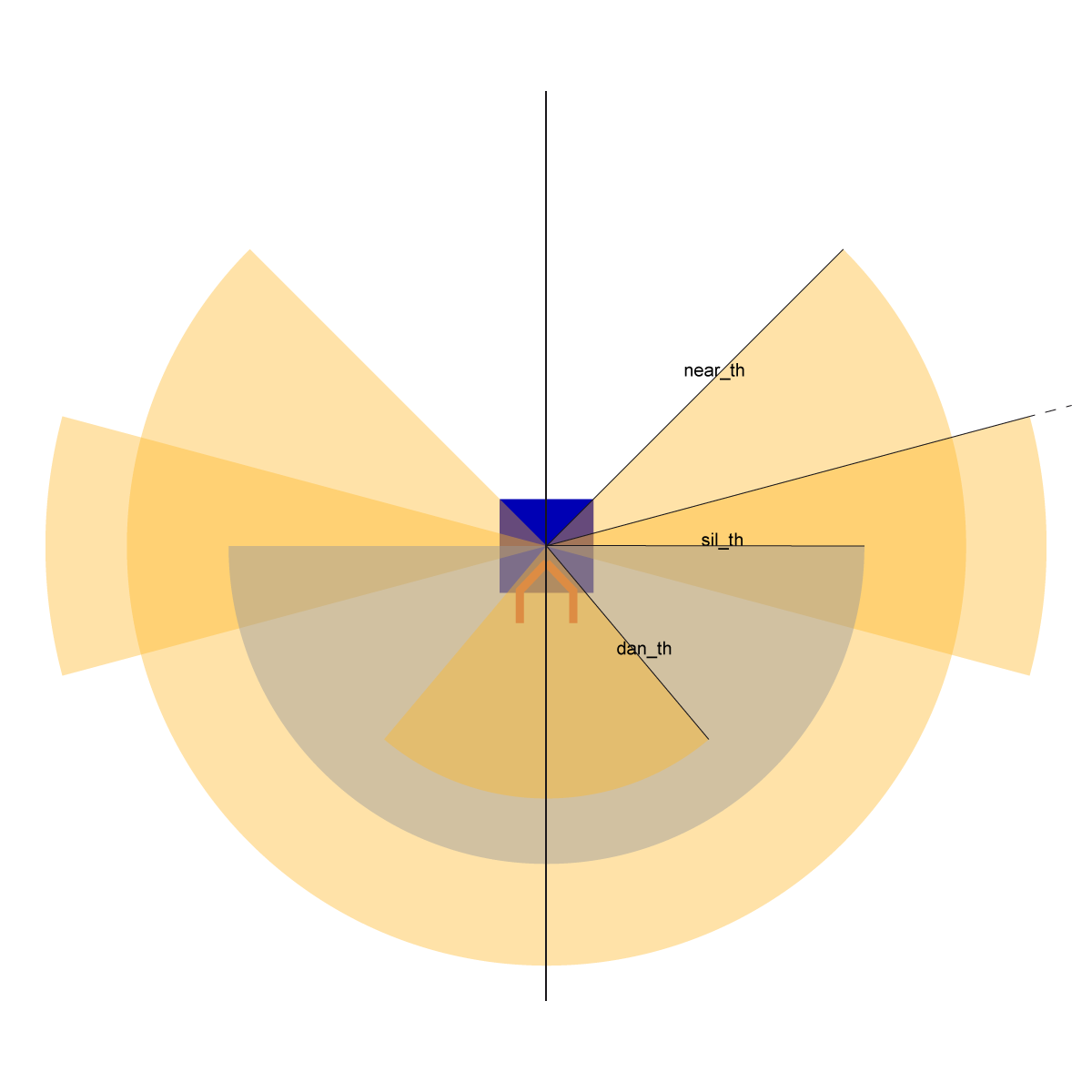
First of all the robot should detect silver tokens. In order to do that, the visual field is limited to a circular sector, 180 degrees wide and with a sil_th radius. These quantities are evaluated so as to make it possible for the robot to find silver boxes, no matter its position in the lane. Once a silver token is detected, the robot aligns with it, moves close to it, grabs it, moves it behind itself and realeases it.
Regarding the recognition of dangerous golden tokens instead, the visual field is restricted to a circular sector, 80 degrees wide and with a dan_th radius. If at least one golden box is inside this sector, the robot stops and checks where to turn to avoid collision. This check is run using two different approches. The first one is based on the fact that usually, once dangerous golden blocks are detected, the robot should turn right or left according to the side where the number of near golden blocks is smaller. Thus the visual field is limited to a circular sector, 270 degrees wide and with a near_th radius. This particular angular width is chosen so as to prevent the robot from seeing the golden boxes behind itself, since they will just ruin the accuracy of the estimate. There are specific cases, though, in which the number of near golden tokens on the right is equal to the number of near golden tokens on the left, and then the first method will not work properly. For this reason the second approach must be considered. This simply consists in checking the distance between the robot and the nearest golden token on the left, and in checking the distance between the robot and the nearest golden token on the right. In order to carry out this task, the visual field is restricted to two circular sectors, one ranging from 75 degrees to 105 degrees with no limit on the radius, and the other ranging from -105 degrees to -75 degrees with no limit on the radius. Naturally, once the condition to resort to this second solution is verified, the robot should turn right or left according to the side where the distance from the nearest golden token is greater.
The idea presented above was implemented with a python script structured in a main function and six additional functions: drive(speed, seconds), turn(speed, seconds), check_dangerous_tokens(), count_tokens(), change_direction(n_left_tokens, n_right_tokens), detect_silver_tokens().
The first function can be described in pseudocode as follows:
drive(speed, seconds):
	set the speed of both robot wheels to a certain speed for a certain number of seconds
The second function can be described in pseudocode as follows:
turn(speed, seconds):
	set the speed of one of the robot wheels to a certain speed and the other to the opposite of that speed for a certain number of seconds
The third function can be described in pseudocode as follows:
check_dangerous_tokens():
	initialize the number of dangerous golden tokens to 0
	retrieve the tokens around the robot within a certain distance with the R.see method
	for i spanning the tokens just detected:
		if (the token is gold) and (the distance from the robot is less than or equal to dan_th=0.9) and (the angular displacement between the robot and the token is between -per_dan_th=-40 and per_dan_th=40):
			increment the number of dangerous golden tokens
	return the number of dangerous golden tokens
The fourth function can be described in pseudocode as follows:
count_tokens():
	initialize the number of near golden tokens on the left to 0
	initialize the number of near golden tokens on the right to 0
	retrieve the tokens around the robot within a certain distance with the R.see method
	for i spanning the tokens just detected:
		if (the token is gold) and (the distance from the robot is less than or equal to near_th=1.6) and (the angular displacement between the robot and the token is between -per_near_th=-135 and per_near_th=135):
			if the angualar displacement between the robot and the token is less than or equal to 0:
				increment the number of near golden tokens on the left
			else:
				increment the number of near golden tokens on the right
	return the number of near golden tokens on the left and the number of near golden tokens on the right
The fifth function can be described in pseudocode as follows:
change_direction(n_left_tokens, n_right_tokens):
	initialize the nearest wall distance to 100
	if the number of left tokens is greater than the number of right tokens:
		turn right a little
	elif the number of left tokens is less than the number of right tokens:
		turn left a little
	elif the number of left tokens is equal to the number of right tokens:
		retrieve the tokens around the robot within a certain distance with the R.see method
		for i spanning the tokens just detected
			if (the token is gold) and ((the angular displacement between the robot and the token is between -per_wall_th2=-105 and -per_wall_th1=-75) or (the angular displacement between the robot and the token is between per_wall_th1=75 and per_wall_th2=105)):
				if the distance from the robot is less than or equal to the nearest wall distance:
					update the nearest wall distance
					update the nearest wall angular displacement
		if the nearest wall angular displacement is less than or equal to 0:
			turn right a little
		else:
			turn left a little
The sixth function can be described in pseudocode as follows:
detect_silver_tokens():
	initialize the distance from the detected silver token to 100
	retrieve the tokens around the robot within a certain distance with the R.see method
	for i spanning the tokens just detected:
		if (the token is silver) and (the distance from the robot is less than or equal to sil_th=1.2) and (the angular displacement between the robot and the token is between -per_sil_th=-90 and per_sil_th=90):
			update the detected silver token distance
			update the detected silver token angular displacement
	if the detected silver token distance is still 100:
		return -1 and -1
	else:
return the detected silver token distance and the detected silver token angular displacementThe main function can be described in pseudocode as follows:
while 1
	go forward a bit, calling the drive function
	retrieve the distance and the angular displacement of the detected silver token, if any, calling the detect_silver_tokens function
	if a silver token was detected:
		if the distance from the silver token is greater than or equal to d_th=0.4:
			while the angular displacement between the robot and the detected silver token is outside the range [-a_th=-2, a_th=2]:
				if the angular displacement between the robot and the detected silver token is less than -a_th=-2:
					turn left a little
				if the angular displacement between the robot and the detected silver token is greater than a_th=2:
					turn right a little
				retrieve the distance and the angular displacement of the detected silver token, calling the detect_silver_tokens function
		else:
			Grab the silver token with the R.grab method
			if the grabbing succeeds:
				turn 180 degrees, using the R.heading method
				release the silver token with the R.release method
				step back to avoid hitting the silver token just released
				turn 180 degrees to reset the orientation to the initial one, using the R.heading method
	else:
		retrieve the number of golden tokens dangerously near, calling the check_dangerous_tokens function
		if the number of dangerous golden tokens is not 0:
			while the number of dangerous golden tokens is not 0:
				retrieve the number of near golden tokens on the left and the number of near golden tokens on the right, calling the count_tokens function
				change the direction, calling the change_direction function
retrieve the number of golden tokens dangerously near, calling the check_dangerous_tokens functionAs far as the limitations of the script are concerned, mainly two of them can be found. The first one is that the robot, once it has released a silver token, steps back in order to avoid hitting that token while resetting its orientation. This could be a problem if the grabbed silver token was very close to a golden wall, because, while performing the step back, the robot could collide with that wall. A possible solution could be to check the distance from the golden walls as a priority with respect to the silver tokens detection. In this manner, however, it would be possible that silver blocks that are very close to the walls are not picked up by the robot.
Another similiar issue concerns the rotation of the robot once it has grabbed a silver token. According to the script, the robot rotates one way or the other based on its initial orientation. However, if the grabbed silver token is too close to a golden wall, the robot could, during its rotation, hit the golden blocks. In order to solve this issue a control on the distance from the nearest wall should be performed and the rotation should be carried out according to that check.
A possible improvement could be to implement a solution to this problem that does not rely on the fact that the walls are made of separate blocks. Under these circumstances the check on the number of golden blocks around the robot could not be run and the second approach that is here implemented could result in the robot going back. In order to avoid that, the method R.heading of the class Robot could be used. As a matter of fact, this method could allow the robot to keep track of its orientation and, therefore, to understand when an odd change of orientation occurs.
When the robot is perfectly aligned with a silver token that it has detected, due to the bulk of its grabber, it never manages to get close to the token enough to grab it. This, however, it is not a script issue, but a simulator issue.