This project is a complete implementation of a custom Dynamic Window Approach (DWA) local planner, built from scratch as a nav2_core::Controller plugin for the ROS 2 Humble Navigation Stack. The planner is designed to navigate a TurtleBot3 in an Ignition Fortress simulation, demonstrating robust path following and dynamic obstacle avoidance.
The entire decision-making logic, from trajectory generation to the multi-objective cost function, is contained within this package, offering a transparent and deeply customizable alternative to the standard Nav2 controllers.
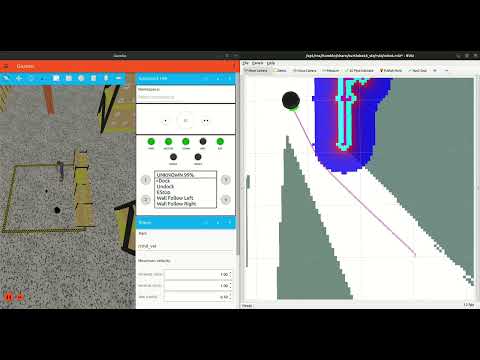
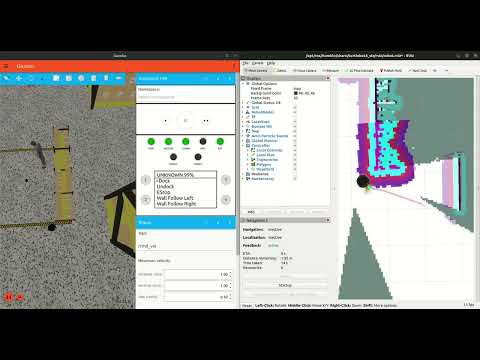
- Custom DWA Algorithm: A from-scratch implementation that generates velocity commands (
cmd_vel) based on dynamic window sampling. - Multi-Objective Cost Function: The robot's behavior is driven by a sophisticated and tunable cost function that balances multiple objectives:
- Progress: A reward function that incentivizes forward motion towards the goal, preventing the robot from getting "stuck".
- Path Adherence: A penalty for straying from the global path, ensuring the robot follows the desired route.
- Heading: A penalty for incorrect orientation, which ensures smooth turns and alignment with the path.
- Obstacle Avoidance: A high-priority penalty that uses the Nav2 costmap to guarantee collision-free trajectories.
- Dynamic Lookahead Point: Instead of aiming for the final distant goal, the planner intelligently aims for a moving target just ahead on the global path, resulting in much smoother and more stable navigation.
- RViz Visualization: The planner publishes all simulated trajectories to a
/local_trajectoriestopic asMarkerArraymessages, providing invaluable insight into the robot's decision-making process.
At its core, the planner makes decisions by constantly evaluating a simple question: "Of all the moves I can possibly make in the next second, which one is the best?"
- Dynamic Window: First, it determines the "dynamic window"—the set of all linear and angular velocities that are physically achievable given the robot's current speed and acceleration limits.
- Trajectory Simulation: It then simulates hundreds of short trajectories, one for each velocity pair in the window.
- Cost Function Scoring: Every single trajectory is scored by the cost function. This scoring is a weighted sum of the different behavioral goals. The final cost is calculated as:
TotalCost = (w1 * ProgressReward) + (w2 * PathPenalty) + (w3 * HeadingPenalty) + (w4 * ObstaclePenalty) - Best Command Selection: The trajectory with the lowest total cost is chosen, and its corresponding velocity command is sent to the robot.
This entire process repeats at 10-20 Hz, allowing the robot to react dynamically to its environment.
- Ubuntu 22.04 with ROS 2 Humble and Ignition Fortress installed.
- TurtleBot3 simulation packages.
- Nav2 (
ros-humble-navigation2) and its dependencies.
Install required Python dependencies using the provided requirements.txt file:
pip install -r requirements.txtNavigate to your ROS 2 workspace, clone this repository into the src folder, and build the package.
# In your workspace root (e.g., ~/ros2_ws)
colcon build --packages-select custom_dwa_local_plannerIn every new terminal, source your workspace first.
# In your workspace root (e.g., ~/ros2_ws)
source install/setup.bash
Terminal 1: Launch Ignition Gazebo and RViz
ros2 launch turtlebot4_ignition_bringup turtlebot4_ignition.launch.py use_sim_time:=true rviz:=trueTerminal 2: Launch SLAM
ros2 launch turtlebot4_navigation slam.launch.py use_sim_time:=trueTerminal 3: Launch Nav2 with your custom DWA parameters
ros2 launch turtlebot4_navigation nav2.launch.py use_sim_time:=true params_file:=$(ros2 pkg prefix custom_dwa_local_planner)/share/custom_dwa_local_planner/config/tb4_custom_nav2_params.yamlNote:
Always source your workspace'ssetup.bashin every terminal before running these commands.
In RViz, use the "2D Pose Estimate" button to initialize the robot's position on the map.
Add a MarkerArray display (from the "Add" button) and subscribe to the /local_trajectories topic to see the planner's thoughts.
Use the "Nav2 Goal" button to set a destination. Watch as the robot navigates, and see the trajectories it considers in real-time!
- https://www.youtube.com/watch?v=OEkIWiLqCsk
- https://github.com/blackcoffeerobotics/vector_pursuit_controller
- https://github.com/turtlebot/turtlebot4/blob/humble/turtlebot4_navigation/launch/slam.launch.py
- https://github.com/turtlebot/turtlebot4_simulator/blob/humble/turtlebot4_ignition_bringup/launch/turtlebot4_ignition.launch.py
- https://www.youtube.com/watch?v=cW_9KRL_rA0
- https://www.youtube.com/watch?v=16TJ6NiHo6A