BookCourier is a full-stack application designed to simplify library access by providing a library-to-home book delivery service. Users can browse available books from nearby libraries, request deliveries, or schedule pickups, all without needing to visit the library physically. The system benefits students, researchers, and avid readers by making borrowing and returning books more convenient, promoting reading, and enhancing access to library resources.
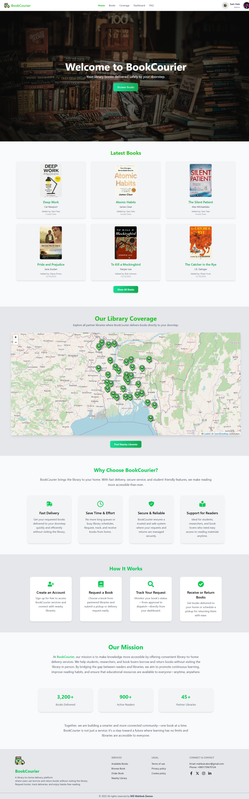
🚀 Click Here to Explore BookCourier
- 📚 Browse Books: Explore a variety of books available in nearby libraries.
- 🏠 Request Home Delivery: Get books delivered directly to your doorstep.
- 🔄 Schedule Pickups & Returns: Arrange convenient times to borrow or return books.
- 👩🎓 User Profiles: View profiles of users and libraries for a trusted experience.
- 📖 Track Borrowing Status: Keep track of your requests, due dates, and returns.
- 🌐 Access Anywhere: Borrow books without physically visiting the library.
- 💻 Frontend: React.js, React Router, Axios, Tailwind CSS
- 🎨 Styling & Components: Tailwind CSS, DaisyUI
- ⚙️ Backend: Node.js, Express.js
- 🗄️ Database: MongoDB, Mongoose
- 🔒 Authentication: JWT (JSON Web Tokens), bcrypt
- 🚀 Deployment: Vercel / Netlify (frontend), Render / Heroku (backend)
- 🛠️ Other Tools: Postman (API testing), Git & GitHub (version control)
- ✨ Animations: AOS (Animate on Scroll)
- 🔔 Notifications: react-hot-toast, SweetAlert2
- 🎠 Carousels & Sliders: Swiper.js
- 🖼️ Images: Sourced from Pexels and hosted on imgbb
- 📌 State Management: React Hooks (useState, useEffect, etc.)
- 🎨 Icons: React Icons
/project-folder
├── public/                 # Public assets like index.html
├── src/
│ ├── assets/               # Images, icons, media
│ ├── components/           # Reusable React components
│ ├── hooks/                # Custom React hooks
│ ├── layouts/              # Layout components for pages
│ ├── pages/                # Individual page components
│ ├── routes/               # Routing configuration files
│ ├── App.jsx               # Main App component
│ ├── index.css             # Base CSS
│ ├── App.css               # Global styles
│ └── main.jsx              # Entry point for React
├── .gitignore              # Git ignore file
├── package.json            # Project metadata & dependencies
├── package-lock.json       # Dependency lock
└── vite.config.js          # Vite configuration
- 📝 Sign Up / Login: Users create an account or log in to access the platform.
- 📖 Browse Books: Users can explore available books from nearby libraries.
- 🏠 Request Home Delivery: Users can request books to be delivered directly to their home.
- 🔄 Schedule Pickups & Returns: Users can arrange convenient times to borrow or return books.
- ✅ Approve / Reject Requests: Libraries or admins review book requests and approve or reject them.
- 📊 Track Borrowing Status: Users can see the status of their requests—approved, rejected, or pending.
- 🤝 Connect & Borrow: Once approved, users receive the books and return them on schedule, making library access convenient.
Follow these steps to run the BookCourier project locally:
- Clone the repository:
git clone https://github.com/Mahbub-Zaman/BookCourier-Client.git- Navigate to the project folder
cd BookCourier-Client- Install dependencies
npm install-
Set up environment variables:
- Create a
.envfile in the root directory. - Add the required variables
(e.g., API URLs, JWT secret, etc.).
- Create a
-
Start the development server
npm run dev- 🌐 Open in browser:
Navigate to http://localhost:5173 (or the port specified in your setup) to access the app.
- 👁️ Admin will be able to view each user's profile for management purposes
- 🤖 Add AI Chatbot to assist users in finding books and answering queries
- 🌙 Improve Dark Mode UI for a better user experience
- 🏛️ Enable Librarian Registration Process to manage library access
- 📦 Track Book Quantity for inventory management
- 🔍 Add Filtering Options by price, category, tags, or author
- 📝 Allow Review Deletion or Hiding by Admin for moderation
- 🎨 More UI Upgrades for a modern and intuitive interface
- 🗺️ Integrate Google Maps to show nearby libraries and delivery routes