Repository for url-shortner-app post. Read the post on:
or...
I have always wanted to have my very own url shortner becuase of the following reasons:
- Link will be easy to remember, for ownself and for others
- Just plain cool. Imagine this,
https://{your-name}.ml/{whatever-you-want}
.ml becuase it is free! .tk is also free. If you have some spare cash lying around, you can buy your own
.com or .whaterver domain you like
Okay sob story is done, let's get right down to it and here is final repository
- NextJS + ChakraUI
- Firebase Firestore for data storage
- Vercel for hosting
- 'Purchase' domain
- Set up Firebase
- Create NextJS app
- Host app on vercel
- Add domain to vercel
We are going to obtain free domain from freenom. Head over there, register for an account and
type in your desired domain in the Find a new FREE domain. Really anything you like but best is to keep it short.
I wanted okkar.ml but it was taken, so I got myself okkar.tk instead.
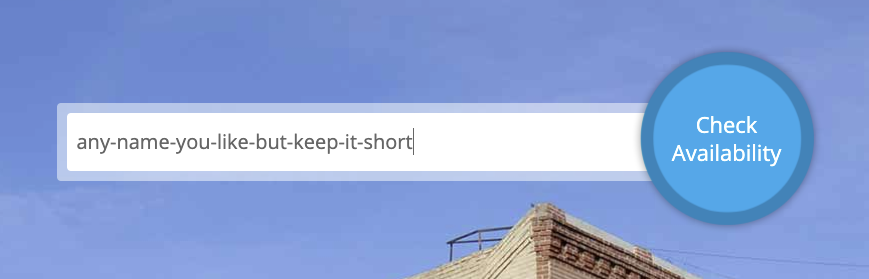
Choose 12 months when asked to select the duration, you can also 'release' the domain free domain back if you happen to buy yourself a domain. Okay we are done with this step
You can use any database you are comfortable with. The shape of the data is simple.
{
  "slug": "linkedin",
  "full_url": "http://linkedin.com/in/okarmin/"
}
When user, navigate to https://okkar.tk/linkedin they are going to get redirected to the full url, which is
http://linkedin.com/in/okarmin/. In general, when user visit https://okkar.tk/[slug] we are going to look up for
corresponding full_url and redirect the user to it.
- Go to Firebase console
- Add project, any name you like, I will be using
url-shortner-app - Default for rest of the options
Now it should take about a minute to create the project. Once ready, click on:
ContinueFirestore Databaseon the leftCreate databaseStart in test mode, this article will do a better job than me to discuss about securing Firestore- Choose location that is nearest to your country,
asia-southeast2for Singapore. See all Cloud Firestore locations here
We have created Firestore, let's now add a document to it, click on:
Start collectionurlsfor Collection IDAuto IDfor Document IDslug,stringgithubthenAdd fieldfull_url,string,{your github link}thenSave
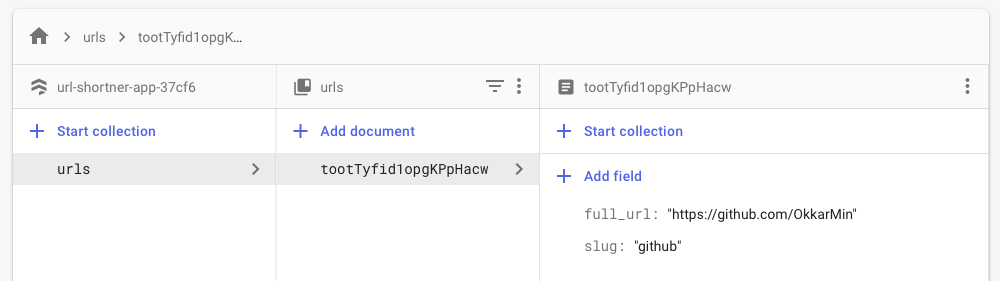
Add more document if you want to have more urls and remember to use same datashape of {slug, full_url}
We now need to add new web project and get configuration values from Firebase
- Click on setting icon beside
Project Over Add app- Choose web,
</>logo - Give it any nickname you like, I will be using
url-shortner-app Register- Firebase should now give you the configurations like below
var firebaseConfig = {
  apiKey: "{ value }",
  authDomain: "{ value }",
  projectId: "{ value }",
  storageBucket: "{ value }",
  messagingSenderId: "{ value }",
  appId: "{ value }",
  measurementId: "{ value }",
};
Keep this tab open, we will be using the config in the next step.
We will use with-chakra-ui-typescript starter from NextJS. Also npm install Firebase module to allow us to connect with Firestore.
npx create-next-app --example with-chakra-ui-typescript url-shortner-app
cd url-shortner-app
npm install firebase
You can delete the src/components and pages/index.tsx we will not be using them.
Create pages/[slug].tsx and put the following code
import { GetServerSideProps } from "next";
import firebase from "firebase/app";
import "firebase/firestore";

const Slug = () => {
  return null;
};

export const getServerSideProps: GetServerSideProps = async (context: any) => {
  const { slug } = context.params;

  const firebaseConfig = {
    apiKey: "{ value }",
    authDomain: "{ value }"
    projectId: "{ value }"
  };

  if (!firebase.apps.length) {
    firebase.initializeApp(firebaseConfig);
  }
  const db = firebase.firestore();

  let result: { slug: string; full_url: string } | undefined;

  const querySnapShot = await db
    .collection("urls")
    .where("slug", "==", slug)
    .get();

  querySnapShot.forEach(
    (doc) => (result = doc.data() as { slug: string; full_url: string })
  );

  return result == undefined
    ? {
        redirect: {
          destination: "/",
          permanent: true,
        },
      }
    : {
        redirect: {
          destination: result.full_url,
          permanent: true,
        },
      };
};

export default Slug;- We import the required modules and files
- Notice the
return null, we don't have to return any UI component as we are will be redirecting the users - On page visit,
getServerSidePropswill help us determine whether there is an entry in Firestore that has{slug, full_url}pair or not, if there is, redirect user tofull_url, otherwise redirect user to/where 404 error page will be shown - We are only making use of 3 config options for Firebase,
apiKey, authDomain, projectIDout of full configuration options that we obatined from step 2.
At this stage, you can npm run dev to test your app locally but for us we are sure that it will work :) so we don't test
and let us directly host on vercel and your folder structure should look like this
url-shortner-app/
┣━━📁 src
┃ ┣━━📁 pages
┃ ┃ ┣━━ [slug].tsx
┃ ┃ ┣━━ _app.tsx
┃ ┃ ┗━━ _document.tsx
┃ ┗━━ theme.tsx
┣━━ .gitignore
┣━━ README.md
┣━━ next-env.d.ts
┣━━ package-lock.json
┣━━ package.json
┗━━ tsconfig.json
Vercel made it extremely easy to host NextJS apps. After all, Vercel is behind NextJS. Before we can host on vercel, create new repository on github and push your codes to github.
Now we can:
- Login to Vercel using GitHub
New ProjectImportthe repository that you just created and pushed- Use default options and
Deploy
After it has successfully deployed, we need to link the domain we obtained from freenom with Vercel. Click on:
Domains, inhttps://vercel.com/dashboardAdd- Select the project that was just deployed and
Continue - Type in your domain,
okkar.tkfor me andAdd
You should see this and take note of Type and Value shown:
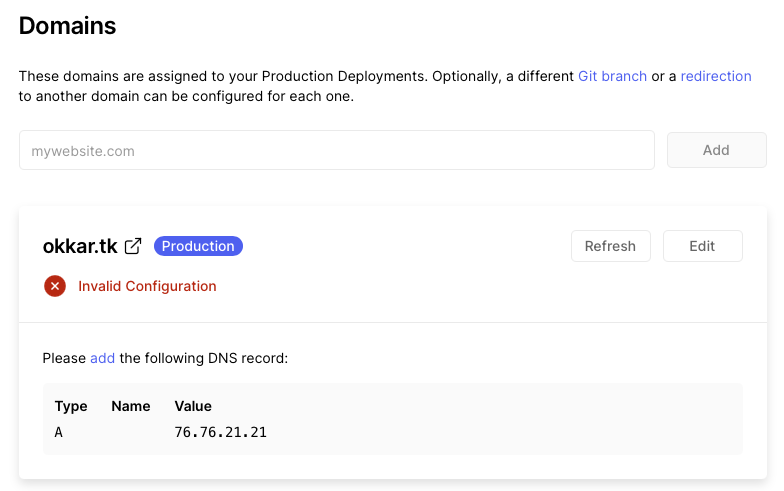
We now need to go back to freenom:
Services->My Domains->Manage DomainManage Freenom DNS- Put the
TypeandValueyou saw from Vercel here Save Changes

Give it sometime for the DNS configuration to propagate and after some time you should be able to see Valid Configuration
on Vercel. Vercel magically gave us SSL certificate as well which allows our domain to have https protocol.
That's it! We now have a functioning app that allows you to pass your slug and redirect to full_url, in my case since
I bought domain, https://okkarm.in/linkedin will be redirected to http://linkedin.com/in/okarmin/.
Right now we are adding new urls from Firebase console, you could try to extend what we have by adding an authenticated
page that allows you to add new urls from the app itself https://domain.ml/addNewUrl. Since we use with-chakra-ui-typescript starter,
you can now use UI components to quickly build fairly nice looking pages.
You could also add in Firebase analytics to keep track of how many visitors per shortened url. Tons of ways you can add on top of this project.
With that, we end here for today, for more content like this, please hit the subscribe button and ofcourse smash that notificaiton bell.