🛒 Resale Photo Enhancer — Open-Source AI Product Photo Studio for Online Resellers (Free Photoroom Alternative)
Turn snapshot reseller photos into professional listing imagery in one click. A production-ready, self-hostable Next.js SaaS boilerplate that swaps cluttered backgrounds for clean studio-grade scenes — purpose-built for sellers on eBay, Poshmark, Depop, Vinted, Mercari, Etsy, and Facebook Marketplace. A free open-source alternative to Photoroom, Pixelcut, and ZMO.ai — powered by the MuAPI AI engine.
Tech stack: Next.js 14 (App Router) · Prisma · PostgreSQL · NextAuth (Google OAuth) · Stripe · Tailwind CSS · MuAPI Use cases: eBay product listings · Poshmark closet photography · Depop snapshot upgrades · Vinted listings · Mercari background swaps · Facebook Marketplace ads · Etsy product shots · Shopify catalog cleanup

resale-photo-enhancer.mp4
GitHub Repository: github.com/SamurAIGPT/resale-photo-enhancer
Sign in with Google to explore the background template gallery, custom prompt inputs, Stripe credit packs, and download history.
Resale Photo Enhancer is a production-ready, highly-optimized AI web application. Out of the box, it seamlessly manages User Authentication, Credits & Billing, Image Persistence, and asynchronous AI generation polling using a sleek Next.js (App Router) architecture. It empowers resellers on platforms like eBay, Poshmark, and Depop to turn basic snapshot photos into professional studio-grade marketing assets.
Why use Resale Photo Enhancer?
- Production-Ready SaaS — Complete with Google OAuth and Stripe Checkout workflows built-in.
- Multi-Category Template Studio — Choose from dozens of curated preset themes (Minimalism, Studio, Tabletop, Surfaces, Indoor, Floral, etc.) or write custom description prompts.
- Historical Gallery — All creations are securely persisted to a PostgreSQL database for a custom user workspace.
- Responsive & Constrained UX — Layout height constraints prevent page overflow, creating an elegant webapp interface that scrolls properly on both desktop and mobile.
- Extensible API — Easily swap or adapt underlying model features without breaking layout styling.
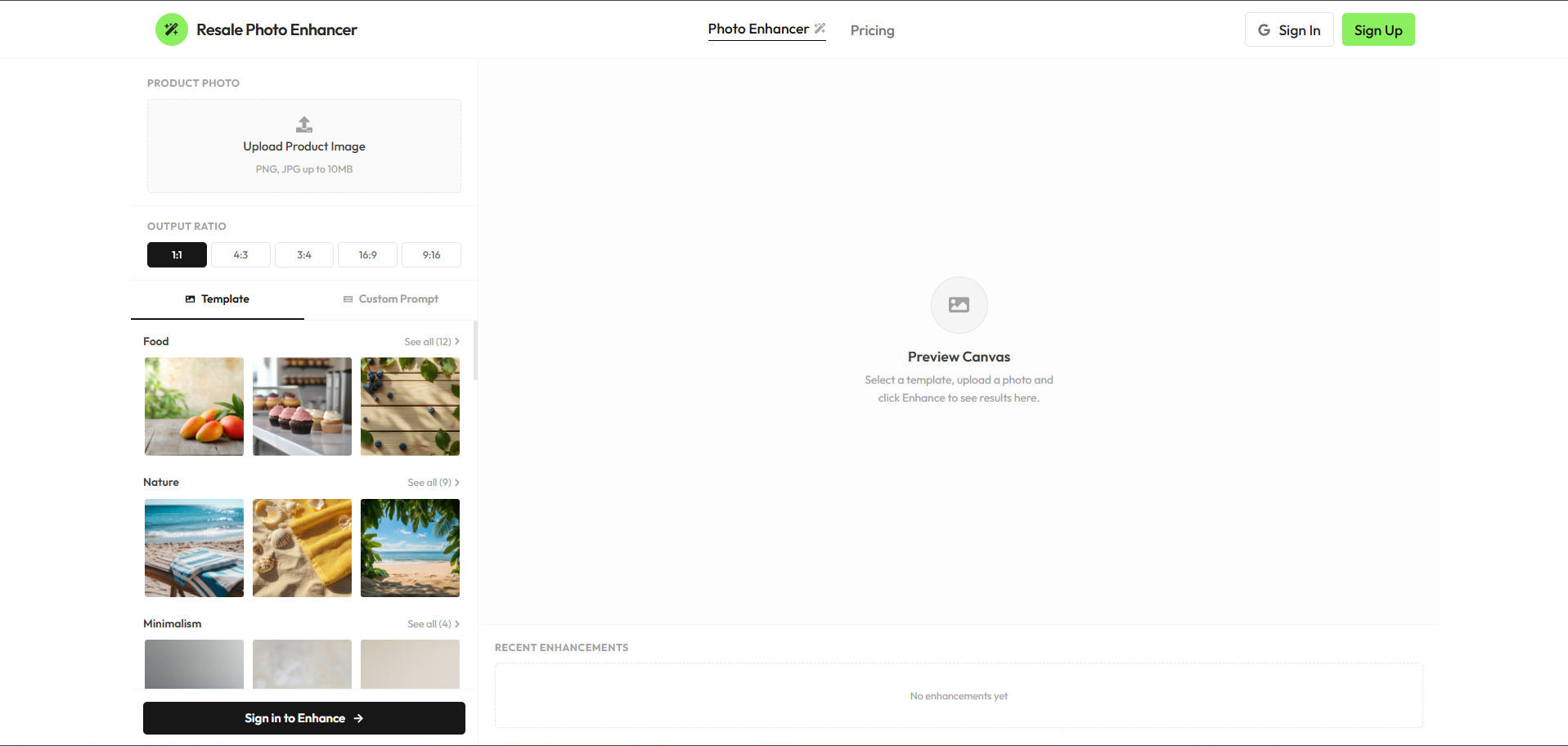
- Background Swap Studio — Instantly replace messy background settings with clean templates. Supports advanced configurations and custom prompt overlays.
- Reference Image Node — Upload any item image and let the AI extract boundaries, compositing it into high-definition backdrops.
- My Creations Archive — A dedicated history vault for logged-in users. Displays past generations securely fetched from the database, viewable in a detailed inspector panel with 1-click downloads.
- Credit Tiers & Billing — Complete Stripe integration. Standard Pack ($5.00) offers 1,000 credits and Pro Pack ($10.00) offers 2,000 credits (exchanging at a high-value rate of $1 = 200 credits). Each background swap costs exactly 1 credit.
- Premium Glassmorphic UI — Sleek dark-bordered elements with elegant hover micro-animations and quick project switching capabilities.
This architecture is engineered explicitly for Vercel serverless environments.
To successfully deploy and run, you must populate the following environment variables in your Vercel project settings:
| Service | Variable | Description & Source |
|---|---|---|
| Database | DATABASE_URL |
PostgreSQL connection string (Supabase or Neon) |
DIRECT_URL |
Direct DB connection for Prisma migrations | |
| NextAuth / Google | NEXTAUTH_SECRET |
Secure random string generated via openssl rand -base64 32 |
NEXTAUTH_URL |
Your production domain (e.g. https://my-app.vercel.app) |
|
GOOGLE_CLIENT_ID |
Get from Google Cloud Console | |
GOOGLE_CLIENT_SECRET |
Get from Google Cloud Console | |
| Stripe Billing | STRIPE_SECRET_KEY |
Get from Stripe Dashboard |
NEXT_PUBLIC_STRIPE_PUBLISHABLE_KEY |
Get from Stripe Dashboard | |
STRIPE_WEBHOOK_SECRET |
Webhook secret for resolving credit purchases | |
| AI Generator | MUAPIAPP_API_KEY |
Create an account and get key from muapi.ai/access-keys |
- Database Provisioning: Create a new Postgres database (via free tiers on Vercel Postgres, Supabase, or Neon). Retrieve the connection strings.
- Project Creation: Import your GitHub fork into the Vercel dashboard.
- Configure Environment Variables: Copy the variables above into the Vercel project settings environment tab.
- Deploy: Hit "Deploy". Vercel will automatically run the build steps (
npm run build). - Database Push: Run
npx prisma db pushto generate the client and synchronize database models before launching.
- Node.js (v18 or higher)
- A local/cloud PostgreSQL instance.
# 1. Clone the repository
git clone https://github.com/SamurAIGPT/resale-photo-enhancer
cd resale-photo-enhancer

# 2. Install dependencies
npm install

# 3. Setup Environment
cp .env.example .env
# Open .env and insert your specific keys.

# 4. Initialize Database Schema
npx prisma generate
npx prisma db push

# 5. Start the Development Server
npm run dev
The console should now be active on http://localhost:3000.
resale-photo-enhancer/
├── prisma/
│   └── schema.prisma           # Postgres tables: Users, Accounts, Creations, Enhancements
├── src/
│   ├── app/                    # Next.js App Router
│   │   ├── api/                # Backend API Routes (Stripe, Auth, Uploads, Creations)
│   │   ├── pricing/            # Interactive tier and credit purchase view
│   │   └── page.js             # Main AI Background Swap Studio Interface
│   ├── components/
│   │   └── saas/               # Reusable Modular UI Components
│   └── lib/
│       ├── prisma.js           # Shared ORM client singleton
│       └── config.js           # Application plans, endpoints, and configs
└── next.config.mjs             # Next Configuration
MIT Licensed.