


说话即字幕 · 离线可用 · GPU 加速 · 虚拟声卡直播 · 零配置
Speak → Whisper ASR → MarianMT Translation → Transparent Overlay → Live Stream
市面上不缺字幕工具。但 —
| 工具 | 痛点 |
|---|---|
| 🤖 云 API 方案 | 延迟高、要花钱、隐私泄露风险 |
| 🪟 Windows 自带 | 不支持实时翻译、不能自定义样式 |
| 🎬 OBS 插件 | 依赖在线服务、配置繁琐 |
EchoCap 是唯一一个 ——
- ✅ 完全离线:ASR + 翻译全在本地跑,断网照样用
- ✅ GPU 加速:ctranslate2 + CUDA,RTX 3060 上延迟 <100ms
- ✅ 直播神器:搭配虚拟声卡(VB-Cable / Voicemeeter),捕获系统音频实现 <300ms 端到端延迟的实时双语直播字幕
- ✅ 透明悬浮窗:PyQt6 无边框窗口,置顶 + 穿透模式,不挡内容
- ✅ 即装即用:安装包 ~581MB,首次启动自动下载模型(~800MB,仅需一次)
- ✅ 创作友好:OBS 绿幕抠像、SRT 字幕导出、全局快捷键
💡 简单说:把 OpenAI Whisper 的精度和 MarianMT 的翻译塞进一个 Windows 安装包,双击即用。
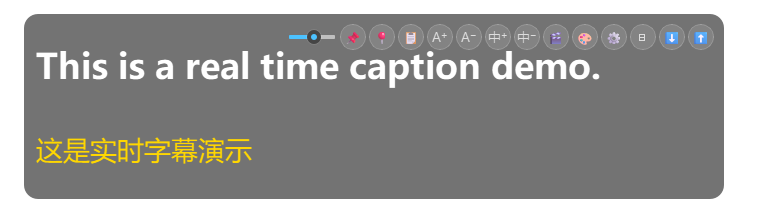
从 GitHub Releases 下载 EchoCap_Setup.exe → 双击安装 → 打开即用。
首次启动弹出模型设置向导,可选择自动下载(国内走 ModelScope CDN,无需 VPN)或手动选择已有模型目录。
git clone https://github.com/Saturn-shine/EchoCap.git
cd EchoCap
pip install -r requirements.txt
python main.py| 功能 | 说明 |
|---|---|
| 🎙️ 实时语音识别 | 基于 faster-whisper,CTranslate2 + CUDA GPU 加速,ASR 延迟 <100ms |
| 🌐 实时英译中 | Helsinki-NLP/opus-mt-en-zh 离线翻译模型 |
| 🎛️ VU 音量表 | 设置中实时麦克风电平指示(绿/黄/红) |
| 🔌 虚拟声卡兼容 | 搭配 VB-Cable / Voicemeeter 捕获系统音频,端到端延迟 <300ms |
| 🪟 透明悬浮窗 | 始终置顶、无边框、可拖拽、可缩放 |
| 🖱️ 穿透模式 | 鼠标点击透过字幕窗口,不干扰其他操作 |
| ⌨️ 全局快捷键 | 在其他应用聚焦时也能用的系统级快捷键 |
| 🎨 5 套配色主题 | 暗金 / 纯白 / 赛博绿 / 暖橙 / Nord 蓝 |
| 🎬 OBS 绿幕抠像 | 绿/蓝色背景模式,直接 Chroma Key |
| 📋 系统托盘 | 右键菜单:暂停、穿透、设置、导出 |
| 📝 SRT 字幕导出 | 保存为 SubRip 格式,直接导入剪辑软件 |
| 🔲 极简模式 | 紧凑单行字幕,适合直播 |
| 🚀 开机自启 | 可选注册表 Run 键,打开电脑就用 |
flowchart LR
    MIC[🎤 麦克风] --> VAD[WebRTC VAD<br/>语音活动检测]
    VAD --> BUFFER[环形缓冲区<br/>累积语音段]
    BUFFER --> ASR[faster-whisper<br/>CTranslate2 + CUDA]
    ASR --> EN[英文文本]
    EN --> MT[MarianMT<br/>opus-mt-en-zh]
    MT --> ZH[中文文本]
    EN & ZH --> OVERLAY[PyQt6 透明悬浮窗<br/>QPaintEngine 逐帧渲染]
    OVERLAY --> SCREEN[🖥️ 屏幕叠加]
| 组件 | 技术选型 | 原因 |
|---|---|---|
| 语音识别 | faster-whisper + CTranslate2 | 比原始 Whisper 快 4×,GPU 内存占用减半 |
| 翻译 | MarianMT (Helsinki-NLP) | Transformer 架构,EN→ZH 离线可用 |
| VAD | WebRTC VAD | 轻量级,40+ 语言通用 |
| UI 框架 | PyQt6 | 原生 Windows 渲染,透明窗口支持好 |
| 音频采集 | sounddevice + PortAudio | 低延迟 WASAPI 环回 |
| 打包 | PyInstaller + Inno Setup | 单 exe + Windows 原生安装程序 |
| 快捷键 | 操作 |
|---|---|
Ctrl + Shift + P |
暂停 / 继续 |
Ctrl + Shift + H |
显示 / 隐藏窗口 |
Ctrl + Shift + C |
复制当前字幕到剪贴板 |
Ctrl + Shift + T |
切换极简模式 |
💡 所有快捷键可在 设置 → 快捷键 中自定义。
EchoCap 的核心亮点之一是与虚拟声卡配合,可以实现延迟极低的实时双语字幕翻译,是直播场景的杀手级功能。
系统音频 / 浏览器 / 游戏 / 视频会议
         │
         ▼
   VB-Cable / Voicemeeter(虚拟音频设备)
         │
         ▼
   EchoCap 音频输入(WASAPI 环回采集)
         │
    ┌────┴────┐
    │  ASR    │  faster-whisper + CUDA  < 100ms
    ├─────────┤
    │  翻译    │  MarianMT EN→ZH        < 50ms
    └────┬────┘
         │
         ▼
   透明悬浮窗叠加 → OBS 采集 → 直播推流
- 安装 VB-Cable(免费)或 Voicemeeter(高级混音)
- 将系统音频输出路由到虚拟声卡
- EchoCap 设置 → 音频 → 输入设备 选择虚拟声卡的录制端
- 开启 OBS 绿幕模式,叠加到直播画面
⚡ 性能基准:RTX 3060 + VB-Cable,端到端延迟(语音 → 双语字幕)< 300ms,人耳几乎感知不到延迟。
- 添加 窗口采集 → 窗口选
[EchoCap] - EchoCap 工具栏点击 🎬 开启绿幕模式
- OBS 中对该窗口采集源添加 色度键 滤镜
- 关键色匹配(绿:
#00FF00,蓝:#0000FF)
EchoCap/
├── main.py               # 应用入口,流程编排
├── overlay.py            # 透明悬浮窗(PyQt6 QPaintEngine)
├── pipeline.py           # 流式 ASR + 翻译处理管线
├── asr_engine.py         # faster-whisper 封装(auto 设备/精度回退)
├── translator.py         # MarianMT 翻译封装
├── hotkeys.py            # 全局热键(WH_KEYBOARD_LL 钩子 + Win32 回退)
├── settings_dialog.py    # 设置对话框(5 个标签页)
├── tray_icon.py          # 系统托盘图标与菜单
├── app_icon.py           # 图标加载(assets/logo.svg → app_icon.ico)
├── vu_meter.py           # VU 音量表组件
├── about_dialog.py       # 关于对话框 + 模型署名
├── export_srt.py         # 字幕 → SRT 转换器
├── update_checker.py     # GitHub Release 版本检查
├── config.py             # 配置 I/O + 默认值 + 自动修复
├── paths.py              # 跨平台路径解析(frozen ↔ dev)
├── logging_config.py     # 日志配置
├── hooks/                # PyInstaller 自定义钩子
├── EchoCap.spec          # PyInstaller spec
├── requirements.txt      # Python 依赖
└── VERSION               # 版本号
# 前置:PyInstaller + Inno Setup 6
pyinstaller --clean EchoCap.spec    # → dist/EchoCap/
iscc installer.iss # → Output/EchoCap_Setup.exe| 标签页 | 可配置项 |
|---|---|
| 音频 | 输入设备、采样率、VAD 灵敏度、静音超时 |
| ASR | 模型路径、设备(auto/CUDA/CPU)、精度、HF 镜像 |
| 翻译 | 语言对、本地模型路径 |
| 界面 | 字号、颜色、透明度、淡出时间、字体、对齐、穿透 |
| 快捷键 | 四组全局快捷键,完全自定义 |
| 模型 | 许可证 | 来源 |
|---|---|---|
| faster-whisper-small (Systran) | MIT | 基于 OpenAI Whisper |
| opus-mt-en-zh (Helsinki-NLP) | CC-BY-4.0 | HuggingFace |
EchoCap 本体使用 MIT 许可证。
欢迎提 Issue 和 PR!
- Fork 本仓库
- 创建分支 (
git checkout -b feat/amazing) - 提交修改 (
git commit -m "Add amazing feature") - 推送分支 (
git push origin feat/amazing) - 提交 Pull Request
- faster-whisper — CTranslate2 加速的 Whisper 推理
- Helsinki-NLP — 开源神经机器翻译模型
- ModelScope — 国内模型下载加速
- PyQt6 — Python Qt 绑定
- sounddevice — PortAudio Python 封装
由 Saturn_shine 用 ❤️ 和 🐍 构建
The market has no shortage of caption tools. The problem:
| Tool | Pain Point |
|---|---|
| 🤖 Cloud APIs | Latency, cost, data leaves your machine |
| 🪟 Windows native | No real-time translation, no customization |
| 🎬 OBS plugins | Online-dependent, complex setup |
EchoCap is the only one that is —
- ✅ Fully Offline — ASR + translation run locally. No internet, no problem
- ✅ GPU Accelerated — CTranslate2 + CUDA. <100ms latency on RTX 3060
- ✅ Live Streaming Beast — Pair with a virtual audio cable (VB-Cable / Voicemeeter) for sub-300ms end-to-end bilingual captions on stream
- ✅ Transparent Overlay — PyQt6 frameless window, always-on-top with click-through
- ✅ Batteries Included — Installer ~581MB. First launch downloads models (~800MB, one-time) via ModelScope CDN
- ✅ Creator-Ready — OBS chroma key, SRT export, global hotkeys
💡 Think of it as OpenAI Whisper + MarianMT, shrink-wrapped into a single Windows installer.
Download EchoCap_Setup.exe from GitHub Releases → double-click → done.
First launch shows a model setup wizard — auto-download (~800MB, one-time via ModelScope CDN) or browse existing model files.
git clone https://github.com/Saturn-shine/EchoCap.git
cd EchoCap
pip install -r requirements.txt
python main.py| Feature | Description |
|---|---|
| 🎙️ Real-time ASR | faster-whisper with CTranslate2 + CUDA GPU acceleration, <100ms ASR latency |
| 🌐 EN→ZH Translation | Helsinki-NLP/opus-mt-en-zh, fully offline |
| 🎛️ VU Meter | Real-time mic level indicator in Settings (green/yellow/red) |
| 🔌 Virtual Audio Cable | Capture system audio via VB-Cable / Voicemeeter, <300ms end-to-end |
| 🪟 Transparent Overlay | Always-on-top, frameless, draggable, resizable |
| 🖱️ Click-through Mode | Mouse passes through the overlay, no interference |
| ⌨️ Global Hotkeys | System-level shortcuts that work across all apps |
| 🎨 5 Color Themes | Dark Gold · Pure White · Cyber Green · Warm Orange · Nord Blue |
| 🎬 OBS Chroma Key | Green/blue background modes for instant chroma keying |
| 📋 System Tray | Right-click: pause, click-through, settings, export |
| 📝 SRT Export | SubRip format — drop straight into DaVinci / Premiere |
| 🔲 Minimal Mode | Compact single-line overlay for streaming |
| 🚀 Auto-Start | Optional Windows boot launch via registry Run key |
flowchart LR
    MIC[🎤 Microphone] --> VAD[WebRTC VAD<br/>Speech Detection]
    VAD --> BUFFER[Ring Buffer<br/>Speech Segments]
    BUFFER --> ASR[faster-whisper<br/>CTranslate2 + CUDA]
    ASR --> EN[English Text]
    EN --> MT[MarianMT<br/>opus-mt-en-zh]
    MT --> ZH[Chinese Text]
    EN & ZH --> OVERLAY[PyQt6 Overlay<br/>QPaintEngine]
    OVERLAY --> SCREEN[🖥️ Display]
| Component | Stack | Rationale |
|---|---|---|
| ASR | faster-whisper + CTranslate2 | 4× faster than vanilla Whisper, half the VRAM |
| Translation | MarianMT (Helsinki-NLP) | Transformer-based, offline EN→ZH |
| VAD | WebRTC VAD | Lightweight, battle-tested across 40+ languages |
| UI | PyQt6 | Native Windows rendering, robust transparent windows |
| Audio I/O | sounddevice + PortAudio | Low-latency WASAPI loopback |
| Packaging | PyInstaller + Inno Setup | Single exe + native Windows installer |
| Shortcut | Action |
|---|---|
Ctrl + Shift + P |
Pause / Resume |
Ctrl + Shift + H |
Show / Hide overlay |
Ctrl + Shift + C |
Copy caption to clipboard |
Ctrl + Shift + T |
Toggle Minimal Mode |
💡 All hotkeys are customizable in Settings → Hotkeys.
EchoCap's killer feature is pairing with a virtual audio cable for ultra-low-latency bilingual captions — ideal for live streaming.
System Audio / Browser / Game / Zoom
         │
         ▼
   VB-Cable / Voicemeeter(virtual audio device)
         │
         ▼
   EchoCap Audio Input(WASAPI loopback capture)
         │
    ┌────┴────┐
    │  ASR    │  faster-whisper + CUDA  < 100ms
    ├─────────┤
    │   MT    │  MarianMT EN→ZH        < 50ms
    └────┬────┘
         │
         ▼
   Transparent overlay → OBS capture → Live stream
- Install VB-Cable (free) or Voicemeeter (advanced mixing)
- Route your system audio output to the virtual cable
- In EchoCap Settings → Audio → Input Device, select the virtual cable's recording endpoint
- Enable OBS chroma key mode and overlay onto your stream
⚡ Benchmark: RTX 3060 + VB-Cable — end-to-end latency (speech → bilingual captions) < 300ms, imperceptible to viewers.
- Add a Window Capture source → select
[EchoCap] - Click 🎬 in the EchoCap toolbar to enable chroma key mode
- In OBS, add a Chroma Key filter on the Window Capture source
- Match key color (green:
#00FF00, blue:#0000FF)
EchoCap/
├── main.py               # App entry point & orchestration
├── overlay.py            # Transparent overlay (PyQt6 QPaintEngine)
├── pipeline.py           # Streaming ASR + translation pipeline
├── asr_engine.py         # faster-whisper wrapper (auto device/precision fallback)
├── translator.py         # MarianMT translation wrapper
├── hotkeys.py            # Global hotkeys (WH_KEYBOARD_LL hook + Win32 fallback)
├── settings_dialog.py    # Settings dialog (5 tabs)
├── tray_icon.py          # System tray icon & menu
├── app_icon.py           # Icon loader (assets/logo.svg → app_icon.ico)
├── vu_meter.py           # VU meter widget
├── about_dialog.py       # About dialog + model attribution
├── export_srt.py         # Caption → SRT converter
├── update_checker.py     # GitHub Release version checker
├── config.py             # Config I/O + defaults + auto-repair
├── paths.py              # Cross-platform path resolution (frozen ↔ dev)
├── logging_config.py     # Logging setup
├── hooks/                # PyInstaller custom hooks
├── EchoCap.spec          # PyInstaller spec
├── requirements.txt      # Python dependencies
└── VERSION               # Version file
# Prerequisites: PyInstaller + Inno Setup 6
pyinstaller --clean EchoCap.spec    # → dist/EchoCap/
iscc installer.iss # → Output/EchoCap_Setup.exe| Tab | Options |
|---|---|
| Audio | Input device, sample rate, VAD sensitivity, silence timeout |
| ASR | Model path, device (auto/CUDA/CPU), compute type, HF mirror |
| Translate | Language pair, local model path |
| UI | Font sizes, colors, opacity, fade-out, font family, alignment, click-through |
| Hotkeys | All four global shortcuts — fully configurable |
| Model | License | Source |
|---|---|---|
| faster-whisper-small (Systran) | MIT | Based on OpenAI Whisper |
| opus-mt-en-zh (Helsinki-NLP) | CC-BY-4.0 | HuggingFace |
EchoCap itself is licensed under MIT.
Issues and PRs welcome!
- Fork the repo
- Create a branch (
git checkout -b feat/amazing-feature) - Commit changes (
git commit -m "Add amazing feature") - Push (
git push origin feat/amazing-feature) - Open a Pull Request
- faster-whisper — CTranslate2-accelerated Whisper inference
- Helsinki-NLP — Open-source neural machine translation
- ModelScope — Model CDN for China mainland users
- PyQt6 — Python Qt bindings
- sounddevice — PortAudio Python wrapper
Built with ❤️ and 🐍 by Saturn_shine