


Your dashboard cannot tell a quiet device from a dead one. Device Sentinel can, and it catches failing batteries and dropping radio links before they take your smart home down.
Pre-Release. This integration is under rapid development. Expect breaking changes.
Home Assistant only reacts to what your devices tell it. When a device quietly dies, Home Assistant doesn't blink. The last value reported stays on your dashboard forever. Nothing turns red. Nothing throws an error.
- A freezer sensor drops off the mesh. Your dashboard shows a comfortable -18°C while the food inside slowly thaws.
- A door sensor dies while the door is closed. Your security automations happily believe that door is secure, indefinitely.
- The batteries in your smart lock have been draining for a month. Nothing warns you until you are standing outside, locked out.
The early warning signs are usually there, in battery levels and radio signal data, but nobody acts on them, because a battery reading of 20% means "two weeks left" on one device and "dead this afternoon" on another.
Device Sentinel doesn't guess. It watches how often each device actually reports and learns its unique rhythm.
There are no watch lists to maintain and no arbitrary timeouts to assign. A chatty motion sensor earns a tight window and is reported within minutes if it goes dark. A twice-a-day rain gauge earns a generous window and is left alone.
Device Sentinel applies the same logic to your batteries and radio links. A radio link is judged against the baseline that specific device normally holds. A battery is judged twice: once against a flat level you choose, and again against how fast it is actually draining.
If a battery is projected to reach empty inside your chosen horizon, say thirty days, Device Sentinel reports it, even if it still reads 80%.
| Problem | Why you care |
|---|---|
| Frozen | Silent while still showing a healthy value. Your automations are acting on a dead reading. |
| Unavailable | Home Assistant knows it's gone. You probably don't. |
| Flapping | Drops out and comes back again and again. One alert, not dozens. |
| Never reported | Devices that have never sent a reading, including ones that died before you installed Device Sentinel. |
| Low or falling battery | Warned while you can still act, even when a coin cell still reads 80%. |
| Weak or stuck signal | Links degrade before they fail. |
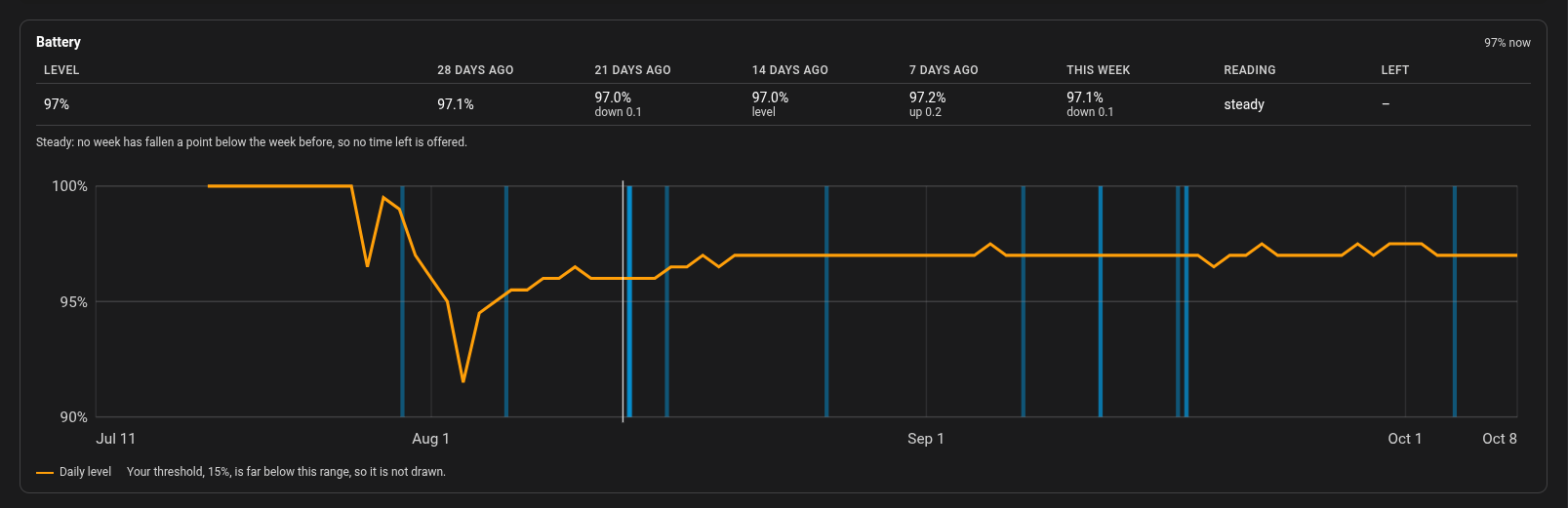
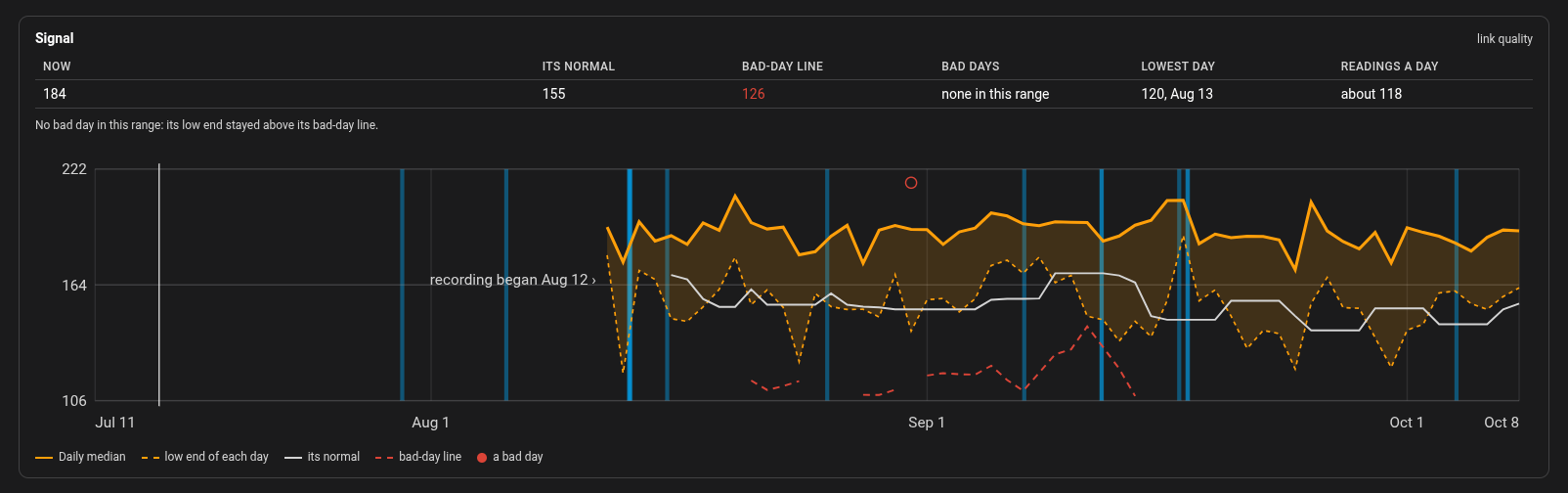
Zero-Config Monitoring From Day One Device Sentinel watches the devices in Home Assistant from the moment you install it. Non-hardware entries (like Sun or HACS) and disabled devices are automatically ignored, and hardware that two integrations both list is watched once.
One Unified Problem List Every fault lands in one Home Assistant to-do list. A device that is both frozen and low on battery is one line, not two. Tick the item to acknowledge it, and it stops making noise on your phone while staying on the list until it recovers.
One Alert When a Coordinator, Broker or Wi-Fi Network Goes Down When a coordinator, broker, or Wi-Fi network goes down, every device behind it goes quiet. Device Sentinel reports the one failure you can fix, rather than giving you sixty separate alerts for sixty silent devices. When it comes back, Device Sentinel gives each device time to rejoin, then reports only the ones that didn't.
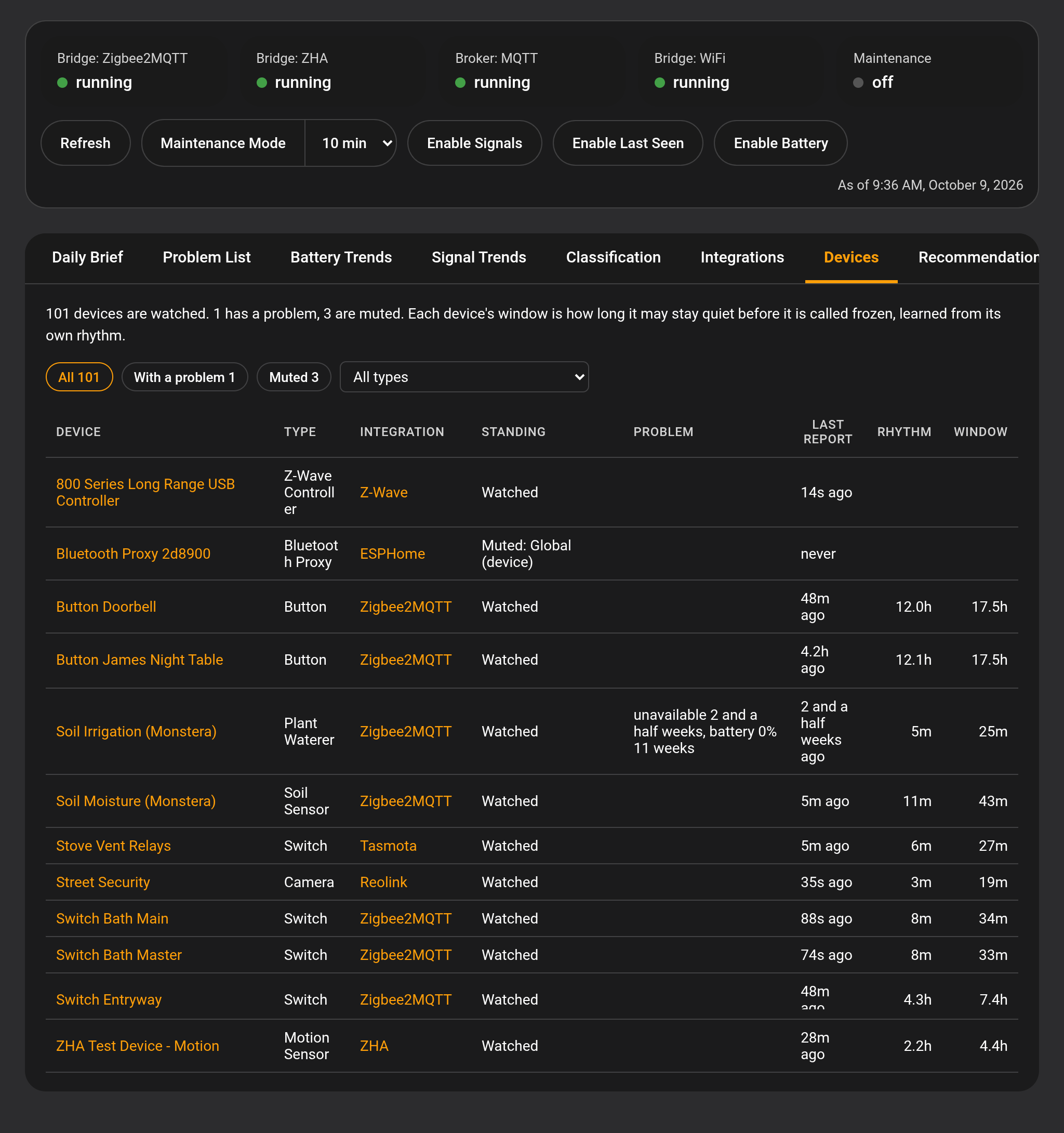
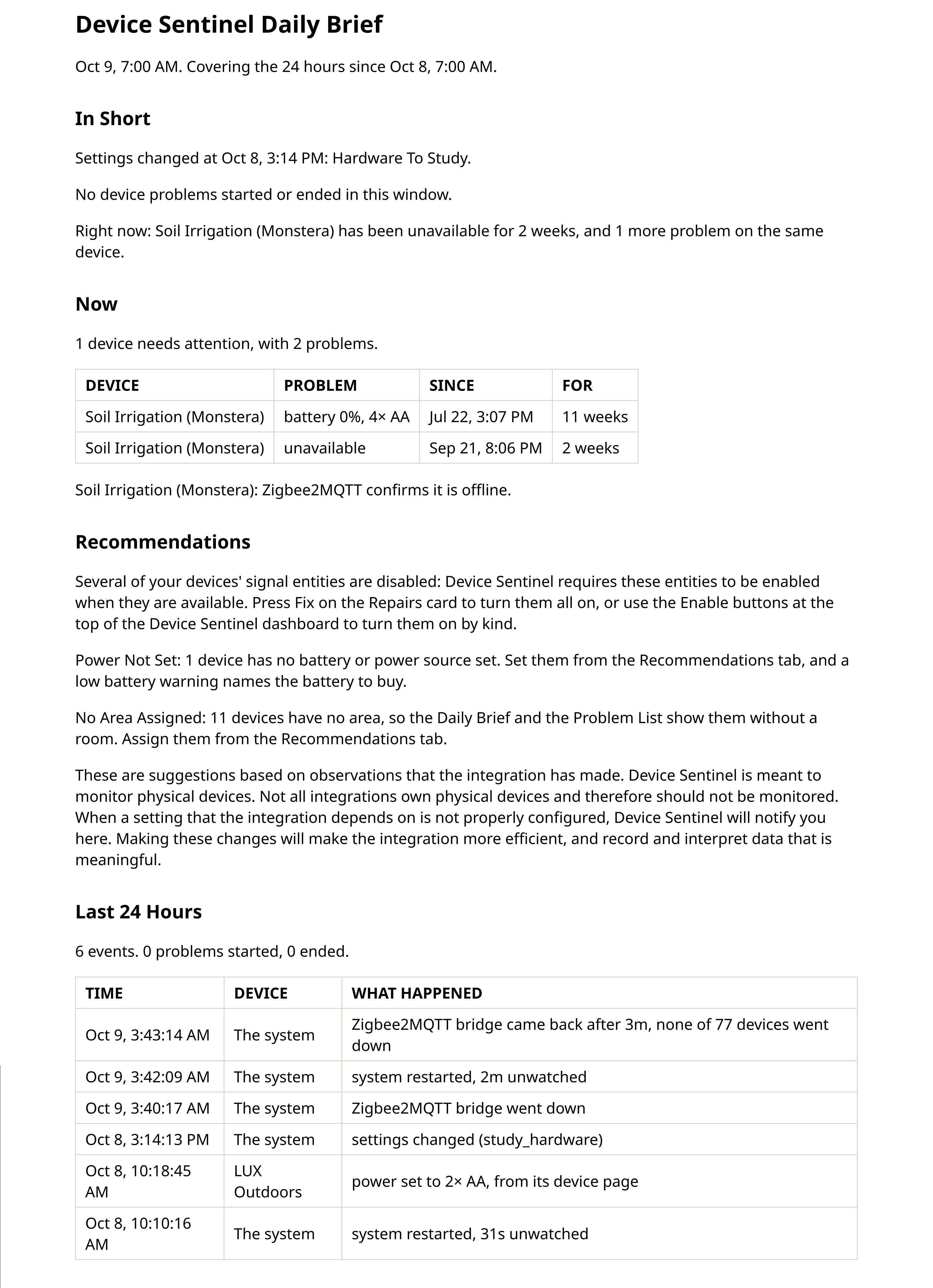
A Dashboard in Your Sidebar The daily brief, the problem list, battery and signal trends, and each device's own page, one click apart. Every device has a type, such as Leak Sensor, Plug or Camera, so you can look at all your door sensors at once, and a recommendations tab lists what you can set right there. Administrators only.
Alerts That Respect Your Evening Live push notifications are sent for real faults, and quiet hours keep your phone silent overnight. A daily brief, delivered by email or push on your schedule, summarizes what happened and highlights devices that keep failing for no clear reason.
Every screen and setting is explained in the wiki.
Device Sentinel is not in the default HACS store yet.

- Open HACS > Custom repositories.
- Paste
https://github.com/TheThinkingHome/device_sentinel, choose Integration, and click Add. - Download Device Sentinel, then Restart Home Assistant.
- Go to Settings > Devices and Services > Add Integration and search for Device Sentinel.
(Requires Home Assistant 2026.5 or newer)
Device Sentinel works with its defaults from the start. Two steps on day one make it far more useful:
- Open the integration settings and configure Notifications and Daily Brief.
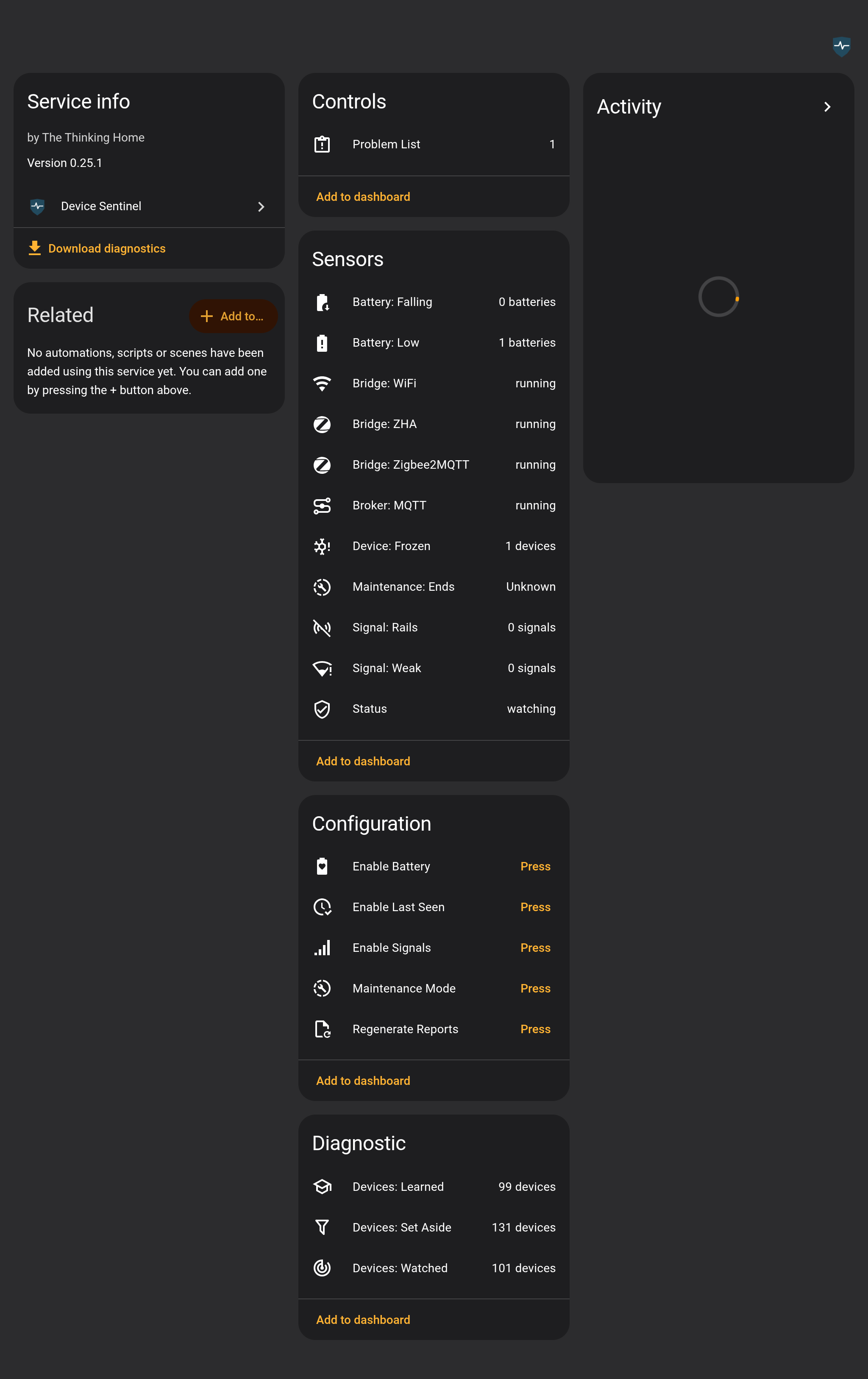
- At the top of the Device Sentinel dashboard, press the three Enable buttons (Battery, Signals, Last Seen) so the integration has data to learn from.
It takes time to learn your house. Freeze detection arms after a week, battery trends after two weeks, and signal baselines settle after three weeks.
Device Sentinel's settings are designed to be set once and forgotten. For complete details, see the Wiki Configuration Guide.
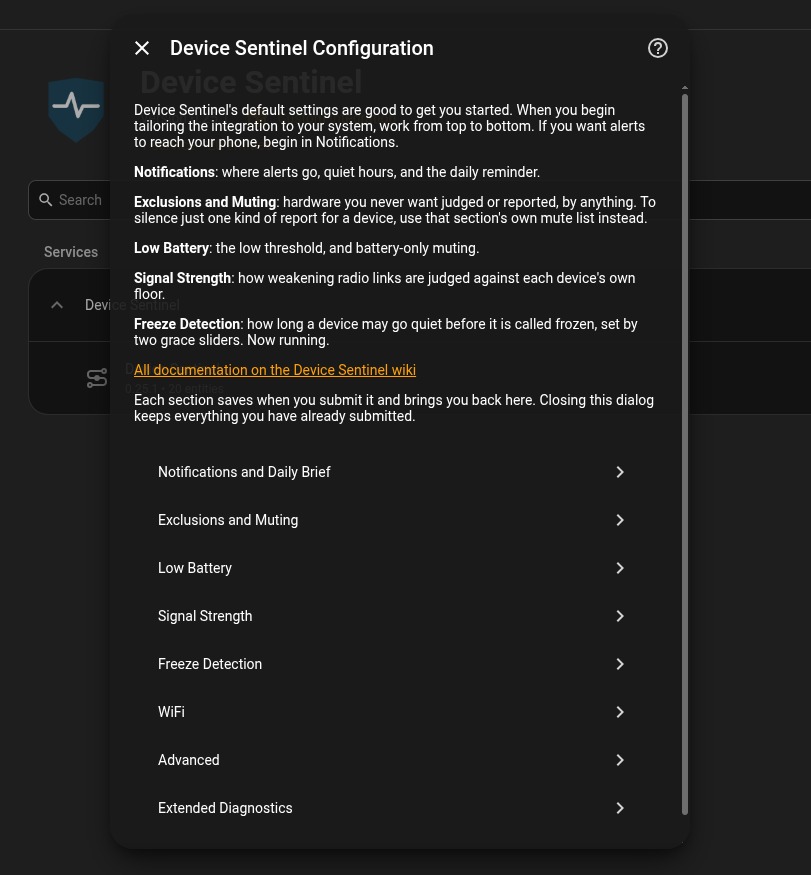
| Section | What it controls |
|---|---|
| Notifications | Where your instant alerts go, your quiet hours, when the Daily Brief is generated and sent, and whether device names in the daily brief open their pages on the dashboard. |
| Exclusions and Muting | Manage the hardware you want ignored. Exclude integrations that provide useless data (like mobile apps). Mute devices to stop alerts while keeping their history. |
| Low Battery | Set your flat percentage threshold and your "Days Till Empty" horizon. |
| Signal Strength | Define what constitutes a "bad signal day" by adjusting how far a signal must drop below its own normal baseline. |
| Freeze Detection | Set how much grace a device gets beyond its own rhythm before Device Sentinel reports it frozen. |
| WiFi | Configure the integration to watch your server's wireless adapter to detect home-wide Wi-Fi outages. |
| Advanced | Storage, history and maintenance-window settings, and the Data Trim tool. |
| Extended Diagnostics | Volunteer hardware data to help build support for new routers and coordinators. |
| Area | Status | Notes |
|---|---|---|
| Dashboard | Working | Everything Device Sentinel knows, one click apart, with each device's own page. Devices carry a type, and the tabs sort and filter by it. Administrators only. |
| Freeze Detection | Stable | Catches frozen, unavailable and flapping devices, each on its own rhythm. Devices with four or more weeks of history get a steadier rhythm that a few bad days can't stretch. |
| Battery | Stable | Warns on low batteries and on batteries falling or speeding up. |
| Storage | Stable | Survives power cuts and restores itself from a backup. |
| Zigbee2MQTT | Working | A bridge outage is one alert, and your re-pairs are never mistaken for faults. |
| MQTT | Working | A broker outage is one alert, not one per device. |
| ZHA | Working | A coordinator outage is one alert, and your re-pairs are recognized. |
| Signal | Experimental | Weak links shown on the dashboard; stuck readings alert. |
| WiFi | Experimental | A Wi-Fi outage is one alert. Needs a wireless adapter on your server or a supported router. |
| Z-Wave | Basic Detection | Devices watched; an integration outage is one alert. Next: reading Z-Wave JS's own report of a dead device. |
| Matter | Basic Detection | Devices watched; an integration outage is one alert. Next: a Thread network outage as one alert. |
Device Sentinel was built with AI assistance under my direction. Every design decision is mine, and nothing reaches this repository without my review and a full test gate, with detection proven on real hardware. AI_DISCLOSURE.md explains exactly what the AI did and how every release is checked.
Device Sentinel is under active development. The three newest releases published as Latest are below, and the changelog lists every release since the first. The 0.25 line, which gives every device a type and watches cloned hardware once, is in pre-release; the newest is 0.25.3.
0.24.11, October 6, 2026. A bad night no longer delays your freeze alerts for two weeks, and an outage or restart can't teach a device to stay quiet. Each device's page shows what powers it, from the Battery Notes library or your own entry, and lets you rename it, give it a room, label it and mute it where you see the problem.
0.23.20, October 1, 2026. An outage caused by a hub, broker or integration reaches you as one alert, and a recovery is announced only when a device actually reports again. A device that keeps dropping out becomes one problem instead of dozens. Batteries are read by the week, so a half-point wobble no longer reads as falling, and your brief and reports sit behind Home Assistant's sign-in.
0.22.29, September 27, 2026. Device Sentinel starts on any house, whatever your other integrations register, and the diagnostics download works again.
The full story: From Blueprints to Integration: Why Device Sentinel Exists.
License: GPL-3.0-or-later. Copyright (C) 2026 James Lander, The Thinking Home.
Battery types come from the device library of Battery Notes by Andrew Jackson, shipped with Device Sentinel under its MIT licence. The notice is in custom_components/device_sentinel/data/BATTERY_LIBRARY_LICENSE.md.