A security simulation and remote administration platform with a web based Command & Control (C2) panel for Windows, designed for ethical and authorised monitoring use cases.
- Remote command execution
- Live desktop streaming via Web RTC
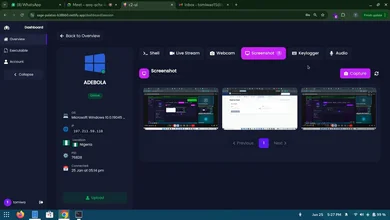
- Audio, screenshot and webcam capture
- Keystroke logging
- Persistent background agent (auto startup after reboot/shutdown/termination)
- Automatic agent update


git clone https://github.com/Tomiwa-Ot/win-rat.git
cd win-rat

# On Linux
chmod +x install.sh run.sh
./install.sh

# On windows
.\install.bat
To build the agent
- Open the agent folder in Visual Studio
- Set URL in
agent/Utilities/Communication.cstohttp://<IP>:8000/api - Build executable and deploy to target
NB: When deploying the agent to the target, ensure vpxmd.dll is in the same folder as the executable. You can find it in the root directory of this project. It is necessary for the live stream feature to work.
# On Linux
./run.sh

# On Windows
.\run.batIf you're interested in contributing or collaborating, open an issue, PR or contact the author.
THIS SOFTWARE IS INTENDED FOR AUTHORIZED, ETHICAL AND LEGAL USE ONLY. UNAUTHORIZED MONITORING OR ACCESS TO COMPUTER SYSTEMS VIOLATES PRIVACY LAWS. THE AUTHOR ASSUMES NO RESPONSIBILITY OR LIABILITY FOR MISUSE OF THIS SOFTWARE.