Releases: WebShells/WS-Sync-with-Github
WS Sync with Github

WS Sync with Github Shortcodes
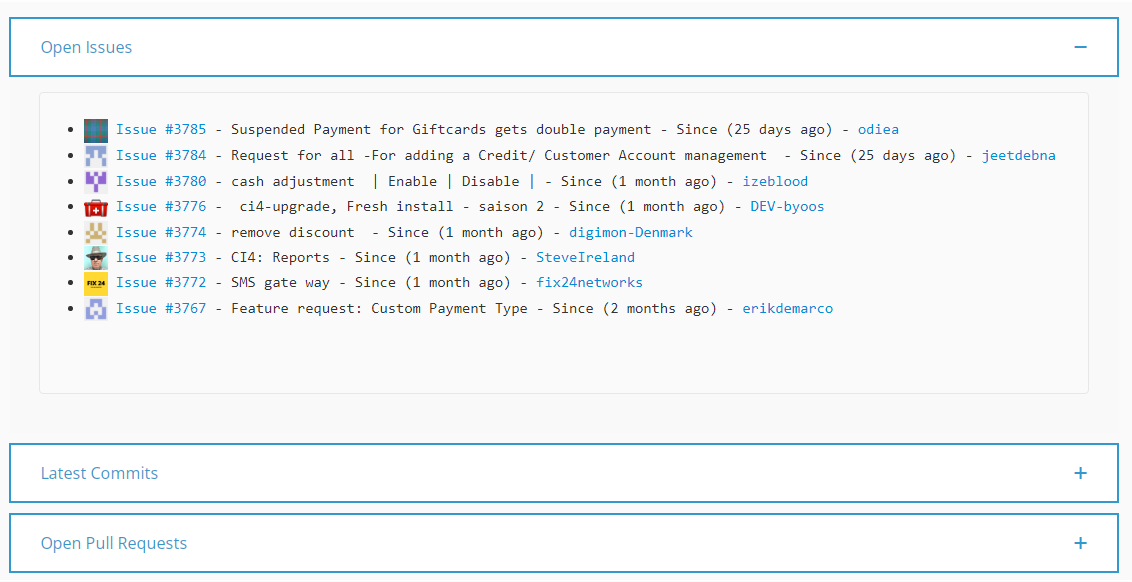
Now you can easily show/display open issues, new commits, and open pull requests using this plugin and it's shortcodes on your Wordpress website.
After downloading the Plugin Files and uploading it as a new plugin, just activate it and you are ready to use the shortcodes!
1. [gitsync_issues]
Displays a list of open issues from a GitHub repository.
Attributes
Token: Your GitHub personal access token. This is required for authentication and API access.repository: The name of the GitHub repository.owner: The owner or organization of the GitHub repository.
Usage
[gitsync_issues token="YourGitHubToken" repository="YourRepository" owner="OwnerOfRepo"]
2. [gitsync_commits]
Displays a list of the latest commits from a GitHub repository.
Attributes
Token: Your GitHub personal access token. This is required for authentication and API access.repository: The name of the GitHub repository.owner: The owner or organization of the GitHub repository.
Usage
[gitsync_commits token="YourGitHubToken" repository="YourRepository" owner="OwnerOfRepo"]
3. [gitsync_pull_requests]
Displays a list of open pull requests from a GitHub repository.
Attributes
Token: Your GitHub personal access token. This is required for authentication and API access.repository: The name of the GitHub repository.owner: The owner or organization of the GitHub repository.
Usage
[gitsync_pull_requests token="YourGitHubToken" repository="YourRepository" owner="OwnerOfRepo"]
Important Notes
-
For public repositories, the shortcodes work without a token. Add a GitHub personal access token if you need better rate limits or private repo access.
-
Replace
YourGitHubToken,YourRepository, andOwnerOfRepowith the appropriate values for your GitHub repository. -
The plugin uses the WordPress HTTP API, so cURL-specific setup is no longer required.
-
The plugin now sends a WordPress-safe User-Agent automatically.
-
Insert the desired shortcode into your WordPress post, page, or widget to display GitHub repository information on your website.
Enjoy displaying GitHub repository data on your WordPress site using these simple and efficient shortcodes!
Change Log
v1.1
- Replaced raw cURL requests with the WordPress HTTP API.
- Added input validation for repository owner and name.
- Added short-term caching with transients to reduce GitHub API calls.
- Improved escaping and added
rel="noopener noreferrer"to external links. - Made commit, issue, and pull request rendering more tolerant of missing GitHub fields.
Enjoy displaying GitHub repository data on your WordPress site using these simple and efficient shortcodes!
WS Sync with Github
WS Sync with Github Shortcodes
Now you can easily display open issues, new commits, and open pull requests using this plugin and it's shortcodes on your Wordpress website.
After downloading the Plugin Files and uploading it as a new plugin, just activate it and you are ready to use the shortcodes!
1. [gitsync_issues]
Displays a list of open issues from a GitHub repository.
Attributes
Token: Your GitHub personal access token. This is required for authentication and API access.repository: The name of the GitHub repository.owner: The owner or organization of the GitHub repository.
Usage
[gitsync_issues token="YourGitHubToken" repository="YourRepository" owner="OwnerOfRepo"]
2. [gitsync_commits]
Displays a list of the latest commits from a GitHub repository.
Attributes
Token: Your GitHub personal access token. This is required for authentication and API access.repository: The name of the GitHub repository.owner: The owner or organization of the GitHub repository.
Usage
[gitsync_commits token="YourGitHubToken" repository="YourRepository" owner="OwnerOfRepo"]
3. [gitsync_pull_requests]
Displays a list of open pull requests from a GitHub repository.
Attributes
Token: Your GitHub personal access token. This is required for authentication and API access.repository: The name of the GitHub repository.owner: The owner or organization of the GitHub repository.
Usage
[gitsync_pull_requests token="YourGitHubToken" repository="YourRepository" owner="OwnerOfRepo"]
Important Notes
-
Before using these shortcodes, make sure you have a valid GitHub personal access token. You can create a token with appropriate permissions in your GitHub account settings.
-
Replace
YourGitHubToken,YourRepository, andOwnerOfRepowith the appropriate values for your GitHub repository. -
Ensure that cURL is enabled on your server to make API requests to GitHub.
-
Add your own User-Agent in the code (where specified) to comply with GitHub API guidelines.
-
Insert the desired shortcode into your WordPress post, page, or widget to display GitHub repository information on your website.
Enjoy displaying GitHub repository data on your WordPress site using these simple and efficient shortcodes!
WS Github Sync Wordpress
WS Github Sync Wordpress Shortcodes
Now you can easily show open issues, new commits, and open pull requests using this plugin and it's shortcodes.
After downloading the Plugin Files and uploading it as a new plugin, just activate it and you are ready to use the shortcodes!
1. [gitsync_issues]
Displays a list of open issues from a GitHub repository.
Attributes
Token: Your GitHub personal access token. This is required for authentication and API access.repository: The name of the GitHub repository.owner: The owner or organization of the GitHub repository.
Usage
[gitsync_issues token="YourGitHubToken" repository="YourRepository" owner="YourOwner"]
2. [gitsync_commits]
Displays a list of the latest commits from a GitHub repository.
Attributes
Token: Your GitHub personal access token. This is required for authentication and API access.repository: The name of the GitHub repository.owner: The owner or organization of the GitHub repository.
Usage
[gitsync_commits token="YourGitHubToken" repository="YourRepository" owner="YourOwner"]
3. [gitsync_pull_requests]
Displays a list of open pull requests from a GitHub repository.
Attributes
Token: Your GitHub personal access token. This is required for authentication and API access.repository: The name of the GitHub repository.owner: The owner or organization of the GitHub repository.
Usage
[gitsync_pull_requests token="YourGitHubToken" repository="YourRepository" owner="YourOwner"]
Full Changelog: v1.0.0...v1.1.0
WS Github Sync Wordpress
WS Github Sync Wordpress Shortcodes
Now you can easily show open issues, new commits, and open pull requests using this plugin and it's shortcodes.
After downloading the Plugin Files and uploading it as a new plugin, just activate it and you are ready to use the shortcodes!
1. [gitsync_issues]
Displays a list of open issues from a GitHub repository.
Attributes
Token: Your GitHub personal access token. This is required for authentication and API access.repository: The name of the GitHub repository.owner: The owner or organization of the GitHub repository.
Usage
[gitsync_issues token="YourGitHubToken" repository="YourRepository" owner="YourOwner"]
2. [gitsync_commits]
Displays a list of the latest commits from a GitHub repository.
Attributes
Token: Your GitHub personal access token. This is required for authentication and API access.repository: The name of the GitHub repository.owner: The owner or organization of the GitHub repository.
Usage
[gitsync_commits token="YourGitHubToken" repository="YourRepository" owner="YourOwner"]
3. [gitsync_pull_requests]
Displays a list of open pull requests from a GitHub repository.
Attributes
Token: Your GitHub personal access token. This is required for authentication and API access.repository: The name of the GitHub repository.owner: The owner or organization of the GitHub repository.
Usage
[gitsync_pull_requests token="YourGitHubToken" repository="YourRepository" owner="YourOwner"]