


asv result file comparer for timings across environments or runs, plus
SBOM-style environment inventory diffs. For a published-site GUI with the same
classify semantics, see asv-tachyon
(docs).
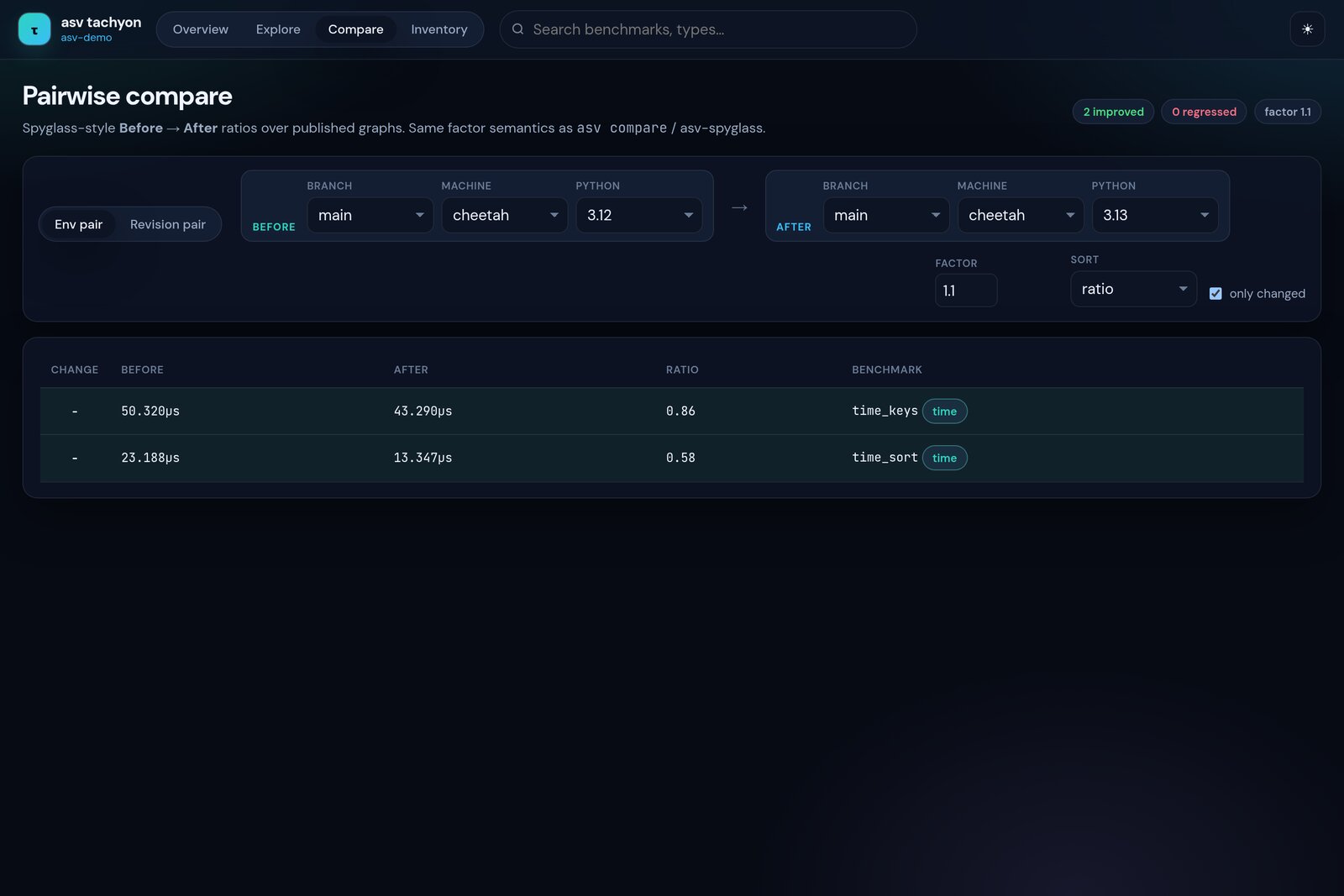
asv-tachyon Compare - same Before / After / Ratio idea as asv-spyglass compare, over published graphs
| Tool | Job |
|---|---|
| asv-spyglass | CLI: compare, compare-many, to-df, inventory, env-diff |
| asv-tachyon | Modern web UI over asv publish (Overview · Explore · Compare · Inventory) |
| asv-perch | PR comment tables (CI), built on spyglass |
To compare two asv result JSON files, do:
➜ asv-spyglass compare tests/data/d6b286b8-virtualenv-py3.12-numpy.json tests/data/d6b286b8-rattler-py3.12-numpy.json

| Change   | Before         | After          |   Ratio | Benchmark (Parameter)                                                                                                               |
|----------|----------------|----------------|---------|-------------------------------------------------------------------------------------------------------------------------------------|
| -        | 1.57e-07±3e-09 | 1.37e-07±3e-09 |    0.87 | benchmarks.TimeSuiteDecoratorSingle.time_keys(10) [rgx1gen11/virtualenv-py3.12-numpy -> rgx1gen11/rattler-py3.12-numpy]             |
| ...      | ...            | ...            |     ... | ...                                                                                                                                 |
Note
Without a benchmarks.json file, asv-spyglass does not know the units (e.g., nanoseconds) or parameter names, and thus displays the raw values from the JSON files in a concise scientific notation.
If you provide the benchmarks.json file, the output is enhanced with
human-readable units and statistical significance checks:
➜ asv-spyglass compare \
    tests/data/d6b286b8-virtualenv-py3.12-numpy.json \
    tests/data/d6b286b8-rattler-py3.12-numpy.json \
    tests/data/d6b286b8_asv_samples_benchmarks.json

| Change   | Before      | After       |   Ratio | Benchmark (Parameter)                                                                                                               |
|----------|-------------|-------------|---------|-------------------------------------------------------------------------------------------------------------------------------------|
| -        | 157±3ns     | 137±3ns     |    0.87 | benchmarks.TimeSuiteDecoratorSingle.time_keys(10) [rgx1gen11/virtualenv-py3.12-numpy -> rgx1gen11/rattler-py3.12-numpy]             |
| ... | ... | ... | ... | ... |You can compare multiple runs against a baseline using compare-many. This
produces a table with multiple ratio columns, similar to hyperfine:
➜ asv-spyglass compare-many \
    tests/data/a0f29428-conda-py3.11-numpy.json \
    tests/data/a0f29428-conda-py3.11.json \
    tests/data/a0f29428-virtualenv-py3.12-numpy.json \
    --bconf tests/data/asv_samples_a0f29428_benchmarks.json

| Benchmark                         | Baseline (rgx1gen11/conda-py3.11-numpy)   | rgx1gen11/conda-py3.11 (Ratio)   | rgx1gen11/virtualenv-py3.12-numpy (Ratio)   |
|-----------------------------------|-------------------------------------------|----------------------------------|---------------------------------------------|
| benchmarks.TimeSuite.time_add_arr | 94.8±30μs | 34.0±0.1μs (- 0.36) | 28.4±0.2μs (- 0.30) |ASV result files record the environment surface the run was configured with
(requirements matrix, Python version, machine attributes). Spyglass can dump
that as a lock-like inventory, or classify two inventories pairwise
(added / removed / version-bumped / unchanged).
Useful next to compare when a timing delta might come from env drift rather
than the code under test. This is a lightweight planned-inventory approach
(no full package solver); see also asv#1447.
Dump one result file:
➜ asv-spyglass inventory tests/data/d6b286b8-virtualenv-py3.12-numpy.json
machine: rgx1gen11
env_name: virtualenv-py3.12-numpy
python: 3.12
commit: d6b286b8794b81e009e097b7f3f28860861fc563
source: tests/data/d6b286b8-virtualenv-py3.12-numpy.json
components:
  [env] asv.env_name = virtualenv-py3.12-numpy
  [library] numpy = (unpinned)
  [machine] machine.arch = x86_64
  ...
  [runtime] python = 3.12
--format json writes a structured inventory; --format cyclonedx emits a
CycloneDX 1.5-shaped document (planned inventory, not a full installed-SBOM
claim). By default this uses a built-in lightweight encoder with no extra
dependencies. Install the optional SBOM extra to prefer the real
cyclonedx-python-lib encoder when present:
pip install 'asv-spyglass[sbom]'Diff two result files (default: library + runtime kinds, changed rows only):
➜ asv-spyglass env-diff \
    tests/data/a0f29428-virtualenv-py3.12.json \
    tests/data/a0f29428-virtualenv-py3.12-numpy.json

# Environment inventory diff

Baseline (`rgx1gen11/virtualenv-py3.12`) → contender (`rgx1gen11/virtualenv-py3.12-numpy`).

## Summary

- **unchanged**: 1
- **added**: 1
- **removed**: 0
- **version-bumped**: 0

## Components

| Status | Component | Baseline | Contender | Kind |
|--------|-----------|----------|-----------|------|
| added | `numpy` | ` - ` | `(empty)` | library |
Options:
--kind library --kind runtime(default surface);--all-kindsalso includes machine facts andasv.env_name--include-unchangedkeeps stable packages in the table--format jsonfor machine-readable output--fail-on-changeexits 1 if anything was added, removed, or version-bumped (handy in CI next to a timing gate)
The same classify is available in the asv-tachyon Inventory web view over published graphs or dropped result files.
Can be useful for exporting to other dashboards, or internally for further
inspection. The benchmark metadata file (BDAT) is optional - if omitted,
asv-spyglass auto-searches for benchmarks.json in the parent directory
of the result file (the standard .asv/results/ layout). If still not
found, results are displayed without extra metadata (units, parameter names).
Write a CSV with --csv:
➜ asv-spyglass to-df tests/data/d6b286b8-rattler-py3.12-numpy.json \
    tests/data/d6b286b8_asv_samples_benchmarks.json \
    --csv /tmp/result.csv
# With explicit benchmarks.json
➜ asv-spyglass to-df tests/data/d6b286b8-rattler-py3.12-numpy.json tests/data/d6b286b8_asv_samples_benchmarks.json
shape: (16, 17)
| benchmark_base | name | result | units | machine | env | version | ci_99_a | ci_99_b | q_25 | q_75 | number | repeat | samples | param_size | param_n | param_func_name |
|--------------------------------|--------------------------------|-----------|---------|-----------|----------------------|-------------------------------|-----------|-----------|-----------|-----------|--------|--------|---------|------------|---------|-----------------|
| benchmarks.TimeSuiteDecoratorS | benchmarks.TimeSuiteDecoratorS | 1.3738e-7 | seconds | rgx1gen11 | rattler-py3.12-numpy | 64746c9051ff76aa879b428c27b42 | 1.3444e-7 | 1.4947e-7 | 1.3621e-7 | 1.4310e-7 | 67364 | 10 | null | 10 | null | null |
| ingle.time_keys | ingle.time_keys(10) | | | | | 47e8ed976c44a40579ae9... | | | | | | | | | | |
| ... | ... | ... | ... | ... | ... | ... | ... | ... | ... | ... | ... | ... | ... | ... | ... | ... |Without benchmarks.json, units and parameter name columns are absent:
# Without benchmarks.json (auto-search finds nothing)
➜ asv-spyglass to-df tests/data/d6b286b8-rattler-py3.12-numpy.json
shape: (16, 14)
| benchmark_base                 | name                           | result    | units | machine   | env                  | version                       | ci_99_a   | ci_99_b   | q_25      | q_75      | number | repeat | samples |
|--------------------------------|--------------------------------|-----------|-------|-----------|----------------------|-------------------------------|-----------|-----------|-----------|-----------|--------|--------|---------|
| benchmarks.TimeSuiteDecoratorS | benchmarks.TimeSuiteDecoratorS | 1.3738e-7 | null  | rgx1gen11 | rattler-py3.12-numpy | 64746c9051ff76aa879b428c27b42 | 1.3444e-7 | 1.4947e-7 | 1.3621e-7 | 1.4310e-7 | 67364  | 10     | null    |
| ingle.time_keys                | ingle.time_keys(10)            |           |       |           |                      | 47e8ed976c44a40579ae9...      |           |           |           |           |        |        |         |
| ... | ... | ... | ... | ... | ... | ... | ... | ... | ... | ... | ... | ... | ... |While asv-spyglass can function with only result JSON files, providing the
benchmarks.json file (the BCONF or BDAT argument) enables:
- Human-readable units: Without it, values are shown as raw numbers (concise scientific notation).
- Parameter names: Enables better column labeling in DataFrames.
- Statistical significance: Uses benchmark-specific thresholds if defined.
If not explicitly provided, asv-spyglass will attempt to find
benchmarks.json by looking in the parent directory of the first result file,
which is the standard layout for .asv/results/<machine>/.
Consider the following situation:
pixi shell & uv pip install -e ".[test]" # To start with the right setup for asv_spyglass
# Somewhere else..
gh repo clone airspeed-velocity/asv_samples
cd asv_samples
git checkout decorator-params
# Generate the config
python scripts/gen_asv_conf.py asv.conf.base.json
Now assuming there are two environments which are present, and both have the
project to be tested installed. For this we will use micromamba.
micromamba create -p $(pwd)/.tmp_1 -c conda-forge "python==3.8" pip asv numpy
$(pwd)/.tmp_1/bin/pip install .
micromamba create -p $(pwd)/.tmp_2 -c conda-forge "python==3.12" pip asv numpy
$(pwd)/.tmp_2/bin/pip install .
Activating the environment is not necessary in this instance, but for more
complex workflows where the installation can be more convoluted, feel free to
work within the environment. Now we can run asv.
➜ asv run -E existing:$(pwd)/.tmp_2/bin/python --record-samples --bench 'multi' --set-commit-hash "HEAD"
· Discovering benchmarks
· Running 1 total benchmarks (1 commits * 1 environments * 1 benchmarks)
[ 0.00%] · For asv_samples commit d6b286b8 <decorator-params>:
[ 0.00%] ·· Building for existing-py_home_rgoswami_Git_Github_Quansight_asvWork_asv_samples_.tmp_2_bin_python
[ 0.00%] ·· Benchmarking existing-py_home_rgoswami_Git_Github_Quansight_asvWork_asv_samples_.tmp_2_bin_python
[50.00%] ··· Running (benchmarks.time_ranges_multi--).
[100.00%] ··· benchmarks.time_ranges_multi                                                                                                                                                                         ok
[100.00%] ··· ===== =========== =============
              --            func_name
              ----- -------------------------
                n      range        arange
              ===== =========== =============
                10    197±1ns      1.12±0μs
               100   535±0.8ns   3.30±0.03μs
              ===== =========== =============

➜ asv run -E existing:$(pwd)/.tmp_1/bin/python --record-samples --bench 'multi' --set-commit-hash "HEAD"
· Discovering benchmarks
· Running 1 total benchmarks (1 commits * 1 environments * 1 benchmarks)
[ 0.00%] · For asv_samples commit d6b286b8 <decorator-params>:
[ 0.00%] ·· Building for existing-py_home_rgoswami_Git_Github_Quansight_asvWork_asv_samples_.tmp_1_bin_python
[ 0.00%] ·· Benchmarking existing-py_home_rgoswami_Git_Github_Quansight_asvWork_asv_samples_.tmp_1_bin_python
[50.00%] ··· Running (benchmarks.time_ranges_multi--).
[100.00%] ··· benchmarks.time_ranges_multi                                                                                                                                                                         ok
[100.00%] ··· ===== ========= =============
              --           func_name
              ----- -----------------------
                n     range       arange
              ===== ========= =============
                10   324±2ns     1.09±0μs
               100   729±4ns   3.25±0.03μs
              ===== ========= =============
Bear in mind that --dry-run or -n or --python=same will skip writing the
results file, and therefore are not going to be relevant here.
With the results files in place, it is now trivial to compare the results across environments.
asv-spyglass compare .asv/results/rgx1gen11/*.tmp_1* .asv/results/rgx1gen11/*.tmp_2* .asv/results/benchmarks.json
| Change   | Before      | After       |   Ratio | Benchmark (Parameter)                                                                                                                                                                                                                          |
|----------|-------------|-------------|---------|------------------------------------------------------------------------------------------------------------------------------------------------------------------------------------------------------------------------------------------------|
|          | 1.09±0μs    | 1.12±0μs    |    1.03 | benchmarks.time_ranges_multi(10, 'arange') [rgx1gen11/existing-py_home_asv_samples_.tmp_1_bin_python -> rgx1gen11/existing-py_home_asv_samples_.tmp_2_bin_python]  |
| -        | 324±2ns     | 197±1ns     |    0.61 | benchmarks.time_ranges_multi(10, 'range') [rgx1gen11/existing-py_home_asv_samples_.tmp_1_bin_python -> rgx1gen11/existing-py_home_asv_samples_.tmp_2_bin_python]   |
|          | 3.25±0.03μs | 3.30±0.03μs |    1.02 | benchmarks.time_ranges_multi(100, 'arange') [rgx1gen11/existing-py_home_asv_samples_.tmp_1_bin_python -> rgx1gen11/existing-py_home_asv_samples_.tmp_2_bin_python] |
| -        | 729±4ns     | 535±0.8ns   |    0.73 | benchmarks.time_ranges_multi(100, 'range') [rgx1gen11/existing-py_home_asv_samples_.tmp_1_bin_python -> rgx1gen11/existing-py_home_asv_samples_.tmp_2_bin_python]  |
The [machine/env -> machine/env] suffix can get very wide with long
venv paths. Use --label-before / --label-after to replace it with
short names, or --no-env-label to suppress it entirely:
➜ asv-spyglass compare --label-before py38 --label-after py312 \
    .asv/results/rgx1gen11/*.tmp_1* \
    .asv/results/rgx1gen11/*.tmp_2* \
    .asv/results/benchmarks.json

| Change   | Before      | After       |   Ratio | Benchmark (Parameter)                                                         |
|----------|-------------|-------------|---------|-------------------------------------------------------------------------------|
| -        | 157±3ns     | 137±3ns     |    0.87 | benchmarks.TimeSuiteDecoratorSingle.time_keys(10) [py38 -> py312]             |
| -        | 643±2ns     | 543±2ns     |    0.84 | benchmarks.TimeSuiteDecoratorSingle.time_keys(100) [py38 -> py312]            |
| ...      | ...         | ...         |     ... | ...                                                                           |
➜ asv-spyglass compare --no-env-label \
.asv/results/rgx1gen11/*.tmp_1* \
.asv/results/rgx1gen11/*.tmp_2* \
.asv/results/benchmarks.json
| Change | Before | After | Ratio | Benchmark (Parameter) |
|----------|-------------|-------------|---------|---------------------------------------------------------------|
| - | 157±3ns | 137±3ns | 0.87 | benchmarks.TimeSuiteDecoratorSingle.time_keys(10) |
| - | 643±2ns | 543±2ns | 0.84 | benchmarks.TimeSuiteDecoratorSingle.time_keys(100) |
| ... | ... | ... | ... | ... |Use --split to group output by improvement, unchanged, regression, and
incomparable sections. Use --only-changed to hide unchanged benchmarks.
To see only improvements or only regressions:
# Show only benchmarks that improved
asv-spyglass compare --only-improved B1 B2 [BCONF]

# Show only benchmarks that regressed
asv-spyglass compare --only-regressed B1 B2 [BCONF]
These two flags are mutually exclusive. The compare command exits with code 1 when any regressions are detected, which is useful in CI.
All contributions are welcome, this includes code and documentation contributions but also questions or other clarifications. Note that we expect all contributors to follow our Code of Conduct.
Since the output of these are mostly text oriented, and the inputs are json,
these are handled via a mixture of reading known data and using golden master
testing aka approval testing. Thus pytest with pytest-datadir and
ApprovalTests.Python is used.
A pre-commit job is setup on CI to enforce consistent styles, so it is best to
set it up locally as well (using pipx for isolation):
# Run before commiting
pipx run pre-commit run --all-files
# Or install the git hook to enforce this
pipx run pre-commit installWhy another CLI instead of being in
asv?
I didn't want to handle the argparse oriented CLI in asv. That being said
this will be under the airspeed-velocity organization..