


This Blender add-on simplifies the process of exporting your 3D scenes into interactive web experiences using A-Frame, a popular web framework for building virtual reality (VR) and augmented reality (AR) experiences.

- Seamless Export: Quickly export your entire Blender scene, including models, materials, and animations, to A-Frame HTML and GLB (binary glTF) files.
- Collision Detection: Automatically add collision detection to your exported models using A-Frame's physics system, enabling interactive experiences.
- Camera Controls: Easily set up basic WASD controls for navigating your A-Frame scene with the camera.
- Customization: Customize the generated A-Frame code to add additional features, components, or interactions.
- Download the latest release of the add-on (
.zipfile) from the Releases page. - In Blender, go to
Edit>Preferences>Add-ons>Install...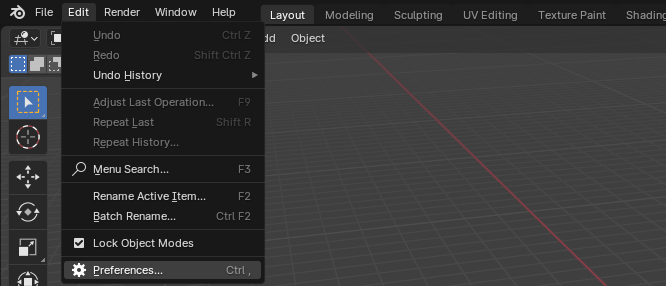
- Select the downloaded
.zipfile and clickInstall Add-on.
- Enable the "A-Frame Exporter" add-on in the list.


-
Create your 3D scene in Blender.

-
Go to
File>Export>A-Frame (.html).
-
Choose a location to save the files and click
Export A-Frame.
-
The add-on will generate an HTML file (
your_scene_name.html) and a GLB file (your_scene_name.glb). -
Open the HTML file in a web browser to view your interactive A-Frame scene.


- Make sure you have a web server running to view the exported HTML file correctly.
- For more advanced A-Frame features and customization, refer to the A-Frame documentation.
Contributions are welcome! Feel free to submit issues, feature requests, or pull requests.
This add-on is released under the MIT License.