A secure, high-performance DNS-over-HTTPS (DoH) proxy running on Cloudflare's global Edge via Pages Functions. Optimized for speed, geographic accuracy (ECS), and professional adblocking.
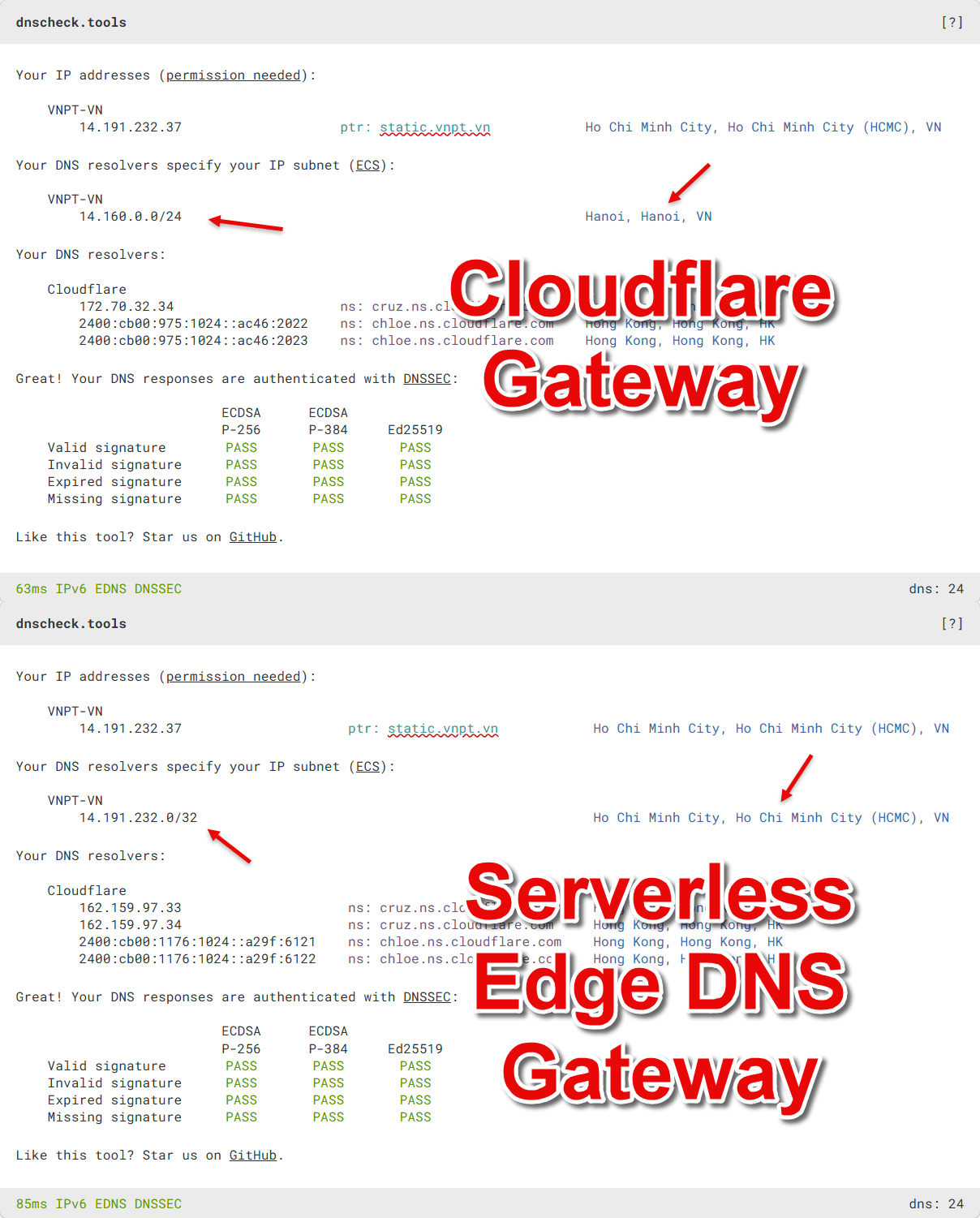

- 100% Free Usage: Fully hosted on the Cloudflare Pages Free Tier with a limit of 100,000 requests per day. Given an average consumption of 200 – 4,000 requests per device daily, a single account can comfortably support 10 – 20 devices (or even 100 – 200 devices with casual usage).
- Custom Domain Scaling: Attach your own domain for a professional, short DNS endpoint. You can spread usage across multiple Cloudflare accounts to multiply your quota (100k per account) while keeping your custom domains.
- Smart Adblocking: Local filtering using professional lists (AdGuard, ABPVN, Bypass-VN, etc.), automatically updated every hour.
- ECS Geo-Optimization (RFC 7871): Injects EDNS Client Subnet (IPv4
/24, IPv6/48) to ensure CDNs (Akamai, CloudFront, Fastly, BunnyCDN, Gcore) resolve you to the nearest servers. - Sequential Failover Reliability:
- Primary/Fallback: Tries Cloudflare Gateway primary endpoint first, with automatic failover to a backup endpoint if it fails.
- Geo-Bypass: Automatically detects geo-blocked results (127.0.0.1) and re-resolves via Mullvad DNS.
- Early Response Filtering: Drops unnecessary query types (
ANY,AAAA,PTR,HTTPS) at the edge to save resources and improve speed. - Private TLD Shield: Prevents local/internal domain leaks (e.g.,
.local,.lan, router logins) by returningNXDOMAINinstantly. - DNS Redirection (CNAME Injection): Redirects domain A to domain B using a CNAME record. This allows forcing a specific CDN chain or overriding resolution (e.g., Bilibili, TikTok, Medium).
- Zero-App Setup: Native Apple
.mobileconfiggeneration and a clean, responsive landing page included.
- Fork this project to your GitHub account.
- Go to the Actions tab in your forked repository and click I understand my workflows, go ahead and enable them.
- Manually select and Enable the following workflows:
Update DNS BlocklistsandDelete old workflow runs.
- Go to Workers & Pages > Create application > Connect to Git.
- Connect your GitHub and select the forked repository.
- Build Settings: Leave everything as default (no changes needed).
- Click Save and Deploy.
Detailed settings are managed at the top of the functions/[[path]].js file.
The parameters below are pre-configured with optimal defaults.
Important
Only Cloudflare Gateway ensures the most accurate CDN resolution for services like Akamai. You can use the default upstreams provided, or create your own DNS locations within your Cloudflare account.
| Constant | Default | Description |
|---|---|---|
UPSTREAM_PRIMARY |
Cloudflare Gateway | Main resolver URL. |
UPSTREAM_FALLBACK |
Cloudflare Gateway | Backup resolver. |
UPSTREAM_GEO_BYPASS |
dns.mullvad.net |
Used when upstream returns loopback (127.0.0.1). |
| Constant | Default | Description |
|---|---|---|
BLOCK_AAAA |
false |
Forces IPv4 routing by blocking AAAA. |
BLOCK_HTTPS |
false |
Prevents Type 65 lookups (speeds up resolution). |
BLOCK_ANY |
false |
Blocks resource-heavy ANY queries. |
BLOCK_PTR |
false |
Blocks reverse DNS queries. |
BLOCK_PRIVATE_TLD |
true |
Blocks internal/router domains. |
ECS_INJECTION_ENABLED |
true |
Enables ECS Injection (Required for accurate CDN). |
Rules are located in the rules/ folder. When you modify and commit these files on GitHub, Cloudflare Pages will automatically sync and apply the new configuration.
Detailed rules:
blocklists.txt/allowlists.txt: Automatically updated every hour.- Logic: Domains in
allowlists.txtoverrideblocklists.txt, ensuring they are never blocked even if flagged by a filter (prevents false positives). - How to configure: Edit the URLs in the
curlcommand inside update_lists.sh to add or remove filtering sources.
- Logic: Domains in
private_tlds.txt: Add your custom local domains or router URLs here.redirect_rules.txt: Redirects domain A to domain B using a CNAME record. Perfect for forcing specific CDN results.- Format:
source-domain target-domain - Example:
www.bilibili.tv www.bilibili.tv.w.cdngslb.com - Effect: If
www.bilibili.tvrandomly returns multiple CDNs (e.g., GSLB or Akamai), this rule forces it to always usewww.bilibili.tv.w.cdngslb.com.
- Format:
- Go to Settings > Privacy and Security > Security.
- Enable "Use secure DNS" and select "Custom".
- Paste your endpoint:
https://your-project.pages.dev/dns-query
- Open your project URL in Safari.
- Click Download Apple Profile and install via system settings.
- Open Intra > Configure custom server URL.
- Paste your
/dns-queryendpoint and toggle ON.
| Endpoint | Description |
|---|---|
/dns-query |
The DoH resolver endpoint. |
/debug |
Returns a JSON summary of config, stats, and rule counts. |
/apple |
Generates a native Apple .mobileconfig profile for iOS/macOS. |