SerpBear is a full-stack Next.js application that tracks where your pages rank on Google, enriches those rankings with Google Search Console and Google Ads data, and keeps stakeholders informed with scheduled email digests. The project ships as a production-ready Docker image, a conventional Node.js application, and a programmable REST API so you can integrate SERP intelligence wherever you need it.
Not every scraper provider is validated on every release—please report any issues with specific integrations in GitHub Discussions.
1. Bug fixes & patches – Hardened scrapers survive DOM and API drift, patched dependency regressions, and keep long-running jobs stable under high request volumes.
2. Configuration & flexibility – Streamlined environment variables, CI-powered deployment workflows, and dynamic toggles for ValueSerp, SerpAPI, and other providers eliminate hardcoded defaults.
3. Security & modernization – Modern Node.js support, removal of deprecated libraries, and stricter sanitisation guard against warning-laden installs and insecure runtime behaviour.
4. Error handling & observability – Descriptive logs, layered retry logic, and adjustable debug levels make diagnosing scraper hiccups or API failures straightforward.
5. Performance & caching – Smarter SERP caching, batched keyword refreshes, and fewer redundant calls drive faster crawls while reducing API spend.
6. Google Map Pack: Now marks keywords that show up in the map pack.
7. White Labeling: Easy white-labeling.
8. Per Domain Scraping: Easily set scrapers per domain globally or both.
9. Transparent SERP result coverage: The keyword details panel now shows exactly which pages were scraped and which were skipped. Skipped page ranges appear as clearly labelled placeholder blocks between real results, and the "not found" badge adapts to reflect the actual number of results checked rather than always displaying "No Results".
10. Dynamic scraping strategy: A flexible 3-tier system lets you control how many pages are checked per keyword at both the global and per-domain level. Basic (default) scrapes only the first page; Custom scrapes a fixed number of pages (1–10); Smart targets the page where the keyword was last seen ± one neighbour, with an optional full-10-page fallback. This directly addresses Google's removal of
num=100support so keywords beyond position 10 are no longer always reported as "No Results".


- 📘 Documentation: https://docs.serpbear.com/
- 📜 Changelog:
CHANGELOG.md - 🐳 Docker Hub image: https://hub.docker.com/r/vontainment/v-serpbear
- 🆕 Current version: v4.0.0 by Vontainment
- 🛟 Community support: GitHub Discussions
- Unlimited domains & keywords: Organise an unrestricted number of tracked keywords across multiple sites.
- Turn-key scraping integrations: Connect a managed SERP data provider or bring your own proxy, then run high-volume organic rank checks with built-in retries.
- Keyword research & ideas: Pull search volumes and suggested keywords straight from your Google Ads test account.
- Google Search Console enrichment: Overlay verified impression and click data on keyword trends to see which rankings actually drive traffic.
- Scheduled notifications: Deliver branded summaries of ranking changes, winners/losers, and visit counts to your inbox. Each digest now opens with a tracker summary—styled like the dashboard card—that highlights total tracked keywords, the rolling average position, and, when supported by your scraper, how many queries sit inside the local map pack before diving into Search Console charts. The summary still derives the averages from the live keyword data, but now prefers any persisted domain map-pack totals and only falls back to keyword counts when that stat is unavailable so missing aggregates no longer drop either figure to zero. Mobile-friendly tweaks keep the tracker metrics aligned in columns on small screens so the compact layout mirrors the desktop digest.
- Trusted domain stats: Background jobs remain the single source of truth for domain aggregates. When those jobs have not yet persisted an average position or map-pack total, the API simply omits those fields instead of guessing from the latest keyword sample.
- Local map-pack tracking: When supported scrapers return the top-three local pack, SerpBear stores the flag and displays a stacked "MAP" badge beneath each keyword's country flag in the dashboard and a compact "MP" badge in email digests. The badge now suppresses the legacy sprite background so you will not see stray punctuation behind the green label. The domains overview also surfaces a "Map Pack" counter in the tracker summary when your chosen scraper exposes this data.
- Mobile-ready progressive web app: Install the dashboard on iOS or Android for quick monitoring on the go. The layout keeps consistent gutters while the top navigation now stretches truly edge-to-edge on phones—the helper offsets the body gutter and widens the bar so no stray right-side padding returns.
- Adaptive desktop canvas: Domain dashboards, Search Console insights, and the research workspace reuse a shared
desktop-containerutility that expands to 90 % of the viewport on large screens so wide monitors surface more data at once. - Focused loading states: Keyword tables drive their own loading indicators, so the single-domain and research workspaces stay visible while data refreshes, and only the domains index keeps the full-page bootstrap overlay when first loading.
- Robust API: Manage domains, keywords, settings, and refresh jobs programmatically for automated reporting pipelines.
- Transparent SERP coverage in keyword details: The keyword details panel groups search results into segments. When a scraper strategy skips pages, dashed "Page X: N results skipped" placeholders appear between real result cards so you can see precisely which positions were checked. An inline banner summarises scraped vs. skipped counts, and the position badge on not-found keywords adapts to say "Not in First N" (where N is the actual scraped count) rather than always showing a hardcoded 100.
- Frontend & API: Next.js 16 application serving React pages and JSON endpoints from a single codebase.
- Database: SQLite (via a custom
better-sqlite3dialect) by default, with optional external database support through Sequelize. - Background workers: Node-based cron runner schedules scrapes, retries, Google Search Console refreshes, and notification emails according to configurable cron expressions and timezone settings.
- Refresh queue: Per-domain locking ensures the same domain is never refreshed twice simultaneously, while configurable concurrency keeps multiple domains processing in parallel.
- Integrations: Scraper selection, Google Ads credentials, and SMTP settings are managed in the Settings UI (persisted in
data/settings.json), while Search Console credentials can be supplied in Settings or via theSEARCH_CONSOLE_*environment variables as a global fallback.
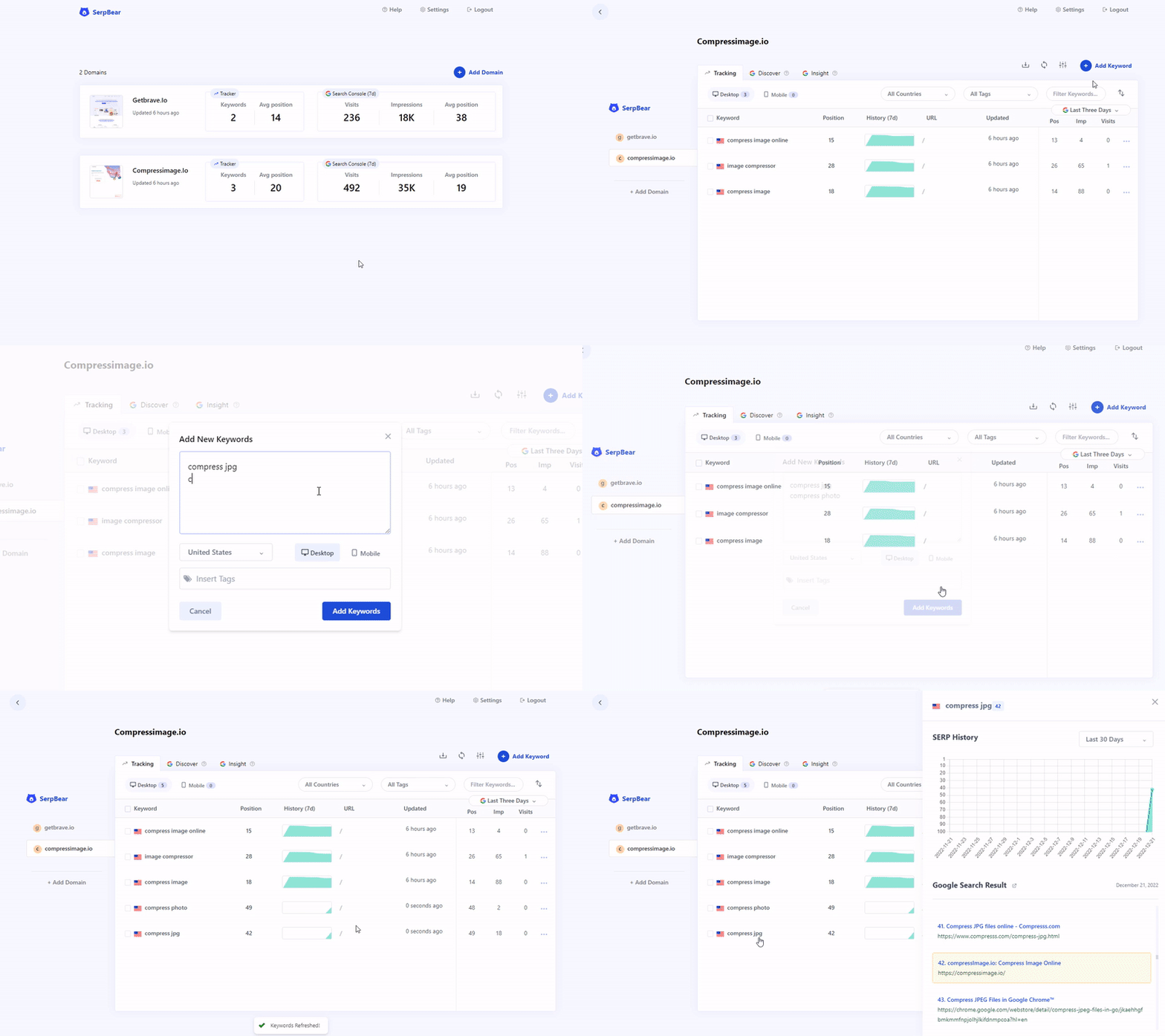

If the animation above does not render, imagine a 15-second screen recording that walks through adding a domain, reviewing the keyword table, and exploring rank history charts. The UI mirrors what you will see after deploying the app.
git clone https://github.com/djav1985/v-serpbear.git
cd v-serpbear
cp .env.example .env
# edit .env with your credentials and scraping provider
docker compose up -d
The default compose stack uses a named Docker volume (data) mounted at /app/data inside the container so your SQLite database and cached Search Console exports persist between updates. To inspect or back up the data, use docker volume inspect serpbear_data or copy files out with docker cp.
- Install Node.js 20.18.1 or newer, matching the version pinned in
.nvmrc. - Install dependencies with
npm install(ornpm ci). - Copy
.env.exampleto.env.localfor local development (Docker Compose uses.env) and fill in the required keys. - Apply database migrations:
npm run db:migrateto set up the SQLite database schema. - Start the development server via
npm run devor build and serve production assets withnpm run build && npm run start.
Note
Node.js 18 is no longer supported because core dependencies—such as better-sqlite3, happy-dom, and cheerio—now require Node.js 20+ runtime features.
- SQLite files: Live under
./databy default for local Node.js development. Docker deployments use a named Docker volume (data) mapped to/app/datainside the container; no manual bind-mount is required. - Docker deployments: Database migrations run automatically from
entrypoint.shwhenever the container starts. No manual intervention required. - Local Node.js development: Use
npm run db:migrateto apply schema changes manually (as shown in the setup steps above). Runnpm run db:revertto roll back the most recent migration if needed. - Migration tooling: The bundled Sequelize/Umzug tooling works for both approaches—Docker uses it internally, while local development exposes it through npm scripts.
- Keyword history rows now default to
{}. The included migrations also backfill any legacy'[]'payloads so refresh jobs always receive plain objects.
Runtime behaviour is controlled through environment variables and settings stored in data/settings.json. The tables below summarise supported environment variables; defaults mirror .env.example where provided.
Env files. Next.js loads
.env.localfor local development, while Docker Compose reads.env. The standalone cron worker (tsx cron.js/npm run cron) explicitly loads.env.local, so keep local credentials there when running the worker outside Docker.
| Variable | Default | Required | Description |
|---|---|---|---|
USER |
admin |
✅ | Initial dashboard username. Update after first login. |
USER_NAME |
— | Optional | Alternate username variable used when USER is not set (useful for some container environments). |
PASSWORD |
0123456789 |
✅ | Initial dashboard password. Update after first login. |
SECRET |
random string | ✅ | Cryptographic secret for cookie signing and JWT verification. Generate a unique value per deployment. |
APIKEY |
random string | ✅ | Server-side API key used to authenticate REST requests from external clients. |
SESSION_DURATION |
24 |
✅ | Session lifetime (hours). Controls how long login cookies remain valid. |
| Variable | Default | Required | Description |
|---|---|---|---|
NEXT_PUBLIC_APP_URL |
http://localhost:3000 |
✅ | Public URL of your deployment. Determines OAuth callbacks and absolute links in email digests. Server-side code falls back to APP_URL when NEXT_PUBLIC_APP_URL is unset. |
APP_URL |
— | Optional | Optional server-side origin used when NEXT_PUBLIC_APP_URL is unset. Helpful for CLI scripts that cannot inject the public variable. |
NEXT_PUBLIC_SCREENSHOTS |
true |
✅ | Toggle keyword thumbnail capture in the UI. Set to false to fall back to favicons. |
NEXT_PUBLIC_WHITE_LABEL |
false |
Optional | Enables white-label branding. When true, the platform name and logo come from the variables below. |
WHITE_LABEL_LOGO_FILE |
branding-logo.png |
Optional | File name under /app/data for the custom logo. Use a 96×96px PNG, SVG, or WEBP asset for best results. |
NEXT_PUBLIC_PLATFORM_NAME |
SerpBear |
Optional | Display name for the application and notification emails in white-label mode. |
Runtime branding. Changes to
NEXT_PUBLIC_WHITE_LABEL,NEXT_PUBLIC_PLATFORM_NAME, or your logo asset are loaded on-demand by the UI. Update the environment values or files and refresh the browser—no container rebuild is required.
| Variable | Default | Required | Description |
|---|---|---|---|
SEARCH_CONSOLE_CLIENT_EMAIL |
— | Optional | Service account email with access to the Search Console properties you want to track. |
SEARCH_CONSOLE_PRIVATE_KEY |
— | Optional | Corresponding private key (remember to keep newlines escaped in .env files). |
Search Console credentials can also be supplied via the Settings UI (stored in data/settings.json), and those values take precedence over environment variables. Google Ads credentials are configured in the Settings UI and stored encrypted in data/settings.json—there are no Google Ads environment variables in the current codebase.
| Variable | Default | Required | Description |
|---|---|---|---|
| (managed in Settings UI) | — | — | SMTP settings (server, port, credentials, sender, and TLS override) are configured in the Notification settings modal or via the settings API and stored in data/settings.json. They are not read from environment variables in the current codebase, but SerpBear will trim whitespace/trailing dots on the optional SMTP TLS hostname (smtp_tls_servername) before passing it to Nodemailer. |
Use the Settings UI (or /api/settings) to manage values that are persisted in data/settings.json and encrypted with SECRET. Key configuration areas include:
- Scraper settings:
scraper_type,scraping_api,proxy,scrape_interval,scrape_delay,scrape_retry,scrape_strategy,scrape_pagination_limit,scrape_smart_full_fallback - Notification defaults:
notification_email,notification_email_from,notification_email_from_name - SMTP credentials:
smtp_server,smtp_port,smtp_username,smtp_password,smtp_tls_servername - Google integrations:
search_console_client_email,search_console_private_key, and theadwords_*credentials used for keyword ideas - UI preferences:
keywordsColumns
| Variable | Default | Required | Description |
|---|---|---|---|
CRON_TIMEZONE |
America/New_York |
✅ | IANA timezone used for all scheduled jobs. |
CRON_MAIN_SCHEDULE |
0 0 0 * * * |
✅ | Cron expression for daily scraping and Search Console refresh runs. |
CRON_FAILED_SCHEDULE |
0 0 */1 * * * |
✅ | Cron expression that retries failed scrapes. |
CRON_EMAIL_SCHEDULE |
0 0 6 * * * |
✅ | Cron expression for the daily notification email digest. |
All cron expressions are normalised at runtime—quotes and stray whitespace are stripped automatically before scheduling jobs.
| Variable | Default | Required | Description |
|---|---|---|---|
LOG_LEVEL |
info |
Optional | Controls log verbosity for the structured logger. Accepts error, warn, info, debug; set to off, none, false, or 0 to disable logging. |
LOG_SUCCESS_EVENTS |
— | Optional | Reserved for future use; ignored in the current codebase. |
NEXT_REMOVE_CONSOLE |
— | Optional | Not wired in next.config.js; currently has no effect. |
REFRESH_QUEUE_CONCURRENCY |
3 |
Optional | Maximum number of domains that can be refreshed in parallel. The queue still prevents duplicate refreshes for the same domain. |
Set ANALYZE=true before running next build to generate a static bundle analysis report (bundle-analyzer-report.html) as configured in next.config.js.
SerpBear integrates with several managed APIs in addition to a "bring your own proxy" option. The table below summarises their capabilities as implemented in the current codebase.
| Provider | Working | Pricing snapshot* | Geo targeting | Map Pack coverage | Results coverage | API key header |
|---|---|---|---|---|---|---|
Custom proxy (proxy) |
? | Bring your own | Google default locale | No – organic listings only | Strategy-controlled (10 per page, up to 10 pages) | None |
Scraping Robot (scrapingrobot) |
? | Free tier (~5,000 req/mo) | Country-level | No – organic listings only | Strategy-controlled (10 per page, up to 10 pages) | Query string token |
ScrapingAnt (scrapingant) |
? | Pay-as-you-go | Country-level (select markets) | No – organic listings only | Strategy-controlled (10 per page, up to 10 pages) | Header x-api-key |
Serply (serply) |
? | Plans from $49/mo | City & region (supported markets) | Yes – extracts local map pack | Strategy-controlled (10 per page, up to 10 pages) | X-Api-Key + X-Proxy-Location |
SpaceSerp (spaceSerp) |
? | Lifetime + subscription plans | City-level | Yes – extracts local map pack | Strategy-controlled (10 per page, up to 10 pages) | Query string apiKey |
SerpApi (serpapi) |
✅ | Free 250/mo + Plans from $75/mo | City-level | Yes – extracts local map pack | Native – up to 100 results per request | Query string api_key |
SearchApi (searchapi) |
✅ | Plans from $40/mo | City-level | Yes – extracts local map pack | Native – up to 100 results per request | Query string api_key |
ValueSerp (valueserp) |
✅ | Pay-as-you-go 10,000 for $25 | City-level | Yes – extracts local map pack | Strategy-controlled (10 per page, up to 10 pages) | Query string api_key |
Serper (serper) |
✅ | Credit-based 50,000 for $50 | City-level | No – organic listings only | Strategy-controlled (10 per page, up to 10 pages) | Query string api_key |
HasData (hasdata) |
✅ | Free 1,000/mo + Plans from $49/mo | City-level | Yes – extracts local map pack | Strategy-controlled (10 per page, up to 10 pages) | Header x-api-key |
CrazySERP (crazyserp) |
? | Pay-as-you-go | City-level | No – organic listings only | Strategy-controlled (10 per page, up to 10 pages) | Header Authorization: Bearer |
*Pricing details are indicative; confirm current pricing with each vendor before purchasing. All managed integrations authenticate with the headers or query parameters shown in the final column, exactly as implemented in the /scrapers/services directory. ✅ = recently validated in production; ? = implemented but not recently validated against the live API.
Results coverage reflects the scrape strategy in use (see Scrape Strategy below). Providers marked Native return up to 100 organic results in a single API call and bypass the app-level pagination system entirely. All other providers return 10 results per page; the scrape strategy controls how many pages are fetched per keyword refresh.
Every domain can opt into its own scraping provider without changing the global default. Open the Domains page, click a domain, and switch to the Scraper tab in the settings modal to reveal the override controls. Use the drop-down to choose a provider or revert to System Scraper, then supply the API key in the masked input when the provider requires one. Stored keys are encrypted before they are persisted, and the helper keeps the latest key for the same provider unless you explicitly clear it. Domains that keep the System Scraper option inherit the global configuration, matching how the refresh pipeline falls back when no override exists. Because overrides change the effective scraper per domain, they also influence whether a refresh job can run keywords in parallel—the pipeline checks each domain’s final scraper settings before opting into the faster path.
The Business Name field is an optional setting in the domain scraper configuration that improves map pack detection accuracy when scraping local search results. When a scraper returns local/map pack results without website URLs (common on mobile devices), SerpBear uses the business name as a fallback to match your business against the local results by title.
How it works:
- SerpBear first attempts to match local results by website URL (the primary matching method)
- If no URL is present in the local result (e.g., mobile SERP responses), it falls back to comparing the business name with the result's title
- The comparison is case-insensitive and uses exact matching
When to use it:
- Your domain targets local search queries
- You're tracking mobile keywords (mobile local results often lack direct website links)
- Your scraper supports map pack detection (ValueSerp, SerpAPI, SearchAPI, HasData, Serply, SpaceSerp)
- Your business name in Google My Business matches a consistent format
Example: If your domain is vontainment.com and your business name in Google My Business is "Vontainment", enter "Vontainment" in this field. When mobile local results don't include a website link but show "Vontainment" as the business title, SerpBear will correctly identify it as a map pack appearance.
- Add a domain – supply the host name you want to monitor.
- Create keywords – capture the query, target country, optional state/city pair (stored as a single location string), and device type (desktop/mobile).
- Run scrapes – the cron worker queries your configured provider and stores rank positions. The number of result pages checked per keyword is governed by the active scrape strategy.
- Analyse trends – interactive charts and tables surface historical rank, average position, and day-over-day change.
- Share insights – export keyword data via the API or send scheduled email summaries to stakeholders.
Click any keyword row to open the details panel, which shows the full SERP snapshot alongside rank-history charts. When a scraper strategy skips pages (for example, providers that only return first-page results), the panel makes those gaps explicit:
- Skipped-page placeholders: Consecutive skipped positions are collapsed into dashed blocks labelled
Page X: N results skippedand inserted between the real result cards at the correct position in the list. - Coverage summary banner: When any positions were skipped, a blue banner at the top of the results section shows
X results scraped • Y positions skipped (scrape strategy limits pages checked)so you can immediately understand the scope of the snapshot. - Adaptive "not found" badge: If your domain was not found and some positions were skipped, the badge in the panel header reads
Not in First N(where N is the number of results actually scraped) instead of the genericNo Results. - Accurate highlight: The amber highlight that marks your tracked domain in the results list is matched by position value rather than list index, so it works correctly even when the result set is non-contiguous.
Google's removal of num=100 support limits most SERP APIs to 10 results per request. The Scrape Strategy system lets you trade API credit spend against ranking depth by controlling how many pages (each containing up to 10 results) are fetched per keyword on every refresh.
Three strategies are available:
| Strategy | Behaviour | API credits per keyword |
|---|---|---|
| Basic (default) | Fetches only the first page – positions 1–10. Fastest and cheapest. | 1 request |
| Custom | Fetches a fixed number of pages you choose (1–10). Useful for sites with stable rankings in a known range. | 1–10 requests |
| Smart | Fetches the page where the keyword was last seen, plus the page immediately before and after it. If the keyword is not found and the Full Fallback option is enabled, all remaining pages are checked. | Usually 1–3 requests; up to 10 with full fallback |
Native pagination providers: SerpApi and SearchApi return up to 100 results in a single API call. For those providers the strategy system is bypassed entirely and full top-100 coverage is always available at the cost of one API credit per keyword.
- Globally: Open Settings → Scraper and use the Scrape Strategy drop-down. When Custom is selected a page-count selector (1–10 pages) appears. When Smart is selected a Full Fallback toggle appears.
- Per-domain override: Open a domain, switch to the Scraper tab, and choose a Scrape Strategy Override. Selecting any value other than Use Global Setting activates domain-level controls. Leave it on Use Global Setting to inherit the global configuration.
Fetched positions carry real SERP data; positions on pages that were not scraped are stored with a skipped flag. The keyword details panel renders skipped ranges as dashed placeholder blocks so you can see at a glance which positions were checked. The "not found" badge in the panel header adapts to display Not in First N (where N is the number of positions actually scraped) rather than the generic No Results.
- Authenticate with a service account and SerpBear will enrich each keyword with impression, click, and CTR metrics.
- Cached data refreshes automatically once per
CRON_MAIN_SCHEDULEcycle (respectingCRON_TIMEZONE) and can be refreshed manually from the settings view. - The Discover tab now disables Search Console keywords that are already tracked and its "select all" checkbox ignores those rows, mirroring the Google Ads ideas workflow to prevent duplicate tracking.
- Search Console data is optional; when credentials are missing the UI gracefully hides related panels.
- When credentials are present, manual refreshes and scheduled digests now always run the Search Console pipeline instead of skipping requests when the domain payload is unexpectedly falsy.
- Connect a Google Ads test account to unlock keyword suggestions and historical volume data right inside SerpBear.
- The app exposes the same functionality through its REST API, making it easy to integrate with reporting pipelines.
- Already-tracked keyword ideas now render as disabled for the active device so research flows stay deduplicated when you revisit Google Ads suggestions.
- When Google Ads cannot supply any ideas that match your filters, the API now responds with a 404 and the UI shows a warning toast instead of a success banner so you can adjust the request immediately.
- Successful keyword idea imports no longer crash with a reference error and the research table now refreshes instantly because the React Query cache invalidation matches the underlying query key again.
- Email selected keyword ideas straight from the research table or a domain-specific ideas tab. The research view prompts you to choose a destination domain before sending, while domain idea pages automatically use their notification contacts. The outbound message includes a formatted table with monthly searches, trend history, and competition without touching the scheduled notification throttle.
- The domains dashboard, single-domain workspace, and research area now share a full-viewport loader that blocks interaction until router state and React Query data have settled.
- Keyword, idea, and insight tables use a spinner-only placeholder with visually hidden labels so loading affordances stay consistent without repeating "Loading…" copy on screen.
- Email digests summarise rank gains/losses, highlight top movers, and include Search Console traffic data when available.
- Notification cadence is fully configurable through
CRON_EMAIL_SCHEDULE. Clear SMTP values in Settings to skip sending emails entirely. - Trigger a manual run from the Send Notifications Now button in the Notification settings modal. Inline guidance and assistive-technology announcements walk through the prerequisites so teams can confirm SMTP credentials and email recipients immediately.
/api/notifynow reserves HTTP 401 strictly for authentication issues—misconfigured SMTP hosts return 400 and runtime delivery errors surface as 500 responses with descriptive messages for easier debugging.
All JSON responses from the core API routes (/api/domains, /api/domain, /api/keywords, /api/refresh) follow a shared envelope contract.
Successful responses return the resource data directly as the response body and include an X-Request-Id response header for request correlation.
// GET /api/domains - 200 OK
{
  "domains": [ /* DomainType[] */ ]
}Error responses always use the following structured failure envelope:
{
  "error": {
    "code": "NOT_FOUND",
    "message": "Domain not found",
    "details": "optional extra context"
  },
  "requestId": "1748901234567-abc123xyz"
}| Field | Type | Description |
|---|---|---|
error.code |
string |
Machine-readable error code (e.g. BAD_REQUEST, NOT_FOUND, UNAUTHORIZED, CONFLICT, METHOD_NOT_ALLOWED, INTERNAL_SERVER_ERROR) |
error.message |
string |
Human-readable description of the error |
error.details |
unknown (optional) |
Additional context such as validation error lists |
requestId |
string (optional) |
Matches the X-Request-Id response header for log correlation |
Use the centralized utils/client/apiClient.ts helpers (apiGet, apiPost, apiPut, apiDelete) for all service-layer fetch calls. These helpers automatically:
- Construct full URLs using the detected client origin
- Set standard
Content-Type: application/jsonandAccept: application/jsonheaders - Parse JSON responses
- Extract error messages from both structured and legacy error shapes
- Propagate the
X-Request-Idfrom the response headers into thrownApiErrorinstances
- Node.js version: Use
nvm useto adopt the20.18.1runtime pinned in.nvmrc. - Install dependencies:
npm install - Code quality:
npm run lintfor ESLint (JavaScript/TypeScript).npm run lint:cssfor Stylelint (global styles). The configuration now registers@stylistic/stylelint-plugin, so runnpx stylelint "**/*.{css,scss}"when you need to lint additional component styles or verify indentation fixes.- Follow the repository's no-trailing-commas rule for object and array literals so configuration changes pass linting.
- ESLint now caps line length warnings at 200 characters and reports function complexity over 60 as a warning; prefix unused arguments or errors with
_to silence the new TypeScript-aware unused-variable checks.
- Testing:
npm testexecutes the Jest test suite using the@happy-dom/jest-environmentadapter.npm run test:cimirrors the CI environment.npm run test:cv -- --runInBandgenerates serialised coverage when debugging.- Regression specs assert the camelCase
mapPackTop3keyword flag—update fixtures to keep that property present when adding new cases.
- Database scripts:
npm run db:migrate/npm run db:revert. - Production build:
npm run buildfollowed bynpm run start. - Full stack (web + cron together):
npm run start:all(usesconcurrentlyto run both the Next.js server and the cron worker in a single terminal). - UI patterns: Add new icons through the
ICON_RENDERERSmap incomponents/common/Icon.tsxand rely on the exported keyword filtering helpers when building new table views to keep predicates shared and complexity low. - Side panels & dropdowns: The
SidePanelcomponent now honours itswidthprop (small,medium,large) andSelectFieldrespectsminWidth, making it easier to tune layouts without hand-editing Tailwind classes. - Settings callouts: Google Ads and Search Console settings surface the latest
settingsErrormessage above the form so operators see integration failures immediately.
We welcome community contributions! Please:
- Fork and clone the repository.
- Create focused commits with descriptive messages.
- Add or update tests for any behavioural change.
- Run
npm run lintandnpm testbefore opening a pull request.
Check AGENTS.md for repository-wide contribution guidelines.
SerpBear is distributed under the MIT License. Commercial support and custom integrations are available—open a discussion if you need help deploying the platform at scale.