




⚠️ Note: AppleTrace is in maintenance mode (bug fixes only).
Recommended: Upgrade to Messier - the next-generation tracing tool that's easier to use and better maintained.
AppleTrace is an iOS tracing toolkit
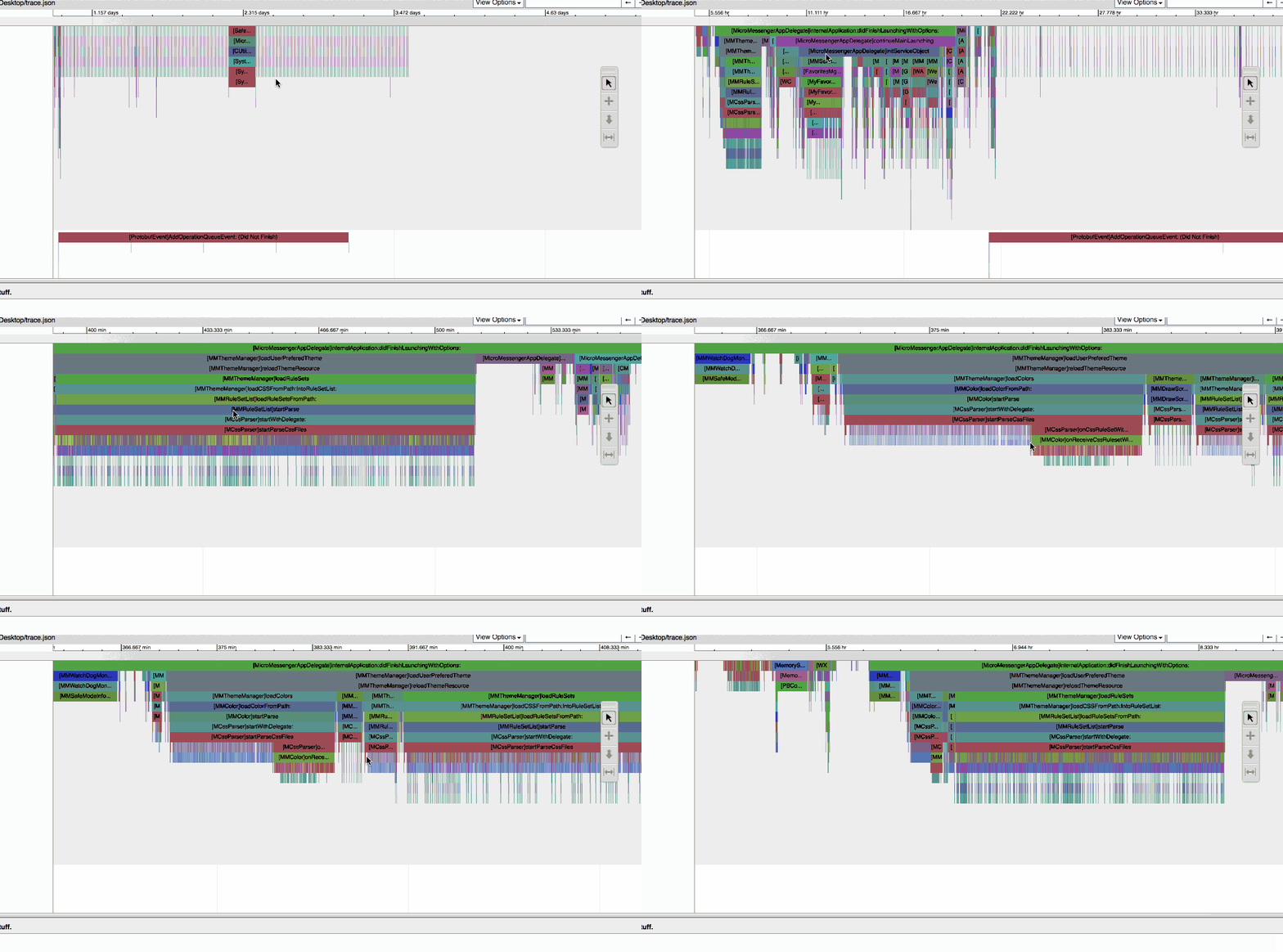

- 📊 Method Tracing - Hook every objc_msgSend to capture all Objective-C method calls
- 🎯 Custom Sections - Define custom trace sections with APTBeginSection/APTEndSection
- 📈 Call Graph - Visualize call relationships and execution flow
- 🌐 Chrome Integration - Export traces to chrome://tracing or generate shareable HTML reports
- 🔧 Dual Modes - Manual instrumentation or dynamic hooking via HookZz
- 🔍 Performance Analysis - Identify performance bottlenecks
- 🐛 Debugging - Trace method execution flow
- 📚 Learning - Understand how iOS frameworks work
- 🛡️ Security Research - Analyze third-party app behavior
# macOS with Homebrew
brew install python ldid git

# Clone the repository
git clone https://github.com/everettjf/AppleTrace.git
cd AppleTrace

# Download Catapult tooling
sh get_catapult.sh

# Optional: Install Python dependencies
pip3 install -r requirements.txt// Add to your Objective-C code
#import <appletrace/appletrace.h>
- (void)yourMethod {
APTBegin;
// Your code here
APTEnd;
}# Requires LLDB and arm64 device/simulator
# Uses HookZz to hook all objc_msgSend calls
lldb ./YourApp
(lldb) command script import loader/AppleTraceLoader.py# Run your app on simulator/device
# Traces are saved to /Library/appletracedata
# Merge trace files
python merge.py -d /Library/appletracedata
# Generate HTML report (requires Catapult)
sh go.sh /Library/appletracedata
# Open in Chrome
open /Library/appletracedata/trace.html- Option 1: Open
trace.htmldirectly in Chrome - Option 2: Drag
trace.jsoninto chrome://tracing - Option 3: Use the online demo
| Requirement | Version | Description |
|---|---|---|
| macOS | 10.15+ | Build environment |
| Xcode | 12+ | iOS/macOS development |
| Python | 3.8+ | Trace processing scripts |
| Chrome | Any | Trace visualization |
| LLDB | (Optional) | Dynamic hook mode |
# 1. Clone the repository
git clone https://github.com/everettjf/AppleTrace.git
cd AppleTrace

# 2. Download Catapult (required for HTML export)
sh get_catapult.sh

# 3. Build the framework
cd appletrace/appletrace.xcodeproj
xcodebuild -project appletrace.xcodeproj -scheme appletrace -configuration Release build

# 4. (Optional) Install signing tool for iOS
brew install ldidAppleTrace/
├── appletrace/ # Core tracing framework
│ ├── appletrace.xcodeproj
│ ├── appletrace/ # Framework source
│ └── appletraceTests/
├── loader/ # Dynamic library loader
│ └── AppleTraceLoader/
├── sample/ # Example projects
│ ├── ManualSectionDemo/ # Manual instrumentation demo
│ └── TraceAllMsgDemo/ # Dynamic hook demo
├── image/ # Documentation images
├── sampledata/ # Demo trace files
├── scripts/ # Processing scripts
│ ├── merge.py # Merge trace files
│ ├── go.sh # Merge + HTML generation
│ └── get_catapult.sh # Download Catapult
├── requirements.txt # Python dependencies
├── README.md # English documentation
└── README_CN.md # Chinese documentation
#import <appletrace/appletrace.h>

- (void)viewDidLoad {
    APTBegin;
    [super viewDidLoad];
    // Your code
    APTEnd;
}

// Or with custom section name
- (void)networkRequest {
    APTBeginSection("network");
    // Network code
    APTEndSection("network");
}#include <appletrace/appletrace.h>
void complexFunction() {
APTBeginSection("processing");
// C++ code
APTEndSection("processing");
}# 1. Build your app with AppleTraceLoader
# 2. Run under LLDB
lldb YourApp.app
# 3. Load the dynamic library
(lldb) command script import loader/AppleTraceLoader.py
(lldb) AppleTraceLoader.load()
# 4. Run your app - all objc_msgSend calls will be traced# Merge all trace files
python merge.py -d /path/to/appletracedata
# Generate HTML (requires Catapult)
python catapult/tracing/bin/trace2html \
/path/to/appletracedata/trace.json \
--output=/path/to/appletracedata/trace.html
# Or use the helper script
sh go.sh /path/to/appletracedataCore Technologies


Key Dependencies


Explore a pre-recorded trace directly in Chrome:
- 📂 Interactive Trace Demo - Open in Chrome to see AppleTrace in action
The trace visualization shows method execution timeline and call relationships.
AppleTrace is in maintenance mode (bug fixes only, no new features).
For new projects, I strongly recommend using Messier:
- ✅ Modern architecture
- ✅ Easier setup
- ✅ Better performance
- ✅ Active development
Yes, but with limitations:
- ✅ Manual instrumentation works on all iOS versions
⚠️ Dynamic hook mode may have compatibility issues on iOS 17+
Yes! See the Chinese guide: 搭载MonkeyDev可 trace 第三方 App
Python 2.x reached end-of-life in 2020. AppleTrace now requires Python 3.8+ for security and compatibility.
Yes! AppleTrace works for both iOS and macOS applications.
Contributions are welcome! Please read our Contributing Guide for details.
- Fork the repository
- Create a feature branch:
git checkout -b feature/amazing-feature - Commit your changes:
git commit -m 'Add amazing feature' - Push to the branch:
git push origin feature/amazing-feature - Submit a Pull Request
- Objective-C: Google Objective-C Style Guide
- Python: PEP 8
- Shell: Google Shell Style Guide
# Build the framework
xcodebuild -project appletrace/appletrace.xcodeproj \
  -scheme appletrace \
  -configuration Release \
  -sdk iphonesimulator build

# Run merge script
python3 merge.py -d sampledata/AppleTrace is released under the MIT License. See LICENSE for details.






中文交流: 欢迎关注微信订阅号

Made with ❤️ by Everett
Project Link: https://github.com/everettjf/AppleTrace