Tracing function input and output
Tiny Tracer allows you to log input and output of functions (or syscalls).
You can get visibility into:
- arguments with which the functions were called
- arguments that were modified after the function call
- the return value of the function
The parameters are logged only if the call was made from the module that was set as the object of tracing (TRACED_MODULE). This helps filtering out the noise.
TinyTracer allows to provide two types of watchlists:
- global (
params.txt, defined ininstall32_64)¹ - local: (
[module].[ext].params.txt) relative to the traced module, provided in the same directory where the TAG file will be generated
Both lists follow identical format.
¹ It is possible to change the default path, which is explained in the next paragraph.
The default global list is defined as params.txt and fetched from install32_64. However, if for whatever reason you want to fetch it from different location, you can do it by modifying the Tiny Tracer execution commandline, and changing the parameter -b. Format: -b [your_list].
In both runners, for Windows (run_me.bat) as well as for Linux (tiny_runner.sh), this parameter is already set, and populated from WATCH_ARGS variable. You can change the path by modifying the WATCH_ARGS value.
Windows example ( run_me.bat ):
rem WATCH_ARGS - a file with a list of functions which's parameters will be logged
rem The file must be a list of records in a format: [dll_name];[func_name];[parameters_count]
set WATCH_ARGS=%PIN_TOOLS_DIR%\params.txt
However, it is recommended to replace the default file with your own rather than modifying the runner.
In order to use this feature, you need to create a list of functions that you want to watch. The list must follow the following format:
[module_name];[func_name];[args_count]
For example:
Windows²:
Kernel32;LoadLibraryW;1
kernel32;LoadLibraryA;1
KERNEL32;GetProcAddress;2
Linux:
libc.so;_IO_puts;1
² TinyTracer comes with a default list for Windows: install32_64/params.txt
Currently TinyTracer allows you to watch up to 10 parameters per function.
The watched functions are listed at the beginning of tracer's execution:
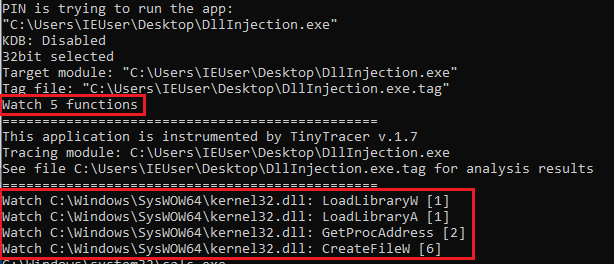
The logger can display a parameter in one of the formats:
- ASCII string (i.e.
Arg[1] = ptr 0x006d9fe8 -> "FlsAlloc") - Wide string (i.e.
Arg[1] = ptr 0x0058ee24 -> L"{7790769C-0471-11d2-AF11-00C04FA35D02}") -
UNICODE_STRING(i.e.Arg[1] = ptr 0x0058ee3c -> U"C:\Windows\system32\calc.exe") - constant (i.e.
Arg[0] = 0x0000016c) - pointer, with a hexdump of a defined length (i.e.
Arg[0] = ptr 0x0058ee50 -> {\x00\x00\x00\x00\x01\x00\x00\x00})
Detection of which of the formats should be applied happens automatically.
Sample results:
ecdc;kernel32.GetProcAddress
	Arg[0] = ptr 0x74a10000 -> {MZ\x90\x00\x03\x00\x00\x00}
	Arg[1] = ptr 0x0039a670 -> "FlsSetValue"

655d;kernel32.CreateFileW
	Arg[0] = ptr 0x006d0e3e -> L"C:\Users\tester\Desktop\demo.exe"
	Arg[1] = 0x80000000 = 2147483648
	Arg[2] = 0x00000001 = 1
	Arg[3] = 0
	Arg[4] = 0x00000003 = 3
	Arg[5] = 0x00000080 = 128

69de;ntdll.RtlCreateProcessParametersEx
	Arg[0] = ptr 0x0058ee50 -> {\x00\x00\x00\x00\x01\x00\x00\x00}
	Arg[1] = ptr 0x0058ee3c -> U"C:\Windows\system32\calc.exe"
	Arg[2] = ptr 0x0058ee24 -> U"C:\Windows\System32"
	Arg[3] = ptr 0x0058ee2c -> U"C:\Windows\system32\"
	Arg[4] = ptr 0x0058ee3c -> U"C:\Windows\system32\calc.exe"
For automatic generation of params.txt basing on the executable's Import Table, try:
You can enable tracking changes in the passed arguments, by setting the relevant option in the INI file.
FOLLOW_ARGS_RETURN=True
Example of the function traced with arguments modifications:
265b6;kernel32.WideCharToMultiByte
WideCharToMultiByte:
	Arg[0] = 0
	Arg[1] = 0
	Arg[2] = ptr 0x000000342ed0f300 -> L"C:\pin\source\tools\tiny_tracer\install32_64\dll_load64.exe"
	Arg[3] = 0x00000000ffffffff = 4294967295
	Arg[4] = ptr 0x00007ff8a01de570 -> {\x00\x00\x00\x00\x00\x00\x00\x00}
	Arg[5] = 0x0000003400000104 = 223338299652
	Arg[6] = 0

WideCharToMultiByte changed:
	Arg[4] = ptr 0x00007ff8a01de570 -> "C:\pin\source\tools\tiny_tracer\install32_64\dll_load64.exe"
You can enable tracking values returned by the function, by setting the relevant option in the INI file.
LOG_RETURN_VALUE=True
Example of the function traced with a return value:
GetProcAddress:
	Arg[0] = ptr 0x00007ff8ae9d0000 -> {MZ\x90\x00\x03\x00\x00\x00}
	Arg[1] = ptr 0x00007ff8a01d1f40 -> "AreFileApisANSI"

GetProcAddress returned:
	ptr 0x00007ff8ae9f0f30 -> {H\xff%\x19-\x06\x00\xcc}