
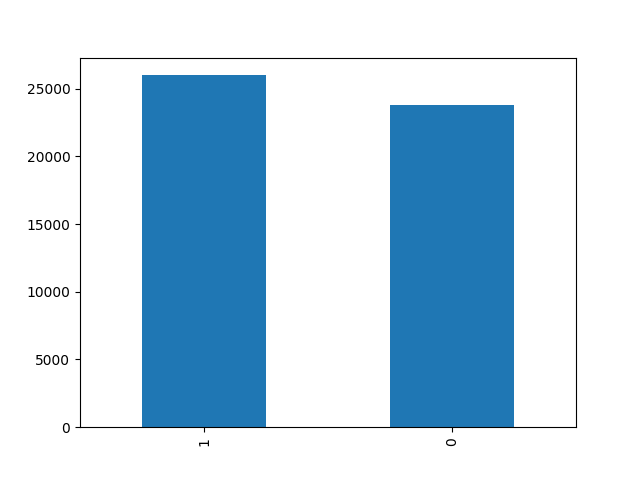
It is a service that makes good and bad prediction of messages that come to an application. Sentiment Analysis algorithm was used as machine learning algorithm and served with Python Flask. You can examine the graph of the data in the data set from the visual below. Those with a positivity value of 0 represent a negative message, and those with a 1 represent a positive message.
$ cd model
$ pip3 install --no-cache-dir -r requirements.txt
$ python3 model.py
$ cd ../service
$ pip3 install --no-cache-dir -r requirements.txt# The following command must be executed within the `service` folder.
$ python3 app.pyBy creating the docker-compose.yml file, it is possible to deploy the project with docker commands below. You can visit the Docker Hub Repository to review the versions.
version: "3"
services:
  serve:
    container_name: sentiment-analysis-service
    image: ismetkizgin/sentiment-analysis-service:latest
    expose:
      - ${PORT}
    restart: always
    ports:
      - "${PORT}:${PORT}"
    env_file:
      - .env
$ docker-compose up -d| Variable Name | Description | Required | Default |
|---|---|---|---|
| ENVIRONMENT | Specifies the environment name. | NO | - |
| CORS | Website endpoints can be defined for Cors safety. | NO | * |
| PORT | It is determined which port will be deploy. | NO | 3310 |
| BODY_SIZE_LIMIT | Specifies the maximum size of the data that will come from the body during the request.(Type: MB) | NO | 1 |
| API_KEY | It allows to add an api key control to the service for security during service use. | NO | - |
REQUEST
// POST {{ENDPOINT}}/predict
{
    "text": "Uygulama kötü bir şekilde tasarlanmış ve gereksiz."
}
RESPONSE
{
    "predictState": true
}Sentiment analysis service is GNU licensed.