

The Web Music Score Service (WMSS) provides an interface allowing requests for music scores on the web using platform-independent clients. It serves as an intermediate layer between data sets and application clients, providing standard access to music score files.

The application currently supports RDF datasets encoded using the MusicOWL ontology or MusicXML files. For more information on creating RDF MusicOWL datasets see Music2RDF converter.
- Configuring WMSS
- Requests
- Exceptions
- Importing Scores
- Web Interface
Both neo4j and WMSS depends on Java, so make sure there is a JVM installed in your system. For isntance, to install the openjdk-8-jre on Ubuntu run:
$ sudo apt-get install openjdk-8-jre
File: conf/settings.json
port Listening port for the WMSS server.
service Service name for the server.
pageSize Number of records per page in the Score List Document.
defaultRequestMode Default request mode for the ListScores requests (default full). Supported request modes are: simplified, omitting the movements and performance medium data, and full for a complete Score List Document.
contact E-mail address of the server administrator.
title Server title.
logPreview Number of lines shown in the GetLogging request.
defaultMelodyEncoding Default encoding type for melody request. Supported encoding formats: pea.
maxFileSize Maximum file size for inserting new scores.
defaultRDFFormat RDF format for inserting new scores. Supported RDF formats: JSON-LD, Turtle, RDF/XML and N-Triples.
defaultCommitSize Number of triples partially committed in the insert scores transaction.
(multiple data sources supported)
File: conf/sources.json
id Data source identifier.
info Data source complementary information.
active Indicates if the data source is available for requests. Supported values: true, false.
storage Data source storage technology. Supported storages: neo4j
type Data source type. Supported types: lpg (Label Property Graphs)
port Listening port for the data source.
repository Data source repository (if applicable).
user/password Credentials for accessing the data source.
In order to be able to import RDF data into Neo4j, WMSS requires the plugins neosemantics and APOC. Neo4j and its plugins are constantly being updated, which makes the compatibility among them quite hard sometimes. To make things a little easier, you may use this compatibility matrix for Neo4j 3.5.5 - in case you're installing Neo4j from scratch.
| Neo4j | neosemantics | APOC |
|---|---|---|
| 3.5.5 | neosemantics-3.5.0.1 | apoc-3.5.0.3-all |
Depending on the amount of RDF data you want to import, consider increasing the memory settings in the <NEO_HOME>/conf/neo4j.conf file.
Example:
dbms.memory.heap.initial_size=12G
dbms.memory.heap.max_size=12G
Click here for more information on the Neo4j memory guidelines.
Also add the following lines to enable the usage of APOC and neosemantics plugins:
dbms.unmanaged_extension_classes=semantics.extension=/rdf
dbms.security.procedures.unrestricted=apoc.*
Check their respectively repositories for more information.
The Neo4j official docker image does not include the plugins WMSS needs. So before we deploy our docker container, let's first create a volume where Neo4j can find these plugins:
$ mkdir neo4j_plugins
$ wget https://github.com/neo4j-contrib/neo4j-apoc-procedures/releases/download/3.5.0.1/apoc-3.5.0.1-all.jar -P neo4j_plugins/
$ wget https://github.com/jbarrasa/neosemantics/releases/download/3.5.0.1/neosemantics-3.5.0.1.jar -P neo4j_plugins/
Optionally, we can also create a volume for managing Neo4j internal data, so that we have directly access to it via an external folder.
$ mkdir neo4j_dataOnce our plugins and data volumes are properly configured, we can finally deploy our Neo4j instance. Using docker-compose we can add all our settings in single file, so that our container starts just the way we want it to, the docker-compose.yml:
version: '2'
services:
  neo4j:
    container_name: neo4j-wmss
    network_mode: host
    image: neo4j:3.5.5
    volumes:
      - ./neo4j_plugins:/plugins
      - ./neo4j_data:/data
    environment:
      - NEO4J_dbms_security_procedures_unrestricted=apoc.*
      - NEO4J_dbms_connectors_default_listen_address=0.0.0.0
      - NEO4J_dbms_unmanaged_extension_classes=semantics.extension=/rdf
      - NEO4J_AUTH=none
      - NEO4J_dbms_memory_heap_maxSize=4G
      - NEO4J_dbms_memory_heap.initial_size=4G
      - NEO4J_dbms_memory_heap.max_size=1G
    ports:
      - 7474:7474
      - 7687:7687
volumes:
  neo4j_plugins:
  neo4j_data:
A few comments to this file:
network_mode: host
This parameter allows connections from inside the container to the host.
image: neo4j:3.5.5
Downloads the Neo4j 3.5.5 image. Changing it to neo4j:latest downloads the most recent Neo4j version, but before doing something that will give you a lot of headache, check if the previously downloaded plugins are compatible with the latest Neo4j version.
volumes:
     - ./neo4j_plugins:/plugins
     - ./neo4j_data:/data
Links container and host directories, which we previously configured.
Here you can tune your Neo4j instace just the way you'd have done in the neo4j.conf file.
- NEO4J_dbms_security_procedures_unrestricted=apoc.*
Allows APOC to use internal API procedure
- NEO4J_dbms_connectors_default_listen_address=0.0.0.0
Default network interface to listen for incoming connections. To listen for connections on all interfaces, use "0.0.0.0".
- NEO4J_dbms_unmanaged_extension_classes=semantics.extension=/rdf
Enables the usage of neosemantics
- NEO4J_AUTH=none
In this variabe you can set the initial credentials to access Neo4j, e.g. NEO4J_AUTH=neo4j/secret says that the user neo4j has the initial password secret. Setting it to none grants access without any credentials.
- NEO4J_dbms_memory_heap_maxSize=4G
- NEO4J_dbms_memory_heap.initial_size=4G
- NEO4J_dbms_memory_heap.max_size=1G
For more information visit: neo4j memory tuning.
Once you have your plugin environment and your docker-compose.yml ready, just run the container with the following command:
$ docker-compose up
If you want it to run in the backgoud, just add the parameter -d to it:
$ docker-compose up -d
To shut it down:
$ docker-compose down
From the console:
$ java -jar wmss-[VERSION].jarFor the source code: Execute the main method of the Java class de.wwu.wmss.web.Start.java
After successfully starting the server you will see a message like this:
Web Music Score Service - University of Münster
Service Name: wmss
WMSS Version: 1.0.0-alpha.1
Port: 8283
Application Startup: 2019/09/15 11:25:59
Default Melody Encoding: pae
Time-out: 5000ms
Page Size: 10 records
System Administrator: [email protected]
After seeing this message, you can access the server API via the HTTP requests described bellow.
The WMSS communication protocol is based on the following HTTP requests: DescribeService, ListScores, GetScore, EditScore, GetLogging.
Lists all service related information as well as all repositories available:
http://localhost:8283/wmss?request=DescribeServiceThe Service Description Report collects all available properties and filter possibilities from each available data source, giving the client all possible filters for each filter option, such as tonalities, tempo markings or instruments.
The Service Description Document is provided as JSON and is structured as follows:
appVersion WMSS version.
type ServiceDescriptionReport (Standard value for Service Description Report)
title Service title of description.
contact Administrator e-mail address.
service Service name.
port Listening port for the service.
timeout Time-out for server internal requests.
pageSize Default page size for ListScores request.
startup Service startup time.
environment Environment settings.
java Java version.
os Operating system description.
supportedProtocols Protocols supported by the service.
datasources Data sources available in the system.
id Data source identifier.
host Data source hosting server.
port Listening port for the data storage.
active Boolean value to enable or disable access to a data source.
type Data source type. Currently supported values are database and triplestore.
storage Storage technology used in a data source. Currently supported values are: postgresql and graphdb.
repository Specific repository of a data storage, e.g database for RDMS or a repository/named graph for triple stores.
version Version for the data storage.
user Username used for accessing the data source.
info Data source description.
totalScores Number of available music scores for the data storage.
formats Formats available in a data source, e.g. MusicXML, MEI.
tempoMarkings Tempo markings available in a data source, e.g. adagion, andante.
tonalities Tonalities available in a data source, e.g. C major, E minor.
collections Collections available in a data source.
mediumTypes Performance mediums (instruments) available in a data source.
mediumTypeIdentifier Identifier of the performance medium type
mediumTypeLabel Description of the performance medium type
mediums Performance mediums (instruments) available for a certain performance medium type
mediumIdentifier Performance medium identifier.
mediumLabel Performance medium description.
An example of a Service Description Report can be found here.
Lists all scores from available repositories.
http://localhost:8283/wmss?request=ListScoresIn order to facilitate the music score discovery the ListScores request offers several filter capabilities, which can be queried as GET and POST requests.
Parameter: source
Constraints the Score List Document to a specific data source:
http://localhost:8283/wmss?request=ListScores&source=neo4j_localParameter: scoreTitle
Searches for scores containing a certain string in the title (case insensitive).
http://localhost:8283/wmss/?request=ListScores&source=neo4j_local&scoreTitle=cellokonzertParameter: collectionIdentifier
To facilitate the management of large repositories, WMSS offers the possibility to add music scores to specific collections. The collection uri, required for this parameter, is delivered together with the music score in the Score List and Service Description Reports.
http://localhost:8283/wmss/?request=ListScores&source=neo4j_local&collectionIdentifier=https://url.collection.deParameters: personIdentifier / personName / personRole
Selects all music scores containing specific persons and optionally with their respective roles. For instance, a request to list all scores from the person "Elgar" as a "Composer" is enconded like this:
http://localhost:8283/wmss/?request=ListScores&source=neo4j_local&personIdentifier=http://dbpedia.org/resource/Edward_Elgar&personRole=composerThe personRole parameter may contain the following values:
composerarrangerencoderdedicateelibrettisteditorlyricisttranslatorperformer
Parameters: mediumIdentifier / solo
Selects all music scores containing specific performance mediums. The performance mediums are structure follows the principles adopted by MusicXML 3.0 Standard Sounds. For instance, requesting a list of all scores containing cello voices can be enconded like this:
http://localhost:8283/wmss/?request=ListScores&source=neo4j_local&mediumIdentifier=strings.celloTo constraint the search for the given performance medium to only solo mediums, use the solo parameter:
http://localhost:8283/wmss/?request=ListScores&source=neo4j_local&mediumIdentifier=strings.cello&solo=trueA complete list of performance mediums containing approx. 900 items can be found here.
Parameter: performanceMediumType
It is also possible to select music scores based on performance medium types, e.g. Strings, Keyboard. The example bellow selects all records that contain movements that are played with bowed string instruments:
http://localhost:8283/wmss?request=ListScores&source=neo4j_local&mediumTypeIdentifier=stringsThe mediumTypeIdentifier paramater is also based on the MusicXML 3.0 Standard Sounds and the following codes:
| code | medium type | code | medium type |
|---|---|---|---|
brass |
Brass | pitched-percussion |
Pitched Percussion |
drum |
Drums | pluck |
Plucked |
key |
Keyboard | rattle |
Rattle |
metal |
Metals | strings |
Strings |
synth |
Synthesizer | voice |
Voices |
wind |
Wind | wood |
wood |
Parameters: tempoBeatUnit / tempoBeatsPerMinute
Selects records containing movements played in a specific tempo, e.g. adagio, largo, andante, etc. Tempo markings may vary depending on the country of orign and century of composition, therefore tempo searches are encoded in two abstract parameters, namely tempoBeatsPerMinute and tempoBeatUnit. Beat units indicates the graphical note type to use in a metronome mark, which follows the principles adpoted by the MusicXML Beat-Unit Element. The beats per unit parameter can be provided as a single integer value or an interval thereof. For instance, a quarter beat unit with an interval of 100-125 beats per minute, can be encoded as follows:
http://localhost:8283/wmss/?request=ListScores&source=neo4j_local&tempoBeatUnit=quarter&tempoBeatsPerMinute=100-125Parameter: dateIssued
Selects records composed at a given date or time interval, e.g. 1910-1920:
http://localhost:8283/wmss/?request=ListScores&source=neo4j_local&dateIssued=1910-1920Dates and intervals must be encoded as yyyyMMdd, yyyyMM or yyyy.
Parameter: format
Selects records available in a specific format. The supported formats are:
mei(Music Encoding Initiative files)musicxml(MusicXML files)
http://localhost:8283/wmss/?request=ListScores&source=neo4j_local&format=musicxmlParameter: melody
Selects records containing a specific a sequence of notes or phrases (not limited to incipt) throughout the database, encoded using the Plaine & Easie musical notation (PAE). For instance, the value ,8AB'CDxDE - which is going to be used throughout this section - corresponds to ..

Notes: A 3rd octave, B 3rd octave, C 4th octave, D 4th octave, D# 4th octave and E 4th octave.
Duration: Eighth
.. and can be searched like this:
http://localhost:8283/wmss/?request=ListScores&source=neo4j_local&melody=,8AB'CDxDEParameter: ignoreOctave
To search for melodies encoded in specific octaves, set the parameter ignoreOctave to false (true by default). Note that in the PAE string the 4th octave is assumed, if no octave is explicitly defined. The following example searches for scores matching the sequence A 3rd octave, B 3rd octave, C 4th octave, D 4th octave, D# 4th octave and E 4th octave, all with the duration eighth (as described above):
http://localhost:8283/wmss/?request=ListScores&source=neo4j_local&melody=,8AB'CDxDE&ignoreOctave=falseParameter: ignoreDuration
It is possible to search only for a sequence of pitches, ignoring their durations. It can be achieved by means of setting the parameter ignoreDuration to true (false by default). The following example searches for all scores containing the pitch sequence A, B, C, D, D# and E, ignoring their durations:
http://localhost:8283/wmss/?request=ListScores&source=neo4j_local&melody=,8AB'CDxDE&ignoreDuration=trueTo extend the note duration add either a . (dot), .. (double dot) or ... (triple dot) right after the note duration, as described at Plaine & Easie rhythmic values. For instance 4.G4.xF4.G4.xF
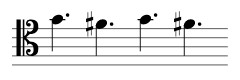
http://localhost:8283/wmss/?request=ListScores&source=neo4j_local&melody=4.G4.xF4.G4.xFParameter: ignorePitch
If you're only looking for a sequence of rhythmical elements (useful for percussionists), just set the parameter ignorePitch to true (false by default). The following example searches for all scores containing a sequence of 6 eighth notes, ignoring pitches:
http://localhost:8283/wmss/?request=ListScores&source=neo4j_local&melody=,8AB'CDxDE&ignorePitch=trueParameters: melody
Read this carefully. In case a sequence of notes in the database contains a grace note, a few things need to be taken into account:
- Grace notes are bypassed: It creates a link between the last non-grace note and the next one. This link enables searches that do not explicity
- Grace notes are also explicity encoded: Grace notes are encoded as such and are linked to their predecessors and successors in the note sequence.
In other words, a search for ,8AGxFgAG2C or ,8AGxFG2C will return the following match:

Grace notes in melody searches are to be encoded using either g (acciaccatura) or q (appoggiatura), according to the Plaine & Easie notation.
Parameter: ignoreChords
It is also possible to look for sequences whose notes are inside of chords. To achieve this, set the parameter ignoreChords to false (true by default).
Consider the following chords ..

.. and the following search criteria ,,2GB8G, which are notes embedded in the chords above:

To be able to find such an embedded sequence, set the parameter ignoreChords to false:
http://localhost:8283/wmss/?request=ListScores&source=neo4j_local&melody=,,2GB8G&ignoreChords=falseNote: This feature assumes that the elements of such an embedded sequence are notes of the same voice.
Parameter: melody
Melodies containing chords can be searched by means of using the PAE chords notation. The PAE notation states that every note of a chord is to be separated by ^, starting by the upper note; then followed by the lower ones.
Searching for the following chord ,,2E^B^,G^'E ..

.. can be done like this:
http://localhost:8283/wmss/?request=ListScores&source=neo4j_local&melody=,,2E^B^,G^'E&ignoreOctave=falseParameters: melody / time
Time signatures are to be encoded according to the PAE key time signature notation. Time signatures embedded in melodies are preceded by @ and followed by beats and beat unit, separated by /, e.g. @3/4 (three-four or waltz time), @2/4 (march time). Common time signatures can be also represented as @c and will be considered by the system as @4/4.
Examples
Common signature: @c 8ABCDxDE

http://localhost:8283/wmss/?request=ListScores&source=neo4j_local&melody=@c 8ABCDxDEWaltz time: @3/4 8ABCDxDE

http://localhost:8283/wmss/?request=ListScores&source=neo4j_local&melody=@3/4 8ABCDxDEAlternatively, time signatures alone can be searched using the parameter time:
http://localhost:8283/wmss/?request=ListScores&source=neo4j_local&time=4/4See also: UNIMARC field 036 $o — MARC21 field 789 $g — MAB field 681 $h (RISM field 823)
Parameters: melody / clef
Clefs are to be encoded according to the PAE clef notation. Clefs embedded in melodies are preceded by %, and are three characters long. The first character specifies the clef shape (G,C,F,g). The second character is - to indicate modern notation, + to indicate mensural notation. The third character (numeric 1-5) indicates the position of the clef on the staff, starting from the bottom line.
Clef examples: G-2 (trebble clef), F-4 (bass clef), C-3 (alto clef), C-4 (tenor clef).

Request example %C-4 ,8AB'CDxD:

http://localhost:8283/wmss/?source=neo4j_local&request=listscores&melody=%C-4 ,8AB'CDxDAlternatively, clefs alone can be searched using the parameter clef:
http://localhost:8283/wmss/?source=neo4j_local&request=listscores&clef=F-4See also: UNIMARC field 036 $m — MARC21 field 789 $e — MAB field 681 $j (RISM field 820)
Parameters: melody
If necessary, it is also possible to look for melodies contained in fixed measures. For instance, the melody '4xF8G4xF8A4B8A4G8E4D8E4C,8B will be searched no matter how the notes are distributed:

http://localhost:8283/wmss/?source=neo4j_local&request=listscores&melody='4xF8G4xF8A4B8A4G8E4D8E4C,8BBy splitting the melodies with the character /, the system will look for exact matches with the given measure/notes distribution. This example will look for the given melody contained in exactly two measures '4xF8G4xF8A4B8A4/G8E4D8E4C,8B:

http://localhost:8283/wmss/?source=neo4j_local&request=listscores&melody='4xF8G4xF8A4B8A4/G8E4D8E4C,8BParameters: melody
Melody containing rests can be encoded by replacing the pitch with a -, e.g. ,,2E-/-4.-6,,B,xC

Parameters: melody / key
Keys signatures are to be encoded according to the PAE key signature notation. Key signatures embedded in melodies are preceded by the character $; The symbol x indicates sharpened keys, b flattened keys; the symbol is followed by the capital letters indicating the altered notes.
Sharpened keys have to be encoded in the following order: F♯ C♯ G♯ D♯ A♯ E♯ B♯
| Major key | Minor Key | PAE key | |
|---|---|---|---|
 |
C major | A minor | $ |
 |
G major | E minor | xF |
 |
D major | B minor | xFC |
 |
A major | F♯ minor | xFCG |
 |
E major | C♯ minor | xFCGD |
 |
B major | G♯ minor | xFCGDA |
 |
F♯ major | D♯ minor | xFCGDAE |
 |
C♯ major | A♯ minor | xFCGDAEB |
Flattened keys have to be encoded in the following order: B♭ E♭ A♭ D♭ G♭ C♭ F♭
| Major key | Minor Key | PAE key | |
|---|---|---|---|
|
C major | A minor | $ |
 |
F major | D minor | bB |
 |
B♭ major | G minor | bBE |
 |
E♭ major | C minor | bBEA |
 |
A♭ major | F minor | bBEAD |
 |
D♭ major | B♭ minor | bBEADG |
 |
G♭ major | E♭ minor | bBEADGC |
 |
C♭ major | A♭ minor | bBEADGCF |
See also: UNIMARC field 036 $n — MARC21 field 789 $f — MAB field 681 $k (RISM field 826 — first part)
To search for melodies encoded with an specific key signature, place the key before the melody (preceded by space). For instance, searching the previously mentioned melody with the signature G Major / E minor can be done as follows:
http://localhost:8283/wmss/?request=ListScores&source=neo4j_local&melody=$xF ,8AB'CDxDEAlternatively, key signatures alone can be searched using the parameter key. The following request seraches for all music scores containing measures written in C♯ minor:
http://localhost:8283/wmss/?request=ListScores&source=neo4j_local&key=xFCGDAThe following example deals with a melody of 36 notes in containing several durations and octaves:

http://localhost:8283/wmss/?request=ListScores&source=neo4j_local&melody='4xF8G4xF8A4B8A4G8E4D8E4C,8B4A8B4A'8C4D8C,4B8G4xF8G4E8D4xC8D4xC8E4xF8E4D,,8B4xA8B4G8xF2B&ignoreOctave=falsePOST requests can be sent using a JSON string (application/json) to the URL:
http://localhost:8283/wmss/
This example shows a ListScores request containing all filters supported by ListScores Request:
The only obligatory fields are request and source. For instance, to retrieve a complete list of all available scores use the following json string:
{
   "request":"ListScores",
   "source":"neo4j_local"
}The Score List Document is provided as JSON and is structured as follows:
An example of a Score List Report can be found here.
Retrieves a specific score based on its identifier:
http://localhost:8283/wmss/?request=GetScore&source=neo4j_local&scoreIdentifier=http://dbpedia.org/resource/Cello_Concerto_(Elgar)The output format can be selected using the parameter format:
http://localhost:8283/wmss/?request=GetScore&source=neo4j_local&scoreIdentifier=http://dbpedia.org/resource/Cello_Concerto_(Elgar)&formatIdentifier=musicxml- mei (Music Encoding Initiative files)
- musicxml (MusicXML files)
Edits the metadata of an existing music score. EditScore requests can be performed via POST using a JSON string (application/json) sent to the URL:
http://localhost:8283/wmss/
This example shows all possible EditScore request attributes.
action: This parameter expects one of the following values: add, update or delete.
The EditScore request returns a Score List Report with the edited score.
Displays the WMSS log file. The parameter logPreview limits the amount of lines displayed. If omitted, the default value in the settings file is assumed. The the last 1000 lines from the log file can be requested as follows:
http://localhost:8283/wmss/?request=Checklog&logPreview=1000| Code | Message | Hint |
|---|---|---|
| E0001 | No request type provided | The request type has to provided in the parameter request, containing one of the following request types: ListScores, GetScore, EditScore, DescribeService, Checklog. |
| E0002 | Invalid request parameter | Provide one of the following request types: ListScores, GetScores, DescribeService, Checklog. |
| E0003 | Invalid document format | Provide one of the following XML formats: musicxml, mei |
| E0004 | Invalid time signature | Time signatures must be encoded in the following format: beat unit / beats. Examples: 3/4, 4/4, 6/8, c (meaning common time and interpreted as 4/4). |
| E0005 | Invalid data source | The provided data source does not exist. Check the sources.conf file and try again. |
| E0006 | Invalid melody encoding | The following melody encodings are currently supported: pea (Plaine & Easie) |
| E0007 | Invalid score identifier | Make sure you're providing a valid score identifier at the parapeter identifier. |
| E0008 | Invalid request mode | Please provide one of the following values: full, simplified. |
| E0009 | Invalid melody length | A melody must contain at least three valid elements. |
| E0010 | Invalid tempo beats per minute | Provide either a positive integer or an interval thereof, e.g. 148, 98-104. |
| E0011 | Invalid tempo beat unit | Provide one of the following beat units: maxima, longa, breve, whole, half, quarter, eighth, 16th, 32nd, 64th, 128th, 256th, 512th, 1024th. |
| E0012 | Invalid date or interval | Provide a date or an inverval thereof in the following formats: 'yyyy, yyyymm, yyyymmdd. For example: 1898, 189805, 19890501, 19890501-19900215, 1989-1990 |
| E0013 | Request type not supported | Check the request section at the settings file |
| E0014 | Invalid RDF file | Make sure that the imported file is properly encoded in one of the following formats: JSON-LD, Turtle, RDF/XML and N-Triples |
| E0015 | Invalid RDF format | Please provide one for the following formats in the format parameter: JSON-LD, Turtle, RDF/XML and N-Triples |
| E0016 | Invalid key | Provide one of the following keys: $ (C major/A minor), xF (G major/E minor), xFC (D major/B minor), xFCG (A major/F# minor), xFCGD (E major/C# minor), xFCGDA (B major/G# minor), xFCGDAE (F# major/D# minor), xFCGDAEB (C# major/A# minor),bB (F major/D minor), bBE (Bb major/G minor), bBEA (Eb major/C minor), bBEAD (Ab major/F minor), bBEADG (Db major/Bb minor), bBEADGC (Gb major/Eb minor), bBEADGCF (Cb major/Ab minor) |
| E0017 | Invalid clef | The clef code is preceded by %, and is three characters long. The first character specifies the clef shape (G,C,F,g). The second character is - to indicate modern notation, + to indicate mensural notation. The third character (numeric 1-5) indicates the position of the clef on the staff, starting from the bottom line. Examples: G-2, C-3, F-4. |
New music scores can be inserted ther via POST requests. The import listener supports RDF files generated using the Music2RDF converter or as plain MusicXML, and can be found in the import service:
http://localhost:8283/wmss/importTo insert music scores using RDF files use the following parameters:
source Data source where the file will be inserted. See Service Description Report for more details.
format Indicates the file RDF format. Supported formats are: JSON-LD, Turtle, RDF/XML and N-Triples
commitSize Commits a partial transaction every n triples. Useful for large RDF files (optional).
Example using CURL:
curl -F file=@elgar_cello_concerto_op.85.nt \
        "http://localhost:8283/wmss/import?source=neo4j_local&format=n-triples&commitsize=10000"
If everything goes well, you will recieve a ImportReport:
{
  "timeElapsed": "780 ms",
  "size": 1,
  "files": [
    {
      "file": "elgar_cello_concerto_op.85.nt",
      "size": "2 MB",
      "records": 10846
    }
  ],
  "type": "ImportReport"
}WMSS has an embedded Music2RDF Converter that enables direct MusicXML import. However, WMSS requests rely on metadata that aren't normally encoded in MusicXML files. This information can be provided using an XML document, which has to be sent to the server in an extra file using the parameter metadata. The metadata can be encoded as XML or JSON.
For more information on the metadata file see the Music2RDF converter documentation.
To send the MusicXML file and its metadata to the server using curl just add a second file parameter -F:
curl -F file=@elgar_cello_concerto_op.85.xml \
     -F [email protected] \
"http://localhost:8283/wmss/import?source=neo4j_local&format=musicxml"Deletes a specific score based on its identifier:
http://localhost:8283/wmss/?source=neo4j_local&request=DeleteScore&identifier=http://dbpedia.org/resource/Cello_Concerto_(Elgar)
If the score was successfully deleted, the DeleteScoreReport is shown:
{
 "type": "DeleteScoreReport",
  "score": [
    {
      "scoreIdentifier": "http://dbpedia.org/resource/Cello_Concerto_(Elgar)",
      "title": "Cellokonzert e-Moll op. 85",
      "collection": "https://url.collection.de"
    }
  ]
}The Service Exception Report is provided as JSON and is structured as follows:
{
  "type": "ExceptionReport",
  "code": "E0009",
  "message": "Invalid data source [fake_repo].",
  "hint": "The provided data source cannot be found. Check the 'Service Description Report' for more information on the available data sources."
}The web interface provides a platform to manage scores and data sources in the WMSS server.
http://localhost:8283/wmss/admin/index.html
The web interface is currently under development and still does not provide an interface to the following featues:
- EditScore requests
- User management
- Data source management (available via the
sources.jsonfile)