
Never lose what you copied.
Unlimited history • Instant fuzzy search • iCloud Sync • Secure & Attested
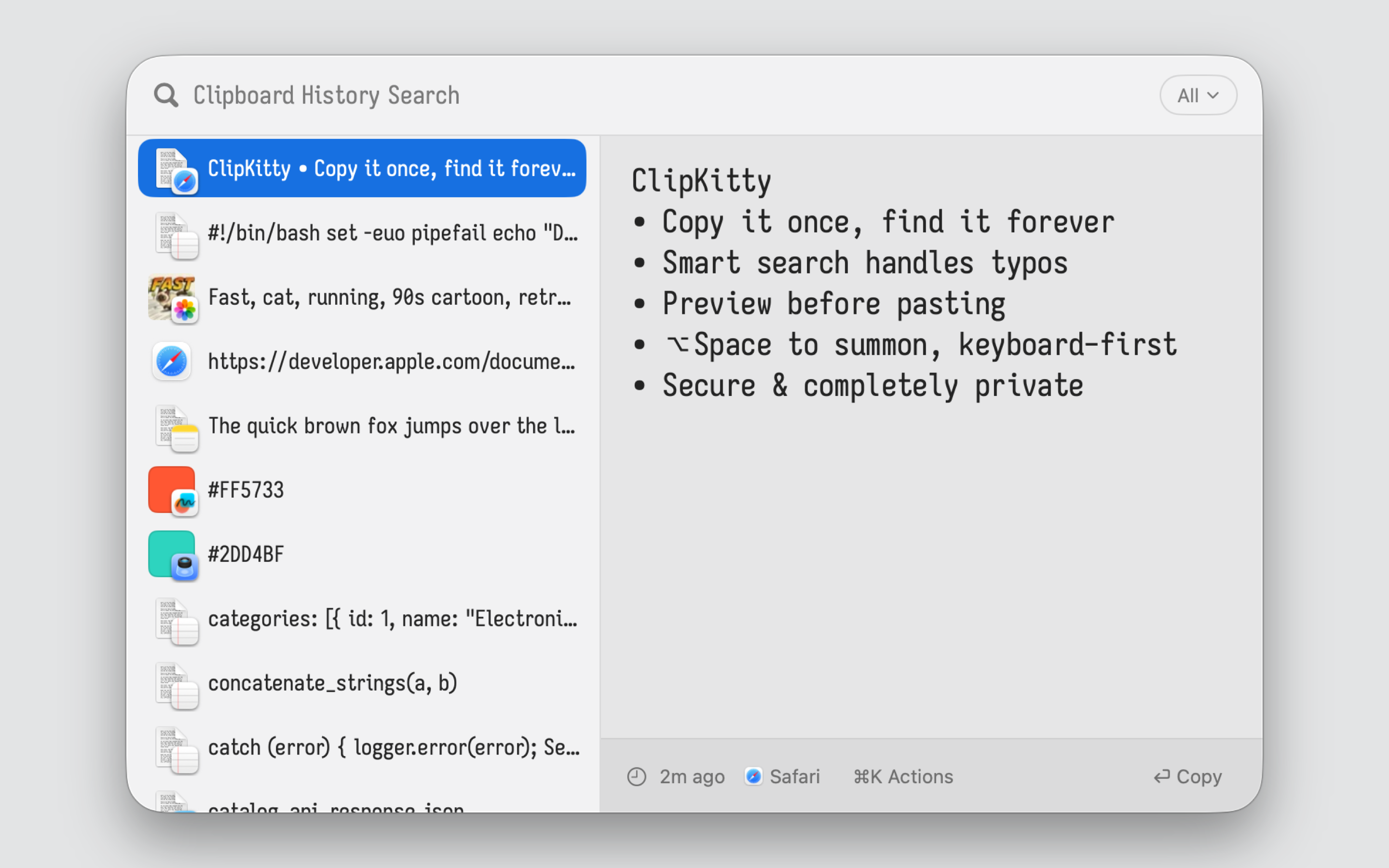
You copied that command last week. That code snippet yesterday. That address six months ago. Your clipboard manager either forgot it, couldn't find it, or cut off half the content.
ClipKitty stores everything. Finds it in milliseconds; whether you have 100 items or 100,000. Built for people who copy lots of things and need to find them again.

- Download the latest DMG from GitHub Releases.
- Drag ClipKitty to your Applications folder.
| ClipKitty | |
|---|---|
| vs Maccy | Same simplicity, no limits. Maccy caps at 200 items and makes you wait on tooltips to view your history. ClipKitty scales to millions, comes with instant live preview, and syncs securely via iCloud. |
| vs Raycast | Same speed, better search, no expiration. Raycast doesn't save long clips and offers limited search only. Its free tier expires after 3 months; sync requires a paid subscription. ClipKitty preserves everything forever, syncs via iCloud for free, and finds items more reliably with smarter, typo tolerant search. |
| vs Paste | Same utility, no subscription. Paste charges $30/year. You own ClipKitty outright. Plus ClipKitty ships with an intuitive list with instant live preview, vs paste's horizontal carousel. |
- Unlimited History: No caps, no expiration. Text, images, files, colors; everything preserved in full, forever.
- Fuzzy Search That Scales: Type "improt" and find "import". Type "dockr prodction" and find "docker push production". All in milliseconds; even with hundreds of thousands of items.
- OCR & Smart Search: Search text inside images and screenshots. AI-powered descriptions make visual content searchable.
- iCloud Sync: Optionally sync your clipboard history across all your Macs via iCloud. Enable it in settings when you want your history everywhere.
- Privacy-First: Your clipboard history is incredibly sensitive. This is why Clipkitty. 100% on-device by default. No telemetry, no accounts, ever.
- Secure & Attested: Don't take my word for it. Source code is fully open source and auditable. Builds are attested: you can verify the app was built from the public source code.
| Shortcut | Action |
|---|---|
| ⌥Space | Open clipboard history |
| ↑ / ↓ | Navigate |
| Return | Paste selected item |
| Tab | Cycle content type filter |
| Escape | Close |
git clone https://github.com/jul-sh/clipkitty
cd clipkitty
nix build .#clipkitty          # Release macOS bundle
The build graph lives entirely in flake.nix + nix/*.nix. Every variant is a nix package.
Requires macOS 15+, Nix with flakes enabled, and a host Xcode install for the sandbox escape into xcrun/tuist.
Search is a latency problem disguised as a text problem.
The search system has a few hard requirements:
- it has to search as the user types, so every keystroke is on the hot path
- it has to stay fast on large histories, not just toy databases
- it has to keep full long documents searchable, not silently truncate them away
- it has to handle fuzzy matching and typo tolerance, because exact-match search is too brittle for clipboard recall
- it has to return one clipboard item per result, even if the internal search representation is more granular
- it has to show useful snippets, previews, and highlights, not just IDs and scores
Those requirements pull against each other. The naive approach is: every time the user types, scan every clipboard item, compute a fuzzy score against the full text, and sort the results. That works for 100 items. It stops working with thousands of items, and it really stops working when some items are hundreds of kilobytes or megabytes long.
ClipKitty solves that by splitting search into cheap recall and expensive judgment:
- Store everything in full. The source of truth lives in SQLite. Nothing is truncated out of storage. If you copied a huge log, code file, or stack trace, the whole thing is still there.
- Index searchable units, not just rows. Small items are indexed as one unit. Large items are indexed as overlapping chunks. This matters because relevance is usually local. If one 16 KB region is a great match, we want to reason about that region, not pay to analyze the entire 1 MB document on every query.
- Use Tantivy for fast broad recall. For normal queries, Tantivy indexes trigrams and word positions. That gives a cheap first pass that is typo-tolerant and can still reward phrase-like matches. For very short queries, ClipKitty uses a simpler prefix/contains path because trigrams are not a good fit below 3 characters.
- Collapse chunks back to one parent item immediately. Large items are chunked internally, but the product is still item-based. During Phase 1 collection, ClipKitty keeps only the best hit per parent item. If 20 chunks from one giant document match, that still becomes one candidate, not 20.
- Make large documents earn their way in.
A huge document almost always contains common words like
the,error, orfunction. Without adjustment, those documents float upward on weak evidence and flood the expensive path. Phase 1 therefore blends Tantivy relevance with recency and a size-aware penalty for weak large-document matches. Strong local evidence still wins. Weak “it matched somewhere” evidence does not. - Only rerank the head. Phase 2 is the high-quality, expensive reranker. It does more detailed matching and prepares the signals used for final ordering. But there is no reason to spend that cost on the entire tail. ClipKitty reranks only a bounded top slice, then appends the rest in Phase 1 order.
- Use the matched region for snippets, highlights, and preview bootstrapping. For large items, the row snippet and highlight analysis come from the best matching chunk, not from the top of the document. That makes results more legible and avoids wasting time analyzing irrelevant parts of large content on the hot path. When a full preview is opened, those chunk-local highlights are mapped back into full-document offsets.
The important idea is that search quality does not come from doing expensive work on everything. It comes from doing cheap work to find plausible candidates, then doing expensive work only where it can change what the user sees.