inspired by mulfok/periodic-note-templates
Recommendation:
- Create only a new 'Daily Log' note for the current day!
- Create only a new 'Weekly Journal' note at the begin of the new week!
The memo has some limitations.
In the created 'Daily Log' note you can jump back to the previous day and forwards to the next day. If the 'Daily Log' note for next day does not exist, it will create a new note with timestamp of next day.
But caution! In the metada section of the new created note, the created day is still the current day and not the next day and the week is the current week. That could cause some issues in case of creating a new note for the next day at the last day of the week. Then, the week of the 'Daily Log' for the next day in next week is still the current week.
Their is a field Learnt Words:: in the 'Daily Log' note, where you can add list of words, like a vocabulary.
You can have any number of words in the field, but it must always be key-value formatted as "word","meaning"
- Learnt Word:: "my new learnt word","what a great idea to create a list of new learnt words to my daily memo"

You can create tasks in the Daily Log, but they are not listed in the Weekly Journal. Therefore I recommend CardBoard (see recommended community plugins). Following hashtags helps me to show my tasks in CardBoard:
#kb/todo
#kb/inprogress
To assign the task to a person (e.g. Bob, Alice, Family, ...):
#who/bob
#who/alice
#who/family
To add the task to a project (e.g. Office task, Home task, China travel, ...):
#project/office
#project/home
#project/china-travel
To add the due date
@due(2023-01-31)
To show up the tasks in CardBoard, you have to create couple of Tag boards with title
- Task
- Who
- Project

To show tasks based on due date, you have to create a Date Board.
- When

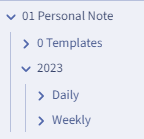
Create folders
01 Personal Note
   0 Templates
Copy templates 'Daily Log.md', 'Weekly Journal.md' and 'DvCharts.js' into the template folder
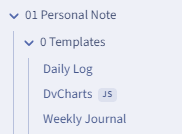
Individual files: DVCharts.js
Folder: 01 Personal Note/0 Templates
Enable JavaScript Queries
Disable Warn on Empty Result
Data Format: yyyy-MM-dd
Date + Time Format: yyy-MM-dd @ h:mm
Enable Daily Notes
Format: MM MMMM/YYYY-MM-DD
looks like this: 01 January/2023-01-24
Daily Note Template: 01 Personal Note/0 Templates/Daily Log.md
Note Folder: 01 Personal Note/2023/Daily
Enable Weekly Notes
Format: YYYY-MM [Week] WW
looks like this: 2023-01 Week 04
Daily Note Template: 01 Personal Note/0 Templates/Weekly Journal.md
Note Folder: 01 Personal Note/2023/Weekly
Enable Syntax Highlighting
Enable Trigger Templater on new file creation
Enable Enable Folder Templates
Add new folder template:
| 01 Personal Note/2023/Daily | 01 Personal Note/0 Templates/Daily Log.md |
| 01 Personal Note/2023/Weekly | 01 Personal Note/0 Templates/Weekly Journal.md |