Your AI coding assistant is forgetting things. MAXSIM fixes that.
As Claude fills its context window, code quality degrades — wrong decisions, repeated mistakes, lost intent. MAXSIM solves this by offloading work to fresh-context subagents, each with a single responsibility and no memory of the mess before.






npx maxsimcli@latestWorks with Claude Code — on Mac, Windows, and Linux.
⚠️ Early Alpha — APIs, commands, and workflows may change between releases. Expect rough edges.
You start a session with Claude. The first 20 minutes are great. Then it starts forgetting your architecture decisions. It repeats the same mistakes. Output quality drops. You start a new session and lose all context.
This is context rot — and it gets worse the bigger your project is.
MAXSIM fixes this by breaking your build into phases, planning each one independently, and running each task in a fresh subagent with only the context it needs. No rot. No drift. Consistent quality from phase 1 to phase 50.
# Install
npx maxsimcli@latest

# In Claude Code, start a new project:
/maxsim:new-project

# Or jump straight to planning a phase:
/maxsim:plan-phase 1

# Execute it:
/maxsim:execute-phase 1
That's the loop. Discuss → Plan → Execute → Verify. Each phase is isolated, each task gets a fresh agent, every change gets an atomic commit.
Individual developers who want to ship complex projects with Claude without losing coherence over long sessions.
Teams who want a shared structure for AI-assisted development — consistent planning, traceable decisions, reproducible phases.
AI-heavy projects (SaaS, CLIs, data pipelines) where a single Claude session can't hold the full project context.
Not a fit if your project is a single file, a one-shot script, or you just want quick answers from Claude — MAXSIM is a workflow system, not a chat interface.
MAXSIM installs 35 slash commands, 11 skills, and an MCP server into Claude Code. Each command is a structured workflow that spawns specialized subagents with fresh context.
1. Initialize your project
/maxsim:new-project
Answer a few questions → MAXSIM researches your domain, scopes v1/v2, and creates a phased roadmap in .planning/.
2. Discuss a phase (optional but recommended)
/maxsim:discuss-phase 1
Shape the implementation before anything gets built. Surfaces gray areas and locks in decisions.
3. Plan the phase
/maxsim:plan-phase 1
Research agent investigates. Planner creates atomic task plans. Plan-checker verifies them. You get a PLAN.md ready to execute.
4. Execute
/maxsim:execute-phase 1
Plans run in parallel waves. Each task gets its own fresh executor agent and atomic git commit. Verifier checks the codebase delivered what the phase promised.
5. Verify
/maxsim:verify-work 1
Walk through testable deliverables. Broken things get fix plans automatically.
6. Repeat until shipped
/maxsim:complete-milestone
/maxsim:new-milestone
You: /maxsim:new-project
MAXSIM: Tell me about your project...
You: A CLI tool that converts PDFs to structured JSON using AI
MAXSIM: [spawns 4 research agents in parallel]
        [synthesizes findings]
        [creates REQUIREMENTS.md and ROADMAP.md with 8 phases]
        Phase 1: PDF parsing + text extraction
        Phase 2: AI-powered structure detection
        ...

You: /maxsim:plan-phase 1
MAXSIM: [research agent investigates pdf libraries]
        [planner creates 3 atomic task plans]
        [plan-checker verifies feasibility]
        Ready. Run /maxsim:execute-phase 1

You: /maxsim:execute-phase 1
MAXSIM: [wave 1: executor installs dependencies, commits]
        [wave 2: executor implements PDF reader, commits]
        [wave 3: executor adds tests, commits]
        [verifier confirms phase goal achieved]
        ✓ Phase 1 complete. 3 commits. Dashboard updated.
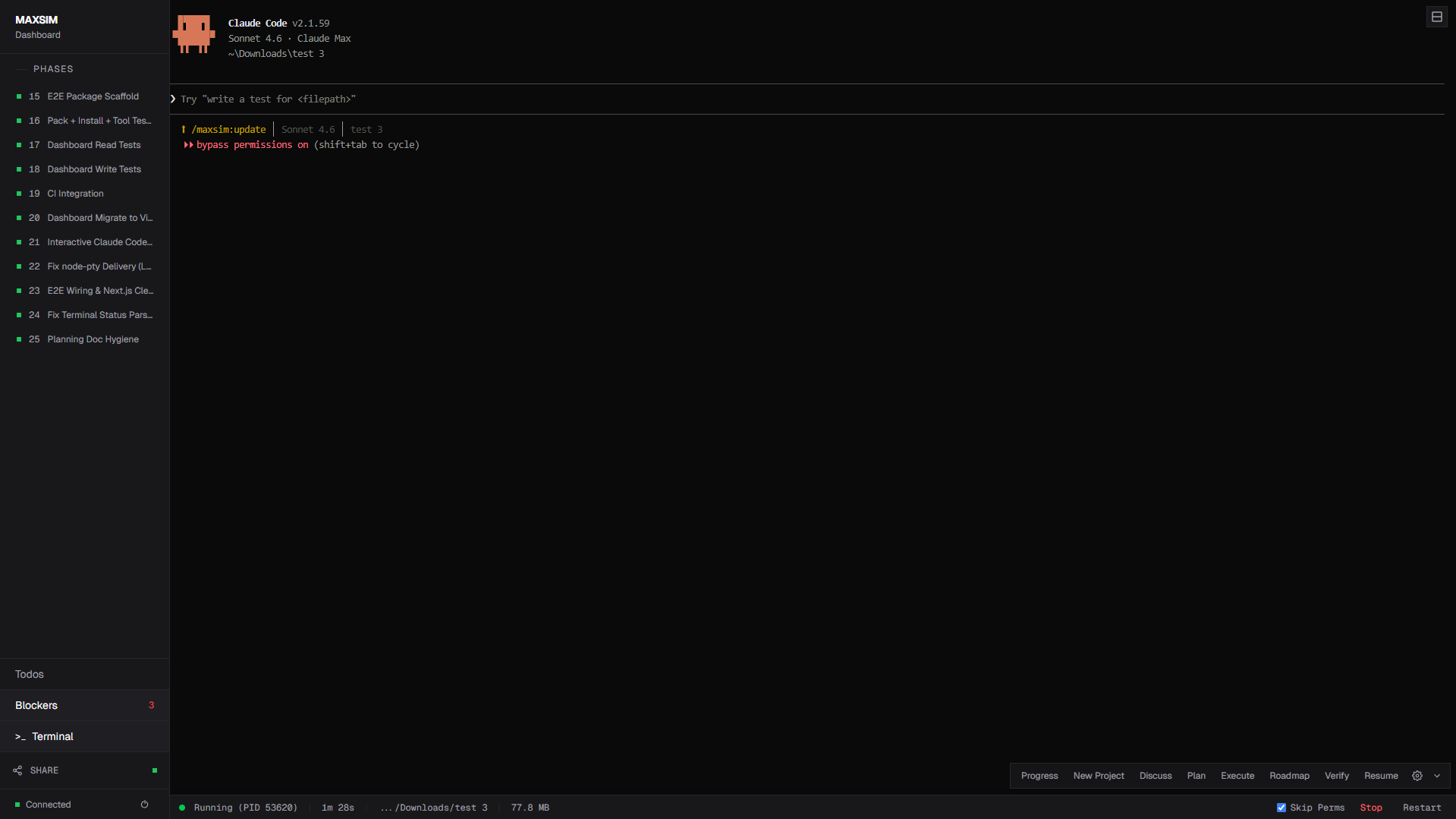
npx maxsimcli dashboardReal-time web dashboard — bundled inside the CLI, no separate setup needed.
- Phase overview — progress bars, milestone stats, completion percentage
- Phase drill-down — expand phases to see individual tasks with checkboxes
- Inline Markdown editor — edit plan files directly in the browser (CodeMirror, Ctrl+S)
- Todos & Blockers — manage todos and resolve blockers from STATE.md
- Q&A panel — answer discussion questions from Claude Code directly in the browser
- Embedded terminal — xterm.js terminal with full Claude Code interaction
- Multi-project — switch between running dashboard instances via project switcher
- LAN sharing — share with teammates on the same network
npx maxsimcli dashboard --network # LAN sharing + QR code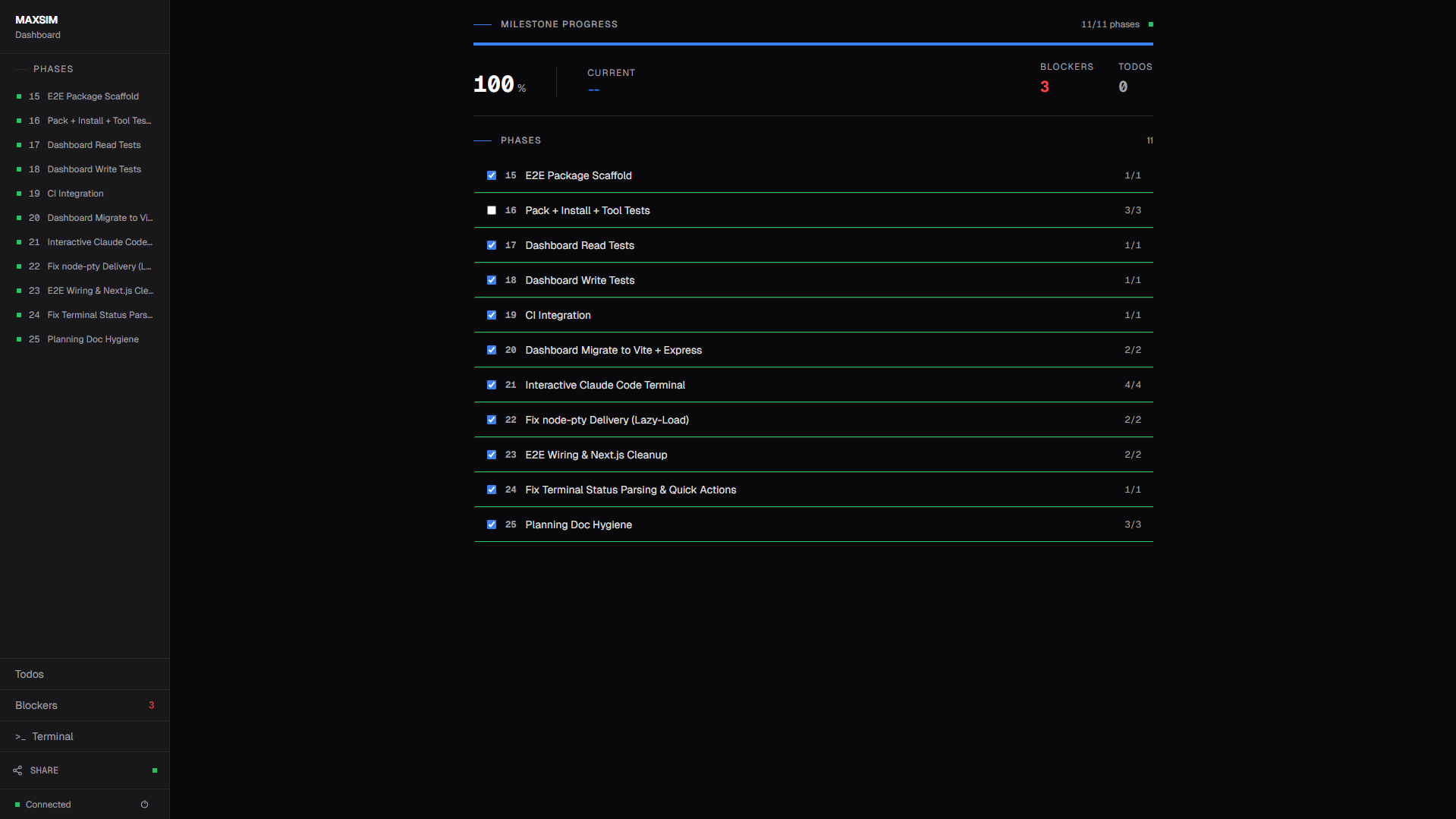
| Command | Description |
|---|---|
/maxsim:new-project |
Initialize: questions → research → requirements → roadmap |
/maxsim:init-existing |
Onboard an existing codebase — scan, verify, capture vision |
/maxsim:discuss-phase [N] |
Capture implementation decisions before planning |
/maxsim:plan-phase [N] |
Research + plan + verify for a phase |
/maxsim:execute-phase <N> |
Execute plans in parallel waves |
/maxsim:verify-work [N] |
User acceptance testing |
/maxsim:complete-milestone |
Archive milestone, tag release |
/maxsim:new-milestone |
Start next version |
| Command | Description |
|---|---|
/maxsim:progress |
Where am I? What's next? |
/maxsim:help |
Show all commands |
/maxsim:quick |
Ad-hoc task with atomic commits (skips optional agents) |
/maxsim:batch |
Decompose large tasks into parallel worktree agents |
/maxsim:sdd |
Spec-driven development — fresh agent per task with 2-stage review |
/maxsim:debug [desc] |
Systematic debugging with persistent state |
/maxsim:map-codebase |
Analyze existing codebase with parallel mapper agents |
/maxsim:pause-work |
Create handoff when stopping mid-phase |
/maxsim:resume-work |
Restore from last session |
/maxsim:roadmap |
Display the full project roadmap |
/maxsim:health [--repair] |
Diagnose and auto-repair .planning/ directory |
/maxsim:update |
Check and install MAXSIM updates |
| Command | Description |
|---|---|
/maxsim:add-phase |
Append phase to roadmap |
/maxsim:insert-phase [N] |
Insert urgent work between phases (decimal numbering) |
/maxsim:remove-phase [N] |
Remove future phase, renumber |
/maxsim:list-phase-assumptions [N] |
Surface Claude's assumptions before planning |
/maxsim:research-phase [N] |
Standalone phase research |
/maxsim:artefakte |
Manage decisions, acceptance criteria, and no-gos |
| Command | Description |
|---|---|
/maxsim:audit-milestone |
Audit completion against original intent before archiving |
/maxsim:plan-milestone-gaps |
Create phases for all gaps found by audit |
/maxsim:add-tests <N> |
Generate tests from UAT criteria and implementation |
/maxsim:cleanup |
Archive accumulated phase directories |
| Command | Description |
|---|---|
/maxsim:add-todo |
Capture idea as a todo from current conversation |
/maxsim:check-todos |
List pending todos and select one to work on |
| Command | Description |
|---|---|
npx maxsimcli dashboard |
Launch the real-time web dashboard |
npx maxsimcli dashboard --network |
Launch with LAN/Tailscale sharing + QR code |
npx maxsimcli dashboard --stop |
Shut down the running dashboard server |
| Command | Description |
|---|---|
/maxsim:settings |
Configure model profile and workflow agent toggles |
/maxsim:set-profile <profile> |
Switch model profile |
/maxsim:reapply-patches |
Reapply local modifications after a MAXSIM update |
npx maxsimcli@latestThe installer prompts you to choose:
- Location — Global (all projects) or local (current project only)
Verify with: /maxsim:help
Non-interactive Install (Docker, CI, Scripts)
npx maxsimcli --global    # Global install → ~/.claude/
npx maxsimcli --local # Project-scoped install → ./.claude/Project settings live in .planning/config.json, created during /maxsim:new-project or editable via /maxsim:settings.
{
  "model_profile": "balanced",
  "branching_strategy": "none",
  "commit_docs": true,
  "search_gitignored": false,
  "research": true,
  "plan_checker": true,
  "verifier": true,
  "parallelization": true,
  "brave_search": false
}| Key | Values | Default | Description |
|---|---|---|---|
model_profile |
quality | balanced | budget | tokenburner |
balanced |
Which models agents use |
branching_strategy |
none | phase | milestone |
none |
Git branch creation per phase or milestone |
commit_docs |
boolean | true |
Commit documentation changes separately |
search_gitignored |
boolean | false |
Include gitignored files in codebase searches |
research |
boolean | true |
Enable research agent before planning |
plan_checker |
boolean | true |
Enable plan-checker agent before execution |
verifier |
boolean | true |
Enable verifier agent after execution |
parallelization |
boolean | true |
Enable wave-based parallel plan execution |
brave_search |
boolean | false |
Enable Brave Search API in research agents |
MAXSIM has 4 model profiles that control which Claude model each of the 11 profiled agents uses:
| Agent | quality |
balanced |
budget |
tokenburner |
|---|---|---|---|---|
| Planner | Opus | Opus | Sonnet | Opus |
| Roadmapper | Opus | Sonnet | Sonnet | Opus |
| Executor | Opus | Sonnet | Sonnet | Opus |
| Debugger | Opus | Sonnet | Sonnet | Opus |
| Phase Researcher | Opus | Sonnet | Haiku | Opus |
| Project Researcher | Opus | Sonnet | Haiku | Opus |
| Research Synthesizer | Sonnet | Sonnet | Haiku | Opus |
| Codebase Mapper | Sonnet | Haiku | Haiku | Opus |
| Verifier | Sonnet | Sonnet | Haiku | Opus |
| Plan Checker | Sonnet | Sonnet | Haiku | Opus |
| Integration Checker | Sonnet | Sonnet | Haiku | Opus |
The remaining 2 agents (Spec Reviewer and Code Reviewer) are spawned by the Executor and inherit its model.
tokenburnerassigns Opus to every single agent. Use it when cost is no concern and you want maximum quality end-to-end.
Switch profiles at any time:
/maxsim:set-profile quality
/maxsim:set-profile balanced
/maxsim:set-profile budget
/maxsim:set-profile tokenburner
You can also override individual agents in config.json:
{
  "model_profile": "balanced",
  "model_overrides": {
    "maxsim-planner": "opus",
    "maxsim-executor": "opus"
  }
}MAXSIM installs three compiled hooks into Claude Code:
| Hook | Function |
|---|---|
maxsim-statusline |
Status bar: model · task · directory · context usage bar |
maxsim-context-monitor |
Warns when context window is running low (35% / 25% thresholds) |
maxsim-check-update |
Periodic npm update check with statusline notification |
The context bar shows a 10-segment indicator that turns red and blinks above 95% — your signal to spawn a new session before quality degrades.
13 specialized subagents, each with fresh context and a single responsibility:
| Agent | Role |
|---|---|
maxsim-phase-researcher |
Researches how to implement a phase |
maxsim-project-researcher |
Domain research before roadmap creation |
maxsim-research-synthesizer |
Synthesizes parallel research outputs |
maxsim-planner |
Creates executable plans with task breakdown |
maxsim-roadmapper |
Creates project roadmaps with phase breakdown |
maxsim-plan-checker |
Verifies plans will achieve the phase goal |
maxsim-executor |
Implements plans with atomic commits |
maxsim-spec-reviewer |
Reviews implementation for spec compliance after execution |
maxsim-code-reviewer |
Reviews implementation for code quality and patterns |
maxsim-verifier |
Goal-backward verification after execution |
maxsim-debugger |
Scientific-method debugging with persistent state |
maxsim-integration-checker |
Verifies cross-phase integration and E2E flows |
maxsim-codebase-mapper |
Explores codebase and writes structured analysis |
MAXSIM includes 11 built-in skills that enforce workflow constraints and best practices. Skills auto-trigger based on context — they're not optional guidelines, they're active workflow enforcement.
| Skill | Description |
|---|---|
batch-worktree |
Run parallel tasks in isolated git worktrees |
brainstorming |
Structured ideation and feature exploration |
code-review |
Automated code review with quality checks |
memory-management |
Persistent memory across sessions |
roadmap-writing |
Guided roadmap and requirements authoring |
sdd |
Spec-driven development workflow |
simplify |
Review changed code for reuse, quality, and efficiency |
systematic-debugging |
Root-cause investigation before attempting fixes |
tdd |
Test-driven development — failing test before implementation |
using-maxsim |
Guide for effective MAXSIM usage |
verification-before-completion |
Verify work before claiming completion |
MAXSIM installs an MCP (Model Context Protocol) server that exposes project tools directly to Claude Code. The server is auto-configured during installation via .mcp.json.
Exposed tools:
- Phase operations — list, add, complete, insert, and remove phases
- State management — read/update STATE.md (decisions, blockers, metrics)
- Todo operations — create, list, and complete todos
- Roadmap analysis — phase status, progress calculation, missing details
- Context loading — intelligent file selection based on task topic
- Config management — read/write
.planning/config.jsonsettings
The MCP server runs as a stdio process managed by Claude Code — no manual startup needed.
MAXSIM is open source and contributions are welcome.
- Bug reports: Open an issue
- Feature requests: Start a discussion
- PRs: Fork, branch, and open a pull request — see CLAUDE.md for architecture overview
The "runtime" for MAXSIM is the AI itself — commands are markdown prompts in templates/, not compiled code. If you want to improve a workflow or add a command, you're editing markdown.
Inspired by GSD (Get Shit Done).
MIT License. See LICENSE for details.
Built and maintained by MayStudios.