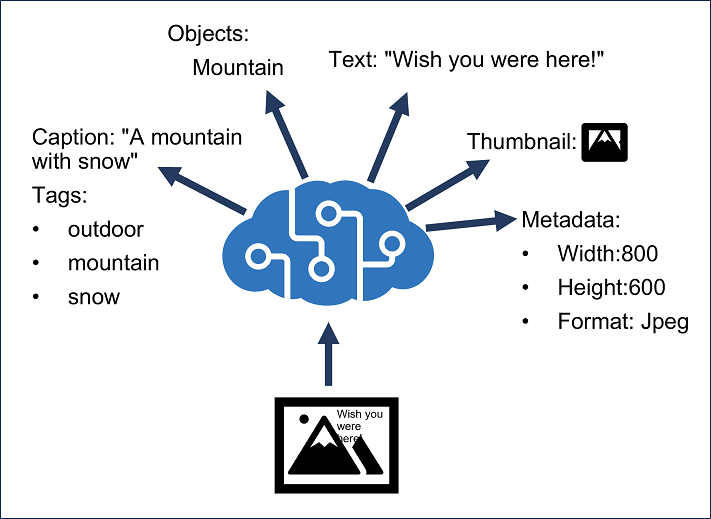
The Azure AI Vision service is designed to help you extract information from images. Below are the functionality that you can use it for:
| Functionality | Description |
|---|---|
| Description and tag generation | Determining an appropriate caption for an image, and identifying relevant "tags" that can be used as keywords to indicate its subject. |
| Object detection | Detecting the presence and location of specific objects within the image. |
| People detection | Detecting the presence, location, and features of people in the image. |
| Image metadata, color, and type analysis | Determining the format and size of an image, its dominant color palette, and whether it contains clip art. |
| Category identification | Identifying an appropriate categorization for the image, and if it contains any known landmarks. |
| Background removal | Detecting the background in an image and output the image with the background transparent or a greyscale alpha matte image. |
| Moderation rating | Determine if the image includes any adult or violent content |
| Optical character recognition | Reading text in the image. |
| Smart thumbnail generation | Identifying the main region of interest in the image to create a smaller "thumbnail" version. |
You can provision Azure AI Vision as a single-service resource, or you can use the Azure AI Vision API in a multi-service Azure AI Services resource.
- To install the Python libraries:
pip install -r requirements.txt
- Copy the .env.example to .env and update the values for the Azure AI Service Endpoint and API Key
cp .env.example .env
- To run the Python script:
python image_analysis.py
If you find the repository helpful, please give it a star!
Thank you, happy coding!