

A modern dashboard for BullMQ and Bull job queues, on Redis or PostgreSQL, plus a pg-boss engine, with authentication built in. Mount it in your NestJS, Express, Fastify or Next.js app, or run it standalone from the CLI or Docker.
Worker Manager is a fork of the open-source bull-board project (MIT), rebuilt with a shadcn/ui + Tailwind CSS interface, first-class authentication and a richer NestJS module. Migrating means a scope rename,
@bull-board/*→@worker-manager/*, plus the v2.0 product rename (createBullBoard→createWorkerManagerBoard,BullBoardModule→WorkerManagerModule, theworker-managerCLI binary andWORKER_MANAGER_*env vars); see the v2.0.0 changelog for the full list.


Tip
Using a coding agent? Install the Worker Manager agent skill and ask for the dashboard in plain words ("add a queue dashboard behind Keycloak to this NestJS app"). It knows the engines (BullMQ on Redis or PostgreSQL, pg-boss), the nine server adapters, every auth strategy and the setup rules people get wrong by hand.
Claude Code
/plugin marketplace add naldomadeira/worker-manager
/plugin install worker-manager@worker-manager
Any agent with a skills folder (one line)
curl -fsSL https://naldomadeira.github.io/worker-manager/worker-manager-skill.zip -o /tmp/wm-skill.zip && unzip -o /tmp/wm-skill.zip -d ~/.claude/skills/Or download the zip. More in Use it with an AI agent.
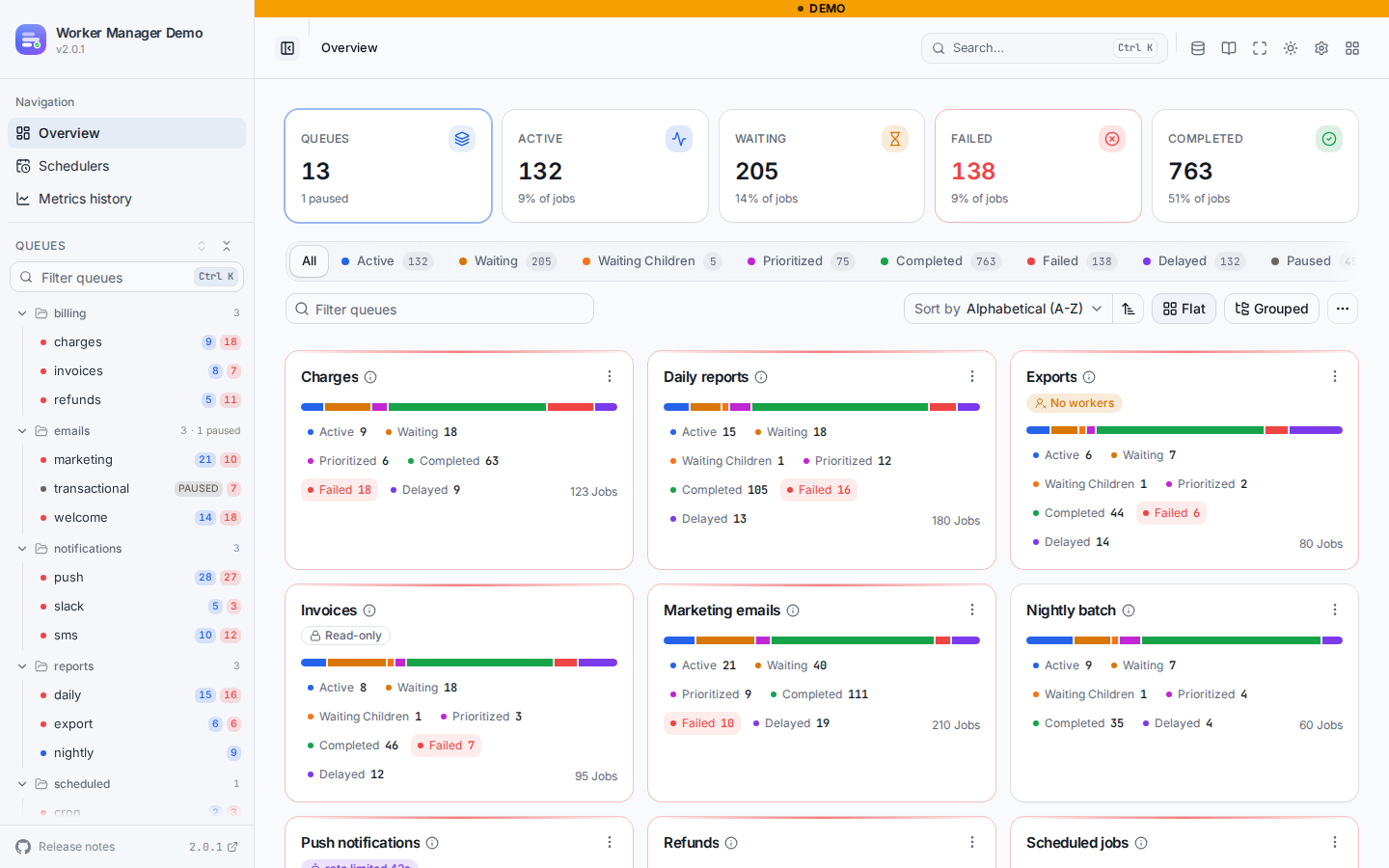
Light and dark ship together, and this picks whichever you are reading in.
What it does · Try it · Quick start · AI agents · Authentication · PostgreSQL · pg-boss · Packages · Contributing
Worker Manager shows your queues, jobs, schedulers and history in the browser, and lets you act on them: retry, promote, clean, pause, reschedule, send. It is a viewer that runs inside your server (or next to it), not a separate service.
Engines and datastores. A board runs one engine; mount two boards to see both.
| Engine | Datastore | Status |
|---|---|---|
BullMQ >= 5.56 and v6 |
Redis (standalone, Sentinel, Cluster) | Stable |
| BullMQ v6 | PostgreSQL (createPostgresBackend) |
Stable |
| Bull (and BullMQ Pro) | Redis | Stable |
pg-boss >= 12.24 (Node.js >= 22.12) |
PostgreSQL | Stable since 2.4.0 |
Authentication. @worker-manager/auth protects the page, the API and the assets on every adapter, the NestJS module and the CLI:
- Basic: static users or a
validate(username, password)callback, constant-time checks. - Keycloak / OpenID Connect: authorization code flow with PKCE, AES-GCM encrypted session cookie with silent refresh, bearer tokens for scripts,
requiredRoles. - Static token:
Authorization: Beareror a header of your choice for scripts and agents, plus a built-in browser login form that trades the token for aSameSite=Strictsession. - Custom: your own
authenticate(req), for example a verified Cloudflare Access JWT or your app's API-key check.
The dashboard.
- KPI tiles, a status-filtered overview grouped by queue category, a collapsible sidebar and a
Ctrl/⌘ Kcommand palette. - Job pages with data, logs, options, timeline and errors, plus hints for stalled, deduplicated and doomed jobs; reschedule delayed jobs and change priorities.
- Parent and child jobs as a pannable flows graph, across queues.
- Schedulers in a table and a day/week/month timeline, editable in place.
- Metrics history (opt-in
@worker-manager/metrics, stored in Redis or PostgreSQL): 7/30/90 day throughput, a daily activity calendar, wait and run-time latency percentiles, queue age, and a storage panel. - Read-only mode, per-request visibility guard, and access-control hooks per API call.
- Whitelabel theme tokens (shadcn contract), title, logo and environment badge; 12 languages; light, dark and system themes; a phone layout.
The pg-boss board. Jobs in all six pg-boss states, cron and RRULE schedules, dead-letter origins, pg-boss's persisted warnings, a queue depth chart, bulk retry/cancel/resume/delete, job lookup by id from the command palette, and schema tolerance: a newer pg-boss schema is probed, not refused, and whatever it lacks is switched off and named. It never migrates, supervises or creates anything in your database.
Integrations. Nine server adapters (Express, Fastify, Koa, Hapi, NestJS, Hono, H3, Elysia, Bun), a NestJS module with platform auto-detection, async config and named boards, a Next.js recipe, the worker-manager CLI and the ghcr.io/naldomadeira/worker-manager Docker image.
If you already have a Redis with queues in it, one command gets you the dashboard:
npx @worker-manager/cli -r redis://localhost:6379Or as a container, no Node needed (docs):
docker run --rm -p 127.0.0.1:3000:3000 ghcr.io/naldomadeira/worker-manager --redis redis://host.docker.internal:6379--postgres <url> serves BullMQ v6 queues from PostgreSQL and --pg-boss <url> a pg-boss board. There's also a live demo, and a pg-boss demo.
npm install @worker-manager/api @worker-manager/nestjs @worker-manager/express # or @worker-manager/fastifyimport { BullModule } from '@nestjs/bullmq';
import { Module } from '@nestjs/common';
import { BullMQAdapter } from '@worker-manager/api/bullMQAdapter';
import { WorkerManagerModule } from '@worker-manager/nestjs';
@Module({
imports: [
BullModule.forRoot({ connection: { host: 'localhost', port: 6379 } }),
BullModule.registerQueue({ name: 'emails' }),
WorkerManagerModule.forRoot({
route: '/queues', // Express or Fastify is detected, no adapter needed
auth: {
strategy: 'basic',
users: [{ username: 'admin', password: process.env.BOARD_PASSWORD! }],
},
}),
// Next to the queue's registerQueue; the queue is resolved from DI by name.
WorkerManagerModule.forFeature({ name: 'emails', adapter: BullMQAdapter }),
],
})
export class AppModule {}Open http://localhost:3000/queues. forRootAsync (with useFactory, useClass or useExisting), readOnly, enabled, title/logo/theme, Keycloak and token auth, named boards and PostgreSQL queues are in the NestJS guide.
Needs Node.js 22.12+ and pg-boss 12.24+. Your app keeps starting pg-boss; the board reuses that instance.
npm install @worker-manager/api @worker-manager/nestjs @worker-manager/express @worker-manager/pg-boss// boss.ts
import { PgBoss } from 'pg-boss';
export const boss = new PgBoss(process.env.DATABASE_URL!);
// main.ts
await boss.start();
const app = await NestFactory.create(AppModule);
await app.listen(3000); // http://localhost:3000/pg-boss
// app.module.ts
@Module({
imports: [
WorkerManagerModule.forRoot({
route: '/pg-boss',
engine: 'pg-boss',
auth: { strategy: 'basic', users: [{ username: 'admin', password: process.env.BOARD_PASSWORD! }] },
pgBoss: {
instance: boss, // writes go through your instance
connection: process.env.DATABASE_URL, // reads use a small pool with a real query timeout
},
}),
],
})
export class AppModule {}Already have a BullMQ board? Keep it and give this one a name: 'pgboss': two boards, two routes, one app. pgBoss.useExisting takes a provider token instead of instance. See the NestJS pg-boss board and the runnable examples/nestjs/pg-boss.
There is no Next.js adapter; the Hono one runs in an optional catch-all Route Handler, app/api/queues/[[...path]]/route.ts:
npm install @worker-manager/api @worker-manager/hono hono @hono/node-server bullmqimport { serveStatic } from '@hono/node-server/serve-static';
import { createWorkerManagerBoard } from '@worker-manager/api';
import { BullMQAdapter } from '@worker-manager/api/bullMQAdapter';
import { HonoAdapter } from '@worker-manager/hono';
import { Hono } from 'hono';
import { handle } from 'hono/vercel';
import { queue } from '@/lib/queue';
export const runtime = 'nodejs'; // the UI is read from disk, so no edge runtime
export const dynamic = 'force-dynamic';
const basePath = '/api/queues';
const serverAdapter = new HonoAdapter(serveStatic);
serverAdapter.setBasePath(basePath);
createWorkerManagerBoard({ queues: [new BullMQAdapter(queue)], serverAdapter });
const app = new Hono();
app.route(basePath, serverAdapter.registerPlugin());
export const GET = handle(app);
export const POST = handle(app);
export const PUT = handle(app);
export const PATCH = handle(app);
export const DELETE = handle(app);On Vercel, add serverExternalPackages and outputFileTracingIncludes for @worker-manager/ui to next.config.js, and run workers as a separate process. For pg-boss, swap createWorkerManagerBoard for createPgBossBoard({ serverAdapter, pgBoss: { connection: process.env.DATABASE_URL } }) from @worker-manager/pg-boss (that variation is not one of the runnable examples). Put auth in front before deploying. See the Next.js & Vercel recipe and examples/nextjs/app-router.
const express = require('express');
const { Queue } = require('bullmq');
const { createWorkerManagerBoard } = require('@worker-manager/api');
const { BullMQAdapter } = require('@worker-manager/api/bullMQAdapter');
const { ExpressAdapter } = require('@worker-manager/express');

const emailQueue = new Queue('emails', { connection: { host: 'localhost', port: 6379 } });

const serverAdapter = new ExpressAdapter();
serverAdapter.setBasePath('/admin/queues'); // must equal the mount path below

createWorkerManagerBoard({ queues: [new BullMQAdapter(emailQueue)], serverAdapter });

const app = express();
app.use('/admin/queues', serverAdapter.getRouter()); // add auth in front, see below
app.listen(3000);
Every other framework follows the same shape; see the server adapters and the docs for queue adapter options (read-only, retries, formatters, visibility guard), BullMQ Pro and UIConfig. See supported versions for what CI tests.
The Worker Manager agent skill teaches a coding agent the choices above (engine, server adapter, auth strategy) and the rules people get wrong by hand, with ready setups for NestJS, Express, Fastify and pg-boss. Install it any of three ways:
-
Claude Code plugin:
/plugin marketplace add naldomadeira/worker-manager, then/plugin install worker-manager@worker-manager. -
Zip: download
worker-manager-skill.zipand unzip it into your agent's skills folder. -
One line:
curl -fsSL https://naldomadeira.github.io/worker-manager/worker-manager-skill.zip -o /tmp/wm-skill.zip && unzip -o /tmp/wm-skill.zip -d ~/.claude/skills/
Use
-d .claude/skills/instead to add it to one project. Other agents that read skill folders can use the sameworker-manager/folder.
Then ask for it in plain words ("add a queue dashboard behind Keycloak to this NestJS app"). The skill lives in skills/worker-manager; the AI agent guide also has a copy-paste prompt and the llms.txt / OpenAPI files for agents.
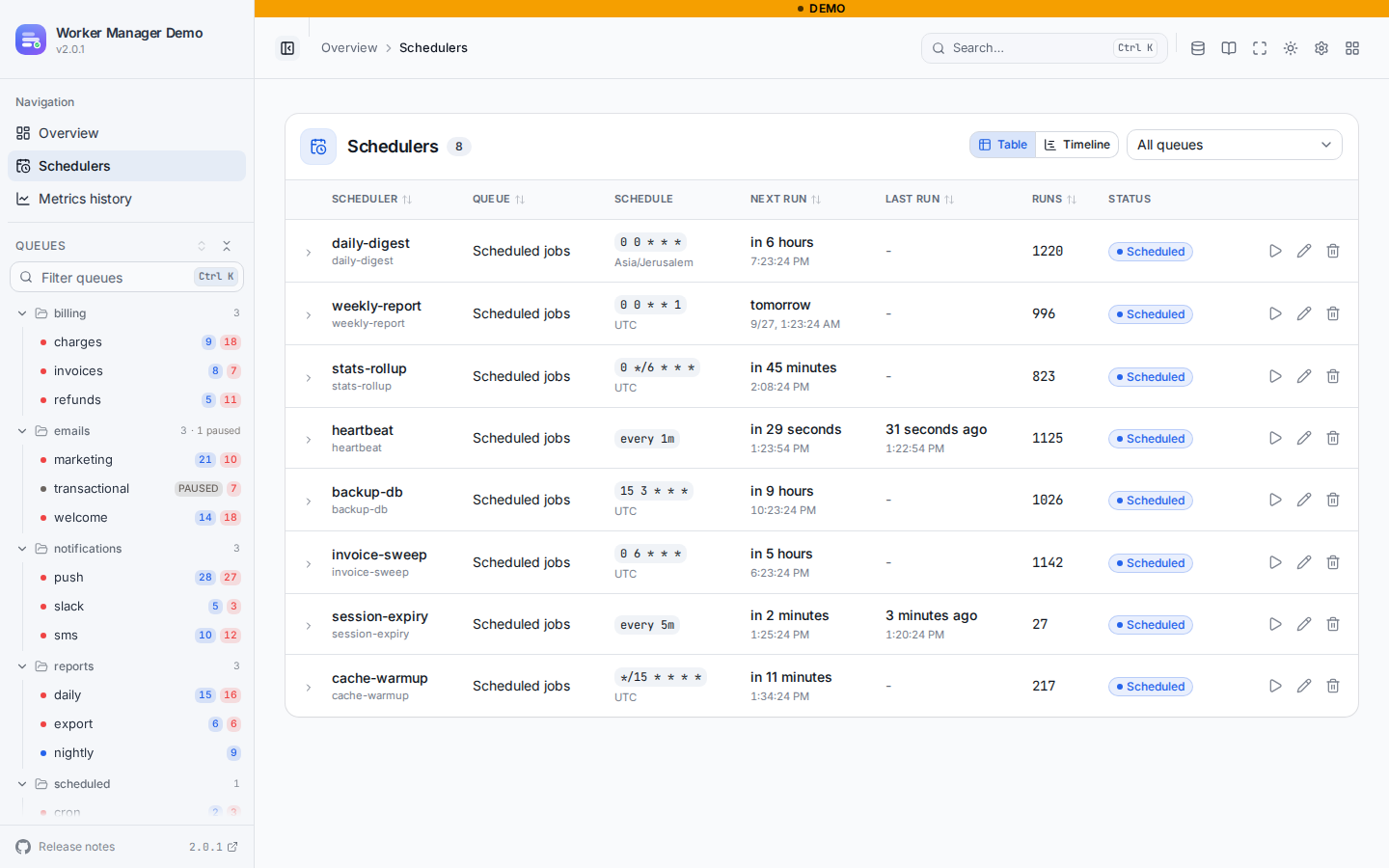 Every repeatable job across every queue, with its pattern or interval, when it next fires and when it last ran. Edit or remove one in place. |
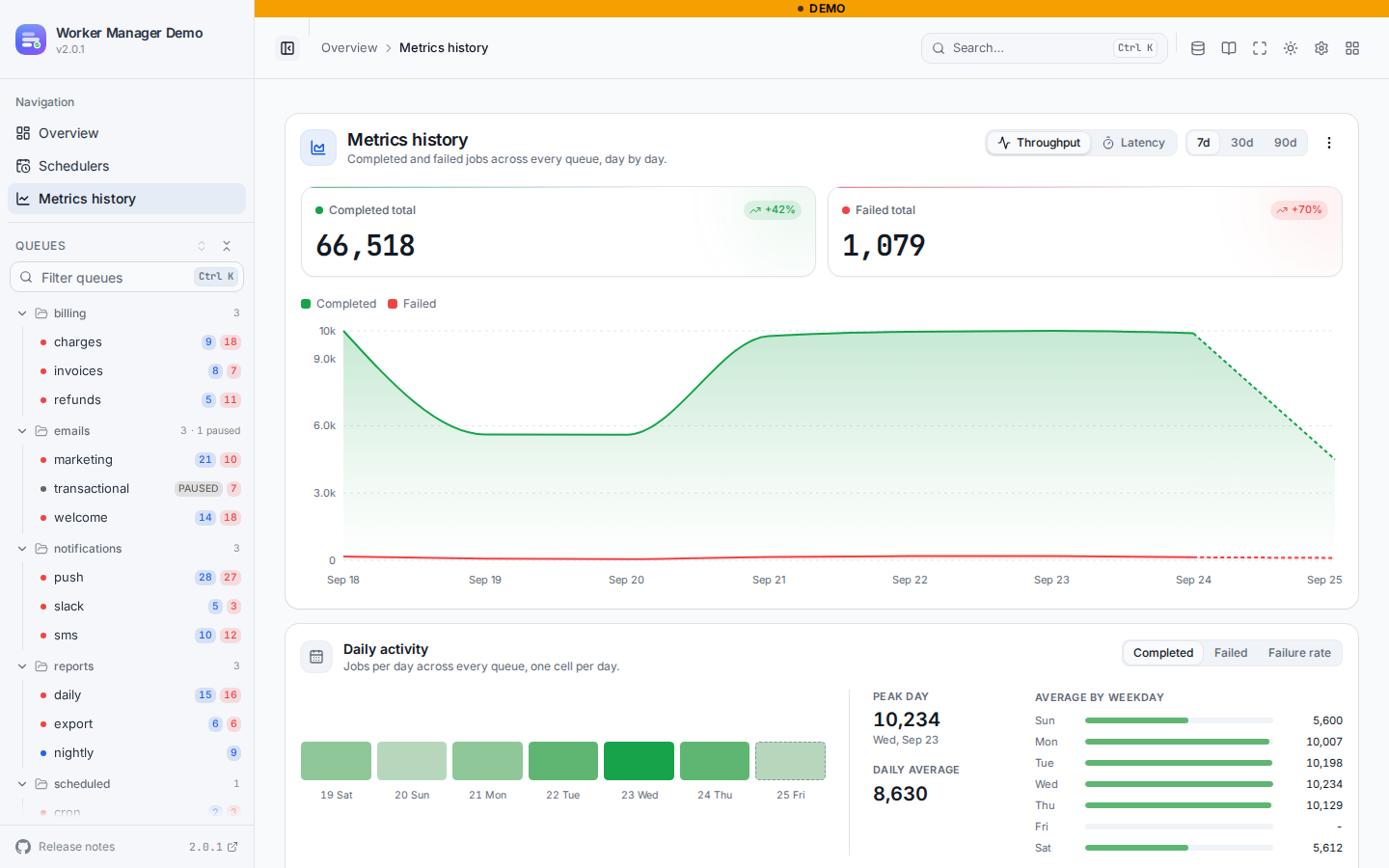 Opt-in throughput and latency history over 90 days, per queue and board-wide. The storage panel tells you what keeping it costs. |
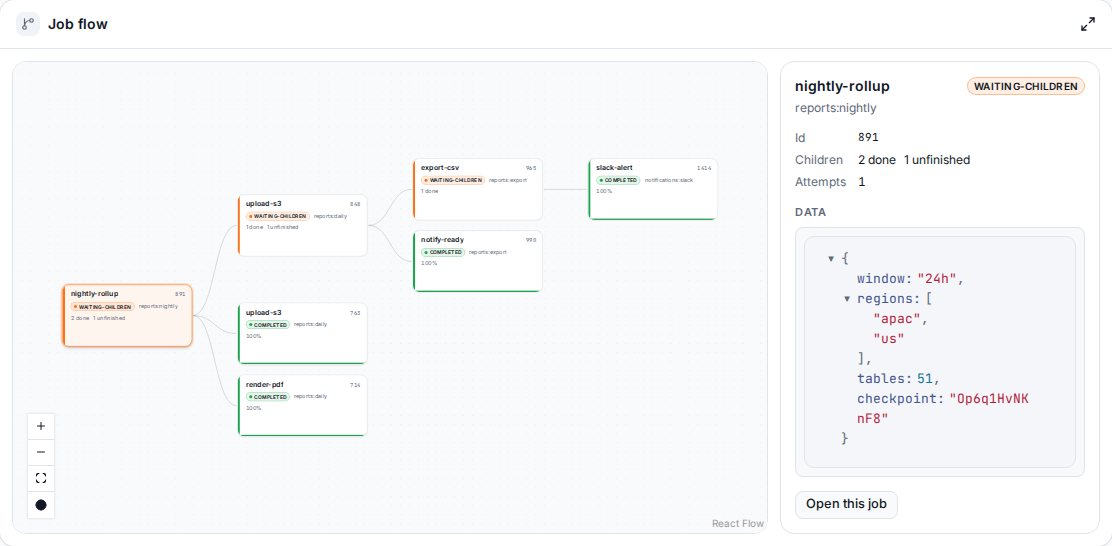 Parent and child jobs as one pannable graph, even when the children live in other queues, each with its own state and progress. Click a node to inspect it without leaving the page. Per-job logs alongside. |
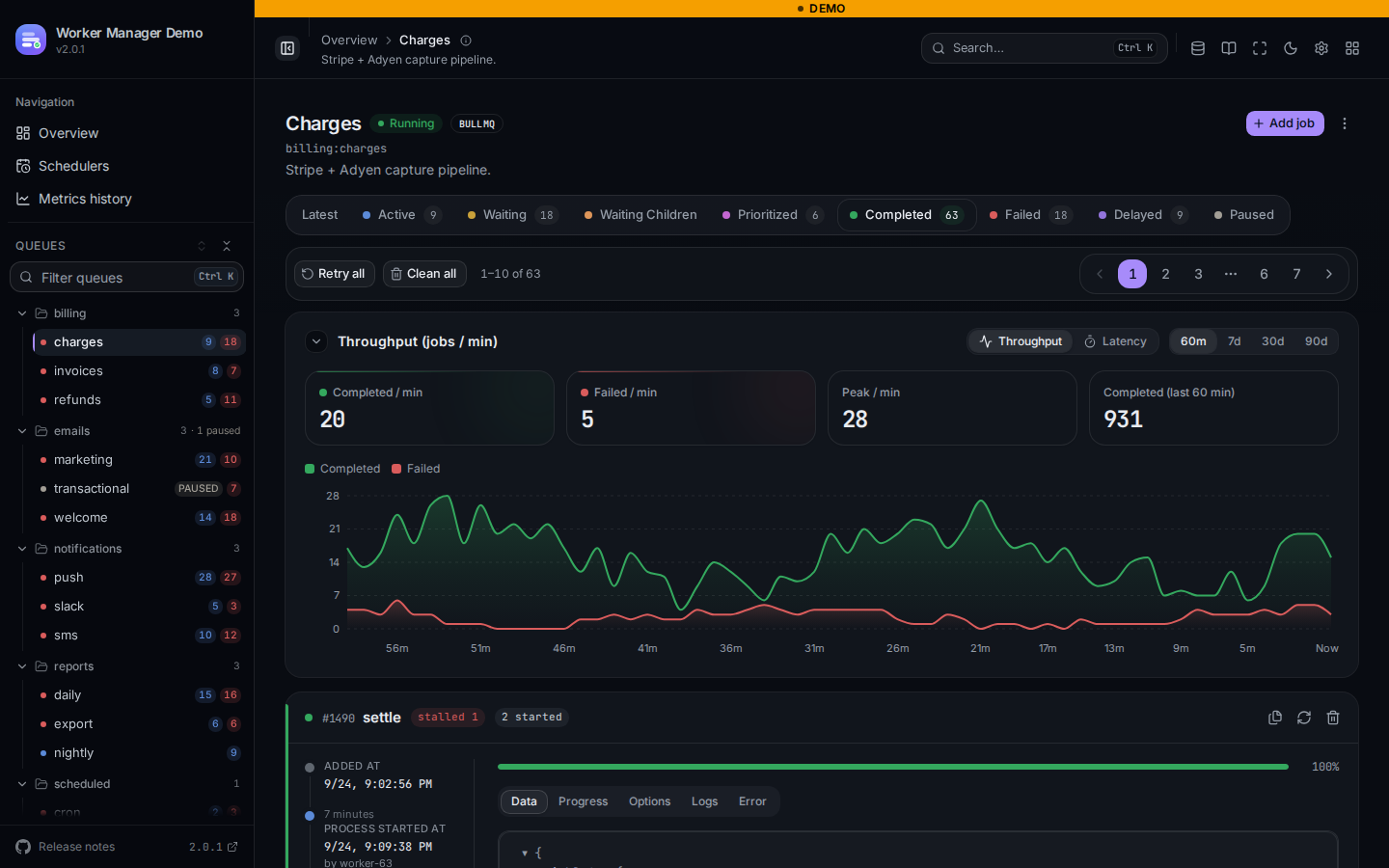 Design tokens named after the shadcn contract. Set primary and the focus ring, the sidebar and the selection states all follow it. |
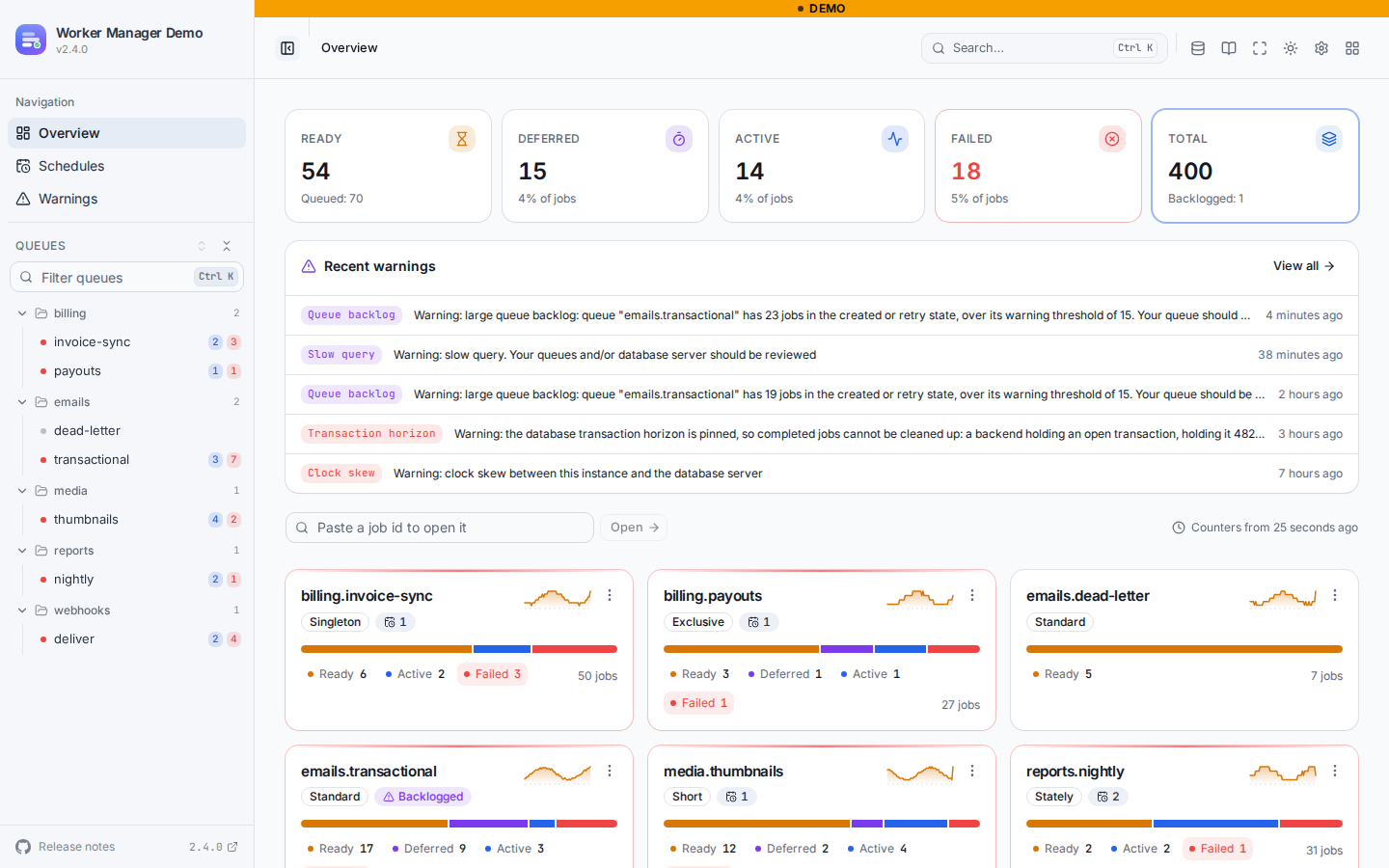 The pg-boss board: pg-boss's cached counters as KPI tiles and one card per queue with its policy. |
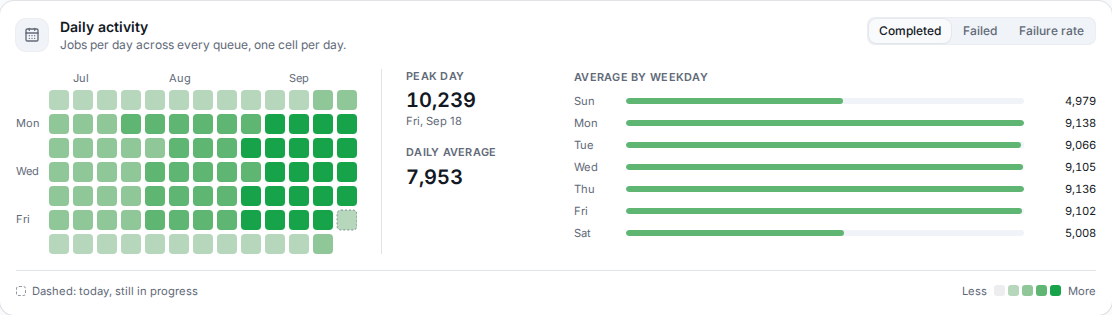 Daily activity: completed jobs, failures or the failure rate as a calendar, with the peak day and the average per weekday. |
@worker-manager/auth is a framework-agnostic middleware. The NestJS module and the CLI use it for you; with any other adapter, mount it in front of the board:
import { createAuthMiddleware } from '@worker-manager/auth';

app.use(
  '/admin/queues',
  createAuthMiddleware(
    { strategy: 'basic', users: [{ username: 'ops', password: process.env.BOARD_PASSWORD! }] },
    { basePath: '/admin/queues' }
  ),
  serverAdapter.getRouter()
);
Four strategies, all with constant-time credential checks and the same req.user, onAuthenticated hook and GET <base>/auth/me endpoint:
| Strategy | For | |
|---|---|---|
basic |
A quick shared login | Static users or a validate(username, password) callback, HTTP Basic challenge. |
keycloak |
Single sign-on | OIDC with PKCE, an AES-GCM encrypted session cookie, silent refresh, bearer tokens for scripts and requiredRoles. |
token |
Internal boards and scripts | Static tokens (or validate(token)) in Authorization: Bearer or a header of your choice; browsers type the token once into a built-in login form and get a SameSite=Strict encrypted session cookie. |
custom |
Anything else | Your authenticate(req), e.g. a verified Cloudflare Access JWT or your app's API-key check. |
WorkerManagerModule.forRoot({
  route: '/admin/queues',
  auth: {
    strategy: 'token',
    tokens: [process.env.BOARD_TOKEN!],
    header: 'X-Board-Token',
    cookie: { secret: process.env.BOARD_SESSION_SECRET! },
  },
});
See the Basic auth, Keycloak, Token and Custom recipes.
BullMQ v6 can store queues in PostgreSQL. Hand those queues to the board like any other; the stats panel reports the Postgres datastore instead of Redis:
import { Queue, createPostgresBackend } from 'bullmq';

const invoices = new Queue('invoices', { connection: { connectionString: process.env.POSTGRES_URL, migrate: true } }, createPostgresBackend);
createWorkerManagerBoard({ queues: [new BullMQAdapter(invoices)], serverAdapter });
The CLI discovers them for you: npx @worker-manager/cli --postgres postgres://user:pass@host/db. See the PostgreSQL recipe.
A board runs one engine. Besides BullMQ and Bull, there is a pg-boss engine, for pg-boss 12.24 and later on Node.js 22.12 and later. It reads the pg-boss tables with plain SQL and writes through the pg-boss API, and never migrates, supervises or creates anything in your database. It is stable since 2.4.0 and follows semver like the BullMQ engine: a breaking change to its screens' behaviour or to the /api/pg-boss HTTP contract only ships in a major.
npm install @worker-manager/pg-bossimport { createPgBossBoard } from '@worker-manager/pg-boss';
const serverAdapter = new ExpressAdapter();
serverAdapter.setBasePath('/pg-boss');
createPgBossBoard({ serverAdapter, pgBoss: { instance: boss, connection: process.env.DATABASE_URL } });
app.use('/pg-boss', serverAdapter.getRouter());The NestJS module mounts it as a named board next to a BullMQ one (engine: 'pg-boss'), and the CLI serves it with --pg-boss <url>. See the pg-boss docs, or the pg-boss demo.
yarn install && yarn build
yarn playground:infra          # Redis, PostgreSQL and Keycloak in Docker
cp playground/.env.example playground/.env
yarn playground                # http://localhost:3100/queues
yarn workspace @worker-manager/playground smoke
Switch WM_AUTH between none, basic and keycloak in playground/.env. See the playground guide.
BullMQ keeps only a short ring buffer of per-minute metrics, so the throughput chart can't look back further than an hour or so. The optional @worker-manager/metrics package snapshots those metrics into long-retention buckets in Redis or PostgreSQL and feeds them back to the board, which adds a Metrics history page (throughput, daily activity, latency, storage) and 7/30/90 day ranges on every queue chart. It is entirely opt-in: without it the core stays stateless and writes nothing.
npm install @worker-manager/metricsThe CLI and the Docker image carry the package already, so --history turns the same thing on with nothing to install:
npx @worker-manager/cli -r redis://localhost:6379 --historySee the historical metrics recipe for the recorder setup and storage sizing, or try it on the live demo.





Issues and PRs welcome. Check the issues page before opening a new one. When reporting a bug, include versions (Node, Redis or PostgreSQL, Bull/BullMQ, Worker Manager) and a minimal reproduction.
To develop locally:
git clone git@github.com:naldomadeira/worker-manager.git
cd worker-manager
yarn && yarn dev:docker && yarn build && yarn dev
This starts Redis, builds the packages, and opens the dev server at http://localhost:3000/ui. See CONTRIBUTING.md for the monorepo layout, running tests and examples, and adding a new server adapter.
MIT.