A lightweight HTTP static file server written in C. Designed for maximum retro compatibility — the directory listing works on browsers as old as Internet Explorer 3.0 and Lynx, with a phosphor green terminal aesthetic. Runs on Linux, macOS, and Windows 95 through Windows 11.
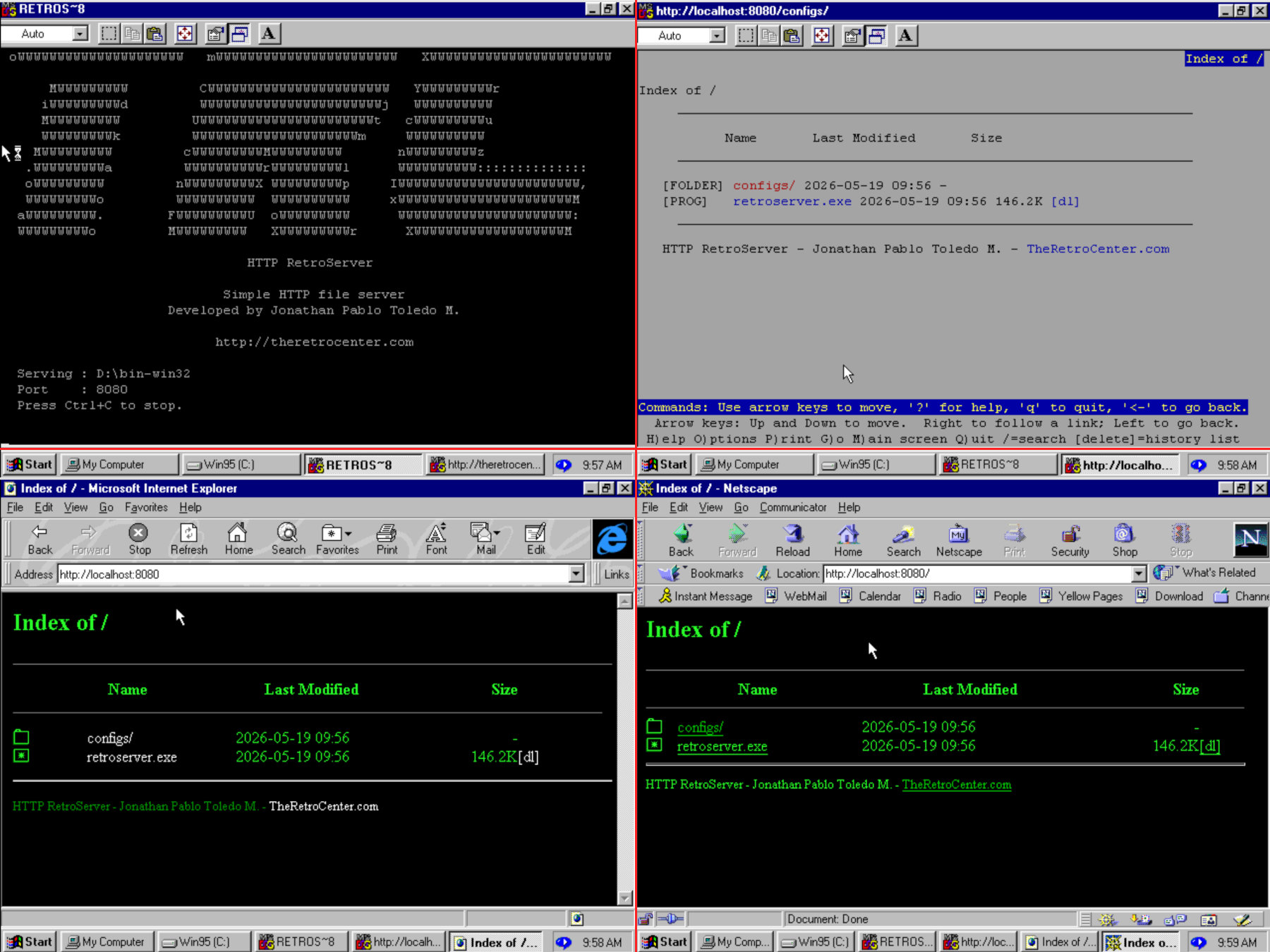
- Serves static files with an auto-generated directory listing
- Force-download any file with the
?dlquery parameter - MIME type detection for common file formats
- Multi-threaded connection handling
- Path traversal protection (blocks
..and symlink escapes) - Configurable via a plain text config file
- Graceful shutdown on
SIGINT/SIGTERM - Installable as a systemd service (Linux)
- Retro compatible: tested down to IE 3.0, Netscape 4, and Lynx
- Phosphor green UI: black background, green terminal style
- Self-contained binary: icons, HTML templates, and startup banner are embedded at compile time — no extra files needed at runtime
- Cross-platform: Linux, macOS, Windows 95+ (no external dependencies)
- GCC or Clang
- CMake 3.10+
No external libraries required.
# Debian / Ubuntu / Raspberry Pi
sudo apt install build-essential cmake

# macOS
brew install cmake

# Windows cross-compile from Linux
sudo apt install build-essential cmake mingw-w64# Linux -> bin-linux/retroserver
./retroserver.sh linux
# macOS -> bin-macos/retroserver (run on a Mac)
./retroserver.sh macos
# Windows 95 to Win11 (32-bit) -> bin-win32/retroserver.exe
./retroserver.sh win32
# Linux debug build (with debug symbols)
./retroserver.sh debugEach platform output is placed in its own directory alongside configs/.
Icons, HTML templates, and the startup banner are compiled directly into
the binary — no additional folders are needed at runtime.
./retroserver.sh run [directory]If no directory is specified, the current directory is served.
Examples:
# Serve the current directory
./retroserver.sh run

# Serve a specific directory
./retroserver.sh run /home/user/files
Once running, open your browser at http://localhost:8080
Edit configs/config.txt:
# Log level: 0=none 1=error 2=warn 3=info 4=debug
verbose_level=1

# HTTP port
http_port=8080The ASCII art shown at startup comes from scripts/show/welcome. Edit that
file and recompile — the banner is embedded into the binary automatically by
scripts/gen_banner_c.sh during the build.
The page structure lives in html/. Edit these files and recompile to apply changes:
| File | Description | Variables |
|---|---|---|
html/dir_header.html |
Page header and listing opening | {{PATH}} |
html/dir_footer.html |
Page footer | (none) |
html/error.html |
Error page | {{CODE}}, {{STATUS}} |
At compile time, these files are embedded into the binary automatically.
Icons are 16x16 GIF images in icons/. To customize:
- Replace any
.gifinicons/with your own image - Recompile — CMake detects the change and re-embeds everything
| Icon | File types |
|---|---|
[FOLDER] |
Directories |
[MUSIC] |
mp3, ogg, wav, flac, aac, m4a, wma |
[VIDEO] |
mp4, mkv, avi, mov, webm, flv, wmv |
[IMAGE] |
jpg, jpeg, png, gif, svg, webp, ico, bmp |
[ZIPED] |
zip, gz, tar, 7z, rar, bz2, xz |
[PDF] |
|
[DISC] |
iso, cue |
[PROG] |
exe, bin |
[TEXT] |
txt, md, log, csv, rtf |
[CODE] |
c, h, cpp, py, sh, js, json, html, xml, go, rs, yaml |
[FILE] |
Everything else |
In text browsers like Lynx, these labels appear in place of the icons, padded to a fixed width for column alignment.
# Install as a service
sudo ./retroserver.sh install

# Remove the service
sudo ./retroserver.sh uninstall| Command | Description | Output |
|---|---|---|
linux |
Build for Linux (Release) | bin-linux/ |
macos |
Build for macOS (run on a Mac) | bin-macos/ |
win32 |
Cross-compile for Windows 95 to Win11 | bin-win32/ |
debug |
Linux build with debug symbols | bin-linux/ |
run [dir] |
Run the server (default: current directory) | |
install |
Install as a systemd service | |
uninstall |
Remove the systemd service |
| Platform | Compiler | Compatible versions |
|---|---|---|
| Linux | GCC / Clang | Any modern distribution |
| macOS | Clang / GCC | 10.9+ |
| Windows | MinGW-w64 (cross-compiled from Linux) | Windows 95 to Windows 11 |
The Windows build uses WinSock 1.1 (wsock32.dll), which is present on
all Windows versions from 95 onward without any additional updates.
The binary targets the i486 instruction set so it runs on any x86 CPU
from 486 to modern processors.
| Document | Description |
|---|---|
| 01 — Overview | High-level architecture and design goals |
| 02 — Components | Module map and component responsibilities |
| 03 — Request Lifecycle | HTTP request flow from socket to response |
| 04 — Build and Embedding | Build system and asset embedding pipeline |
| 05 — Decisions | Architecture decision records (ADRs) |
| Diagram | Description |
|---|---|
| 01 — Context | System context (C4 model) |
| 02 — Component Layers | Layered component view |
| 03 — Module Dependencies | Module dependency graph |
| 04 — Request Sequence | Sequence diagram for a full HTTP request |
| 05 — Server States | Server lifecycle state machine |
| 06 — Build Pipeline | Asset embedding build pipeline |
| 07 — Platform Abstraction | Cross-platform abstraction layer |
retroserver/
├── src/
│   ├── main.c
│   ├── platform/                     # Cross-platform abstraction layer
│   │   ├── platform.h                # OS detection, socket types, helpers
│   │   ├── fs.h / fs_posix.c         # Filesystem API (Linux + macOS)
│   │   ├── fs_win32.c                # Filesystem API (Windows)
│   │   ├── thread.h / thread_posix.c # Threading API (pthreads)
│   │   ├── thread_win32.c            # Threading API (Win32)
│   │   └── win95_compat.c            # Win95 startup overrides (i486-safe)
│   ├── server/
│   │   ├── start_stop.c              # Server lifecycle
│   │   ├── connection.c              # Socket read/write abstraction
│   │   ├── connection_thread.c       # Thread-per-connection handler
│   │   ├── http_request_parser.c
│   │   ├── request_handler.c         # Routes requests
│   │   ├── static_handler.c          # File serving and directory listing
│   │   └── icons_handler.c           # Serves embedded icons at /_icons/
│   └── utils/
│       ├── config_loader.c
│       ├── server_utils.c            # MIME types, URL encode/decode, template engine
│       └── log.h
├── html/                             # HTML templates (embedded at compile time)
│   ├── dir_header.html
│   ├── dir_footer.html
│   └── error.html
├── icons/                            # GIF icons 16x16 (embedded at compile time)
├── docs/
│   ├── architecture/
│   │   ├── 01-overview.md            # Architecture overview
│   │   ├── 02-components.md          # Component architecture
│   │   ├── 03-request-lifecycle.md   # HTTP request lifecycle
│   │   ├── 04-build-and-embedding.md # Build system and asset embedding
│   │   ├── 05-decisions.md           # Architecture decision records
│   │   └── diagrams/                 # PlantUML source diagrams
│   │       ├── 01-context.puml
│   │       ├── 02-components-layers.puml
│   │       ├── 03-module-dependencies.puml
│   │       ├── 04-request-sequence.puml
│   │       ├── 05-server-states.puml
│   │       ├── 06-build-pipeline.puml
│   │       └── 07-platform-abstraction.puml
│   └── images/                       # Screenshots
├── cmake/
│   └── mingw-w64-win95.cmake         # Windows cross-compile toolchain
├── configs/
│   └── config.txt
├── scripts/
│   ├── compile_linux.sh
│   ├── compile_macos.sh
│   ├── compile_win32.sh
│   ├── compile_debug.sh
│   ├── patch_win32.c                 # Replaces CMOVcc (i686) instructions for i486
│   ├── gen_icons_c.sh                # Embeds icons into C source (run by CMake)
│   ├── gen_html_c.sh                 # Embeds HTML into C source (run by CMake)
│   ├── gen_banner_c.sh               # Embeds startup banner into C source (run by CMake)
│   └── show/
│       └── welcome                   # ASCII art banner source
└── retroserver.sh                    # Main entry point
Jonathan Pablo Toledo M.
TheRetroCenter.com