Setting stand off elements
By default, coreBuilder creates entries using tei:linkGrp, tei:link, and lists selected ids in tei:link's @target attribute. You can set other elements and behaviors by clicking on "Stand-off" on the sidebar.
The panel allows you to set up to four elements, the ones in bold are required:
- Wrapper: the element that will contain a full entry;
- Grouping element: an element that can group container elements (see grouping);
- Container: the element that will wrap and contain pointer elements;
- Pointer element: the element that will contain the actual reference to the XML data.
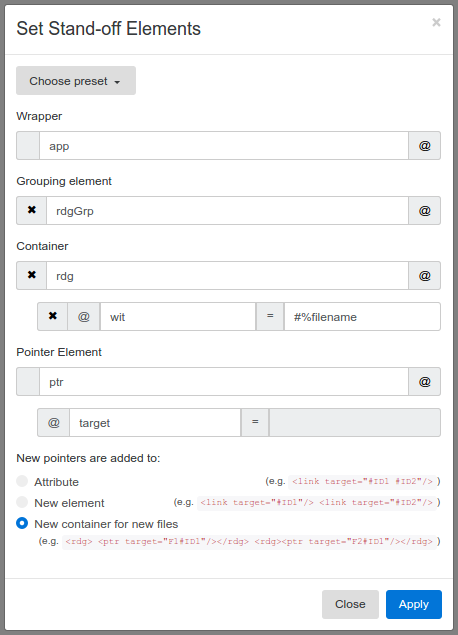
You can also determine how new pointers can be added. Currently there are three options:
-
Attribute: new references are added to the pointer element's attribute
(e.g.<link target="#ID1 #ID2"/>) -
New element: a new pointer element is created with every new reference
(e.g.<link target="#ID1"/> <link target="#ID2"/>) -
New container for new files: a container is created for every referenced file
(e.g.<rdg> <ptr target="F1#ID1"/></rdg> <rdg><ptr target="F2#ID1"/></rdg>)
If you have a suggestion for other behaviors, please open an issue.
Elements and behaviors can be changed at any point and different entries can have different settings.
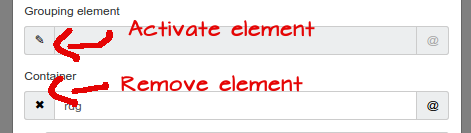
You can turn on or off elements by clicking on the pen or cross icon respectively. Please note that the grouping element is only available with certain behaviors.
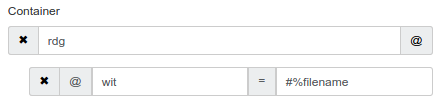
You can add attributes to the elements. This is useful if you expect certain elements to have specific attributes that you don't want to add at a later stage. Click on the @ button to add a new attribute.
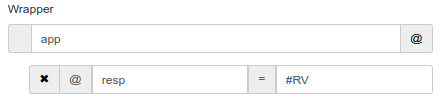
The shorthand %filename is available for adding the filename as part of an attribute value. If you have suggestions for more shorthands, please submit an issue.
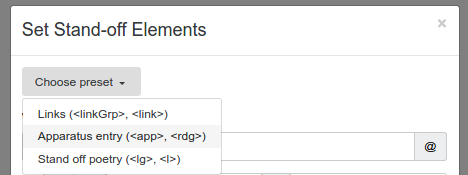
You can choose from a list of preset elements. If you'd like to see a new preset group of elements, please request it with an issue.