
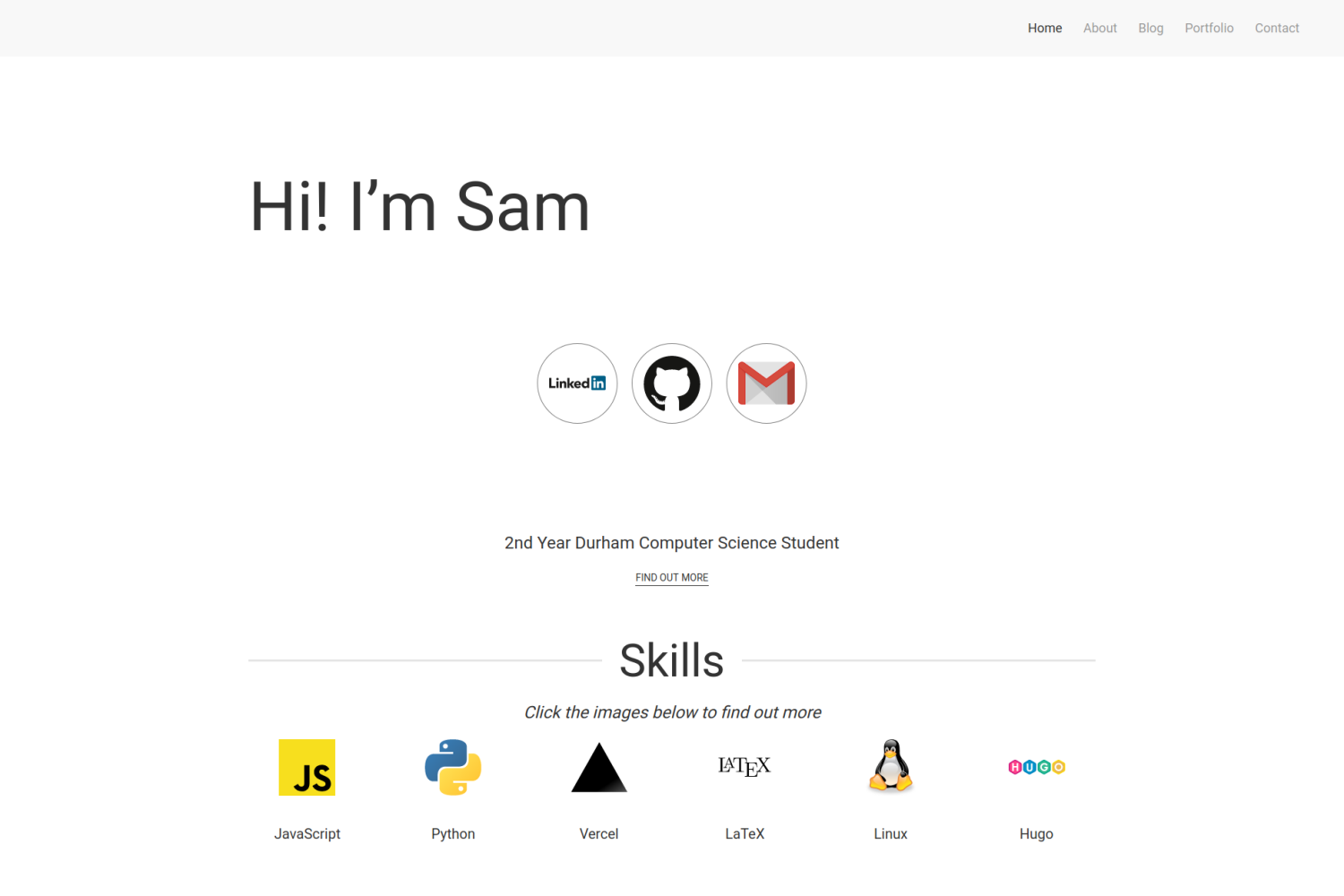
- Responsive Design
- Blog Section
- Portfolio Section
- Homepage to show off skills
To install this theme, first create a themes folder in your site with
mkdir themesThen move into this directory with
cd themesThe repository can then be added either by cloning or adding as a submodule
# Cloning
git clone https://github.com/samrobbins85/hugo-developer-portfolio hugo-developer-portfolio
# Submodule
git submodule add https://github.com/samrobbins85/hugo-developer-portfolio hugo-developer-portfolio
In the config.toml file in your site directory add
theme="hugo-developer-portfolio"The exampleSite folder is almost set up to work as a site, if you copy it out of the Git Repo and remove the lines in config.toml under "Remove this when using normally" and uncomment the lines starting at "[module]" it should work. You need to have golang installed as it uses hugo modules.
This is a highly configurable site, and as such, it will be unlikely that it will work with your existing site.
Config.toml provides the basic structure of the site, it contains a range of sections
In the example site, the base information looks as follows
baseURL = "http://example.com" # The URL of your site
languageCode = "en-gb" # The language you want to display the site in
title = "Sam Robbins" # The title you want to appear in the address bar
theme = "hugo-developer-portfolio" # The theme, don't change thisThese are the essential plugins required to run the site, but you can add more if you need
[params.plugins]
  # CSS Plugins
  [[params.plugins.css]]
  URL = "https://cdn.jsdelivr.net/npm/[email protected]/dist/css/uikit.min.css"
  # JS Plugins
  [[params.plugins.js]]
  URL = "https://cdn.jsdelivr.net/npm/[email protected]/dist/js/uikit.min.js"
  [[params.plugins.js]]
URL = "https://cdn.jsdelivr.net/npm/[email protected]/dist/js/uikit-icons.min.js"This specifies the titles for the entries in the taskbar. name can be changed to show a different name. URL should not be changed in most situations as the pages will exist at the old URLs rather than the new ones, so this will result in dead links.
# navigation
[menu]
  [[menu.main]]
  name = "About"
  URL = "about"
  [[menu.main]]
  name = "Blog"
  URL = "blog"
  [[menu.main]]
  name = "Portfolio"
  URL = "portfolio"
  [[menu.main]]
  name = "Contact"
URL = "contact"This contains the other configuration information
[params]
home = "Home" # What you want the homepage to show up as in the menu bar
# Meta data
description = "The website of Sam Robbins, 2nd Year Computer Science Student at Durham University"
author = "Sam Robbins"


  [params.contact]
  formAction = "https://formspree.io/<Insert code>" # Add your formspree URL here to get emails

  # This contains the contact information for the footer
  [params.footer]
  email = "[email protected]"
  address = "Durham, UK"
googlemaps = "https://www.google.com/maps/embed/v1/place?q=place_id:ChIJwbHYJaUqfEgRK0Ui9dVGimc&key=AIzaSyAE_4rVAKux_DSPcb_OdSRDaovtPOSk_3U"This file is stored in data/homepage.yml. It determines the content of the homepage and contains many sections
This is the text in the hero section, change it to whatever you want
banner:
title: Hi! I’m SamPut all of your social links here and they will appear in the social section
social:
  twitter: ""
  linkedin: sam-robbins-gb
  bitbucket: ""
  github: samrobbins85
  gitlab: ""
  facebook: ""
  instagram: ""
  gmail: samrobbinsgb
  hotmail: ""
  telegram: ""
whatsapp: ""enablecan be used to hide this sectioncontentdetermines what text is shown herebtnTextchanges the text on the buttonURLchanges the URL the button directs to
about:
  enable: true
  content: 2nd Year Durham Computer Science Student
  button:
    btnText: Find out more
URL: "/about"enablecan be used to hide this sectiontitledetermines the text both under the image and in the modallogodetermines the image that shows updescriptionis the text that appears inside the modal
skill:
  enable: true
  item:
    - title: JavaScript
      logo: https://res.cloudinary.com/samrobbins/image/upload/v1591793272/logos/logos_javascript_adj1dx.svg
description: Details coming soon, contact me if you want to know moreThis is used to highlight specific portfolio projects you want to show
enablecan be used to hide this sectiontitleis the text at the top each itemimageis the image for each itemdescriptiongoes underneath the image for each itemlinkdirects to the main portfolio pagetoolsindicates what technologies you used, it uses the icons from https://simpleicons.org/
portfolio:
  enable: true
  item:
    - title: Easy DMARC
      image: https://res.cloudinary.com/samrobbins/image/upload/v1597159067/Easy_DMARC_hkcgif.webp
      description: A website to make it easy to add DMARC to a Vercel website
      link: "/portfolio/easy-dmarc"
      tools:
        - next-dot-js
        - tailwindcss
        - vercel
- reactenablecan be used to hide this sectionlogodetermines the image that shows uptitleis the main text that appears in the cardcompanyis the secondary text in the carddurationis the tertiary text in the card
experience:
  enable: true
  item:
    - logo: https://res.cloudinary.com/samrobbins/image/upload/f_auto,q_auto/v1591793271/logos/logos_google_id6v9a.svg
      title: init.g
      company: Google
duration: November 2019By placing none in the URL field, the image will be rendered without any links
hackathons:
  enable: true
  item:
    - title: Hack Cambridge 2019
      description: Climate change simulator
      image: https://res.cloudinary.com/samrobbins/image/upload/f_auto,q_auto/v1591793405/stickers/Hack_Cambridge_101_ozoq5d.png
url: noneThis allows you to list your certifications in the following format
certifications:
  enable: true
  item:
    - title: Microsoft Azure Fundamentals
      image: https://res.cloudinary.com/samrobbins/image/upload/v1592501459/microsoft-certified-fundamentals-badge_cpcgyn.svg
url: https://www.youracclaim.com/badges/b4cf7a86-eb83-478e-bfd0-9f427c3474a0/public_urlThis allows you to list your awards and achievements in the following format
awards:
  enable: true
  item:
    - title: Phase 1 Winner
      event: GNOME Community Engagement Challenge
image: https://res.cloudinary.com/samrobbins/image/upload/v1595701167/CEChallenge-P1Winner2_iyjvyu.pngThis section allows you to showcase your education history, the fields are self explanatory.
education:
  enable: true
  item:
    - title: BSc Computer Science
      year: 2018 - Present
      academy: Durham University
image: https://res.cloudinary.com/samrobbins/image/upload/f_auto,q_auto/v1591793268/logos/logos_Durham_fc2sae.svgThis section allows you to showcase your publications history, the fields are self explanatory.
publications:
  enable: true
  item:
    - image: /path/to/img
      title: Title of the publication
      description: details about the publication
      code_link: link/to/the/repository
pdf_link: link/to/the/pdfThis file configures the about page, and follows the format below:
leadership:
  enable: true
  item:
    - logo: https://res.cloudinary.com/samrobbins/image/upload/f_auto,q_auto/v1591793280/logos/logos_yl_qozav6.webp
      title: Young Leader
      company: The Scout Association
duration: September 2014 - July 2018This file configures the portfolio page, allowing you to specify the filters you want to use.
filter:
  - label: Web Dev
value: web-devWhen submitting a blog, you can supply the following fields in the front matter
title: "Making a new Website"
date: 2019-12-31T12:14:34+06:00
description: "My first blog, introducing my new website"
author: "Sam Robbins"The portfolio page and blog page use the same configuration, so you can use these new fields if you want, but they are more suited to portfolio pages
categories = ["hackathon", "web-dev"]
coders = ["samrobbins85", "karina-talibzhanova"]
date = 2020-05-30T23:00:00Z
description = "A Firefox Browser Extension"
github = ["https://github.com/karina-talibzhanova/oxfordhack2020"]
image = "https://res.cloudinary.com/samrobbins/image/upload/q_auto/v1593352345/twoo-home_k7molq.png"
title = "Oxford Digithon"
[[tech]]
logo = "https://res.cloudinary.com/samrobbins/image/upload/q_auto/v1591793272/logos/logos_javascript_adj1dx.svg"
name = "JavaScript"
url = "https://www.ecma-international.org/memento/tc39.htm"
[[tech]]
logo = "https://res.cloudinary.com/samrobbins/image/upload/q_auto/v1593368547/firefox-ar21_cps6me.svg"
name = "Firefox WebExtensions"
url = "https://www.mozilla.org/en-GB/firefox/"
The [[tech]] item can be repeated as many times as you desire.


