![M3 Memory]
Local-first Agentic Memory Layer Framework for MCP Agents • 96 tools • Hybrid search (FTS5 + vector + MMR) • Directory ingestion & file-memory • GDPR • FIPS 140-3 ready • 100% local
"Wait, you remember that?" — Stop re-explaining your project to your AI. Give it a long-term brain that stays 100% on your machine.
🚀 New to M3? Start here with our 5-minute "Human-First" guide.






Works with Claude Code, Gemini CLI, Aider, OpenCode, and any MCP-compatible agent. Quick one-line command to have your agent install chat log sub-system which saves verbatim chat log info, before compaction, with zero lag/latency and 100% retrieval recall. Just tell your AI agent "install m3-memory chat log sub-system" and your agent will automatically install it with all the proper hooks with some minimal customization questions from you (you can accept the default answers).
👉 I've read enough, I just want to install it on Windows, macOS, or Linux.
curl -fsSL https://raw.githubusercontent.com/skynetcmd/m3-memory/main/install.sh | bashInstalls on macOS or Linux with the single command above. Use this to install on Windows. Use this link to install manually and this to examine the script and what it does.
Claude Code users can also install as a plugin instead — gets you 15 /m3:* slash commands, two curator subagents (m3:curate-memory, m3:curate-chatlog), and auto-wired hooks:
/plugin marketplace add skynetcmd/m3-memory
/plugin install m3@skynetcmd
Plugin reference · Claude.ai (web/desktop) connector
Add to your MCP config:
{
  "mcpServers": {
    "memory": { "command": "m3" }
  }
}pip install m3-memory
m3 setupm3 setup is an interactive wizard. It detects every agent on PATH (Claude
Code, Gemini CLI, OpenCode, OpenClaw), asks a handful of questions, then
drives the full install end-to-end: system payload, sovereign CPU embedder
(BGE-M3 on port 8082), per-agent MCP wiring, chatlog hooks, and a doctor
verification. Restart your agent — that's it.
The embedder ships in the repo. Our own BGE-M3 CPU embedder runs as a
small always-on service on 127.0.0.1:8082 after m3 setup. No LM
Studio, no Ollama, no GPU, no internet required for embedding to work.
| Embedder path | When it's used | What you do |
|---|---|---|
| Sovereign CPU (port 8082) | Always installed by m3 setup. Concurrency=2 BGE-M3, GGUF bundled via Git LFS at _assets/models/bge-m3-Q4_K_M.gguf. |
Nothing — it's the default. |
| GPU in-process | Optional opt-in for ~10-50× faster embedding. CUDA / Vulkan / Metal auto-detected. | m3 embedder install-gpu (needs the matching GPU toolchain). |
| External (Ollama, LM Studio, vLLM, …) | Power users who want a different model or shared host service. | Set EMBED_BASE_URL to your endpoint; m3 falls back to it if the sovereign service is down. |
Want auto-classification, summarization, and consolidation? Load a small
chat model for generation (e.g. qwen2.5:0.5b via Ollama, or any 0.5–1B
instruct GGUF). M3 auto-selects it; embedding-only features work without
it. See docs/QUICKSTART.md → Optional: load a small chat model.
Optional — Rust core (
m3-core-rs). A Rust compute core (m3-core-rs) takes over hot-path work — hashing, cosine/MMR ranking, redaction, and the in-process llama.cpp embeddings (CPU + optional GPU). Untilm3-core-rsships wheels to PyPI, install it manually:pip install "m3-core-rs @ git+https://github.com/skynetcmd/m3-core-rs.git@v0.9.0#subdirectory=crates/m3-core-py"(needs a Rust toolchain ≥1.94 + maturin). SetM3_CORE_RS_DISABLE=1at runtime to force the Python path. See docs/ENVIRONMENT_VARIABLES.md → Project Oxidation.
Restart your agent. Done!
M3 exposes 87 MCP tools so power users can customize at fine granularity — single-id deletes, bulk variants, per-store searches, KG traversals, GDPR primitives, agent handoffs, watch-mode admin, the lot. Most agents never touch most of them in a typical session.
To avoid burning context space on tool schemas you won't use, m3 groups
its catalog into 8 domains (memory, chatlog, files, entity,
agent, tasks, conversations, admin) and loads them lazily.
At MCP startup only 6 essentials register (memory + chatlog + files
search/write); the rest expose on demand when the agent calls
tools_load_domain(domain="…").
Measured on m3 main with the gpt-4o tokenizer:
| Mode | Tools at startup | Tokens at startup | % of 200 K window |
|---|---|---|---|
| Lazy (default) | 8 | ~2,400 | 1.2 % |
| Typical session (lazy + agent loads files + memory) | 48 | ~11,400 | 5.7 % |
Eager (M3_TOOLS_LAZY=0 — legacy) |
87 | ~16,100 | 8.0 % |
For comparison, common alternatives: a 40-tool GitHub MCP server ≈ 12,000 tokens; the full 93-tool GitHub MCP server ≈ 55,000 tokens (MCP Token Counter). m3's lazy default keeps the always-on surface ~6× smaller than a stock GitHub server while giving the agent the full 87 tools whenever it actually needs them.
Disable with M3_TOOLS_LAZY=0 if your client doesn't support
dynamic tool registration
or you want every tool at startup. Direct Python imports
(from memory_bridge import memory_write) always expose every tool —
this only gates the MCP wire surface.
M3 is sovereign by default — the baseline install needs no external services. For fully air-gapped environments, the only extra step is to pre-stage the repo (with the LFS-tracked GGUF materialized) on a connected machine and transfer it to the target.
# On a connected machine:
git lfs install                                              # one-time
git clone https://github.com/skynetcmd/m3-memory.git
cd m3-memory && git lfs pull                                  # ~438MB
pip download m3-memory -d _assets/python_wheels               # pre-fetch wheels

# On the air-gapped target (after sneakernet-copying the folder):
pip install --no-index --find-links=_assets/python_wheels m3-memory
m3 setup --non-interactive --capture-mode both
That's it. No curl, no LM Studio, no third-party model server.
See the Sovereign & Air-Gapped Deployment Guide for full instructions, FIPS-mode hardening, and GPU-on-air-gap details.
By default, m3 stores its configuration, payload, and backups under
~/.m3-memory. Override with M3_MEMORY_ROOT.
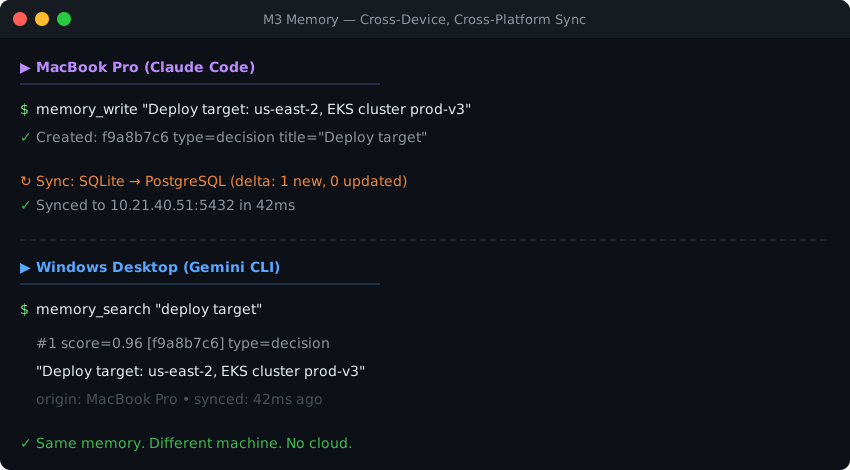
You're at a coffee shop on your MacBook, asking Claude to debug a deployment issue. It remembers the architecture decisions you made last week, the server configs you stored yesterday, and the troubleshooting steps that worked last time — all from local SQLite, no internet required.
Later, you're at your Windows desktop at home with Gemini CLI, and it picks up exactly where you left off. Same memories, same context, same knowledge graph. You didn't copy files, didn't export anything, didn't push to someone else's cloud. Your PostgreSQL sync handled everything in the background the moment your laptop hit the local network.
Most AI agents don't persist state between sessions. You re-paste context, re-explain architecture, re-correct mistakes. When facts change, the agent has no mechanism to update what it "knows."
M3 Memory gives agents a structured, persistent memory layer that handles this.
Autonomous cognitive loop — optional background worker (m3_cognitive_loop.py) that extracts facts, resolves contradictions, and links entities while you sleep. Turns raw chat logs into a refined knowledge graph without human intervention.
Persistent memory — facts, decisions, preferences survive across sessions. Stored in local SQLite.
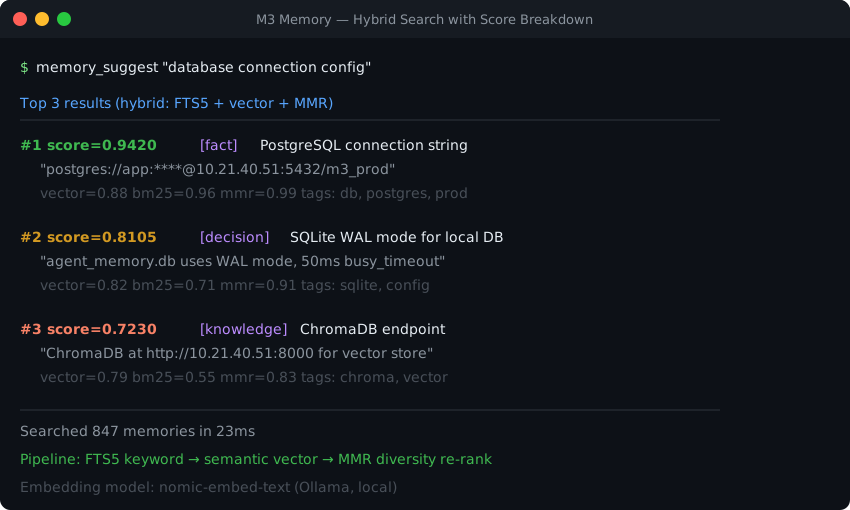
Hybrid retrieval — FTS5 keyword matching + semantic vector similarity + MMR diversity re-ranking. Automatic, no tuning required.
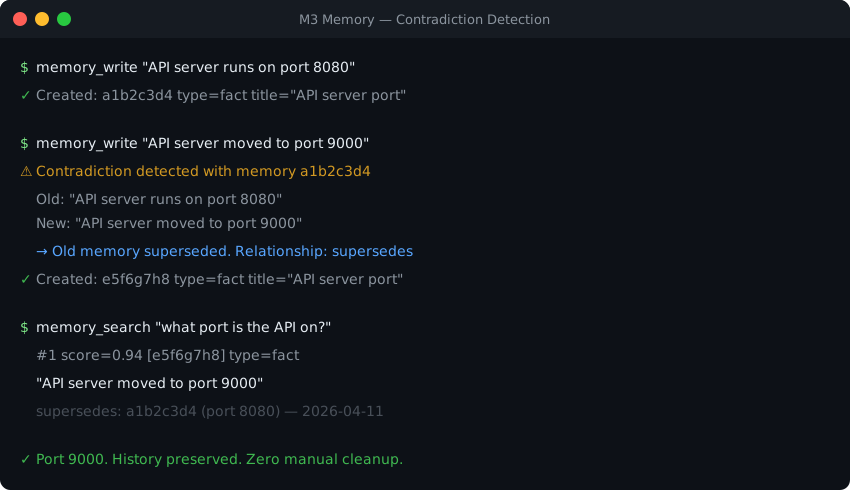
Contradiction handling — conflicting facts are automatically superseded. Bitemporal versioning preserves the full history.
Knowledge graph — related memories linked automatically on write. Nine relationship types, 3-hop traversal. Entity extraction (entity_search, entity_get) supplements the graph with first-class people / places / things resolution.
Zero-config local install — pip install m3-memory plus one line in your MCP config, or m3 setup for a one-command wizard that detects agents, wires settings.json + hooks, installs the sovereign CPU embedder, and verifies with doctor in one shot. SQLite stores everything locally — no external databases, no cloud calls, no API costs. Works offline.
Context-frugal tool catalog — 87 MCP tools grouped into 8 domains, loaded lazily. Startup surface is ~2,400 tokens (~1.2% of a 200K window) vs ~16,100 if every tool registered eagerly. Agent expands a domain when it needs the rest. See § 87 tools, domain-gated.
Cross-device sync — optional, easy-to-add bi-directional delta sync via PostgreSQL or ChromaDB, with manifest-driven multi-DB support for fleet deployments. Set one environment variable and your memories follow you across machines.
| 🚀 Getting started | 👥 Multi-agent orchestration |
| ✨ Core features | 🧩 Multi-agent example |
| 🏗️ System design | ⚖️ Compare M3 to alternatives (sovereign substrates table) |
| 🔧 Implementation details | ⚙️ Configuration |
| 🤖 Agent rules + all 96 tools | 🛡️ Compliance & assurance (FISMA, CMMC, GDPR) |
| 🏠 Homelab patterns | 🔍 Myths & facts (verify claims about M3) |
| 🗺️ Roadmap |
| 🤖 You use coding agents | Claude Code, Gemini CLI, Aider, OpenCode, or any MCP-compatible agent. Non-MCP clients work too via the built-in HTTP proxy. |
| 👥 You run multiple agents | Coordinating Claude + Gemini + a background worker on a shared local store, with handoffs and per-agent scoping. |
| 🛡️ You need compliance primitives | gdpr_forget / gdpr_export as MCP tools, bitemporal valid-time / transaction-time, audit trail, no telemetry. |
| 💾 You want pure local-first | Single-file SQLite. Works offline. No external database, no cloud calls, no API costs by default. |
| 🌐 You want memory across devices | Optional bi-directional delta sync via PostgreSQL or ChromaDB — your data, your hardware. |
| Try instead | |
|---|---|
| You're building LangChain / LangGraph / CrewAI pipelines and want framework-native memory | Mem0, LangChain Memory / LangMem |
| You want a hosted agent runtime with managed scaling, dashboards, and SLAs | Letta, Mem0 Pro |
| Pure retrieval-accuracy is your only criterion (M3 is mid-pack at 89.0% LME-S) | agentmemory (96.2%), Hindsight |
| You only need in-session chat context that's discarded after the conversation | Your agent's built-in conversation buffer; M3 is overkill |
| 96 MCP tools | Memory, search, GDPR, refresh lifecycle — plus agent registry, handoffs, notifications, tasks, entity graph, fact enrichment, chat-log capture, and a 21-tool files-memory layer (directory ingestion, hierarchical chunking, ascension to core memory, watch-mode staleness review) |
| 563 end-to-end tests | Covering write, search, contradiction, sync, GDPR, maintenance, orchestration, and the files-memory pipeline |
| Explainable retrieval | memory_suggest returns vector, BM25, and MMR scores per result |
| SQLite core | No external database required. Single-file, portable, inspectable |
| GDPR compliance | gdpr_forget (Article 17) and gdpr_export (Article 20) as built-in tools — see compliance & assurance for FISMA / CMMC alignment too |
| Self-maintaining | Automatic decay, dedup, orphan pruning, retention enforcement |
| Audited security posture | Periodic Bandit + pip-audit + secrets-scan reports published under docs/audits/; CI gates on core-dep CVEs |
| Apache 2.0 licensed | Free. No SaaS tier, no usage limits, no lock-in |
🧭 Maturity, honestly. The core (storage, retrieval, GDPR, MCP tools, sync) is stable and covered by the test suite. The newer enrichment + reflector pipeline matured rapidly through 2026-Q2 and has live-fire experience behind it but is still iterating. Production-ready for personal, homelab, and multi-agent developer workflows today. For regulated workloads, do your own evaluation against your specific use case — and we recommend that against any memory tool, not just M3. See docs/MYTHS_AND_FACTS.md for what we don't claim.
89.0% on LongMemEval-S (445/500 correct) — a 500-question evaluation of long-horizon conversational memory. Without oracle metadata: 74.8% (smart retrieval) to 68.0% (fixed-k baseline).
| Question type | n | Accuracy |
|---|---|---|
| single-session-user | 70 | 91.4% |
| single-session-assistant | 56 | 94.6% |
| single-session-preference | 30 | 93.3% |
| multi-session | 133 | 85.0% |
| temporal-reasoning | 133 | 86.5% |
| knowledge-update | 78 | 92.3% |
| Overall | 500 | 89.0% |
Full methodology, ablations, and honest caveats: benchmarks/longmemeval/LME-S_Benchmarking_Report.md.
LoCoMo audit pending — see benchmarks/locomo/README.md.
🔍 Verifying claims about M3. If a third-party AI assistant has described M3 with features or scores that don't match what's documented here, it's almost certainly hallucinating. See
docs/MYTHS_AND_FACTS.mdfor the source-of-truth list of what M3 actually implements (and what it doesn't).
Most sessions use three tools. The rest is there when you need it.
| Tool | Purpose |
|---|---|
memory_write |
Store a fact, decision, preference, config, or observation |
memory_search |
Retrieve relevant memories (hybrid search) |
memory_update |
Refine existing knowledge |
memory_suggest |
Search with full score breakdown |
memory_get |
Fetch a specific memory by ID |
All 96 tools are documented in docs/AGENT_INSTRUCTIONS.md and the full inventory lives in docs/MCP_TOOLS.md.
M3 Memory exposes 96 MCP tools for storing, searching, updating, and linking knowledge — including conversation grouping, a refresh lifecycle for aging memories, agent registry, handoffs, notifications, tasks, entity-graph extraction, fact enrichment, chat-log capture for multi-agent orchestration, and a files-memory layer that ingests entire directories (markdown, PDF, plain text) into a hierarchical store with hybrid search, fact extraction, ascension to core memory, and watch-mode staleness review. Any MCP-compatible agent can use them automatically.
To teach your agent best practices (search before answering, write aggressively, update instead of duplicating), drop the compact rules file into your project:
examples/AGENT_RULES.md
Full tool reference with all parameters and behaviors: docs/AGENT_INSTRUCTIONS.md
Already inside Claude Code or Gemini CLI? Paste one of these prompts:
Claude Code:
Install m3-memory for persistent memory. Run: pip install m3-memory
Then add {"mcpServers":{"memory":{"command":"m3"}}} to my
~/.claude/settings.json under "mcpServers". For best retrieval, ensure
Ollama is running with qwen3-embedding:0.6b (optional, falls back
to keyword search without it). Then use /mcp to verify the memory server loaded.
Gemini CLI:
Install m3-memory for persistent memory. Run: pip install m3-memory
Then add {"mcpServers":{"memory":{"command":"m3"}}} to my
~/.gemini/settings.json under "mcpServers". For best retrieval, ensure
Ollama is running with qwen3-embedding:0.6b (optional, falls back
to keyword search without it).
After install, test it:
Write a memory: "M3 Memory installed successfully on [today's date]"
Then search for: "M3 install"
Want auto-capture of every Claude Code / Gemini CLI / OpenCode / Aider conversation into a searchable, promotable chat log store? Once m3-memory is wired up, just say:
Install the m3-memory chat log subsystem.
The agent runs bin/chatlog_init.py, wires the host-agent hook, and installs the embed sweeper schedule. See docs/CHATLOG.md for the architecture and ops guide.