
Show uncommitted, untracked and unpushed changes in multiple Git repositories. Scan for .git dirs up to DEPTH directories deep. The default is 2. If DEPTH is 0, the scan is infinitely deep.
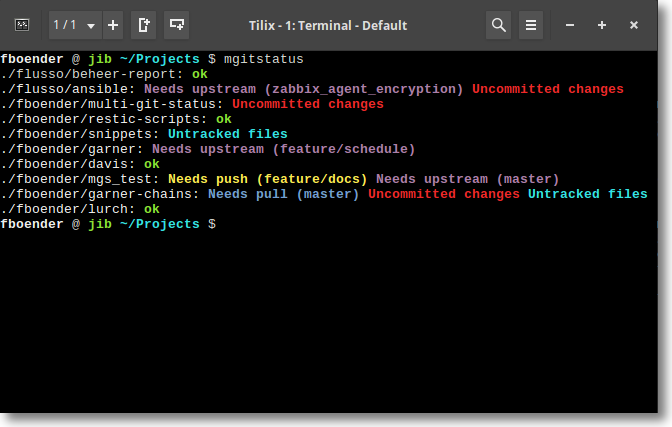
This is a fork of fboender/multi-git-status that integrates several open pull requests and adds new functionality.
| PR | Author | Description |
|---|---|---|
| #62 | bailey-coding | Support reftable refs format (newer git storage format) |
| #61 | loelkes | Add make uninstall target |
| #53 | abathur | Find git-dir directly and look up work-tree (improved repo detection) |
| #51 | lyknode | Fix man install path (use /share/man/man1 for FHS compliance) |
| #27 | cipherbrain | Add list file support (-l/--list and -s/--save-list options) |
-boption to show currently checked out branch--no-okas an alias for-e- Config file support with glob patterns for skipping paths and ignoring repos
mgitstatus shows:
- Uncommitted changes if there are unstaged or uncommitted changes on the checked out branch.
- Untracked files if there are untracked files which are not ignored.
- Needs push (BRANCH) if the branch is tracking a (remote) branch which is behind.
- Needs upstream (BRANCH) if a branch does not have a local or remote upstream branch configured. Changes in the branch may otherwise never be pushed or merged.
- Needs pull (BRANCH) if the branch is tracking a (remote) branch which is
ahead. This requires that the local git repo already knows about the remote
changes (i.e. you've done a
fetch), or that you specify the-foption. mgitstatus does NOT contact the remote by default. - X stashes if there are stashes.
Since there are a lot of different states a git repository can be in, mgitstatus makes no guarantees that all states are taken into account.
mgitstatus can also list dirs that are not a repo, if given the -w
switch. To ignore certain repos, set the mgitstatus.ignore git config flag
for that repo to true. (See "usage" below for an example).
Usage: mgitstatus [--version] [-w] [-e] [-f] [--throttle SEC] [-c] [-d/--depth=2] [--no-depth] [--flatten] [--no-X] [DIR [DIR]...]

mgitstatus shows uncommitted, untracked and unpushed changes in multiple Git
repositories. By default, mgitstatus scans two directories deep. This can be
changed with the -d (--depth) option.  If DEPTH is 0, the scan is infinitely
deep.

  -b               Show currently checked out branch
  -c               Force color output (preserve colors when using pipes)
  -d, --depth=2    Scan this many directories deep
  -e               Exclude repos that are 'ok'
  -f               Do a 'git fetch' on each repo (slow for many repos)
  -h, --help       Show help message
  -l, --list FILE  Use list of repo paths from FILE instead of searching
  -s, --save-list FILE  Search for repos and save paths to FILE, then exit
  --flatten        Show only one status per line
  --no-depth       Do not recurse into directories (incompatible with -d)
  --throttle SEC   Wait SEC seconds between each 'git fetch' (-f option)
  --version        Show version
  -w               Warn about dirs that are not Git repositories

You can limit output with the following options:

  --no-push
  --no-pull
  --no-upstream
  --no-uncommitted
  --no-untracked
  --no-stashes
  --no-ok          (same as -e)

The list file may contain comments (lines starting with '#') and empty lines.
The following example scans all directories under the current dir, with a depth of 2. That means the current dir and all directories directly under it.
~/Projects/fboender $ mgitstatus
./mgitstatus: ok
./mdpreview: ok
./snippets: ok
./boxes: ok
./ansible-cmdb: Uncommitted changes Untracked files
./scriptform: Uncommitted changes
For more examples, see the manual page.
mgitstatus supports a configuration file at ~/.config/mgitstatus/config (or
$XDG_CONFIG_HOME/mgitstatus/config).
The config file uses a simple INI-like format with two sections:
# Skip paths matching these glob patterns during scanning
[skip_paths]
*/node_modules/*
*/.cache/*
*/vendor/*

# Ignore repositories matching these glob patterns
[ignore_repos]
*/third-party/*
*/external/*
[skip_paths] - Patterns matched against the full path during directory scanning. Matching paths are skipped entirely (not scanned for .git directories).
[ignore_repos] - Patterns matched against the repository path. Matching repositories are not displayed in the output.
Both sections support shell glob patterns (*, ?, [...]).
You can also ignore individual repos by setting a git config flag:
cd /path/to/repo
git config mgitstatus.ignore true
mgitstatus requires make.
The following steps will install mgitstatus:
# Clone the repo
$ git clone https://github.com/fboender/multi-git-status.git
$ cd multi-git-status

# Install globally (all users)
$ sudo make install

# Install locally (only your user)
$ PREFIX=~/.local make install
Copyright 2016-2022, Ferry Boender (et al).
Licensed under the MIT license. For more information, see the LICENSE.txt file.