
A Visual Studio Code extension that provides ready-to-use snippets for all WordPress Coding Standards (WPCS) whitelist flags. Quickly insert // phpcs:ignore comments to exclude specific lines or rules from WPCS checks.
Note: From version 1.2.0 onwards, this extension requires WordPressCS 3.0.0+ for the snippets to work correctly.
This extension was originally developed by Claudio Sanches. After the original project became unmaintained, it was updated, fixed, and is now maintained by Vijay Hardaha.
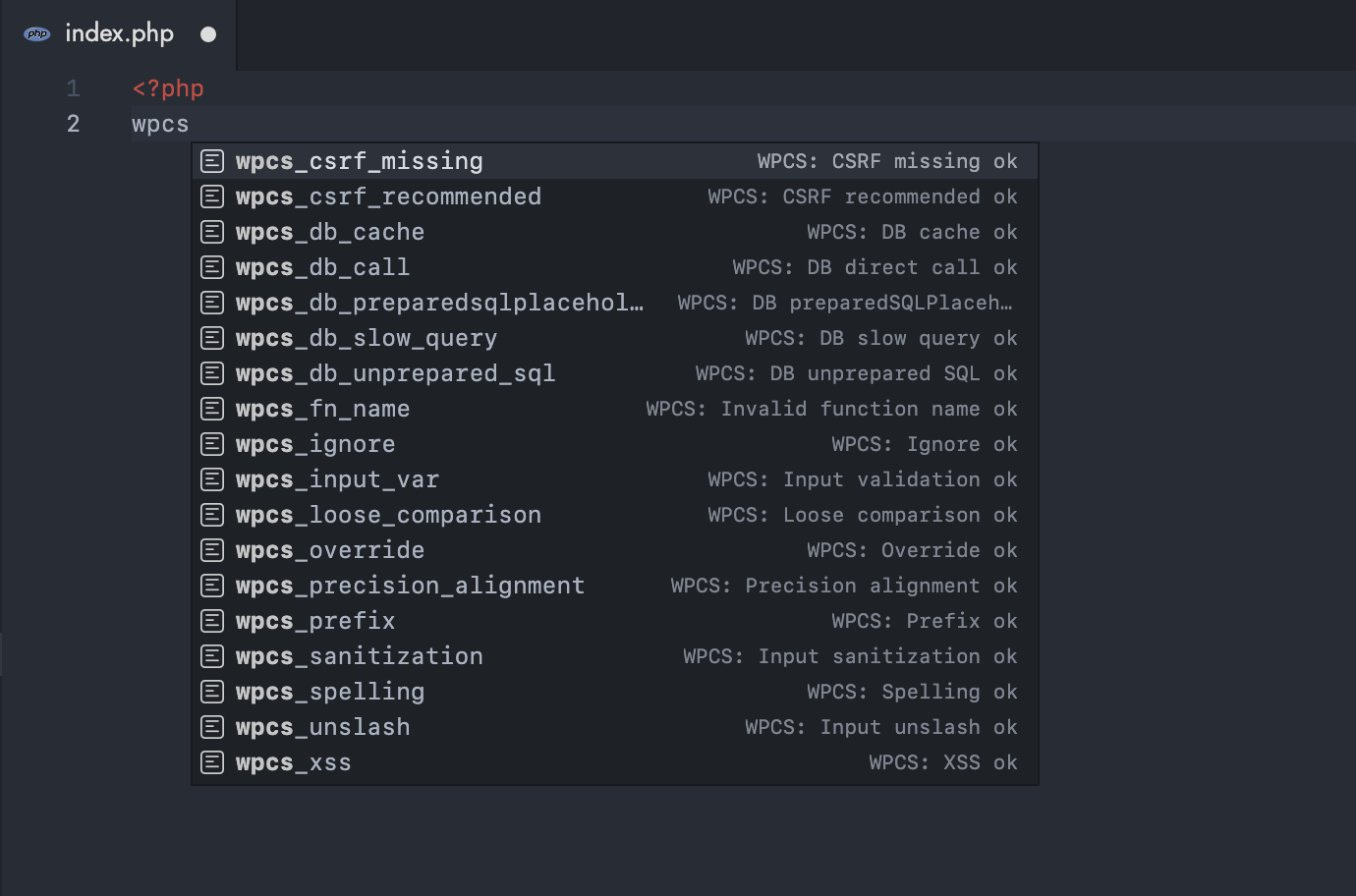
- 32 pre-configured snippets covering common WPCS ignore rules
- Groups snippets by category: Security, Database, Naming Conventions, PHP/Operators, WordPress Core
- Zero setup required — install and start using immediately
- Matches official WPCS whitelist flag syntax exactly
- Requires WordPressCS 3.0.0+ (from version 1.2.0 onwards)
- WordPressCS 3.0.0 compatibility — Updated 3 snippets to use new rule names:
wpcs_loose_comparison→Universal.Operators.StrictComparisons.LooseComparisonwpcs_precision_alignment→Universal.WhiteSpace.PrecisionAlignment.Foundwpcs_spelling→WordPress.WP.CapitalPDangit.MisspelledInText
Available in 1.2.2:
wpcs_input_nvs— Input not validated nor sanitized
Available in 1.2.1:
wpcs_unused_param— Unused function parameters
Available in 1.2.0:
wpcs_var_snake— Non-snake_case variable nameswpcs_prop_snake— Non-snake_case property nameswpcs_hook_underscore— Hooks without underscoreswpcs_non_yoda— Non-Yoda conditionswpcs_loose_equal— Loose equality (==)wpcs_safe_redirect— wp_redirect() usagewpcs_dev_functions— Debugging functions (var_dump, die, exit)wpcs_method_name— Invalid class method nameswpcs_commented_code— Commented out code blockswpcs_textdomain— Missing translation text domainswpcs_file_name— Non-standard file nameswpcs_escape— Alternative towpcs_xss
View full CHANGELOG for complete version history.
| Snippet | Title | Description | Category |
|---|---|---|---|
wpcs_ignore |
WPCS: Ignore ok | Ignore all phpcs rules. | General |
wpcs_csrf_missing |
WPCS: CSRF missing ok | No need for nonce verification/CSRF. | Security |
wpcs_csrf_recommended |
WPCS: CSRF recommended ok | No need for nonce verification/CSRF. | Security |
wpcs_input_var |
WPCS: Input validation ok | Allow use of non-validated input. | Security |
wpcs_sanitization |
WPCS: Input sanitization ok | Allow use of non-sanitized input. | Security |
wpcs_unslash |
WPCS: Input unslash ok | Allow use of unslashed input. | Security |
wpcs_input_nvs |
WPCS: Input not validated nor sanitized ok | Allow use of input that is neither validated nor sanitized. | Security |
wpcs_xss |
WPCS: XSS ok | Allow unescaped code. | Security |
wpcs_escape |
WPCS: Escape output ok | Allow unescaped code. | Security |
wpcs_safe_redirect |
WPCS: Safe redirect ok | Allow use of wp_redirect() instead of wp_safe_redirect(). | Security |
wpcs_db_cache |
WPCS: DB cache ok | Allow database query without caching. | Database |
wpcs_db_call |
WPCS: DB direct call ok | Allow direct database query. | Database |
wpcs_db_preparedsqlplaceholders |
WPCS: DB preparedSQLPlaceholders replacement count ok | Allow preparedSQL placeholders vs replacements. | Database |
wpcs_db_slow_query |
WPCS: DB slow query ok | Allow slow DB queries. | Database |
wpcs_db_unprepared_sql |
WPCS: DB unprepared SQL ok | Allow unprepared SQL query. | Database |
wpcs_prefix |
WPCS: Prefix ok | Allow non-prefixed function/class/variable/constant in the global namespace. | Naming Conventions |
wpcs_fn_name |
WPCS: Invalid function name ok | Allow invalid function name. | Naming Conventions |
wpcs_method_name |
WPCS: Method name ok | Allow invalid class method names. | Naming Conventions |
wpcs_var_snake |
WPCS: Variable snake case ok | Allow variable names not in snake_case | Naming Conventions |
wpcs_prop_snake |
WPCS: Property snake case ok | Allow property names not in snake_case | Naming Conventions |
wpcs_hook_underscore |
WPCS: Hook underscore ok | Allow hook names without underscores | Naming Conventions |
wpcs_loose_comparison |
WPCS: Loose comparison ok | Allow loose comparison | PHP & Operators |
wpcs_non_yoda |
WPCS: Non-yoda ok | Allow non-Yoda conditions | PHP & Operators |
wpcs_loose_equal |
WPCS: Loose equal ok | Allow loose equality (==) | PHP & Operators |
wpcs_dev_functions |
WPCS: Dev functions ok | Allow use of debugging functions like var_dump, die, exit. | PHP & Operators |
wpcs_commented_code |
WPCS: Commented code ok | Allow commented out code blocks. | PHP & Operators |
wpcs_unused_param |
WPCS: Unused parameter ok | Allow unused function parameters. | PHP & Operators |
wpcs_override |
WPCS: Override ok | Allow override WordPress globals. | WordPress Core |
wpcs_spelling |
WPCS: Spelling ok | Allow incorrect 'WordPress' spelling in text. | WordPress Core |
wpcs_textdomain |
WPCS: I18n text domain ok | Allow translation functions without text domain. | WordPress Core |
wpcs_file_name |
WPCS: File name ok | Allow non-standard file names. | WordPress Core |
wpcs_precision_alignment |
WPCS: Precision alignment ok | Ignore precision alignment. | WordPress Core |
Type the snippet prefix in any PHP file and select the snippet from IntelliSense to insert the corresponding ignore comment.
- WPCS: Ignore ok
- Prefix:
wpcs_ignore - Description: Ignore all phpcs rules.
- Ignore Rule:
// phpcs:ignore - Example:
$value = $_GET['value']; // phpcs:ignore
- Prefix:
-
WPCS: CSRF missing ok
- Prefix:
wpcs_csrf_missing - Description: No need for nonce verification/CSRF.
- Ignore Rule:
// phpcs:ignore WordPress.Security.NonceVerification.Missing - Example:
// phpcs:ignore WordPress.Security.NonceVerification.Missing
$action = $_POST['action'];
- Prefix:
-
WPCS: CSRF recommended ok
- Prefix:
wpcs_csrf_recommended - Description: No need for nonce verification/CSRF.
- Ignore Rule:
// phpcs:ignore WordPress.Security.NonceVerification.Recommended - Example:
// phpcs:ignore WordPress.Security.NonceVerification.Recommended
$page = $_GET['page'];
- Prefix:
-
WPCS: Input validation ok
- Prefix:
wpcs_input_var - Description: Allow use of non-validated input.
- Ignore Rule:
// phpcs:ignore WordPress.Security.ValidatedSanitizedInput.InputNotValidated - Example:
// phpcs:ignore WordPress.Security.ValidatedSanitizedInput.InputNotValidated
$email = $_POST['email'];
- Prefix:
-
WPCS: Input sanitization ok
- Prefix:
wpcs_sanitization - Description: Allow use of non-sanitized input.
- Ignore Rule:
// phpcs:ignore WordPress.Security.ValidatedSanitizedInput.InputNotSanitized - Example:
// phpcs:ignore WordPress.Security.ValidatedSanitizedInput.InputNotSanitized
$name = $_POST['name'];
- Prefix:
-
WPCS: Input unslash ok
- Prefix:
wpcs_unslash - Description: Allow use of unslashed input.
- Ignore Rule:
// phpcs:ignore WordPress.Security.ValidatedSanitizedInput.MissingUnslash - Example:
// phpcs:ignore WordPress.Security.ValidatedSanitizedInput.MissingUnslash
$data = $_POST['data'];
- Prefix:
-
WPCS: Input not validated nor sanitized ok
- Prefix:
wpcs_input_nvs - Description: Allow use of input that is neither validated nor sanitized.
- Ignore Rule:
// phpcs:ignore WordPress.Security.ValidatedSanitizedInput.InputNotValidatedNotSanitized - Example:
// phpcs:ignore WordPress.Security.ValidatedSanitizedInput.InputNotValidatedNotSanitized
$value = $_POST['value'];
- Prefix:
-
WPCS: XSS ok
- Prefix:
wpcs_xss - Description: Allow unescaped code.
- Ignore Rule:
// phpcs:ignore WordPress.Security.EscapeOutput.OutputNotEscaped - Example:
// phpcs:ignore WordPress.Security.EscapeOutput.OutputNotEscaped
echo $custom_html;
- Prefix:
-
WPCS: Escape output ok
- Prefix:
wpcs_escape - Description: Allow unescaped code.
- Ignore Rule:
// phpcs:ignore WordPress.Security.EscapeOutput.OutputNotEscaped - Example:
// phpcs:ignore WordPress.Security.EscapeOutput.OutputNotEscaped
echo $trusted_content;
- Prefix:
-
WPCS: Safe redirect ok
- Prefix:
wpcs_safe_redirect - Description: Allow use of wp_redirect().
- Ignore Rule:
// phpcs:ignore WordPress.Security.SafeRedirect - Example:
// phpcs:ignore WordPress.Security.SafeRedirect
wp_redirect( $external_url );
exit;
- Prefix:
-
WPCS: DB cache ok
- Prefix:
wpcs_db_cache - Description: Allow database query without caching.
- Ignore Rule:
// phpcs:ignore WordPress.DB.DirectDatabaseQuery.NoCaching - Example:
// phpcs:ignore WordPress.DB.DirectDatabaseQuery.NoCaching
$results = $wpdb->get_results( "SELECT * FROM {$wpdb->prefix}table" );
- Prefix:
-
WPCS: DB direct call ok
- Prefix:
wpcs_db_call - Description: Allow direct database query.
- Ignore Rule:
// phpcs:ignore WordPress.DB.DirectDatabaseQuery.DirectQuery - Example:
// phpcs:ignore WordPress.DB.DirectDatabaseQuery.DirectQuery
$wpdb->query( "DELETE FROM {$wpdb->prefix}transient" );
- Prefix:
-
WPCS: DB preparedSQLPlaceholders replacement count ok
- Prefix:
wpcs_db_preparedsqlplaceholders - Description: Allow preparedSQL placeholders vs replacements.
- Ignore Rule:
// phpcs:ignore WordPress.DB.PreparedSQLPlaceholders - Example:
// phpcs:ignore WordPress.DB.PreparedSQLPlaceholders
$wpdb->prepare( "SELECT * FROM table WHERE id = %d AND status = %s", $id );
- Prefix:
-
WPCS: DB slow query ok
- Prefix:
wpcs_db_slow_query - Description: Allow slow DB queries.
- Ignore Rule:
// phpcs:ignore WordPress.DB.SlowDBQuery - Example:
// phpcs:ignore WordPress.DB.SlowDBQuery
$users = get_users( [ 'meta_query' => $complex_query ] );
- Prefix:
-
WPCS: DB unprepared SQL ok
- Prefix:
wpcs_db_unprepared_sql - Description: Allow unprepared SQL query.
- Ignore Rule:
// phpcs:ignore WordPress.DB.PreparedSQL.NotPrepared - Example:
// phpcs:ignore WordPress.DB.PreparedSQL.NotPrepared
$result = $wpdb->get_var( "SELECT COUNT(*) FROM {$wpdb->prefix}options" );
- Prefix:
-
WPCS: Prefix ok
- Prefix:
wpcs_prefix - Description: Allow non-prefixed function/class/variable/constant in the global namespace.
- Ignore Rule:
// phpcs:ignore WordPress.NamingConventions.PrefixAllGlobals - Example:
// phpcs:ignore WordPress.NamingConventions.PrefixAllGlobals
function my_helper_function() { ... }
- Prefix:
-
WPCS: Invalid function name ok
- Prefix:
wpcs_fn_name - Description: Allow invalid function name.
- Ignore Rule:
// phpcs:ignore WordPress.NamingConventions.ValidFunctionName.FunctionNameInvalid - Example:
// phpcs:ignore WordPress.NamingConventions.ValidFunctionName.FunctionNameInvalid
function MyAwesomeFunction() { ... }
- Prefix:
-
WPCS: Method name ok
- Prefix:
wpcs_method_name - Description: Allow invalid class method names.
- Ignore Rule:
// phpcs:ignore WordPress.NamingConventions.ValidFunctionName.MethodNameInvalid - Example:
class MyClass {
    // phpcs:ignore WordPress.NamingConventions.ValidFunctionName.MethodNameInvalid
    public function MyMethod() { ... }
}
- Prefix:
-
WPCS: Variable snake case ok
- Prefix:
wpcs_var_snake - Description: Allow variable names not in snake_case.
- Ignore Rule:
// phpcs:ignore WordPress.NamingConventions.ValidVariableName.VariableNotSnakeCase - Example:
// phpcs:ignore WordPress.NamingConventions.ValidVariableName.VariableNotSnakeCase
$myVariableName = 'value';
- Prefix:
-
WPCS: Property snake case ok
- Prefix:
wpcs_prop_snake - Description: Allow property names not in snake_case.
- Ignore Rule:
// phpcs:ignore WordPress.NamingConventions.ValidVariableName.UsedPropertyNotSnakeCase - Example:
class MyClass {
    // phpcs:ignore WordPress.NamingConventions.ValidVariableName.UsedPropertyNotSnakeCase
    public $MyProperty;
}
- Prefix:
-
WPCS: Hook underscore ok
- Prefix:
wpcs_hook_underscore - Description: Allow hook names without underscores.
- Ignore Rule:
// phpcs:ignore WordPress.NamingConventions.ValidHookName.UseUnderscores - Example:
// phpcs:ignore WordPress.NamingConventions.ValidHookName.UseUnderscores
add_action( 'myCustomAction', 'my_function' );
- Prefix:
-
WPCS: Loose comparison ok
- Prefix:
wpcs_loose_comparison - Description: Allow loose comparison.
- Ignore Rule:
// phpcs:ignore Universal.Operators.StrictComparisons.LooseComparison - Example:
// phpcs:ignore Universal.Operators.StrictComparisons.LooseComparison
if ( $value == 'yes' ) { ... }
- Prefix:
-
WPCS: Non-yoda ok
- Prefix:
wpcs_non_yoda - Description: Allow non-Yoda conditions.
- Ignore Rule:
// phpcs:ignore WordPress.PHP.YodaConditions.NotYoda - Example:
// phpcs:ignore WordPress.PHP.YodaConditions.NotYoda
if ( $status === 'active' ) { ... }
- Prefix:
-
WPCS: Loose equal ok
- Prefix:
wpcs_loose_equal - Description: Allow loose equality (==).
- Ignore Rule:
// phpcs:ignore Universal.Operators.StrictComparisons.LooseEqual - Example:
// phpcs:ignore Universal.Operators.StrictComparisons.LooseEqual
$result = $a == $b;
- Prefix:
-
WPCS: Dev functions ok
- Prefix:
wpcs_dev_functions - Description: Allow use of debugging functions like var_dump, die, exit.
- Ignore Rule:
// phpcs:ignore WordPress.PHP.DevelopmentFunctions - Example:
// phpcs:ignore WordPress.PHP.DevelopmentFunctions
var_dump( $variable );
die();
- Prefix:
-
WPCS: Commented code ok
- Prefix:
wpcs_commented_code - Description: Allow commented out code blocks.
- Ignore Rule:
// phpcs:ignore WordPress.PHP.CommentedOutCode - Example:
// phpcs:ignore WordPress.PHP.CommentedOutCode
// $old_code = 'deprecated';
// $this->old_function();
- Prefix:
-
WPCS: Unused parameter ok
- Prefix:
wpcs_unused_param - Description: Allow unused function parameters.
- Ignore Rule:
// phpcs:ignore Generic.CodeAnalysis.UnusedFunctionParameter.Found - Example:
function my_function( $param1, $unused_param ) { // phpcs:ignore Generic.CodeAnalysis.UnusedFunctionParameter.Found
    return $param1;
}
- Prefix:
-
WPCS: Override ok
- Prefix:
wpcs_override - Description: Allow override WordPress globals.
- Ignore Rule:
// phpcs:ignore WordPress.WP.GlobalVariablesOverride.Prohibited - Example:
// phpcs:ignore WordPress.WP.GlobalVariablesOverride.Prohibited
$GLOBALS['post'] = $custom_post;
- Prefix:
-
WPCS: Spelling ok
- Prefix:
wpcs_spelling - Description: Allow incorrect 'WordPress' spelling in text.
- Ignore Rule:
// phpcs:ignore WordPress.WP.CapitalPDangit.MisspelledInText - Example:
// phpcs:ignore WordPress.WP.CapitalPDangit.MisspelledInText
echo 'Welcome to Wordpress!';
- Prefix:
-
WPCS: I18n text domain ok
- Prefix:
wpcs_textdomain - Description: Allow translation functions without text domain.
- Ignore Rule:
// phpcs:ignore WordPress.WP.I18n.TextDomainMissing - Example:
// phpcs:ignore WordPress.WP.I18n.TextDomainMissing
$label = __( 'Submit' );
- Prefix:
-
WPCS: File name ok
- Prefix:
wpcs_file_name - Description: Allow non-standard file names.
- Ignore Rule:
// phpcs:ignore WordPress.Files.FileName.NotHyphenatedLowercase - Example:
// phpcs:ignore WordPress.Files.FileName.NotHyphenatedLowercase
// File: MyCustomFile.php
- Prefix:
-
WPCS: Precision alignment ok
- Prefix:
wpcs_precision_alignment - Description: Ignore precision alignment.
- Ignore Rule:
// phpcs:ignore Universal.WhiteSpace.PrecisionAlignment.Found - Example:
// phpcs:ignore Universal.WhiteSpace.PrecisionAlignment.Found
$var1   = 'value1';
$var222 = 'value2';
- Prefix:
- Open a PHP file in Visual Studio Code
- Type the snippet prefix (e.g.,
wpcs_xss) and select the snippet from the IntelliSense dropdown - The corresponding
// phpcs:ignorecomment will be inserted at the cursor position
Originally Developed by Claudio Sanches