Project Tracking
- Overview
- Hours Usage
- Task Completion
- Invoice Burn
- Cost Burn
- Lifetime Value Cards
- Project Rates
- Contracts
The Tracking tab on a project shows hours, invoices, cost, and profit for that project.

API: /api/method/next_pms.next_projects.api.project.get_project_tracking
- Company: Company associated with the project.
- Total Project Value: Total Sales Amount from Sales Orders. Shown only for billable projects.
-
Projected Profit:
Total Project Value − (Total Costing Amount + Forecasted Cost to Completion)- Total Project Value = Total Sales Amount (via Sales Orders)
- Total Costing Amount = Cost incurred from timesheets
- Forecasted Cost to Completion = Forecasted cost from remaining resource allocation
-
Projected Profit Margin:
(Projected Profit ÷ Total Project Value) × 100. Shown only for billable projects.
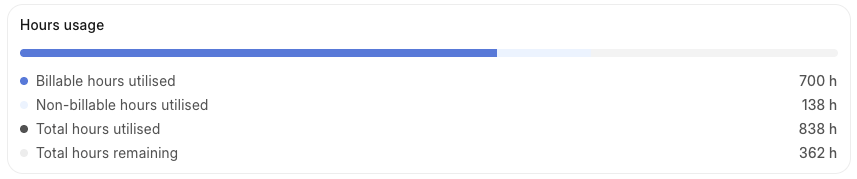
Billable Hours Utilised: Total billable hours logged against the project from draft and submitted timesheets. Rejected timesheets are also included.
Non-Billable Hours Utilised: Total non-billable hours logged against the project from draft and submitted timesheets. Rejected timesheets are also included.
Total Hours Utilised: Billable Hours Utilised + Non-Billable Hours Utilised.
Total Hours Remaining depends on billing type:
- Fixed Cost and Retainer: Total Hours Purchased − Total Hours Utilised
- Time & Material and Non-Billable: Target Hours − Total Hours Utilised
Source fields on the project:


Total Issues Created: Tasks on the project in Open, Working, Pending Review, Overdue, or Completed status.
Open Issues: Tasks in Open, Working, Pending Review, or Overdue status.
Completed Issues: Tasks in Completed status.
Tasks marked as Template or Cancelled are excluded from all issue counts.

Currency is the company's default currency.
Invoiced and Paid: Amount collected from the client.
- For each submitted Sales Invoice:
Base Grand Total − Outstanding Amount(in company currency) - Summed across all submitted invoices for the project.
Invoiced but Not Paid: Amount invoiced but not yet collected.
- Outstanding amount on each submitted Sales Invoice, converted to company currency using the invoice exchange rate.
- Summed across all submitted invoices for the project.
Total Project Amount: Total Sales Amount from Sales Orders. Shown only for billable projects.

Actual Cost Incurred: Total Costing Amount (via Timesheet). Sum of costing_amount (logged hours × employee cost rate) from all submitted Timesheet Detail entries linked to the project.
Forecasted Cost to Completion: Estimated remaining cost from current resource allocation. Includes:
- Full cost of all future resource allocations.
- A pro-rated cost for ongoing allocations from today onward.
- Adjustments for chargeable working days, day overrides, weekends, and employee relieving dates.
Target Cost: Manually entered in the Costing and Billing section of the Project form in Desk.


Shown only for billable projects. These are manually entered:
- Lifetime Value to Date
- Expected Lifetime Value
- Lifetime Value vs. Billed Amount
Shown only for Time & Material projects.
- Flat Rate (Hourly): Project's default hourly billing rate.
- Flat Rate (Valid From): Actual Start Date (via Timesheet).
- Project Billing Team Rates: Rates from the Project Billing Team table.

Shown only for Fixed Cost or Retainer projects.

Project Hours by Contract comes from the Project Hours by Contract table on the Project document.
