Feature guide: Header & Footer
Minecraft feature introduced in 1.8 showing text above and below playerlist. It cannot be displayed on 1.7 clients in any way.
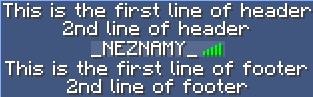
The feature can be configured in config.yml under header-footer section.
This is how the default configuration looks:
header-footer:
  enabled: true
  designs:
    world-test:
      display-condition: "%world%=test"
      header:
        - "Test header in world 'test'"
      footer:
        - "Test footer in world 'test'"
    default:
      header:
        - "<#FFFFFF>&m                                                </#FFFF00>"
        - "&3&lServer name"
        - "&r&7&l>> %animation:Welcome%&3 &l%player%&7&l! &7&l<<"
        - "&r&7Online players: &f%online%"
        - "&6Online staff: &e%staffonline%"
        - ""
      footer:
        - "%animation:time%"
        - "&2Ping: %ping%"
        - "&7&l Used memory: %memory-used% MB / %memory-max% MB"
        - ""
        - "&r&7Visit our webpage %animation:web%"
        - "<#FFFFFF>&m                                                </#FFFF00>"
All the options are explained in the following table.
| Option name | Default value | Description |
|---|---|---|
| enabled | true | Enables / Disables the feature |
| designs | Map | Designs to display based on conditions (see below for more info). |
A header/footer design consists of the following options:
| Option name | Description |
|---|---|
display-condition (optional) |
Condition (either condition name or a conditional expression) that must be met for the design to be displayed. If not defined, design will be displayed without any required condition. If player does not meet condition, another design may be displayed based on chaining (see below for more info). |
header |
List of lines to display in the header. |
footer |
List of lines to display in the footer. |
Example:
header-footer:
  enabled: true
  designs:
    MyDesign:  # Design name
      display-condition: "%world%=world"  # Delete the line for no condition requirement
      header:
        - "Header for world %world%"
      footer:
        - "Footer for world %world%"
When defining more than 1 design in config, the plugin will display the correct design based on conditions.
The plugin goes through all defined designs, starting with the design on top.
If the design's condition is met or not set, it is displayed.
If not, the next defined design is checked and so on.
If no suitable design is found (the last one has a condition requirement which wasn't met), none is displayed.
Example:
header-footer:
  enabled: true
  designs:
    per-world:
      display-condition: "%world%=world"
      header:
        - "Header for world world"
      footer:
        - "Footer for world world"
    default:  # No display condition
      header:
        - "Header for every world except world"
      footer:
        - "Footer for every world except world"
Design per-world is checked first. If condition is not met, default is displayed.
If a chaining 3 or more and player meets 2 or more conditions for 2 (or more) different designs, the first one defined in the config will be displayed. You can swap order of designs based on your priority needs.
Header/Footer is a feature that cannot be handled by multiple plugins at once. To make sure no other plugin sends their own Header/Footer when not disabled in the plugin's config properly, TAB will block header/footer coming from all other plugins if this feature is enabled (and not disabled for a player with a condition). An exception to this is Velocity installation, where this "anti-override" is not available.
When under a BungeeCord network and having TAB installed on backend server and switching to another server, the header/footer will not reset. This is because BungeeCord makes it look like a world switch to the client. To avoid this, you have 2 options:
- Install TAB on BungeeCord and disable header/footer on the server.
- Install a plugin that sends some, or even empty header/footer on join.
Velocity sends reset packet, so it isn't a problem there.
To get started with the API, see Developer API page.
To access this feature, you'll need to obtain HeaderFooterManager instance. Get it using TabAPI.getInstance().getHeaderFooterManager(). If this feature is disabled, the method will return null.
To set the header and/or footer for a player, use the following:
HeaderFooterManager#setHeader(TabPlayer, String)HeaderFooterManager#setFooter(TabPlayer, String)HeaderFooterManager#setHeaderAndFooter(TabPlayer, String, String)
To reset the header and/or footer for a player back to their original values, use null as argument.
Minecraft 1.21.9 has introduced object components, but these are not available for older versions. Let's make 2 designs, one for 1.21.9+ and second one for <1.21.9.
header-footer:
  enabled: true
  designs:
    newer-client:
      display-condition: "%player-version-id%>=773" # 1.21.9 uses 773
      header:
        - "Look, it's your head! <head:name:%player%>"
      footer:
        - "Cool, isn't it?"
    older-client:
      header:
        - "Regular header for old clients"
      footer:
        - "Consider updating your game"
For this, we can use design chaining with conditions. There is no limit to how many worlds we can configure, but let's stick to 3 designs - one for world, one for world2 and one for the rest.
header-footer:
  enabled: true
  designs:
    world:
      display-condition: "%world%=world" # Only show if player is in world "world"
      header:
        - "Header for world world"
      footer:
        - "Footer for world world"
    world2:
      display-condition: "%world%=world2" # Only show if player is in world "world2"
      header:
        - "Header for world world2"
      footer:
        - "Footer for world world2"
    default:
      header:
        - "Header for all worlds except world and world2"
      footer:
        - "Footer for all worlds except world and world2"
The entire header is just a single character sequence that allows newline symbol (\n) for new lines. It is only being split into multiple lines in config for convenience to make it readable when configuring and editing. Same for footer.
If using a placeholder that returns the newline symbol, it will create a new line. You can use this to your advantage and create a conditional placeholder or an animation that includes newline in some frames.
Example
animations.yml
MyAnimation:
  change-interval: 1000
  texts:
    - "First frame with only 1 line"
    - "Second frame\nconsisting of 2 lines"
config.yml
header-footer:
  designs:
    DesignName:
      header:
        - "%animation:MyAnimation%"